One for aircraft if related (start typing in your aircraft name in the tag section and pick correct option)
Feel free to delete this quote section after adding your appropriate tags.
ISSUE DESCRIPTION
Description of the issue: Fuel burn is constant, regardless of sim rate, causing landing with excess fuel.
FREQUENCY OF ISSUE
How often does this occur for you (Example: Just once, every time on sim load, intermittently)? Always
REPRODUCTION STEPS
Please list clear steps you took in order to help our test team reproduce the same issue:
Use sim rate 2X
Observe fuel consumption not reflecting sim rate
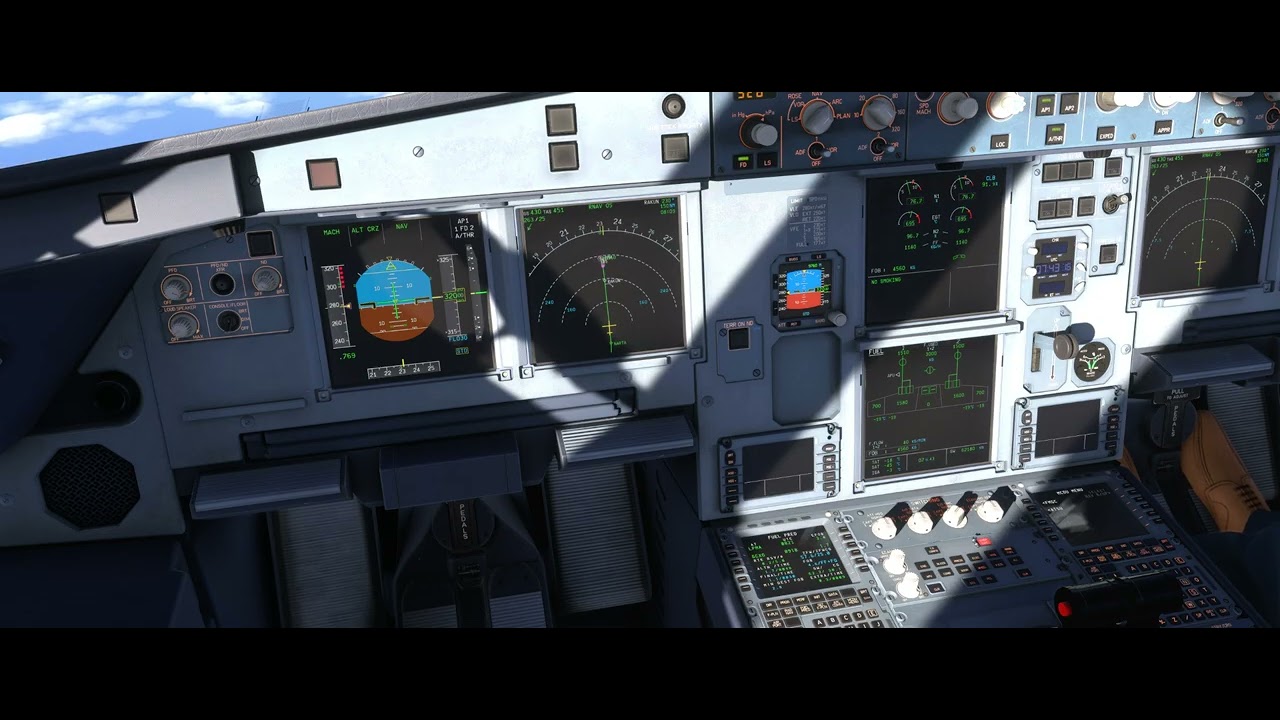
Check the below video, the EFOB increases (it was 2.2 at the beginning of the flight) and fuel consumption is 20 kg/min instead of the indicated rate of 40 kg/min
YOUR SETTINGS
If the issue still occurs with no mods and add-ons, please continue to report your issue. If not, please move this post to the User Support Hub.
What peripherals are you using:
[PC Only] Are you using Developer Mode or have you made any changes to it? No
[PC Only] What GPU (Graphics Card) do you use? RTX 5080
[PC Only] What other relevant PC specs can you share? 7800X3D
MEDIA
Please add a screenshot or video of the issue occurring.
EFOB increases (it was 2.2 at the beginning of the flight) and fuel consumption is 20 kg/min instead of the indicated rate of 40 kg/min
Simrate can be set (if one binds the simrate increase and simrate decrease bindings to something) and the clock will run twice as fast at 2x. However, fuel burn stays the same even though time is running twice as fast. It would be nice if fuel burn aligned with time compression. Please address with adding simrate functionality. Very useful for longhaul planes.
This has unfortunately been true of the Inibuilds Airbuses since they made the A310 for 2020. They stated on their own forums a couple years ago that they just don’t support increased sim rate. I voted for this in the (almost certainly vain) hope that they will one day fix it.
Someone posted above back in Oct that Ini doesn’t support Sim Rate. That should explain this problem with any of their aircraft unless I’m misunderstanding something.
There has also been feedback on this issue in the inibuilds forum, but the response received is that as a default aircraft built into the game, they will not make any changes unless you request it from inibuildings. However, what I want to express is that it is time to solve this problem now. Not everyone has enough time to complete a long-distance flight. I hope the synchronization of simulation speed and fuel consumption in the built-in Airbus aircraft can be taken seriously
PS, Inibuilds Aircraft - fuel burn is still only 1x when Sim Rate is increased to 2x or 4x… this should be easy to fix. Should I keep hope alive that Inibuilds will fix this?
For the A320neo (V2) and A321LR (did not check for other aircraft, will update accordingly), fuel consumption is ruled by the actual real-world clock instead of the in-simulator clock, leading to invalid fuel consumption when using either positive or negative simrate modifier (positive simrate = lower consumption, negative simrate = higher consumption)
FREQUENCY OF ISSUE
Always (when using a simrate ratio different from 1 (default)).
REPRODUCTION STEPS
Start a flight with a A320neo (V2) or A321LR with simrate = 1 (default)
While in stable cruise, note the in-sim time using the aircraft’s clock, FOB and F.FLOW 1+2 on the ECAM FUEL page.
Set a positive simrate (lets say x4) and wait for a time to let fuel consumption run…
Note the same number as in step 2 and calculate in-sim time elapsed, theoretical fuel consumption (according to fuel flow and time elapsed) and actual fuel consumption (according to the difference between the x2 FOB points, you can also check using F.USED)
Repeat with a negative simrate (eg. x0.125)…
Below are measurements I made to confirm this issue:
aircraft = A320neo (V2)
In-sim time (UTC)
Simrate since prev
In-sim time elapsed since prev (min)
FOB (kg)
F.FLOW 1+2 (kg/min)
Theoretical FOB (kg)
Fuel consumption error (kg)
23:41:31
-
-
9360
30
-
-
23:43:08
x0.0625 (1/16)
1.62
8580
30
(9360 - 30*1.62 = ) 9311
731 (~30*1.62 * 16)
As a side note, I also made this test with the same simrate but with the Active Pause ON (“pause” on the keyboard, not pause menu as with ESC), in this case the In-sime clock continues to run with the selected simrate but fuel consumption is frozen.
YOUR SETTINGS
[PC Only] Are you using Developer Mode or have you made any changes to it?
In career and with A320neo (V2) and A321LR, mission briefing’s fuel prediction (shown on the refuel page before starting the mission) is severely under-estimated (~1/4), leading to User having to cheat in order to complete the flight without running out of fuel.
This appears to be due to the estimated fuel consumption as reported by the aircraft’ checklists being way off what the models actually implement (see details further below).
FREQUENCY OF ISSUE
All the time for A320neo (V2) and A321LR. Did not check for other aircraft, will update accordingly.
REPRODUCTION STEPS
Select a A32# career mission flight
Refuel the aircraft as recommended with a margin (I tried with a +45% margin for 1000NM trips, which already seems excessive as regards real-world margins)
Start the flight and monitor FOB, F.USED and EFOB;
During Init, EFOB will be negative and the FMGS will alert “DEST BELOW MIN EFOB”
At some point during cruise, you will run out of fuel and fail the mission if you do not cheat (add fuel mid-flight or exploit simrate bug to lower fuel consumption)
Here are the measurements I made to confirm this issue:
- FOB = 4740 kg - Trip = 5.3 T (time = 02:39) - Extra = -2.1 T - EFOB = -0.8 T
- FOB = 5800 kg - Trip = 6.3 T - Extra = -2.2 T - EFOB = -0.8 T
Top of climb
- FOB = 3500 kg - F.USED = 1210 kg - EFOB = -0.6 T
- FOB = 4640 kg - F.USED = 1130 kg - EFOB = -0.4 T
Running out of fuel during cruize
- in-sim time elapsed : 01:56 - FOB = 520 kg - F.USED = 4190 kg - EFOB = -0.6 T
- in-sim time elapsed : 02:08 - FOB = 1000 kg - F.USED = 4770 kg - EFOB = -1.0 T
(Nb: because of the simrate bug, those measurements were made with simrate = 1 during the whole flight)
Which leads to the following assumptions:
A320neo (V2) actual fuel consumption = ~2110 kg/h (instead of 533) → ~4.7 kg/NM
(yes I know this calculation is very incomplete because consumption is not linearly proportional to distance/time, but it allows to have a rough idea of how much the briefing recommended fuel is off the mark)
A321LR actual fuel consumption = ~2400 kg/h (instead of 533) → ~4 kg/NM
-> estimated actual range = ~6600 NM which is significantly off the 3500 number in the checklist (same as A320neo) … surely this is a copy-paste error since the “LR” stands for “Long Range” and thus should have a greater range?
So it appears that the estimated fuel consumption per hour reported in the aircraft checklists are severely off the mark, which may be the explanation why the mission briefing’s recommended fuel is that wrong.
YOUR SETTINGS
[PC Only] Are you using Developer Mode or have you made any changes to it?

 (for the A320neo at least)