Not only that, but they adhere very tightly to service volumes in the sim, so many navaids, even those fairly close, are unable to pick up on the ground (which is not realistic). As soon as you go positive rate, there they are.
Thanks, I can’t identify a Six Pack style NAV/VOR Radio/OBS Indicator on the Glass Cockpit.
With it, I could tune the VOR frequency and rotate the OBS knob, to determine the radial from that VOR, until the needle centered.
I then knew which heading that I need to fly to go to that VOR.
With 2 of these radios tuned to two different VORs, The intersection of those 2 radials tell me where I am.
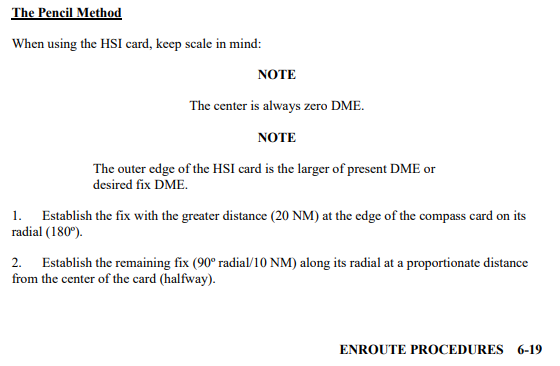
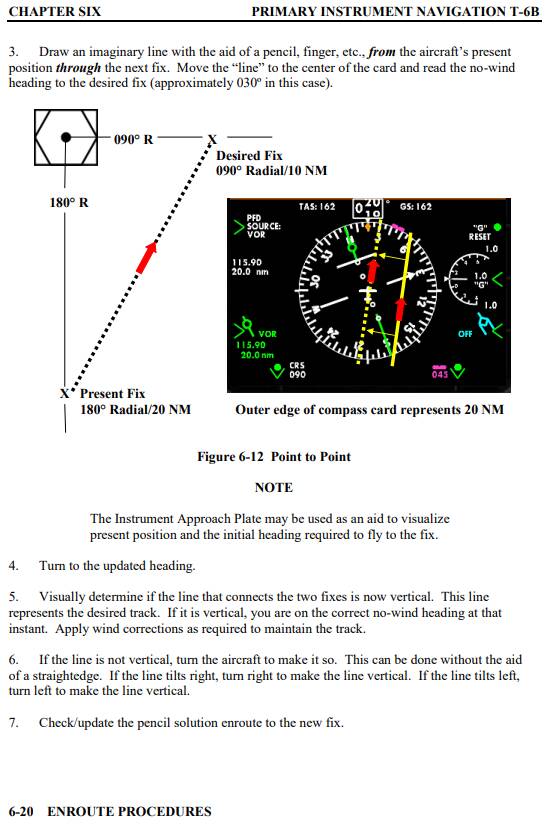
While it can be a bit of a pain in the butt, you can still fly VOR/TACAN point-to-point with what’s available in the plane, as long as you can get the needles or CDI and DME. As usual, I’ll reference one of the cleared for public release Chief of Naval Air Training (CNATRA) training publications (in this case the student pilot primary instrument navigation one, starting around page 6-18 https://www.cnatra.navy.mil/local/docs/pat-pubs/P-765.pdf):
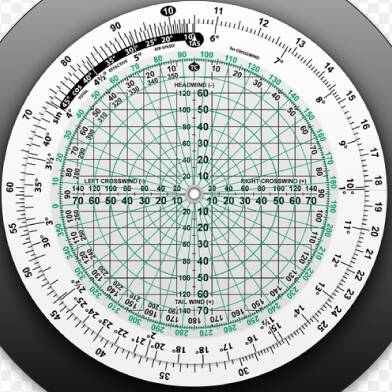
If you have one of those Jeppesen circular computers (“whiz wheels”), you can just mark the points in the same way on the back protractor side with a pencil (using the numbers for DME instead of wind speed), rotate it to align the points with the grid, and read the desired course off the top:
I am not an expert and I rarely fly the CJ4 (which appears to be your chosen aircraft) and I’m just trying to help. It appears to me that the CJ4 radios have some sort of bug. I was able to tune in two different frequencies and set bearing pointer one to one and bearing pointer two to the other but both CRS1 and CRS 2 knobs only control bearing pointer one and also, after setting NAV2 to 115.4, I was not able to change it to 115.9. It would show it on the FMC but not on any display.
So, since you know how to to tune in at least one radio, just bring up the second bearing pointer and tune it once. If you can know how to make a change to NAV2 frequency become active, I’d be interested to learn how.
I myslef am more of a C172 kind of guy.
When you say “glass cockpit,” to which aircraft are you referring? I consider a G1000 a glass cockpit and have no difficulty pulling up an HSI/CDI/RMI combo in the PFD.
C172 G1000 NXi
Sitting on runway 31L at KJFK.
NAV1 set to 115.40.
115.40 is the COL VOR which is at 234 degrees relative to KJFK
and 23 NM away.
I know it is 234 degrees from Little Navmap.
But, I cannot see it displayed here on the C172.
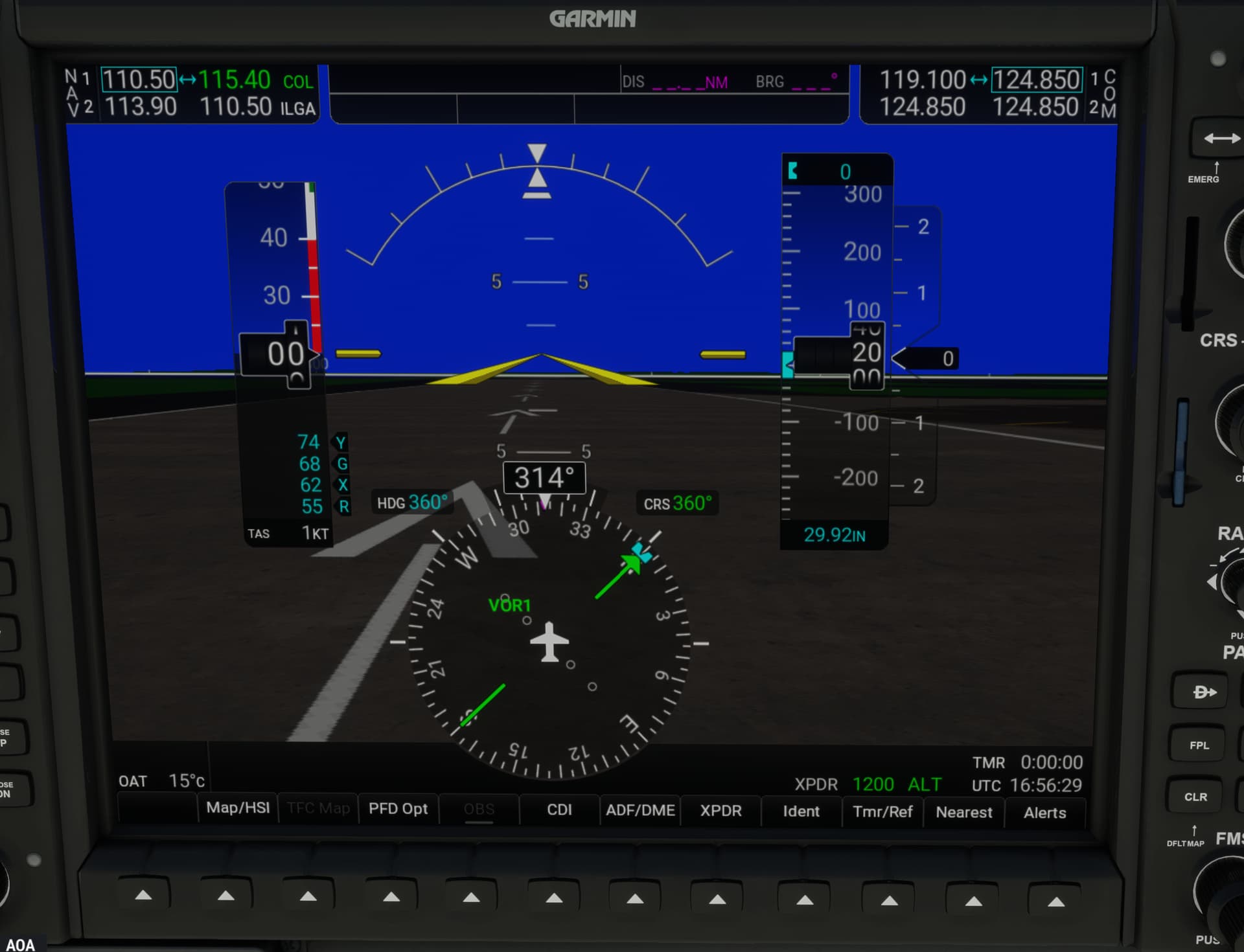
I just want to know the heading to fly from KJFK to the COL VOR.
Same here.
The bearing pointer is of my airplane, the coarse set.
Not the bearing, redial, to the distant VOR.
As previously discussed, there’s a good chance you won’t pick up the signal on deck. I’m not familiar with KJFK airspace, so this probably isn’t procedurally realistic, but since you did your preflight planning, just try taking off, turning left to 234, and seeing if you start picking up the needle on COL as you get closer.
P.S. If I were doing something like this, I would have one nav radio tuned to the JFK VOR and the other tuned to the COL VOR, and I’d plan to fly outbound on the JFK 234 radial while looking for the COL needle to come alive.
You do not have line-of-sight to the COL VOR on the ground. As soon as you get high enough in the air (probably only about 50-100 feet at that range), you will receive the radio signal and the needle will become active.
3 Likes
Yea, if he’s trying to use the CJ4, I wouldn’t even bother until the AAU for it is released in January. It’s just a hot mess at the moment, IMO.
The updates for the CJ4 coming in AAU1/January, are pretty impressive, and should be a lot easier/more accurate to deal with.
If you even want to try the current version, you can dial up two VOR freqs (hit the tune button on the bottom/left side of keypad area, and then punch in numbers, and click on the nav1 or nav2 softkey. That will also change freqs if you need to tune another number.
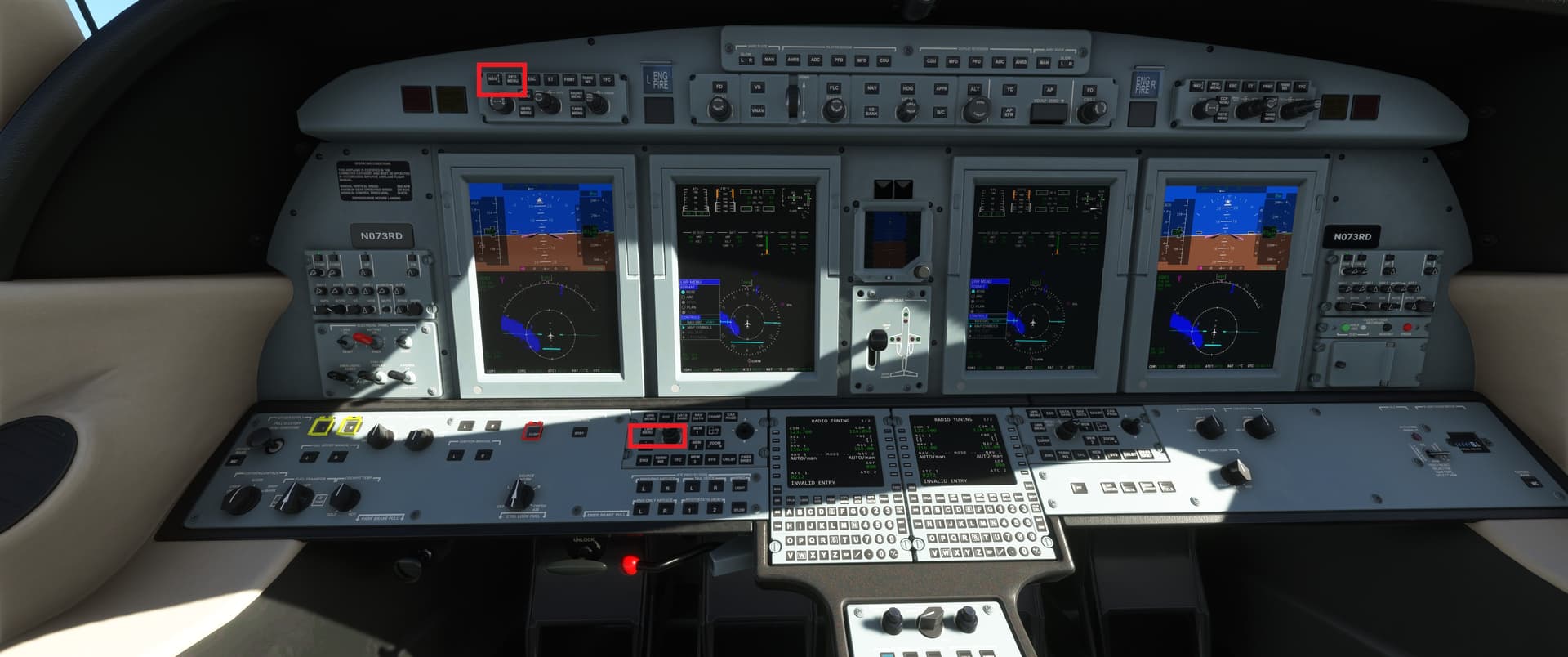
The bottom area I’ve marked controls the pilot’s MFD info (press button on the left, then use large/small twist dials to change options)
The top area over the pilot’s PFD pulls up the menu (PFD options?? I forget the exact name), then use the same large/small twist dial as before to make changes. That’s where you select which nav input you want to put on the PFD. It will cycle through the three options.
That’s truely (to put it mildly!!) a quick and simple. But as I said, I wouldn’t even bother with it until the AAU is implemented.
@MSFSRonS , if you’re talking about some other model of glass (i.e. G1000/NXi, G3000, G5000), then please specify which aircraft you’re having problems with as the 1000/NXi, and 3000 are much easier to do VOR work on. I’m sure the G3x is ok, but I don’t really use it.
Regards
1 Like
when you have the VOR frequency and you are within its reach look at your HSI instrument.
The needle will show the path towards the VOR. There will be a small triangle bottom right. Turn the dial until that triangle faces upward and the needle is now perfectly vertical. Your heading to the VOR will be the degrees AT THE TOP of the needle. As you fly towards it the needle will start deflecting. If it drifts LEFT then it means you are to far to the right and need to steer gently to the LEFT to pick up the perfect signal of the VOR. Vice Versa to the right. If you do it gently you will see the needle moving back to the vertical.
Whern you want to land at an airport you need to pickup the localizer of the runway you have selected. This will have a frequency AND a CRS. You need to dial both in. Tools such as Little NavMap are the most useful for the numbers you need.
SO; if you have the frequency of the VOR transmitter you do not require a RADIAL to fly towards it. If you select a VOR/DME then instruments will also show you how far you are from it.
Thanks, that is what I was missing.
Okay, I slew up to 1,000 feet and it picks up the COL VOR.
25.9 NM but the CRS 000 is a little confusing.
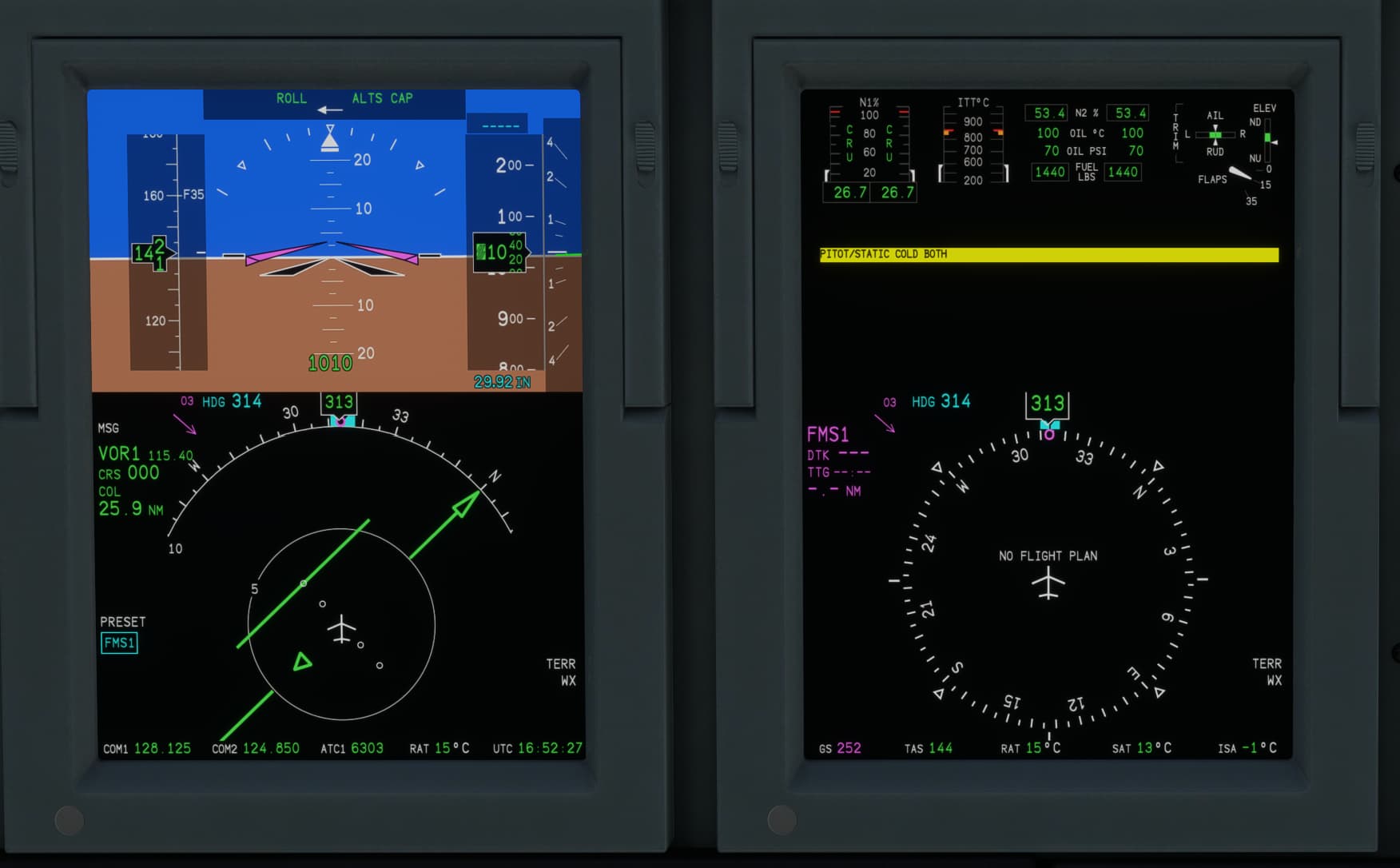
This is the 0 or 360 radial out of the COL VOR.
Wanting to fly a heading with the green arrow on top , heading = course, I would just fly North from KJFK.
So, I could fly west until I meet the needle and then fly south to the
COL VOR on that radial.
But, then I spun the CRS1 knob until the needle lined up with the green arrow. CRS = 234
Fly that heading, the 234 radial out of COL VOR, to
go there.
Now, finally, I understand.
1 Like
The operation of it is different with glass compared to steam gauges. It’s a different buttonology and you have to know where to find stuff, how to enable it, etc. But once you know that, you realize you’re doing the exact same thing you would with steam gauges, only a different way.
In any case, congrats on taking that leap of learning. It’ll make your experience with the CJ4 and G1000 much less frustrating.
Technically, you are flying inbound to COL on the 054 radial (because radials are defined off the navaid as the origin), but otherwise you are correct.
So, I should set my heading to 54 degrees?
No, that’s fine. Your course (CRS) that you are flying would be 234, and in a no-wind situation your heading (HDG) that you’re pointing the plane would be 234, but the radial is the “spoke” sticking out from the center of the navaid.
For example, if you look at this piece of the enroute low chart:
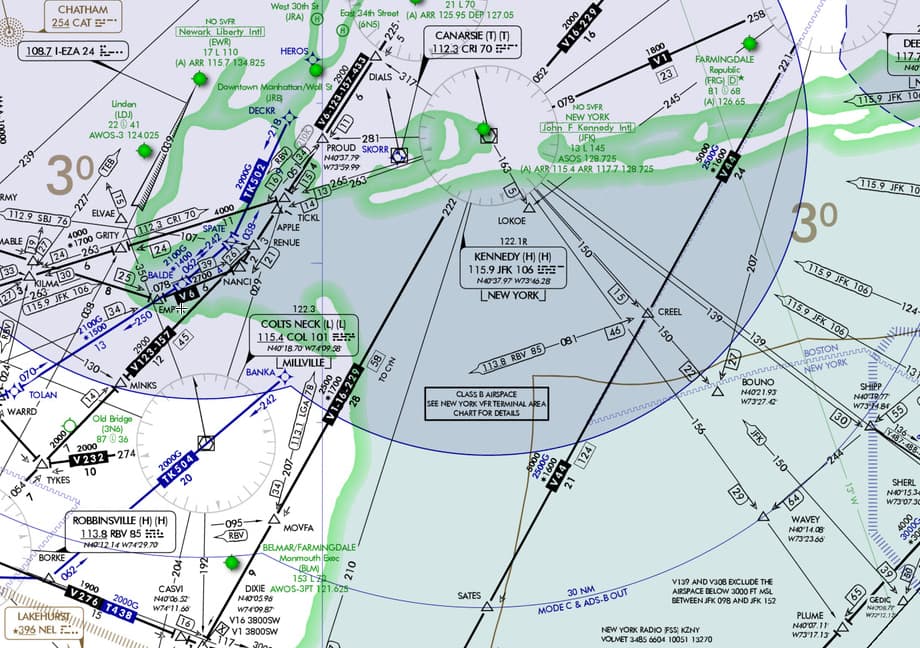
If you’re for example flying directly inbound to KJFK from BOUNO to CREEL, you are on the 150 radial of the JFK VOR, though your course would be 330. LOKOE is on the 163 radial (at 5 DME), MOVFA is on the 222 radial (at 28 DME), APPLE is on the 263 radial (at 14 DME), and so on.
Similarly, in your leg from KJFK to COL, you are in essence intercepting the 234 radial outbound from the JFK VOR while simultaneously getting on the 054 radial inbound to the COL VOR.
1 Like
I think the reason why GPS is an “obsession” is because it makes so many things in aviation so much easier. Easier than? One of the issues with the GPS “ease of use” not only in MSFS but IRL is that the fundamentals are forgotten quickly. No more paper charts or books. No more learning the E6B. No more flight planning using sectionals, a protractor/ruler, hand-held calculator, and a pencil. No more kneeboards to keep the necessary papers together. IFR flying have even more items needed to flight plan.
Autopilots have been available in aircraft for many years. But when the autopilot was connected to a GPS and a FMS containing a navigation database, planning and flying a flight plan became significantly easier.
But “ease of use” allows sloppiness and laziness to sneak into one’s daily flying. “Children of the Magenta Line” (search on YouTube for some excellent videos) is synonymous with flying becoming too dependent on automation including GPS. Where do you think the term “magenta line” came from? Even though the original videos were for professional pilots, I think they are very applicable to MSFS flying.
MSFS makes it easy for anyone to attempt virtual flying. At the same time, it gives users the ability to dive very deep into most aspects of aviation. Both of these are positive for the flight sim community.
3 Likes
Yes, I think this was the real momentous change that changed everything. We should not forget that the combination of these functions increased safety a lot, although as we have seen in the case of the Boeing Max, things then can go wrong. Bottom line, a pilot needs to know should all the instruments fail, admittedly unlikely, how to find his or her way and navigate the old fashioned way. Many years ago the thought of a 22 year old flying an airliner was unheard of I think. Now after 18 months of training, they do. Take off, engage GPS and systems sit back and monitor.
When using the simulator there is an important element missing of course; you ain’t going anywhere, really.
Therefore I hope that we will for a long time to come be able to enjoy VOR navigation which, in the simulator at least, provides more user activity.
I have read several opinions on what the official real world policy is regarding VOR/DME/VORTAC but does anyone know where such a policy can be found?
It would be interesting to read.