I have been using Xbox controller (MS Elite) in both, my PC and my XboxX, no need for other controllers besides keyboard and mouse of course.
-eelis-
I have been using Xbox controller (MS Elite) in both, my PC and my XboxX, no need for other controllers besides keyboard and mouse of course.
-eelis-
The problem with controller-only is you need to enable rudder assist and you can’t do partial braking with the keyboard. A cheap set of rudder pedals (or taking a spare throttle quadrant and assigning the three axis to left brake, left/right rudder, right brake) is much better than using the keyboard. Of course, that opens up the whole “money pit” world of flight hardware; if a boat is a hole in the water that you throw money into, a sim pit is, mutatis mutandis, the functional equivalent.
Not using rudder assist. Left and right analog bumpers as rudder.
-eelis-
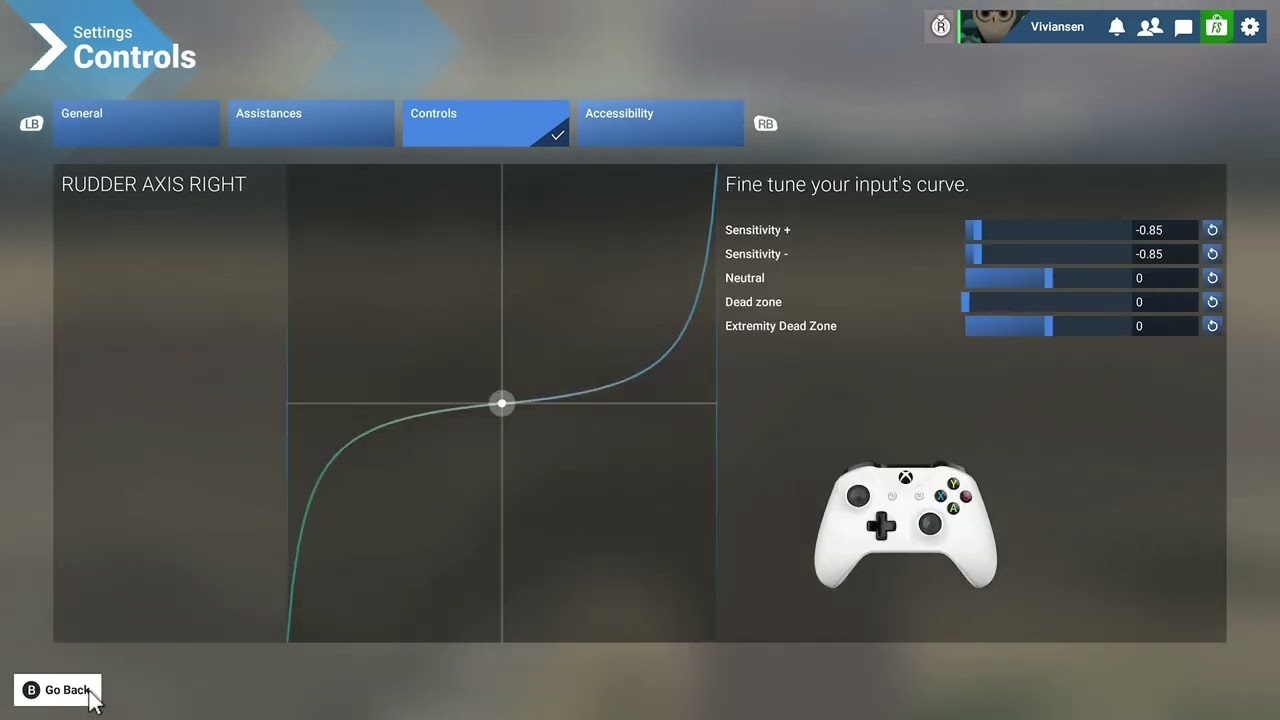
I’ve more than 600 hours of flight time in 2020 using an xbox controller with every assist turned off. It’s doable, but you need to take your time setting sensitivity both for sticks and rudders/bumpers.
Sorry but that is not correct. I have been using controller only (not even keyboard or mouse) since FS2020 was released on Xbox and all assist has been off.
LT/RT is an axis and works fine for rudder/tai rotor.
… I use FS2020 in my living room sitting in a puff.
Its cool to see this thread have a bit of life to it…
Its been almost 6 months now since I left to go traveling, and been using the xbox controller…
Its been something to really get used to and still finding wee annoyances with it but, its helped fill the void immensely…
I’ve tried so hard to be smooth with the controls but I dont seem to beable to get that “hold” with like elevator use while climbing out on the various airliners and even slamm GA aircraft like I had with the joystick..
Is that just a limitation with those tiny joysticks on the xbox or, is there a setting or sensitivity adjustment to beable to get that control using those tiny joysticks…
Especially on takeoff, i cant seem to get that smooth rotate and just hold it on that climb profile like you can easily get with, for example my thrustmuaster
It’s partially simply a side effect of the small, spring loaded joysticks, and also a matter of getting use to it. Stick with it and you’ll get better at smooth controls, and there is also an assistance option for Xbox controllers that is supposed to help in this regard.
It’ll never be as good as a dedicated yoke or flight stick, but it can be good enough.
The Elite Series 2 is expensive and worth it. I feel that my ability to finely control helicopters with all assists off is about 90% of the precision that I subjectively manage with my perfectly adequate X56 HOTAS and MFG pedals. I prefer the freedom of the controller. This will inspire a chuckle (but it works):
(Well the photo is too big and I don’t care enough to resize from my phone so…)
I’ve added wine-corks to the thumbsticks. The 3/4” extra throw makes all the difference. Looks dumb but it’s a free and comfortable solution. Left stick is collective/anti-tq; right stick is cyclic. Triggers are cockpit view left and right.
Absolutely. It’s the same as when people come from a racing sim to a yoke - hard left hard right hard left when all they need is a fingertip on the yoke and a wee bit of rudder.
And people who try to use a controller like an old atari or nintendo 4-position stick - or a dpad.
A controller gives a lot more flexibility than a hat switch or mouse for looking around, while using a yoke or joystick. That’s why some people velcro a gamepad to their yoke.
Didn’t read all the replies, just like to share my experience.
I’m a merchant navy office, used to be away for 4 months. Now I work 1 week on 1 off. On board I use my Xbox controller together with mouse and keyboard. It works great, both for GA and airliners. I can make perfect take offs and landing. It takes a single take off and landing again with my honeycomb alpha to adjust again to my home setup.
If any questions, feel free to ask.
Bram
You can try this. Eventually on “hardware settings” you can change the sensitivity on Y axis from -75 to -90.
The controller works well enough for different craft. I paired the controller with a plug in keyboard/chatpad that i got off Amazon for like £12, and it works great. Binded some controls in easy to reach places with my thumbs, and it works great.
I’m away for work very often and than I take my laptop and a controller, great fun and works very well!
I can practice touch and goes in a C172 as well butter airliners.
Doesn’t take long to re-adapt to my honeycomb at home. 1 hour max.
This topic was automatically closed 365 days after the last reply. New replies are no longer allowed.