Do you have the same issue if you follow the OP’s steps to reproduce it?
•
Provide extra information to complete the original description of the issue:
•
If relevant, provide additional screenshots/video:
• same.atc dont close
Do you have the same issue if you follow the OP’s steps to reproduce it?
•
Provide extra information to complete the original description of the issue:
•
If relevant, provide additional screenshots/video:
• same.atc dont close
I always use the Communication Window (Formally ATC).
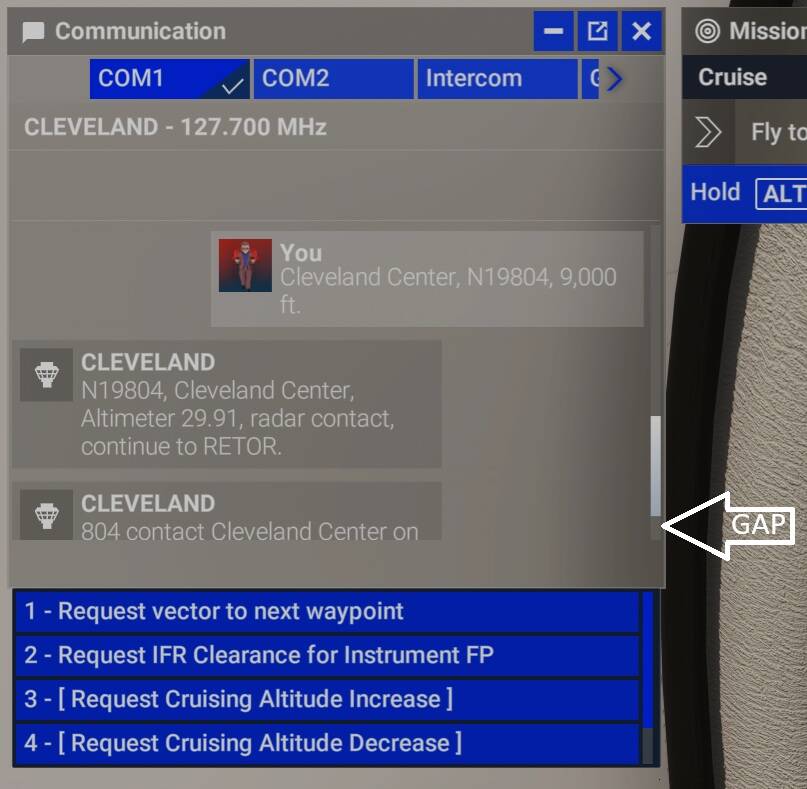
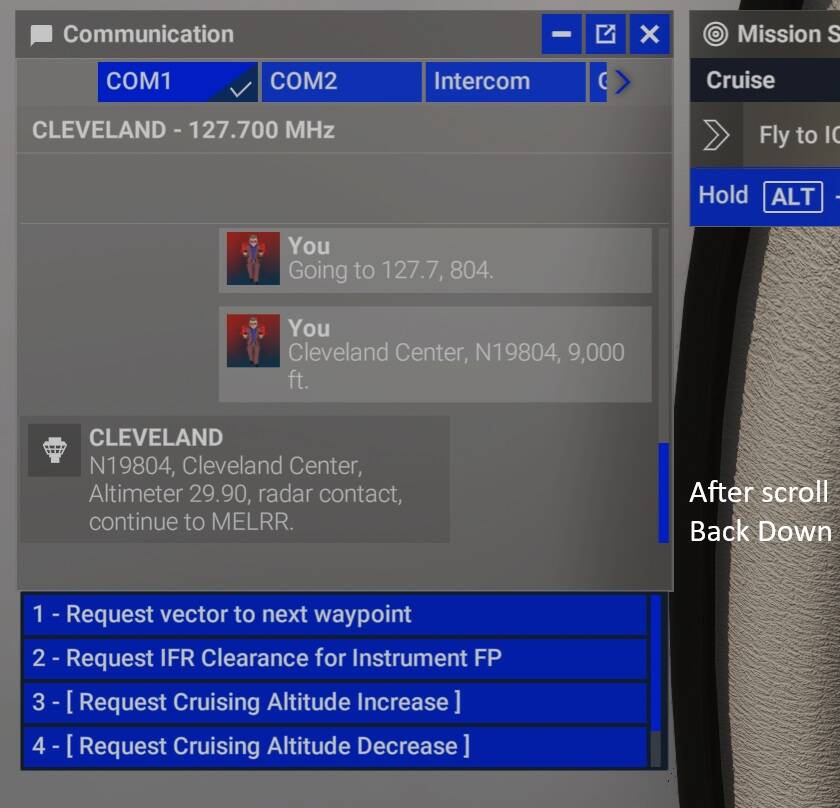
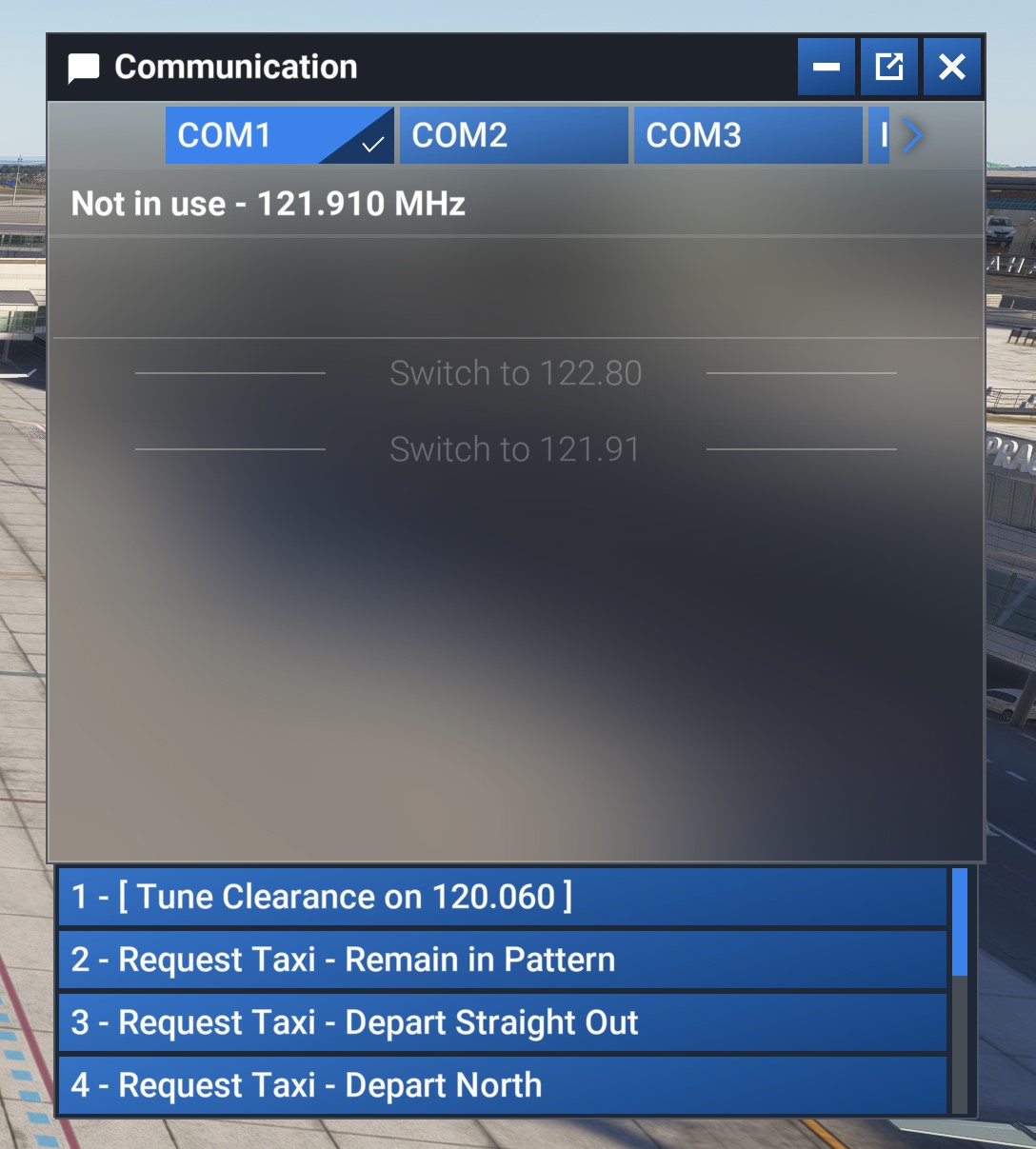
When a new communication appears from ATC or my own transmission, the window scrolls up such that I have to scroll down to see the latest entry.
This happens every time.
After instruction from ATC:
After I scroll back to the bottom
 For anyone who wants to contribute on this issue, Click on the button below to use this template:
Do you have the same issue if you follow the OP’s steps to reproduce it?
•
Provide extra information to complete the original description of the issue:
•
If relevant, provide additional screenshots/video:
•
Text size need to be editable.
Do you have the same issue if you follow the OP’s steps to reproduce it?
• YES
Provide extra information to complete the original description of the issue:
• This has happened since FS2024 was released. I’m now on SU1 Beta Ver. 3, PC, Store.
If relevant, provide additional screenshots/video:
•
try screen scaling mod at flightsim to it fixes the text size issue but not the text not scrolling down to last entry
Having to scroll to see the answer options is really painful.
When will this be fixed? SU7 or SU8?
It’s especially annoying when you’re in an area with many airports and heliports, as the list keeps resorting constantly due to your distance from each changing.
Now I don’t even see any answer possibilities.. Freq is the correct one. What am I supposed to do? Wait for SU9?
Using the template below will greatly help the team reproduce the issue and ease the process of fixing it. Before posting, search for an existing report. If you are not sure it’s a bug, please first report in User Support Hub.
2 tags are required - add them in the tag section next to the title above:
Feel free to delete this quote section after adding your appropriate tags.
Description of the issue:
The ATC window does not properly scroll on new messages, making it hard to read what ATC say. You always have to scroll down manually.
If applicable, which aircraft is experiencing this issue:
Every aircraft.
[PC Only] Did you remove all your community mods/add-ons? If yes, are you still experiencing the issue?
MSFS2024 Career does NOT allow mods-addons.
How often does this occur for you (Example: Just once, every time on sim load, intermittently)?
Always
Please list clear steps you took in order to help our test team reproduce the same issue:
If the issue still occurs with no mods and add-ons, please continue to report your issue. If not, please move this post to the User Support Hub.
What peripherals are you using, if relevant:
Not relevant.
[PC Only] Are you using Developer Mode or have you made any changes to it?
No.
[PC, MSFS 2020 Only] Are you using DX11 or DX12?
Both, irrelevant
[PC Only] What GPU (Graphics Card) do you use?
4080 Super. Irrelevant
[PC Only] What other relevant PC specs can you share?
Irrelevant
Please add a screenshot or video of the issue occurring.
https://i.ibb.co/m5Y2CGrk/Untitled-1.jpg
 For anyone who wants to contribute on this issue, Click on the button below to use this template:
Do you have the same issue if you follow the OP’s steps to reproduce it?
•
Provide extra information to complete the original description of the issue:
•
If relevant, provide additional screenshots/video:
•
Communications window of ATC does not automatically scroll text as new messages are delivered or sent.
SU 1 and atc scrolling is still not fixed…
how possible i have to manually scroll down every message i receive…
Seems rocket science to resize a window or make it resizable by user and have it automatically scroll to the last message.. I guess we will have to wait for SU5 if at all ..
• I have the same issue as described. We need the ATC window to scroll to the latest message.
Description of the issue:
Unable to resize the in game windows (ATC, mission list, EFB,…), forcing users to scroll - very annoying and jumpy. Smallest EFB is still too big, taking too much of the screen, making it unusable in flight.
Clarification: You can resize all windows if you pop them out. That, however, eats some resources. BUT, the ATC windows still only show 4 out of 10 communications options, forcing unnecessary scrolling…
All the time!
Please add a screenshot or video of the issue occurring.
For anyone who wants to contribute on this issue, Click on the button below to use this template:
Do you have the same issue if you follow the OP’s steps to reproduce it?
•
Provide extra information to complete the original description of the issue:
•
If relevant, provide additional screenshots/video:
•
Do you have the same issue if you follow the OP’s steps to reproduce it?
• yes
Provide extra information to complete the original description of the issue:
• The texg is too large to the extent that in the ATC window you have to scroll through to see all available options which isn’g easy when you’re flying
If relevant, provide additional screenshots/video:
•
Re the EFB, you can interact with it without bringing it into the screen with the TAB key, it operates just like a normal instrument. That might work for you.
Yes, that’s what I’m talking about, and it’s too big even in small setting
Same here,
Especially with the ATC window this is a bummer.
I even cannot see what the numbers of the possible answers are without havin to go search my mouse and fumble scrolling the tiny little muchtoosmall list of options.
I can’t believe such things slip through testing.
I mean don’t press TAB, just zoom in like it’s a normalm instrument, you can have it as big or as small as you like controlled by how close you zoom into it
And how am i supposed to see out and on the instruments while hand flying? All I want for it is to be smaller and not taking up third of my screen, so I can have it up, being able to see outside, not having blocked instruments and still see the navlog when flying VFR. Is that so hard to understand? Not to mention the stupid EFB blocks the view itself. Why can’t we just hide it altogether from the 3D cockpit?