Kodiak vs Caravan

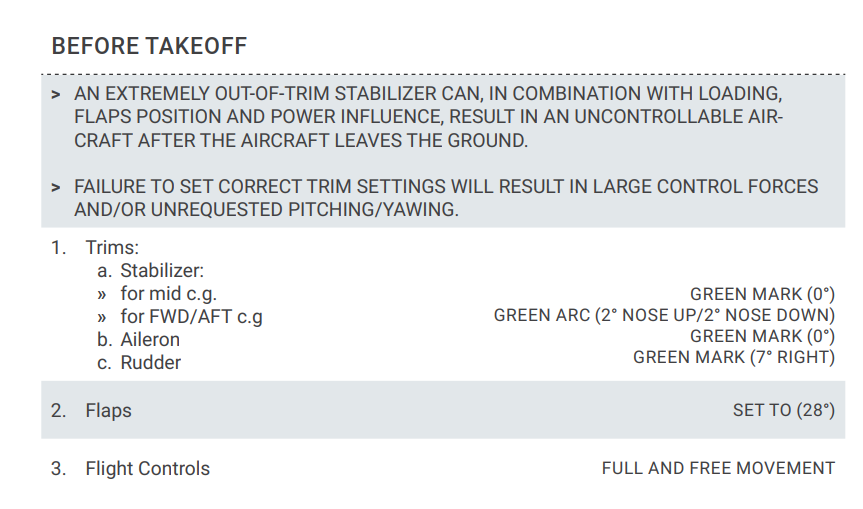
I didn’t look, but given it was -58% down, and they say in the manual above 50% is pointing straight down @ 6 o’clock, it would have been about 5 o’clock. CG in this case is right on the aft limit though.

Edit: Dev says manual is wrong. 50% trim is

In any event, you can just go in external camera view to check the trim % exactly on the right trim readout, or use the cockpit view minimal Hud, or use an external app that reads it and also allows you to set/reset for convenience.

The “crazy amounts of trim” are exactly what they specify in the Kodiak manual.
It doesn’t seem to be a misprint, going by what the dev themselves say @ SimWorks Studios Kodiak 100 one the best aircraft for MSFS 2020 - #1109 by VirtualChrisM and other posts there.

Edit:

Their elevator CG trim recommendation is still the same:

Seems to work, when your CG is on the aft limit, and if it takes off fine doing it with minimal stirring of the pot then I don’t see what the issue is. If that’s how they’ve built it and documented it, then that’s what you input, relative to where the CG is sitting aft. We’ll see what they change in the update.

It’s easy enough to test trim variations to see handling differences, just turn off damage, set the trims, and keep resetting at different settings to see the handling difference. Make sure to set the weight before hitting fly though, as otherwise you have to keep resetting them once you restart it if you’ve set the weights on the runway, which is a pita on repeats.

As the dev says too, -75% is probably overkill, but you can try just to see the difference. I only went as far as -58%. Do it on a nice flat long sea level runway to keep it consistent, you are really most interested in just seeing the handling variations. I would dial in enough right rudder to minimise the amount of manual rudder you need, just to focus on the pitch. At 30% right rudder trim I found I was using really tiny rudder inputs compared to 0 rudder trim, which is what I typically use. I think it’s just a matter of getting used to it, especially if you’ve become habituated to doing the rudder dance on various planes.

Warbirds like the Spitfire and Corsair also use a lot of rudder trim on take off to compensate.

Different planes are also built/modelled differently to solve the CG/Trim positioning equation, so you can’t just compare one to another directly in trim % terms, but you still need to set them properly depending on the CG position at TO.

I was on a fully loaded Indonesian Military Porter once in Bogor, and luckily we had a Porter owner/pilot with us who managed to stop the pilot taking off with the wrong trim for our CG config. That mistake has killed more than a few people. Shifting CG in flight (for a variety of reasons) is also another killer.

Milviz Porter says:
Note Porter also uses pretty much full right rudder trim for TO, it’s not a “matter of taste”.

It’s all about physics & balance: https://aviation.stackexchange.com/questions/32278/what-does-mac-mean
I just use the pedals for the rudder on TO?? It’s not like trying to keep the WACO in line-where it’s a muscle memory ‘game’ and has virtually nothing to do with actual forces you would be dealing with. Didn’t know it was such an issue for some. Elevator trim between -15 to -34% depending on load. At St Barth for fun I often throw near full left rudder and a flat turn out on climb before the cruise ship like you see Islander pilots do IRL videos. I think I run -39% on the Velo’s Elevator sensitivity, 0 on aileron and -25% on rudder(pedals) with a little dead zone for clumsy feet.

On my TB I do have one button on the panel that combined resets rudder trim/lock tailwheel and another that resets rudder trim. The Kodak to me at least feels very responsive for rudder input and/or bringing it in for the slowest wing-rocking short landings ~64KN or so. I think it’s easy to fly, you just have to fly it, and I always ‘know’ what it’s going to do or needs to have done. Don’t think I’ve ever borked a landing in it, even being stupid with it. The RV14 on the other hand goes from floating like a feather to a stone with the slightest mistake…

Updated my reply Kodiak vs Caravan - #166 by Sonicviz with clarifications from the SWS dev

Trim reset works great, but it’s a game feature, not a real life feature.

It’s not advised to use if you are flying with full realism settings (damage & failures ON). If you do a snap reset to zero while flying with any decent amount of trim in damage/failure mode, you’ll cause an immediate structural failure of the aircraft.

You might get away with it if it’s a small trim setting, and I suspect different aircraft have different tolerances for this instant change in trim, but certainly every time I’ve tried it with damage on and decent trim it’s been instant black screen of death.

In reality, large amounts of trim are rolled off (or on) progressively.
Same in combat flight sims when you drop ordnance and need to retrim.

Trim is as in reality, which requires crazy amounts. The Caravan does too, but not as modelled in MSFS -check the TO trim line on its pedestal.

Regarding the Kodiak, on my post there you can see side-by-side the MSFS NXi (right) and the real one (left). Trim can be seen and measured as 0%-75% nose down.

1 Like

A good rule of thumb that seems to be working is take your CG and add 10%. If you’re at 40% aft CG… dial in 50% nose down trim. 20% aft CG go with 30% nose down trim. Etc.

3 Likes

Weighing in on this discussion, as one does. I have flown the Kodiak a lot in PNG bush strips. To me the handling is wonderful. Very consistent. The plane definitely needs some handling, especially when landing because it tends to want to scrub speed and drop drop drop, so you need to throttle throttle throttle ( not too much though ). My landings are always ok, g-force wise, although Volanta states very high fpm’s, which I think are a touch wrong, because they do not match the g’s. What is different from Ryan’s vids, and it has been said here as well, is that the approach and landing torque is almost doubled as compared to the vid. If I fly at the torques Ryan uses, well, that would not be flying. I also noticed that full throttle always results in the torque specified in the poh, it’s not like I have to set it, that doesn’t work. Can someone confirm this? Maybe I am not seeing it right, but if I do not full throttle, I cannot take-off from short fields.
All in all, I really like the plane. Other planes I have flown a lot : Baron, Bonanza, King Air, Citation, Zenith 701CH. They all have their quirks. The Baron is probably the easiest of the bunch.
Working on taildraggers now.

1 Like

Been flying the Kodiak daily since picking it up last week. I don’t think I’ve ever worked so hard to love a plane! It fights me constantly, but I’m trying to stick with it.

Since I fly only in VR, the glass cockpits with their teeny text buttons and busy screens are killing me. Installed the WT G1000 Nxi and that’s got some cool features, but it’s still pretty tedious in VR. Flying the Caravan with analog gauges and TDS 750 is so much pleasurable.

I’m going to keep at the Kodiak to see if it wins me over. It’s still too soon to tell.

2 Likes

I like the 750 over the G1000 Nxi also. Regarding the twitchiness, I believe it will be updated when SU10 drops to account for a smaller throw on the yoke. It was initially developed to accommodate yokes with a longer pitch.

It’s a whole other discussion point but until VR gets better this and a good control method are the very big down sides of the current state of VR.

For any aircraft that seems pitch trim sensitive, you can add a negative input response/sensitivity to them to get more fidelity around center for that given controller saved profile. Pretty sure it’s axis 7 on a TBV1. I don’t use rudder trim on any aircraft on takeoff, I just fly it off the runway.

Reading this thread i realized i must be the world’s greatest sim pilot lol
I crashed my Kodiak 3 times on the first day i got it. Then i decided to read the manual and follow the correct procedure. Since then she has been the sweetest flyer. I’ve got about 30 hours on it now and loving every moment. I regularly land off runway too as part of Neofly missions. No problems landing or taking off. Just requires some knowledge of the aircraft systems. Rule of thumb don’t fly with the CG too far back. Set you trim right for takeoff and landings. Be ready on the rudder. She is alive. Planes like the Caravan feel completely boring now.

1 Like

VR is a lot like Full Self Driving in a Tesla - equally amazing and awful at the same time.

I just wish they’d fix the VR control instability. You’re on final, look down, and suddenly you have no mouse control and ALL your control devices are inert. Have to do some voodoo to get a mouse cursor back and gain control.

Still, I fly only in VR…

How do you guys reset your rudder trim back to neutral after takeoff? I tend to hold the button which results in a pretty abrupt yaw movement of the aircraft. It’s just so tedious to tap the button until it centers.

Surprising that it requires double the amount of torque, it doesn’t seem very accurate at all. Is this plane perhaps a bit overhyped?

You don’t need rudder trim on takeoff. Just use your feet. I think i used trim once.

The problem is not in the engine but elsewhere. We have improved this for the next update.

1 Like

One vote for the Caravan. The Lionheart Kodiak was one of my favorite planes in P3D and Thranda Kodiak in XP11, but I just don’t like this version. Tempted by the 208 Black Box mod as I have the PMS50 GTN but like the coupled VNAV in the G1000 NXi. Love to get a mod to tweak the original NXi version with better system depth and turboprop dynamics, hopefully in won’t be long.

1 Like

I love the Kodiak. I’ll get on a Bush Trip kick and spend a few hours in the legacy aircraft, been hitting all the Caravan ones now that the NXi is native and everything works so well. Then I’ll jump back into the Kodiak for some island hopping and holy carp, it’s such a different world of immersion, every single thing about it is SO much better, one of the few aircraft that trump all the cockpit visuals of any legacy aircraft.

Usually it’s the other way around, flying a Caranado then jumping back into the classic 172 and the 172 is clearly better in it’s general presentation of gauges and interior environment. I’m not sure why anyone has trouble flying the Kodiak(within safe CG parameters). It just feels like you’re there. I have a fairly big stable of xbox 3rd party aircraft, really don’t feel the same way, even when they’re still really good aircraft. I like them ‘study level’ and as easy as the King Air for what they are. Even the RV is REALLY good, but it’s just not the same as the Kodiak. At 170KN over some random field I spot from 5000AGL, I just KNOW what to do to get it right at the threshold within minutes, on the spot. Can’t wait for more updates and the Floatiak.

I have zero issues keeping it in trim or taking off or landing or throwing it around more than should be done. On my V1 I think I have -35% on elevator and about the same on pitch trim, and about -30% on TM rudder pedals, and some wonky thing I did on the condition lever so I just bring it back down on my ring finger and it snicks right into low idle. You also need to tweak the V1 back elevator with 3-5% dead zone, slid to the left of center to make sure the yoke finds zero at rest(because of the sponges) so you don’t get wonky trim coming out of AP.

1 Like

I have a rudder reset button, but rarely trim the rudder more than a few clicks in flight, and fly it away on takeoff with pedals only. You could use a reset button but just trim it close first if you’re really cranking it, or cheat and hit it when on AP.

I can’t remember if there’s a scale for rudder trim position in the MFD on the Kodiak, or some other visual representation.

1 Like