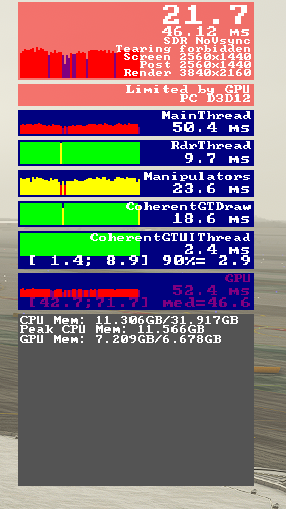
I have been constantly having low FPS and cannot figure out why. It says Limited by main thread and GPU D3D12.
I have a 3080 and also tried a 2070 super and having the exact same results. I usually get 10-20 fps and when I get 25 it only lasts a few minutes if I’m lucky. With the specs I have I should be able to get at least 40-60 FPS. I would greatly appreciate any help. I also attached a screenshot with the FPS with my 2070 Super.
Have you tried DX11? I have slightly more powerful CPU and GPU than your system and DX12 is horrible for me at Native 4k. LOD 200. I get 30’s at Large airports on the ground and 40+ everywhere else.
Looking at the memory used, it seems to me that you are using a good number of add-ons or the LOD is too high as indicated by other members.
I would expect that using a lot of memory is indirectly loading a lot of models.
Also, I don’t know if this is a direct cause, but it has happened in the past that sound devices give to manipulator threads.
FYI
As for sound devices, I have seen this happen outside of MSFS, especially in non-English speaking countries. Specifically, it happened when the sound device name in Meta Quest was not English, and I solved it by renaming the sound device in English.
As your VRAM is limited, you should use DX11 as it uses less VRAM. As others have already pointed out, you’ve maxed out your VRAM which will cause performance to tank.
On a side note, I’m not sure why your total available VRAM is so low for a 3080. This may sound redundant, but are you sure you have a 3080? Download GPUZ and post a screenshot of the info.
First install the complete system and update it to the latest version. Update the GPU driver to the latest version. The game installation path uses English names.
Is this with a specific plane? At airport or inflight?
Also have you tried dlss off and bumping render scale up to roughly 130?
Unfortunately (really fortunate actually), all in one day without testing between i ran DDU, installed 517.48 (debloated w/nvslimmer), optimized NVCP, and tweaked some settings in msfs. After all that loaded the sim and switched to DX12 and started a flight…everything was smoother than it has ever been! That’s when i tried dlss and just didn’t like the blur. Then i bumped up the render scale to 150 and it was pretty, but hit performance enough that stuttering while panning was back…turned it down to 130 and it was still buttery smooth and super crisp. Tried turning TAA off but it is needed to keep that perfect look.
In what scenario though? At FL320 with no terrain near you, or sat on the ramp at KSFO, or worse EGLL?
If you get the same results with diffferent GPU’s then it would seem you are are CPU bound, though the image above doesn’t indicate that.
I also just noticed that you are rendering a 4K image even though the monitor only supports 2560x1440. I’m guessing you have your render scale upped for some reason?
I suspect you either have a problem with your GPU, GPU driver, or your graphics configuration.
First, your GPU memory used is 7.2 Gb but the GPU memory available is only 6.67 Gb. NVIDIA is using more memory than it has.
Second, your DLSS is upside down as other posts have mentioned. DLSS is designed to run the graphics pipeline at a LOWER resolution and then create the higher resolution image for displaying on the monitor.
Your system is rendering at 3480x2160 but displaying 2160x1440. Your graphics pipeline is processing 8,294,400 pixels but displaying only 3,686,400 pixels! Your system is working twice as hard which is why your FPS is lower than you expect it should be.
Who provided your graphics parameters to use?
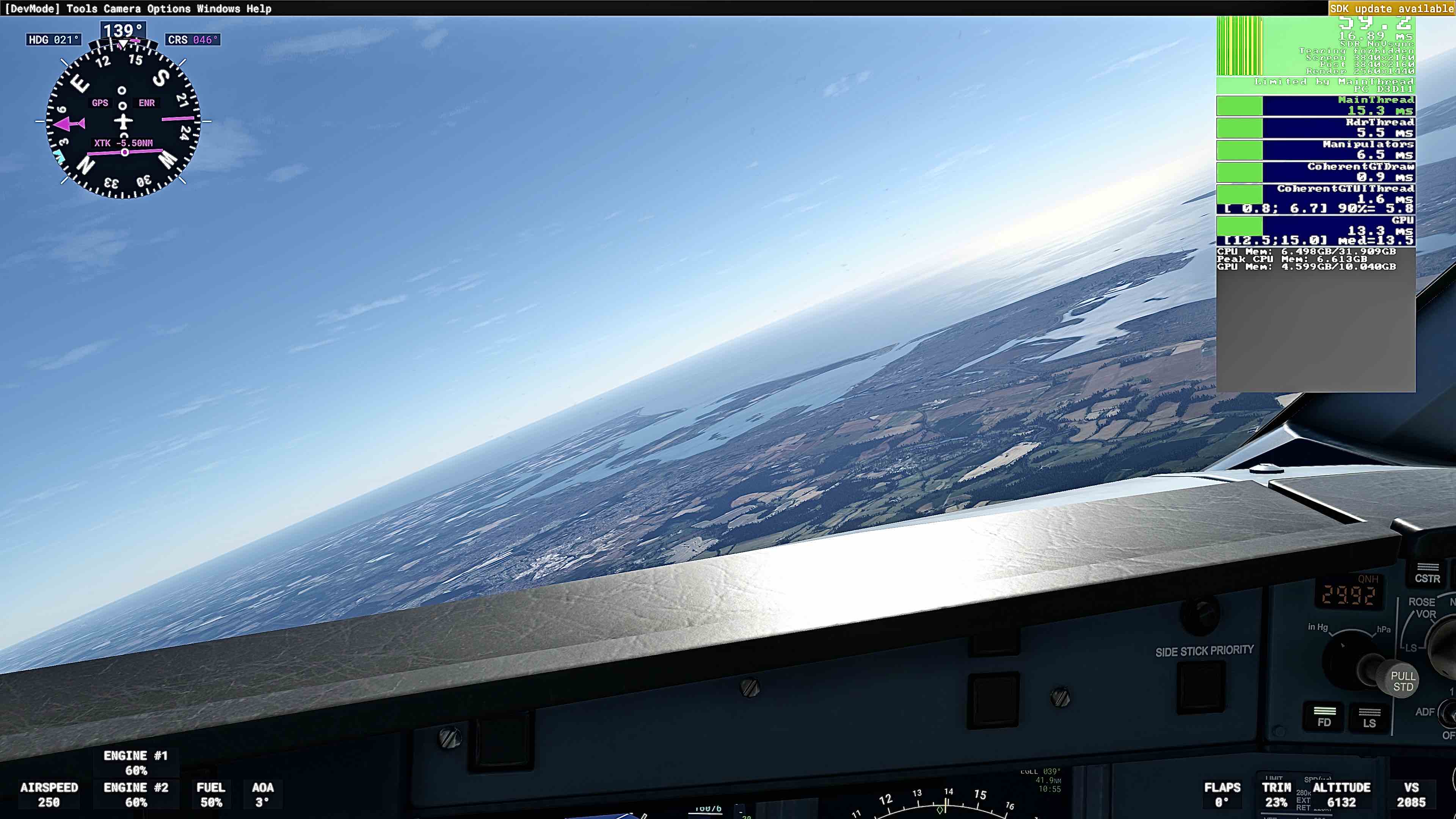
I have a 2080ti @ 4k. Here is a recent screen capture of the A320neo flying over Heathrow. I am using DLSS QUALITY and DX11. Both the CPU and GPU memory used are low. GPU memory used is 4.6 Gb out to the 10.0 memory available. Comparing FPS stats:
My screen resolution is greater than yours and my FPS is almost 3x more. DLSS renders at a lower resolution and then improves it as it is sent to my monitor. Honestly, I never expected to see 60 FPS for MSFS on my system. My settings could be tweaked to improve FPS a little more but I’m very happy with 60 FPS!
No it’s any plane at any major airport. Once I’m past 10,000 feet the fps goes up to 30fps. I found NVIDIA DLSS with DX12 gave me the highest fps now at like 20-25fps. I’ll give the DDU in safemode a try though
It happens at any major airport but once I’m past 10,000 feet it gets better. I’m using NVIDIA DLSS so I don’t have the option to set my render scale. I always had a feeling it was my CPU. But when I put my 2070 in last weekend and logged into my pc it loaded up way faster than my 3080 which was weird