Hi there,
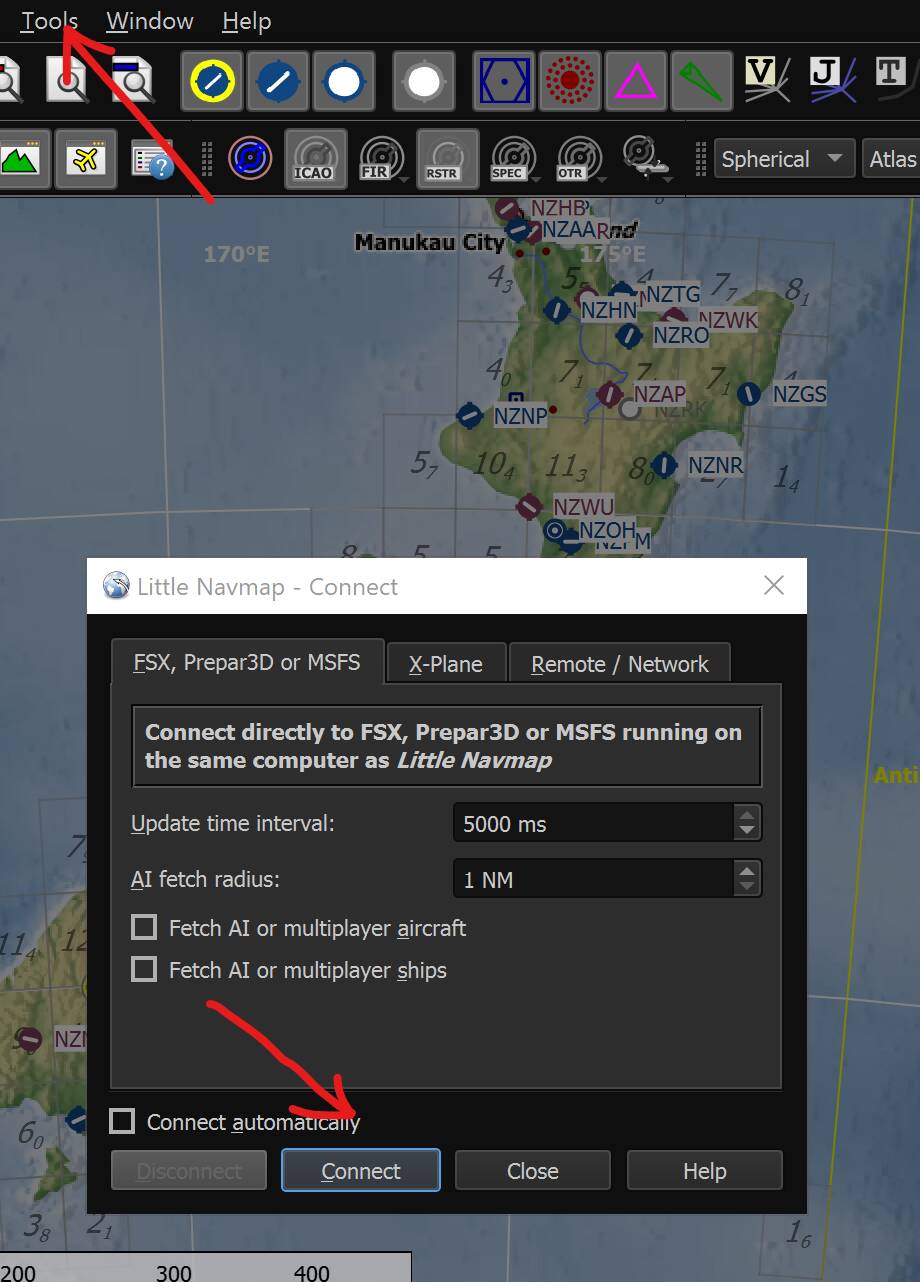
How do you connect the little navmap to MSFS 2020? Any help is greatly appreciated. Thanks in advance.
Thank you very much for your help.
Hi there,
I just tried to connect but it didn’t launch MSFS.
I’ve been using Little Navmap in the past 2 months and I now say I have no idea how I used to fly without it. It’s by far the most useful tool in MSFS and there’s no end to what this app can do.
However I don’t remember having any issues connecting it to MSFS. I’ve just permanently enabled “connect automatically” in the Tools menu and I never give it a second thought. I didn’t even remember that “connect” button exists actually! It doesn’t matter if you launch MSFS first and Little Navmap second or vice verse, it always works.
But Little Navmap won’t launch MSFS for you, so not sure about that last comment.
5 Likes
Thank you for your input. When I launch MSFS first can I minimize it so that I can use the Navmap? I am very new to this.
Yes, you can minimize MSFS or send Navmap to a second monitor if available.
Personally I don’t minimize anything, I just use Alt-Tab combination and switch between MSFS and Navmap. Or I press the Windows key on my keyboard and then select between these two from the Windows taskbar at the bottom.
ps: if you’ve started using Navmap just now, my advice would be to NOT try and understand what the app is doing, as it’s doing A LOT and you’ll probably get confused. Try to take it one step at a time and play around with the various menus or options while you’re cruising in MSFS (it kills time among other things).
Thanks very much for all your help.
1 Like
You must download and install FSUIPC7. There is a free version and it must be started every time you start the sim
Not sure it Little Navmap uses FSUIPC though. I never have to launch the latter and I’m pretty sure it doesn’t autolaunch itself. Either Navmap connects to MSFS via SimConnect or must have some embedded version of FSUIPC, so no need to download anything to make Navmap work out of the box.
Having said that, FSUIPC is essential for many other apps anyway, so downloading it is a must.
If I dont start FSUIPC7 then LNM will not connect for me
I do not have FSUIPC and have never had issues with MSFS and LNM connecting. Totally seamless and invisible: it just… happens!
4 Likes
Beware that FS2020 will often CTD when Navmap is pulling AI traffic information. It’s been reported to the developer and Asobo.
This has happened since the last update for some reason for before that LNM ran with MSFS quite nicely. I saw on another discussion that lowering the fetch time in LNM may help.
There is also a good tutorial for a first flight in the manual! Dont skip that, as it gives a good start.
Try not to launch (and connect) LNM while you’re in flight. Chances are that the sim will CTD.
This topic was automatically closed 30 days after the last reply. New replies are no longer allowed.