I am giving up on my 6 FIP panels. Had them working (after countless hours of trying) on my previous PC, but had to switch each one on at a time, otherwise a race condition occured where some of them went blank. But at least they worked.
Now I have built a NEW pc (AMD 3950x and RTX 3090) and I can’t get them to work at all. Either they only are backlit, i.e. get power but no splash screen, or they work for a while and turn off. Have read all threads on the subject and tried everything suggested. Spad.next did not help.
I am actually going to throw them in the garbage, I am so sick of wasting any more time on them. Googling makes it clear that I am not alone. Shame on Logitech for not supplying software and drivers that make these usable. I have an M.Sc. in computer science, but guess I need a Ph.D to get this rubbish to work.
Surprised at that, since afaik spad does not depend on any Logitech drivers at all. Granted I don’t have multiple FIPs (one FIP, multi and switch panel), but they work flawlessly (not to mention all the additional configuration possibilities you have with it).
Maybe the FIPs (or at least one of them) have hardware issues…
Weird thing is, they still work on my old PC (except from the fact that I have to manually switch them on one at a time, which I’m fine with).
I will do a last effort before I get rid of them and do a clean install of Windows, installing nothing but MSFS2020 and the drivers.
Before I do this: I assume I need to install the old drivers from 2017 (Flight Instrument Panel Drivers 8.0.124.0) before I install the Microsoft Flight Simulator Plug-in 8.0.313.0?
Or can I install just Spad.next and not the Logitech drivers? I don’t really need Spad.next, but happy to pay for it if it works better than the Logitech drivers.
I have to correct myself, for the FIP you actually need the Logitech hardware drivers (I initially only had the switch/multi panel and for those you don’t need any Logitech software at all). You definitely don’t need the plugin (I uninstalled it since it was interfering with spad.next). Follow the instructions from here: https://www.spadnext.com/forum/viewtopic.php?f=5&t=56373&p=69829&hilit=fip+driver#p69829
I found it extremely useful, especially for the FIP. You can load third party gauges from fipgauges.com (I’m running an ILS and a radio gauge), switch between gauges via joystick button press, program sim events to the FIP buttons, etc.
I’ve got 7 and they work fine as long as I follow the following procedure;
Spad.next installed, latest drivers etc
FIPs all connected to a powered USB 2.0 compat hub
Before booting, they are turned off individually (using hub power toggles)
PC Boots and when it has loaded and on windows I turn each FIP on in sequence, I do this by pressing the individual usb hub power switch and wait until the FIP unit powers up (red pulsing flash on FIP arrow button switch) - the FIP unit will boot and be backlit and in a state to accept spad.next
I perform this for all of my FIP, note that I find I can safely add 2 at a time like this, any more and they can crash - probably due to usb voltage demands. The time between turning a FIP on and it being on and in a status to proceed is about 5-7 secs - listen for the USB device added tone and watch the arrow button on the FIP flash.
After 30-40 secs all my FIP are on (brighter due to being backlit) and all black/blank. At this point I run spad.next and this brings the FIPs to life although the gauges are not active until MSFS 2020 boots and runs the simulation.
After spad.next, I run msfs2020 and bingo.
The process may sound long winded but if the usb hub is conveniently close to use the individual hub power buttons it’s no problem.
Of course it would be ideal if I could just turn the pc on and all gauges boot,but I have found this to cause problems and individual FIP will crash (7 FIP draw just about 1A and this surge of USB power seems the problem).
App my FIP are on a hub to themselves, another powered hub has yoke, rudders, quadrant and panels.
Following this has led to 100% success. Spad.next seems integral to this.
Just to confirm that on my configuration I’ve added two USB hub 10 ports ( 65 W (20 V/3,25 A) found on amz) on which I’ve connected all my Saitek Peripherals.
Everything works smoothless and peripherals are waking up with PC Startup.
When the FIP stop blinking (small arrows) it’s time to launch spad.
Again I use this configuration for years now and I’m pretty happy with my configuration:
At this time I’ve 6 FIPs, 1 BIP, 1 Radio, 1 multi panel and 1 switch.
This (spad) was working with XP11, FSX, P3D and FS2020 (since alpha)
I did a clean install of Windows and they are up and running again. I must have messed up with the drivers or installed some incompatible hw/sw.
@daspadger That’s exactly how it I do it as well. I noticed that it doesn’t matter anymore whether I use a USB2 or USB3 hub. Having to turning them on in sequence is ok, I don’t mind.
It would be nice if Logitech would explicitly write on their download page that we first have to download the old 2017 driver before installing the MSFS2020 plugin. Their documentation is outdated.
My FIPs flash on and off during boot, it would be good to clear out whatever’s happening, but currently I’m satisfied that everything is ok if I follow that procedure.
Hi Dirk!
Im completely new to this forum and actually to simming as well. I just got myself a Logitech Multi Panel and use it with SPAD. Of course therefore Im a complete newbie to SPAD as well.
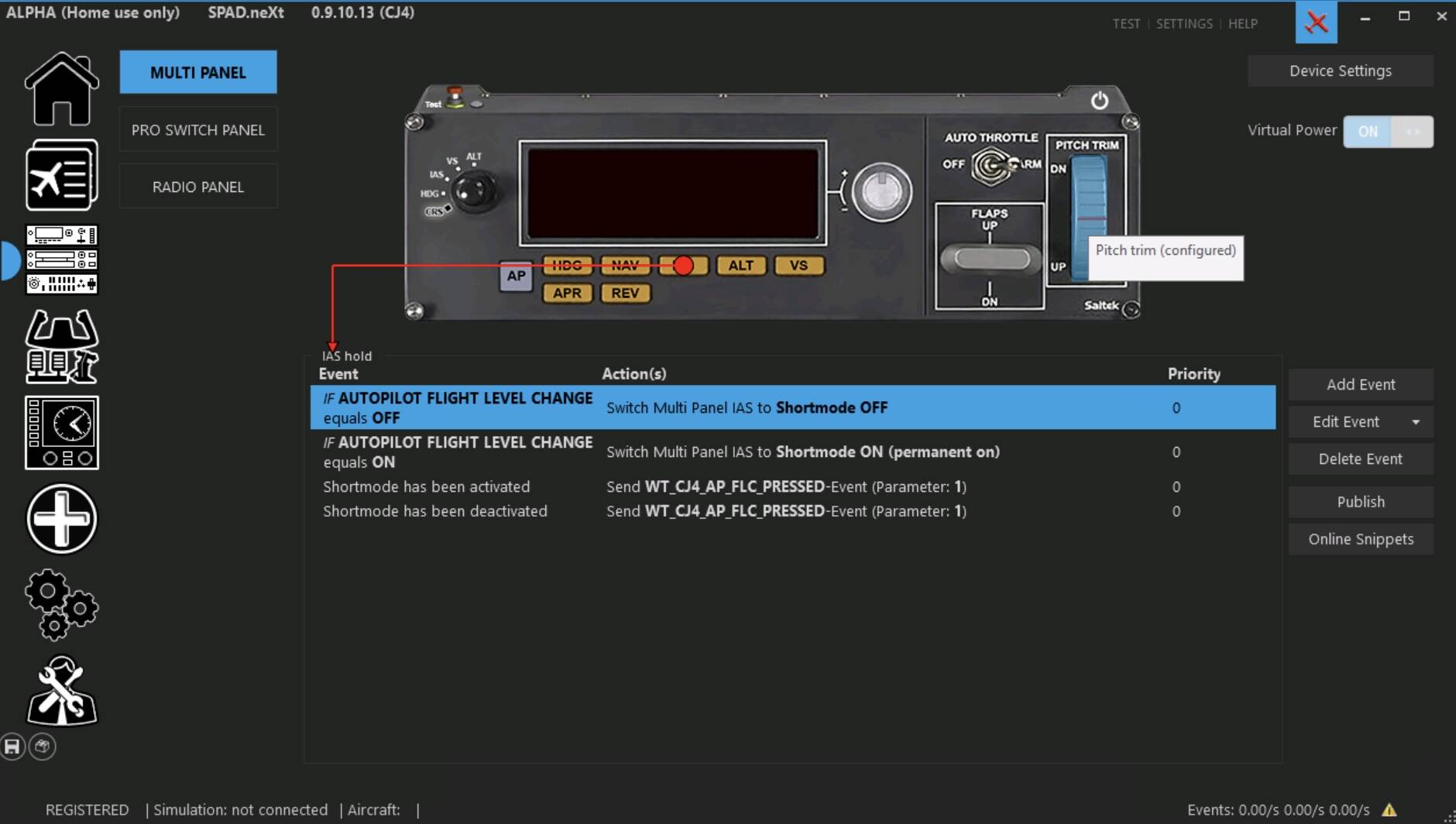
The thing is, I would like to assign the IAS (or maybe REV) button to work as FLC.
What I have tried in SPAD is the event “Shortmode has been activated” leads to action “Set AUTOPILOT FLIGHT LEVEL CHANGE to 1”.
But it doesn`t do anything…
You mentioned in your post that you got it fully working after checking out some Youtube videos.
I couldn`t find anything myself, so I wanted to ask you if you could let me know how it can be done!
Thank you, thank you, thank you!!! For the link to the drivers!!! I had the plug in but the device was not working. I downloaded the driver, did the install and it came to life!! I’m looking at the Saitek ads on it now. I assume they will disappear when I start MSF 2020. Again, thanks for the tip and the links.
It’s the panel’s altimeter wich change when pressing B.
And the Saitek’s display don’t show actual altitude, but choosen one for the A//P.
If you set e.g. 5000ft for A/P altitude, when the plane stops climbing, what do you read on the plane altimeter ?
If you have a difference, is it the same at differents altitudes ?
Is it the same in differents planes ?

 I must have messed up with the drivers or installed some incompatible hw/sw.