Have just installed Logitech Throttle and Stick and have found that the throttle is not giving enough
thrust to get me into the air before running out of runway. If I use the F3 key it helps but I still get
the throttle dying halfway during flight. I have downloaded the Logitech software but I can’t find a solution.
Is it the Throttle/Mixture or a problem in the MSFS? How can I adjust to get more oomph ?
George
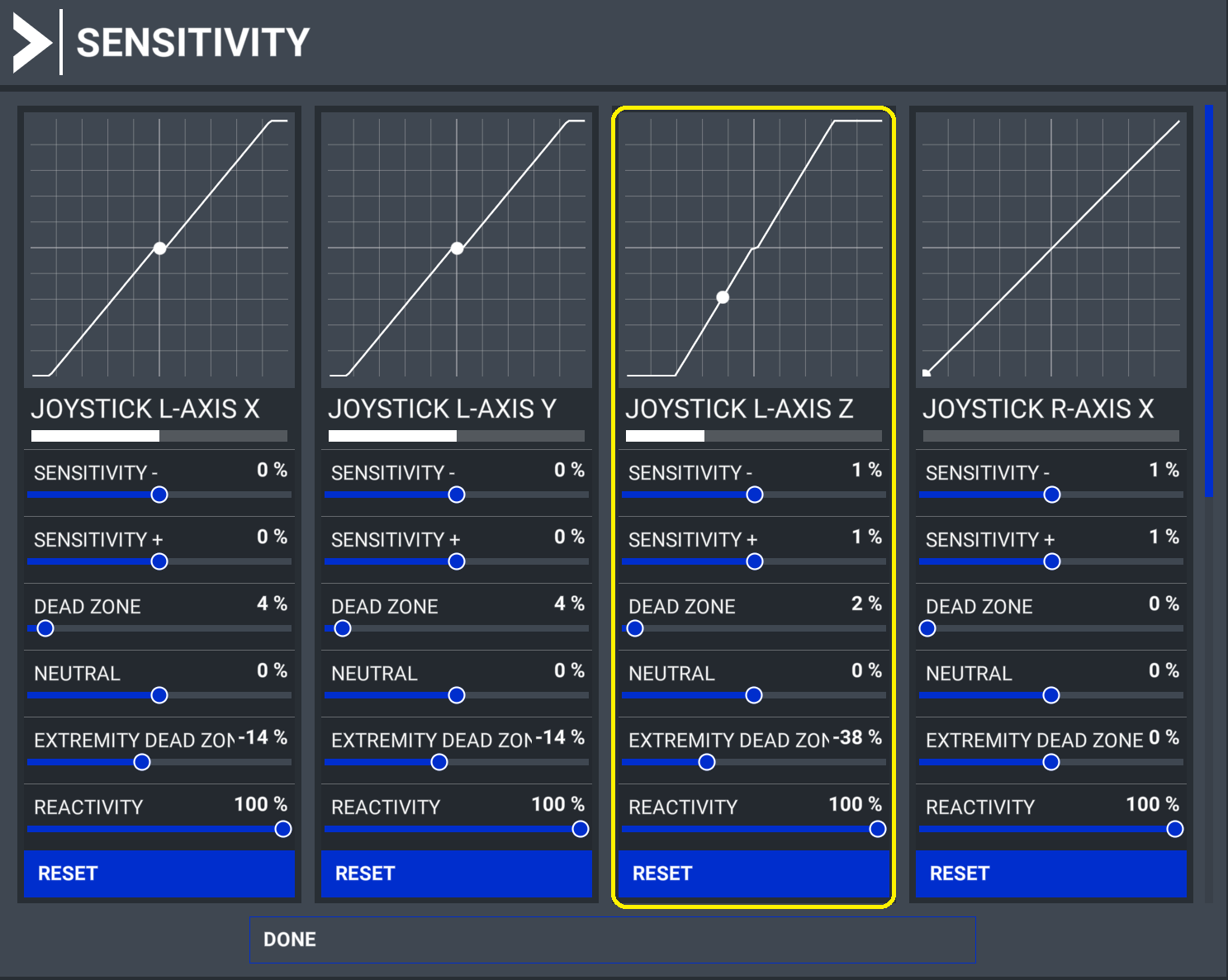
You may need to adjust the throttle Extremity Dead Zone in the Sensitivity Settings.
I had to do that to mine, because when I was at full throttle, the game only registered about 3/4 throttle.
In the image below, I have my throttle set to be at full as it just touches the detents.
I presume you can see that the throttle is not fully open in the cockpit with the lever at full travel? I suggest checking the throttle movement in the Logitech app outside the game, it (both) should just move up and down the scale cleanly. My X.56 throttle is fully on defaults in the app and in game and it works fine.
This topic was automatically closed 30 days after the last reply. New replies are no longer allowed.