Alright, it is for sure an issue with Telekom for me.
My neighbour let my try his vodafone connection, which I still receive quite well.
Paris loaded up in all it’s beautiful glory.
With Telekom, it loaded forever and was just a melted mess…
same problem here, telekom isp
low bandwith message every day, but only in the evening.
today i changed the dns server in the router to cloudflare dnsv4: 1.1.1.1. / 1.0.0.1 dnsv6: 2606:4700:4700::1111 / 2606:4700:4700::1001
in my case, this has helped so far. low bandwith message is gone, game loads fast and missions in career mode also. i will continue to test it at the weekend
This additional step helped me to get back in the game. When setting rolling cache to 64 GB I’m already up in the air again. Wonders happening !
Same for me on PC.
Low bandwidth warnirng started 2 days ago.
Changing the DNS was not resolving the issue for me, as I was using the Google DNS already.
My network has a Pi-Hole, which I also monitored, suspecting that it might block some queries to the servers. Luckily, my default lists were not interfering and everything went through.
Ultimately, I decided to use a VPN and that started to work for me. I have connected to a UK VPN and I have not seen the low bandwidth message in the simulator ever since. Loading times are now acceptable and I can finally take off to the skies!
Loading times were fine for me also. But landscape is still a mixture from FS X, 2020 and Minecraft…
I am back to 100% CTD. Yesterday it did pretty well, today nothing is working anymore.
Have you tried the Cloudflare DNS? That one’s working better for me. Especially with the DNSv6 added
Also Telekom ISP on PC. Unfortunately the MSFS2024 is totally unusable due to „Low Bandwidth“ Messages popping up all the time. Region: Nuremberg, Germany. I decided to switch back to MSFS2020 until the issues are fixed.
Had a talk with a Telekom guy. They know the problem, but he can’t say if they really want to fix it. Decided to switch to another ISP, even if I think the failure is more on MS side.
Did he mention what the cause of the probem is, @SnakeDoc142? Clogged pipes?
If there was a generic problem between Telekom and MS, it would affect the T-Systems enterprise customers running their infrastructure on Azure. And people like me who get forced (with money) to work with O362.
After changing ip4 and 6 DNS in my router settings from Telekom default to the cloudflare ones it seems that requesting/loading times are even on Friday and Saturday evening hours optimized.
Starting on the runway at major airports needs less than 2 to 3 minutes.
The only issue I have is the error message about insufficient traffic data no matter which DNS is in use.
Exactly the same for me !
Hey, unfortunately he didn’t explained. He only said they know about this issue. They offered me to double up my internet speed, but I‘m in doubt that this would end the problems.
I give it up too. Was reading the Topics here since release day. I haven’t and don’t want a company nor an own aircraft. I wanna fly what I like and was hoping Carrear give me only a route fly from a to b then b to c. In best case go around the world so. But carrer missions have as it seems to me more bugs then thinks that function as planned I tryed to use neofly in freelance mission, but I’m not able to get Aircraft loading within 20 Minutes. I’m with 100MB Telekom-Connection having no Problem outside msfs2024. Im working daily in MS Teams at video call and my girlfriend too on same Connection. I can view 3 HD Videos at same time without stutter. I’m on Telekom Speedport W724V Typ C and I wanna stay there cause everthing is fine, only msfs2024 is the problem, so I’m going to ask for refund.
P.S. In Steam I have 85 flight hours, the most of them is Loading Screen in real I think I have about 5 to 10 flight hours.
Is this a possible Solution? (see details below)
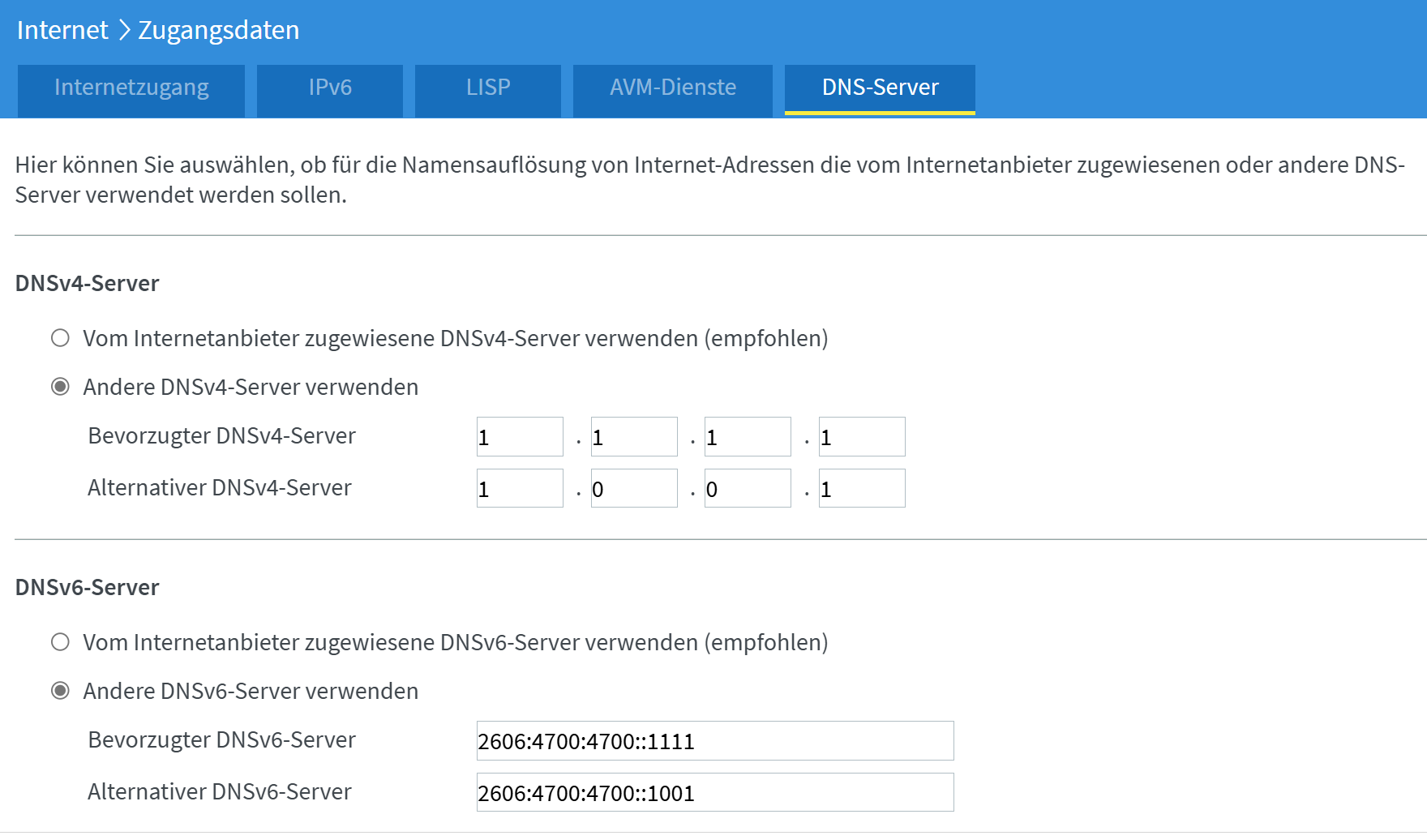
in short:
More details:
After reading all comments in this thread (and wondering how on earth it could be true that it is up to us (the paying customers) to solve a problem that obviously Microsoft and Telekom seem to have for years now), I made some tests to figure out, which of the suggestions spread over all posts might indeed deliver a ‘solution’.
Whereas: I don’t consider what I found out more than a (at least for now) functioning workaround, IMHO it’s up to Microsoft and Telekom to provide a solution that works for every user, not just for those who are willing to mess with their router configuration.
Here’s my configuration:
- XBOX X, per LAN cable connected to Fritzbox 7632SL, 100 Mbit VDSL Telekom
- DNS-settings on XBOX: automatic
- DNS-settings on Fritzbox:
- primary IPV4: 1.1.1.1
- secondary 1.0.0.1
- primary IPV6: 2606:4700:4700::1111
- secondary IPV6: 2606:4700:4700::1001
- wether I have google or CloudFlare as second DNS makes no difference
What I’ve tried to get here:
- Google DNS in XBOX-configuration

- CloudFlare DNS in XBOX-configuration
- just Google or CloudFlare DNS IPv4 in Fritzbox
- Google DNS IPv4 and IPV6 in Fritzbox
- CloudFlare DNS IPv4 and IPV6 in Fritzbox

With all the above ‘’ configuration, in FritzBoxs’ Online Monitor it looks something like this:

Apparently nearly no data at all is received!

With CloudFlare it looks like this:
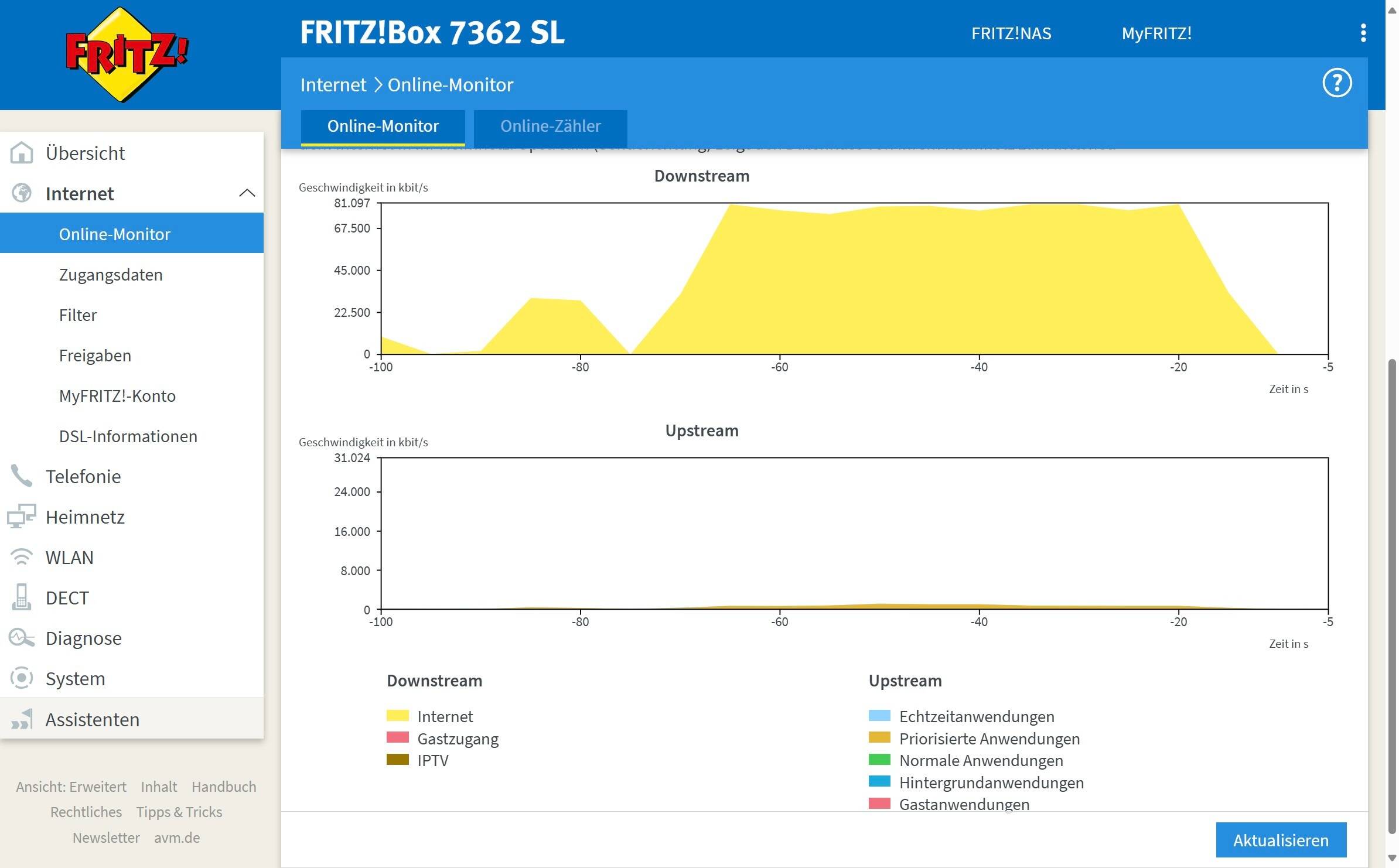
Finally the Sim is using the bandwidth available!! 
Loading times of all tested options (missions, freeflight, challenges) are quite good, as the screenshot show it now even might make sense to go for a faster internet connection, since the Sim seems to use the available bandwidth.
Please reply to this post and let us know if this configuration works for you too (even for PC-users?).
If so, this might be important information for Microsoft and Telekom to find a stable solution.
In any case:
I suggest Microsoft and Telekom shall have some serious conversation!
I will try that tomorrow as well, I’m on Telekom 100 MBit DSL.
I just installed FS2024 and nothing happened when trying to enter a flight. I turned on the VPN, then I could at least start the flight but Mannheim and Heidelberg looked horrible.
Thanks Wildbur3203, I entered the IP-adresses for my Fritzbox. Now, Singapore and other high detailed ares are loaded within a few secons with > 50 Mbs. Before, it was sometimes below 1Mbs.
Big thank you! 
Thanks a lot Wilbur3203. I will also try those settings on my PC. Is it possible to enter those DNS Settings without touching the router itself only within the Ethernet Settings of Windows 11? I need my router to connect per VPN to my company hence I want to avoid mixing up my router settings.
Yes, I guess it is prossible.
Didn’t try for myself, but my friend (ChatGPT) seems quite confident:
Just remember to use CloudFlare DNS instead of Google.