Seems to make a difference indeed. The following are the settings for Pi-Hole:
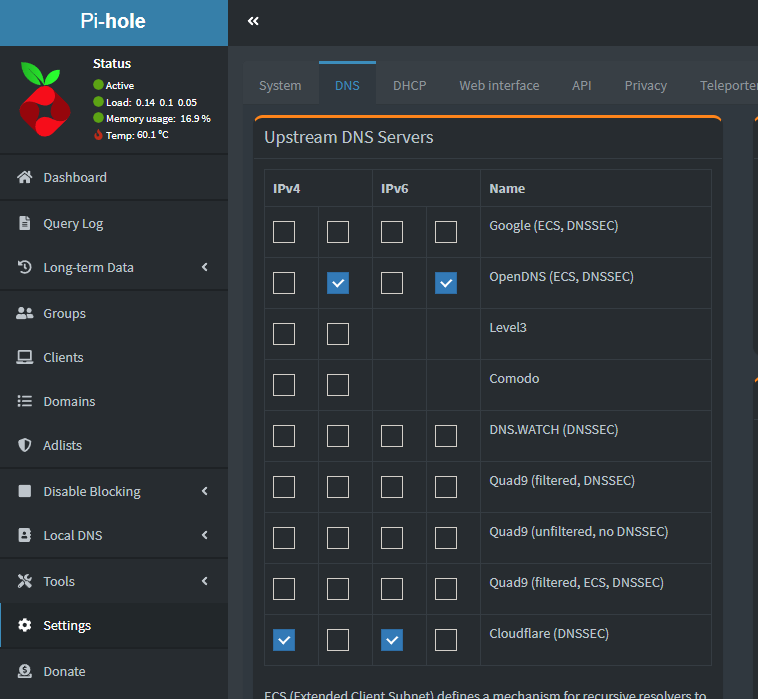
Here’s a step by step guide how to set IPv4 DNS in Windows 10/11. Just repeat the steps for the IPv6 DNS with the settings provided by @Wilbur3203 above.
From personal experience I would also definately recommend the Cloudflare DNS over Google. Since the change a few days ago, I didn’t have a single problem.
BTW: after entering the Cloudflare DNS into my FritzBox, I also didn’t have any problems with streaming Disney+ on my FireTV anymore. Hearing about the ability to simply change the DNS server is probably the most valuable lesson I learned this year.
This is for the few people this solution seems not to work as it did not work for me.
I got the following hint from Support via Ticket:
Microsoft Flight Simulator uses the English (United States) Language Package for the ATC and other essential features. The simulator can’t run correctly when this pack is missing or corrupted, resulting in a CTD.
Here is how to install a language pack for Speech. If the pack is already installed, we suggest you remove it and install it again
The language pack was installed on my system. After switching the system language to English (United States) I was able to start the Sim a couple of times without CTD.
Will further review tomorrow and give an Update if it remains working.
I just thought its worth a try if you are still struggling.
UPDATE: Game did run a couple of hours yesterday. I was able to get out and into the sim without issues.
Starting around 18:00 CET it did not work anymore.
I will not continue post in this topic regarding CTD since it is related to low bandwith.
Thank you and good luck to all of you. May we see us in the sky at some point. 
Thx for finding this out and sharing this. First test was successful, I’ll test it more intensively in the next days.
Until now I used a VPN to bypass Telekoms weired network structure, which worked quite ok. But it is so annyoing to turn VPN on and off only for MSFS.
Sorry to hear (uhm, read) that you’re having so much problems with CTDs.
The solution I described above is not about CTD, but the ‘Bandwidth too low’ messages and poor loading times.
Do you still suffer from these after applying the tips?
I am also from nuremberg and had the same problems. Changing DNS to Cloudflare directly at pc network settings fixed the issue for me.
I changed the DNS settings in my FritzBox as Wilbur and others suggested and did two test flights today. One around Mannheim and Heidelberg, the other in Bavaria, south of Munich.
Both flights worked great, terrain loaded fine and looked amazing, no stutters, no pop-ups, smooth as butter 
Thanks a lot for finding this and sharing it!
Same here, massive problems with Deutsche Telekom in the evening. After changing DNS settings as Wilbur described it works now like a charme. Thanks for your effort.
What a shame for Deutsche Telekom!
Yeah … they want to charge you the full price for a broadband connection but don’t you dare use it!
And it fixed my blurry ground textures too. What a difference!
Sadly for me this did not seem to help that much.
Changed the DNS both in my Fritzbox as well as my Edgerouter X (exposed host behind the Fritzbox, used as my main GW) from Google to Cloudflare but I still have the same issues.
Using Magenta Regio Fiber to the Curb 100 Mbit/s
Not sure that this is a Telekom issue all by itself, but maybe they are making the problem just a bit worse?
Worked perfectly for me. Loading and access response times are quicker than before. DNS ip4 and 6 are set to cloudflare and replaced the Telekom ones.
I’m not sure if I understand your setup correctly.
What do you mean by having one router behind another?
Maybe the DNS-routing has to be different in such a configuration.
I’d suggest to only configure CloudFlare (IPv4 and IPV6!) on the most ‘outer’ router (facing the internet) and have the DNS of all your devices (and the ‘inner’) router (in your local net) and devices (PC, XBOX) direct their DNS-requests to the outer router.
Something like this:
PC → outer Router → CloudFlare → Microsoft
or
PC → inner Router → outer Router → CloudFlare → Microsoft
Would be interesting to perform a traceroute or something to find out which way the data packages take.
Does anyone know the DNS names of the Microsoft-servers?
So at least on a PC one could use tracreroute I guess.
Don’t know if there is a similar solution when you’re using a XBOX.
I use my Fritzbox more or less just as the modem and have my Edgerouter X as the only device connected to the Fritzbox (as an exposed host).
Meaning all my LAN, VLAN, Routing, DNS, DHCP etc are done in the Edgerouter X.
DNS is running on my inner router as this one is used to configure my local domain names etc.
But I am giving up for now and will try again in a year or so once the sim is out of its “beta” phase.
Thanks though for helping, at least other people did get good results.
Same issue for me, Telekom, Germany
This absolutely fixed it for me. I changed DNS settings with your values here, but in the network settings in Windows as described by you here Low Bandwidth issues with Telekom - Germany only! - #104 by Wilbur3203
Do you have the same issue if you follow the OP’s steps to reproduce it?
•Yes, i have the same problem.
Measured with the task manager, the data streams fluctuate between single-digit MB up to approx. 100MB (150 MBits/sec according to FritzBox / constant).
Provide extra information to complete the original description of the issue:
• Even worse in the evening hours (20.00 CET).
If relevant, provide additional screenshots/video:
•
Have you tried this: Low Bandwidth issues with Telekom - Germany only! - User Support Hub / Install, Performance & Graphics - Microsoft Flight Simulator Forums?
We’re collecting feedback to this configuration, which might help Miscrosoft and Telekom to (finally!) sort things out.
■■■■ man, that solved it also for me! Thumbs up mate!
It really looks like this is the solution for most people.
But I won’t mark it as such because this is just a workaround. It’s not acceptable that we need to change DNS settings in the router. Some people won’t be able to do this at all or have other reasons not to do so.
The issue needs to be solved by Microsoft, Asobo and Telekom!