Low fps low cpu&gpu utilization

EDIT: Sorry, I think my cpu or its cooling elements are broken. Returned laptop for repairs. I have to wait atleast 2 weeks for results, to know for sure. HWMonitor when running MSFS ingame, shows all components working fine, gpu a bit hot, but cpu always overheating regardless of graphical settings, and throttling the fps to max 30 fps.

On airbus 310.
windows 11 (game mode on)
Rtx 3070 (high performance on 3d settings)
and 12th gen intel
I think 32 gb.
Drivers and windows up to date.

I get low fps and low cpu and gpu utilization percentage.
Could something be bottle necking here?
I am wandering if there is a cooling issues.
I see 12 cpu cores, maybe 3 or 4 cores are being low% utilized (like 10, 5, 15) and they can get to 80 degrees celcius quickly. So its like 1 out of 12 cores and only half of this one at best that is being used.
High end graphics and super performance on dlss.
Same with gpu. Not much used. Any changes in the game, doesn’t affect low utilization %.

I tried user benchmark and it says its all fine in the normal average sense.
And stress test on cpu worked fine. All 12 cores at 100%.
Gpu stress test the same. 100% utilization. And reasonable temp, or so I hope. in between 70 and 85 degrees. same with cpu temp.
but core temp app does show an exclamation mark next to a few cpu cores that reached 90 degrees for a short time.

I tried many different game settings. Data traffic graphics. I’ve mostly always had same graphics. And in the past I do remember getting 60 easily even on high end graphics.
Now it can go between 10 fps to 30 fps. And again cpu very very low % utilization. And gpu also low % utilization.

If anyone could please help me find a fix for this.
Or help me understand why it is not using cpu and gpu to full potential in msfs?

I would so much appreciate it.
Have you seen this thread?

1 Like

Yeah. I was very excited to see it.

I did try all the advice. Didn’t help unfortunately. Altho I do have nvidia control panel > manage 3d settings > power management set to ā€œmaximum performanceā€. Unlike the op of that thread. But that didn’t help either.
I only have bare windows 11, google chrome webbrowser, and nvidia and windows updates,and games installed.
Well, steam, EA, battlenet too.
That’s all I got.

I’ll have to try display driver uninstal or ddu or something. It mentioned there was risks and its ment for windows 10. So I left it for last. But I will try it when I have time. Hope it works. But its somewhat weird, how ensuring gpu driver can help with nearly 0% cpu utilization. I’ll have to find out I guess. Hope it works.

Oh and sorry, I have 14 cpu cores, if I count core 0 aswell. So not 12.

Did more cpu stress testing.
Max load, all 14 cores were stable in between 76°C and 86°C.

GPU at max load stable 81°C.

And checked also that I indeed have 32 GB ram.

oh man, I am so bummed out. It took so long but I did absolutely every step to perfection, with Display Driver Uninstaller. In safe mode. and restart, install manually without gforce, etc
I even reset cache as was mentioned.

And still nothing. I tried every single recommendation.

It makes no sense. Still very low % utilization of cpu and gpu and very low fps. Like 10 fps now.
It feels like the problem has gotten worse.

Altho I am glad I had no issues with the questionable methods presented. I am glad my computer still works. but msfs… Low fps low utilization of cpu&gpu still…

I hope the community here can help and you get this sorted out.

2 Likes

thank you, that’s very kind.

I hope so too.

1 Like

Can I ask if your bios is up to date?

1 Like

Ofcourse, and I usually don’t mess with bios, but it could be that I have possibly updated it in the past. And I can’t recall if it is this computer or another. They are the same brand. But it is very possible that it is this computer.

In the past MSFS runned fine. Always had good fps.
I tried other games which I never had issues with before. Like CoD: MW3

They have low cpu utilization and 100 fps, which seems slower than they used to be. But gpu is utilized max. some cpu cores are overheating to 99 degrees celcius, even when their load is 0%. Which makes zero sense at all. And the game uses max gpu utilization. But cpu looks like max 2% utilization.

Then I do a cpu stress test and again… 100% utilization on all 14 cores and no overheating.
What on earth is happening?

Why does cpu stress test work, but games use 0 cpu. I just cant make any sense out of any of it.

I did an intel cpu diagnostic tool test. And everything passed green.

Then someone on reddit to youtube suggested to go into powermanagement and reduce max load from 100 to 99% to prevent overheating.
And it worked on max load stress test, it went max 75 degrees celcius instead of 90 or even 100, or 84 average. it was 65 to 75celcius. Instead of 76-86. And it never had peaks of 90-100 celcius

But when I started MSFS the fps halfened. From 8-30fps to 3-15 fps, so its even worse. So I reverted those settings to normal.

I still don’t understand what is happening. If the cpu load on core temp app shows 5% utilization, then what does max load settings matter? Nothing makes sense.

I have always been able to play MSFS with very good fps. Even on way higher settings. In my current setup, which never changed. Somehow the fps dropped someday and I cant go back in time to try and identify a difference to know what has changed.

I can only imagine that the cooling paste came loose. Maybe someone dropped it. But I cannot know if this is the case. Or if MSFS changed. And my computer being healthy.

All tests are good. But I recall better performance on CoD:MW3. But I don’t remember exactly the fps. So I can’t know that either.

I give up. I’m just going to return the laptop.

It seems to me that after every mandatory update the performance gets a little worse each time. I used to be able to run all graphics settings on Ultra with no stutters at all and now, High to Medium. Mostly the latter. I have uninstalled FS and reinstalled many times now and can run 2 graphics settings on Ultra and the rest, Medium to High with slight stutters. I always use VR. And now that Microsoft is dumping Mixed Reality, I’m not wasting my money on 2024.

2 Likes

I am so confused. Do you think my laptop should get better than 7-30 fps on high end QHD with dlss set to max performance? And A.I., and traffic settings to low and variety to low.

i7-12700H (14 cores 2.3 ghz i think)
rtx 3070 laptop
32 GB.

I used to run heavier settings and remember I easily got over 60 fps.

Has something happened to the game that it becomes so slow now? Like 30fps max and often 10 to 20 fps.

And is low cpu utilization a normal thing in MSFS?

And what if I run on an i9 24 core and rtx 4070 laptop?
Would I still just get 30 fps in standard high end QHD settings?

1 Like

I have never used boost mode, untill recently to test if 14 core boosted from 2.4 to 4.7 ghz would increase fps and I didn’t even get 1 fps extra. Still max 30 fps and low cpu utilization % on core temp app. but temperatures did increase on cpu stress test to max 100celcius if boost was activated. So I didn’t activate it except this one time to see what happened.

It makes absolutely zero sense to me, what on earth is happening. I am no tech expert. by far

It has to be my cpu cooling that is broken.

Because I just downloaded HWMonitor, which is much better monitor tool.
And on MSFS ingame my cpu hits max temp at 25% cpu utilization. And gpu also 25% utilization, but lower temps.

And as usual 30 fps. But when I lowered graphics to 1080p and medium…

IT IS STILL 30 FPS MAX!

Every single component is working perfectly. Only cpu temps keep getting warning and reaching 100 degree celcius.

I’m definitely returning this laptop.

Even at 720p its 34 fps max.

And 720p with dlss AND LOW END graphics!
Still 36 fps max! It’s 100% cpu temp throttling.

I’m just glad that I have finally identified the problem. Woah… That took so long.

I didn’t even know my own laptop specs untill the fps gotten so bad. That is how untechnical I am.

What is really deceiving is that all the test applications like cpu monitoring tool and benchmarks gave me perfect results on cpu. When it is far from perfect.

Shot in the dark here…

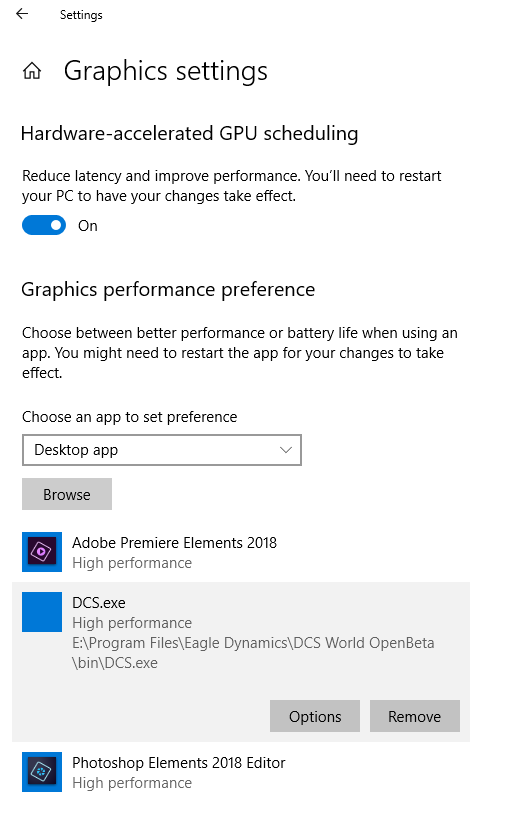
I have a laptop that has an nVidia 1060 Max-Q GPU. I learned that Windows tries to use the default Intel GPU, and I had to manually change DCS to use the nVidia GPU.
I thought the 1060 was a discreet GPU, but it’s not - it’s a ā€˜helper’ chip. Hopefully these screenshots will help:

Also, FS2020 does not use all cores. In fact, it’s terrible at optimizing core usage.
Hopefully FS2024 will fix or at least improve this.

1 Like

Since this is a laptop, is it sitting on a solid surface? Their air inlets are typically on the bottom, and sitting it on something like a blanket, carpet, pillow, etc. will block the air inlets and basically suffocate the cooling system.

I would also look into undervolting your CPU. That can lower temps without sacrificing performance, but takes time to test and adjust.

Fyi it’s not really useful to only look at regular monitoring software for this sim. When it comes to the CPU, 25% utilization is about normal, but you can still be CPU limited due to the poor core utilization by the sim. To know where the actual limitation lies, you need to turn developers mode on in the sim, go to the new debug menu, then turn on fps display. That said, it sounds like you are describing thermal throttling of the CPU, which is a problem to address even outside the sim.

1 Like

Yes, thank you for the help, and ofcourse such an expensive laptop I always use a solid platform.

But I am pretty confident, about 90+ percent that the cpu or its cooling elements are damaged. I mean…

Low-end graphics at 720p resolution and ultra performance dlss. 30 fps.
High end graphics at 2k resolution and ultra performance dlss. 30 fps.

Obviously the gpu is waiting for the cpu, because the cpu is reaching peaks of 100*C at 25% utilization.

But how can you say that 25% utilization is normal? That’s like saying ā€œMy car only goes 10 miles per hour.ā€ And you’re driving in the middle of the highway all cars racing you by, and you say ā€œSee, it’s normal. All cars drive 10 mph.ā€ And an suv behind you tries to avoid crashing into you and crashes into the railing next to you and flips around its axis several times. And you say ā€œSee, that one even goes 0 mph. It’s totally normal. Happens all the time.ā€

I mean, if you are correct, it is truely weird.

25% may not be normal exactly (it depends on you specific system), but the sim is unique in that it primarily runs on only one or two threads. So the larger principle that the sim can be CPU limited despite not being fully utilized is correct. This is why it’s normally advised to look at the sim’s built in fps display for CPU limitations and not other programs like Task Manager. If considering which CPU’s to choose from, single core performance is more important than total core count/load performance.

1 Like

What about fast startup? Hibernation? (turn off fast startup and hibernation)
1 How to Disable Fast Startup (howtogeek.com)
2 How to Disable Hibernation (howtogeek.com)

3 Power plan (ultimate performance)
How to Enable the Ultimate Performance Power Plan (howtogeek.com)

4 Many laptops switch to a lower power mode when running on battery to conserve energy which can result in reduced graphics performance. When connected to a power supply, the laptop can operate at its full potential, allowing for better graphics rendering and smoother gameplay.

1 Like

Ok, thank you. And that is very strange. Why do cpu’s have up to 24 cores, maybe more, when applications dont or cant even use them? That is like 1 out of 24 performance. Why dont cpu developers or architects maybe just one very fast core if even a simulation application can only use just 1 core? Makes no sense to me. I thought ā€œoh cool, I got somewhat low ghz. but with 14 cores?! Pfff, that’s 14 times better than my 7 year old cpu.ā€
So basically all of these cores are scams use by cpu developers to earn more money for selling worse cpu’s?
Or is there some kind of famous application that everyone uses which require 24 cores?

And yeah my ingame fps count is always 0-30 fps. No matter the graphics settings. As I said, 720p low end ultra performance dlss, 2k QHD high end, both 30 fps.
And I use HWMonitor. I don’t know any better hardware monitoring tool that this one. IT is epicly good and accurate and expansive and all inclusive.
I doubt just looking at the fps counter alone is gonna reveal what the problem is. And as I said, no matter the graphical settings, my cpu is constantly overheating to 100*C.

So I see no other possibility, when all other hardware are working fine. My cpu or its cooling elements are damaged.

hehehehe xD
thank you for your reply. Your help was great. Great suggestions.

And I said I was untechnical. But I’m not that untechnical to not know that fps lowers when I unplug the power. hehehe.

I mean that is obvious if I play games on a laptop.

And I did try those suggestions. I actually never had hibernation.

It’s pretty cool tho, I can play for like 30 minutes when I unplug.

Anyway, my cpu is damaged, as I am assuming. There is no other evidence than just, cpu broke, or thermal paste broke, or fans broke. Something is broke with the cpu or something related to it. And who knows maybe more stuff is broke, but only the cpu is obviously broke. I send it to repairs for checkup. I mean actual physical damage which might also have led to overcooking the gpu or cpu cores. But for now, I can only say, the cpu has less performance than the gpu. So i cant say how broke the gpu is.

They are going to repair it. But since I don’t know the original performance. They might aswell make it half as good as it use to be, and I woulden’t even know about it. Very frustrating. Having a bad memory like mine, and having always limitted fps to max 60. Now I have no idea what the original performance of my laptop is and is suppose to be.

I have noticed benchmarks and stress tests are extremely useless and false representations of the actual performance of the computer in actual games.

I even used a special intel provided cpu diagnostic tool and it passed all green.
Only when I download HardwareMonitor. HWMonitor. I was able to see every single aspect of every single component in the laptop while running MSFS.

And it became very obvious that atleast the cpu or its cooling elements are damaged.

But I’ll just leave it to the experts, as i sent it to repairs, and hopefully they can clarify what the problem was, and wether or not it is fixable at all. They’ll fix it if it is possible to be fixed.