Yes, I can confirm that the same did happen to me one time the other night at CYUL where it spawned in but then crashed when I tried to start the flight. All other times just had spinning wheel.
For me the best solution is to leave all my settings as I’ve configured them, mostly Ultra and some High, TLOD=250 and OLOD=200, except I disable sea traffic. Now I’m able to spawn everywhere and no issues, at least until Asobo has resolved this.
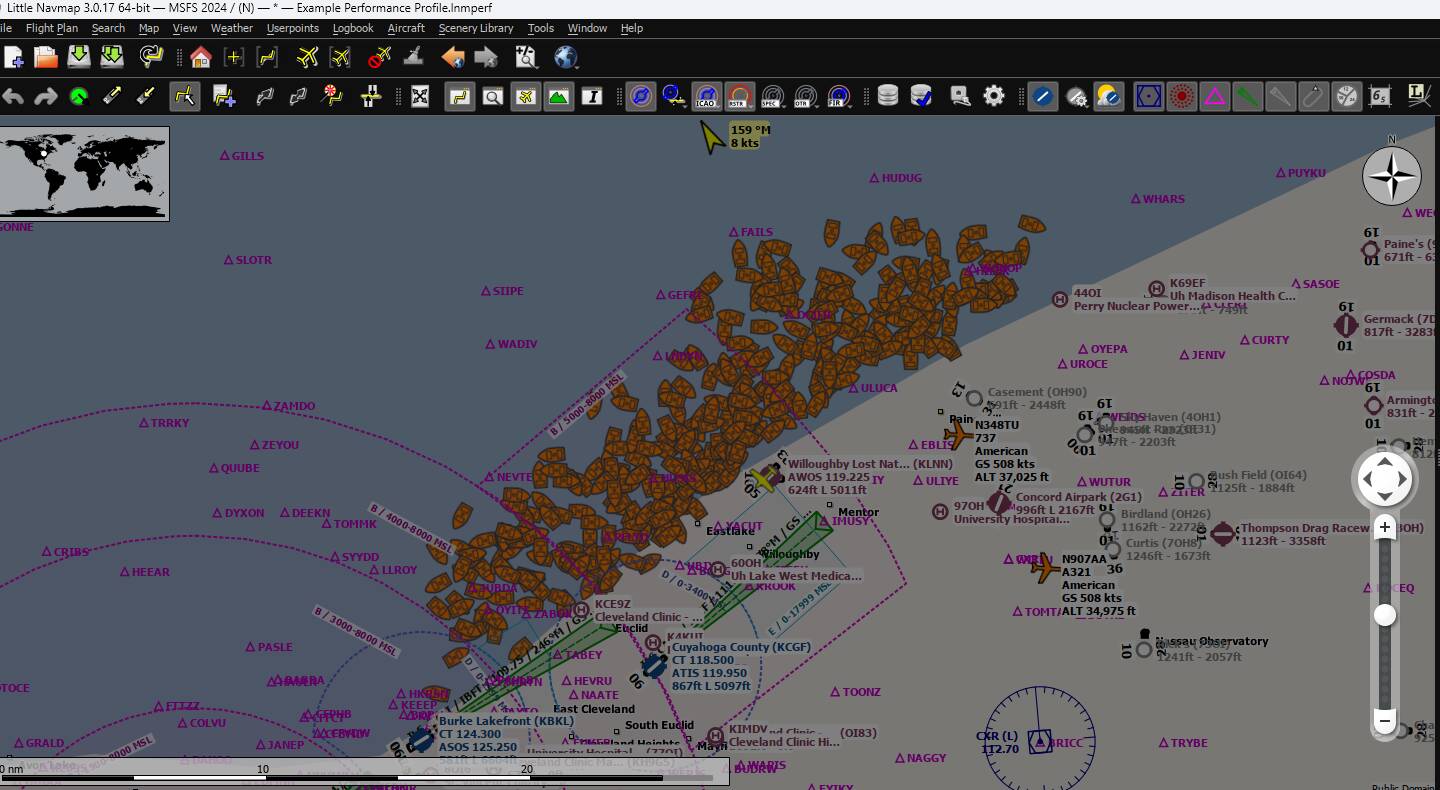
Just out of curiosity, I again tried to spawn into KLNN with Sea Traffic at Ultra. It failed, of course, but check out the amount of vessels in the area and you might understand why. Seems like an awful lot of vessels the SIM has to track
I’m not saying this is real world traffic nor am I assuming anything. I don’t know where the SIM gets its information from, or if it just creates it on its own, all I know is the SIM is creating those objects when sea traffic is enabled.
So I wanted to perform one final test to see what the impact of sea traffic had on spawning. I chose 6 airports close to and around lake Erie on the US and CDN side.
KLNN, KBKL, KSKY, CLM2, CPU3 and CJA2.
I also chose 6 airports in the same general vicinity of the lake but further inland, away from sea traffic.
KPHD, KMNN, KAOH, CPR3, CCN4 and CNW3
I used the same graphics settings for all the airports. Ultra, including sea traffic on ultra, with some settings on high and a TLOD of 250.
The results:
Spawning at all 6 airports close to the lake failed.
Spawning at all 6 airports that were inland were successful.
There is no doubt in my mind that it is the sea traffic that is the cause of the spawning issue.
If you have any doubts then give it a try to see if you can replicate my findings.
I believe the same goes for EHAM (Amsterdam) as the Netherlands is usually packed with ships with all the sea ports there, whereas spawning at Rhodos was not a problem even with sea traffic at max.
For me the issue is solved by setting sea traffic to medium, at least on my testing airport EHAM. It might be the case though that in even more dense sea traffic areas it has to be lowered to even lower settings.
I do think that with all the testing that we have done in this area will definitely help the developers find the cause earlier than they would have done on their own.
At least we have a couple of workarounds whilst waiting for a fix. That is at least far less frustrating than some bugs that get found.
Seem to havebissues loading into KTVC and 28MI. Took me wholecday troublebleshoot,
Description of the issue: When attempting to load into KTVC – Cherry Capital Airport in MSFS 2024 (Steam version), the sim enters an infinite loading circle and never loads into the airport.
This happens with:
Default aircraft (C172, DA62, etc.)
Empty Community folder
Online or Offline mode
Photogrammetry On or Off
After attempting to load KTVC, the sim cannot load any airport (even EGKB, KCLT, KORD, KORS, etc.) until MSFS is restarted.
All other airports worldwide load normally.
Only KTVC and locations within ~20–40 miles fail every time.
This appears to be a corrupted streamed terrain tile for the KTVC region (Northern Michigan). Multiple airports around KTVC work fine, but as soon as KTVC is attempted, the loader breaks permanently until restart.
Coordinate or location of issue:
FREQUENCY OF ISSUE
100% reproducible
Occurs every time when loading KTVC, regardless of aircraft or settings.
MSFS 2024 (Steam).
Ensure Community folder is empty.
Select KTVC as departure airport (any parking or runway).
Select any default aircraft (C172, DA62, etc.).
Press Fly.
Loading circle appears indefinitely and flight never loads.
Try to load into another airport (e.g., EGKB, KORS, KORD kmbs kbiv kgrr kord).
The same infinite loading circle now happens until the sim is restarted. SETTINGS
no mods and add-ons,
RTX 4090, not sure if its just me..I did a clean intall msfs 2024.
Great to hear, would love confirmation from others to make sure! And yes, appreciate everyone who contributed here with specific details for the test team.


 .
.