after one month with nothing words?
2 Likes
Started flight, super smooth, high fps. Almost unflyable by the time I arrived at my arrival airport. It was a 2 hour flight. This seems to be an issue that has plagued the FS series. FS9 did the same thing. System: Ryzen9 5900x RTRX3080 10G 32 DDR4.
1 Like
Yup. I start with 40+ FPS and upon arrival I am at 28 with stutters. No matter where or when. 2 hour flight, 8 hour flight, it is always the same.
1 Like
I did a long flight (4-5 hours) with a C310R, after 4 hours I noticed a fps drops from 60 to 30, then to 20 fps. I was able to land at a nearby airport, then when I turned off the avionics, the fps increased close to 60.
Avionics: GNS 530 (with PDS mod).
Yeah for me it’s the same, and it started from SU7, if flight is shorter than 2H then its fine FPS are solid at 50, but if flight is longer then FPS constantly drops and ends at 5 wich you can’t land the airplane.
Video with performance Tab with low FPS
1 Like
For me it helped to set everything in traffic settings tab to 0 and live traffic to off. This includes fauna and stuff too to 0. I think those things is really unoptimised in the sim.
Well it’s not a fix to disable those things but i think Asobo should optimise those things much.
Those things reduced my fps with 20fps and only affect the cpu what i could see.
FS 2020 is FSX under the skin, so it’s no wonder that it exhibits many of the same issues as FSX (and FS9/FS 2004). It’s the old poorly-written, unoptimized code with a lot of massaging by Asobo, placed inside a pretty wrapper. This sim should have NEVER been based upon FSX. That’s like dropping a Pininfarina body over a Yugo chassis and calling it a Ferrari.
It’s the FSX heritage that prevents FS 2020 from using the full capability of multi-core CPUs (which is why, EXACTLY like FSX, it still hammers the main thread/core and leaves the rest severely underutilized).
1 Like
@Orishek and others.
I also have a feeling and I am almost very certain that live weather also has an impact to the problem “good FPS → low FPS (to CTD in many cases)”.
What I discovered yesterday after approaching Bristol, the METAR didn’t match the current condition and during this phase my FPS dropped from my locked 32FPS to like 25 and further to 16 FPS.
After I landed with horrible stutters and around 13 FPS, i noticed the internal METAR “overcast” wasn’t there. After restarting the Sim and loading back into Bristol, activated live weather the “overcast” was there and FPS smooth and my locked 32 were back again.
Maybe this helps, maybe not.
One of the reasons i think it must have something to do with “live” weather is that loading into Dublin with live weather “disabled” works. Activating live weather in the menu and loading into Dublin is a 100% CTD for me.
3 Likes
Yeah, it was my understanding that the base engine was used. I expect it would have been a massive undertaking to rewrite the core engine in more efficient code. I know it’s a different ballgame, but some of the titles - every bit, and sometimes more, visually complex and appealing that my son plays - are super smooth and stutter free and push 100 - 150 fps. I know that his games do not have a ‘global’ scale like FS, but not certain how much difference that would make to cpu and gpu demands given similar code. I never did try X-plane or P3D and I wonder if they performed better. Eons ago, I played a title called Flight Unlimited, which ran crazy fps on a pentium 3 and 64 mb video card. It also had photoreal ground textures. It was however ‘limited’ to a much smaller geographic area. I do thoroughly enjoy FS, but really look forward to a day that we can have all that FS offers with great performance, fluidity under all conditions and one that is more stable, but not holding my breath that we shall ever see that. Thanks for your thoughtful and detailed response.
1 Like
This almost precisely describes the experience I had on yesterday’s flight. Departed CYYZ (Fly Tampa)in heavy rain, overcast and thick cloud layers to nearly cruise altitude. I arrive at KLGA, clear skies and my FPS has tanked. A jerky mess taxiing to the terminal. I restart the return flight from the same gate at KLGA, same weather, same graphics settings (so it’s not the photogrammetry of the NY area causing the fps hit) and it is super smooth and fluid. I wii try the same flight without live weather and see if I get the same results as you.
This also makes me wonder if the injected metar is causing this issue and if prior to injected metar, if this performance degradation was present. Not sure though, as discussed above, FS2020 is based on the same core code that FS9 was and it too suffered the same degradation.
ive had the classic FPS drop after hours of flight, over the atlantic so it isnt PG related, i remember I read a post recently explaining to change some files which worked but the issue is back again. havent played in some time because of the herendous performance?
will it ever get better!?
2 Likes
Do you have the same issue if you follow the OP’s steps to reproduce it?
Yes
Provide extra information to complete the original description of the issue:
So, I’m having this very same issue as above.
Ryzen 9 3900
Nvidia 2070Super OC
32GB 3200mhz ram
Mvme m.2 & ssd
850way gold plus psu
3 days of testing and I’ve found that the new vapour effects are absolutely killing FPS.
CPU @ 14% usage
GPU DROPS to 16% usage
It’s the wing/ g vapours.
As soon as they start to appear in high g turns, the system bombs from 50FPS goodness to 11FPS slideshow.
How do I know it’s specifically the vapours?
On every fast jet I have:
F16
F15
F14
F35
F18
I’ve had to go into the individual model XML files and block the lines of code that include, “Asobo_FX_WINGVAPOUR” and “Asobo_FX_PRESSURETRAIL”
After that, the aircraft have all become flyable again.
Hope this information helps!
If relevant, provide additional screenshots/video:
2 Likes
When are we going to get the bug as logged and most important ‘fixed’ ?
Seriously Asobo or whoever is reading this, show some respect and allow us to fly properly!!!
Did not even try the Top Gun thingy or whatever they throw there, what a waste of time.
And to stay on topic, FPS loss here too.
1 Like
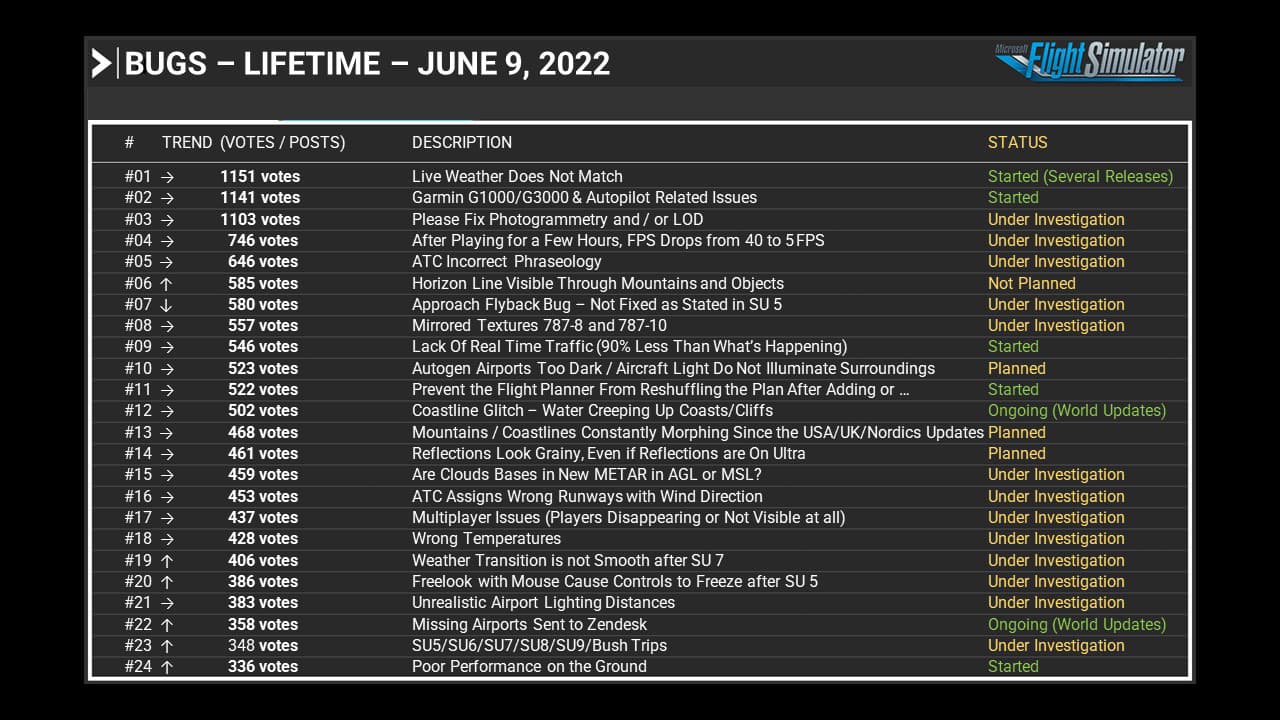
This bug was introduced with the first SU9 beta. Me and others reported it early on, and it was marked “bug logged”. This is now months ago.
I am not a coder myself, but I can not imagine it’s not possible for a group of elite programmers to single out and correct a bug which they clearly introduced with this first beta and which was absent until this point.
4 Likes
So now they finally made it. Just had between 14 and 19fps no matter where, no live weather, no multiplayer, no live ai, no photogram.
Before SU09 I had everything turned on around 38-46FPS (VR)
Until yesterday I was able to reach at least around 35 +/-5 without live weather and Ai.
I’m fed up with this bugfest for the time being and am happy about 75-86 FPS in DCS at 25% higher resolution.
A shame about the senseless wasted money.
3 Likes
nope, nothing.
this may be a point yes. If it’s because of the metars, I don’t know. But it’s pretty obvious that it’s part of a problem.
In case you didn’t see the other topic on that issue, we discovered that adjusting Windows HPET settings can stop that major FPS drop.
However I do still believe it is a bug, as the main thread is clearly still getting hammered by it.
2 Likes
Windows HPET? What’s that?