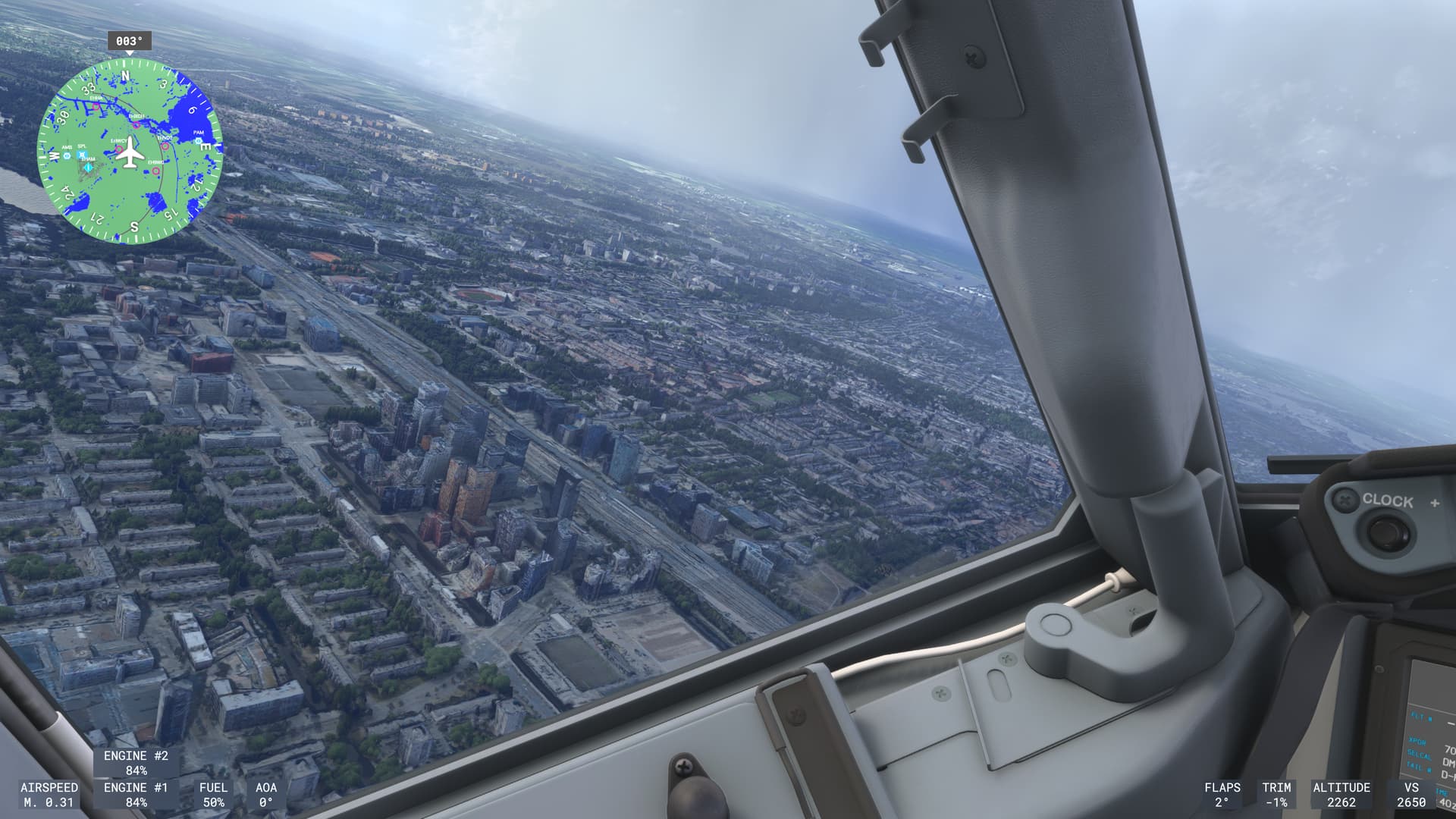
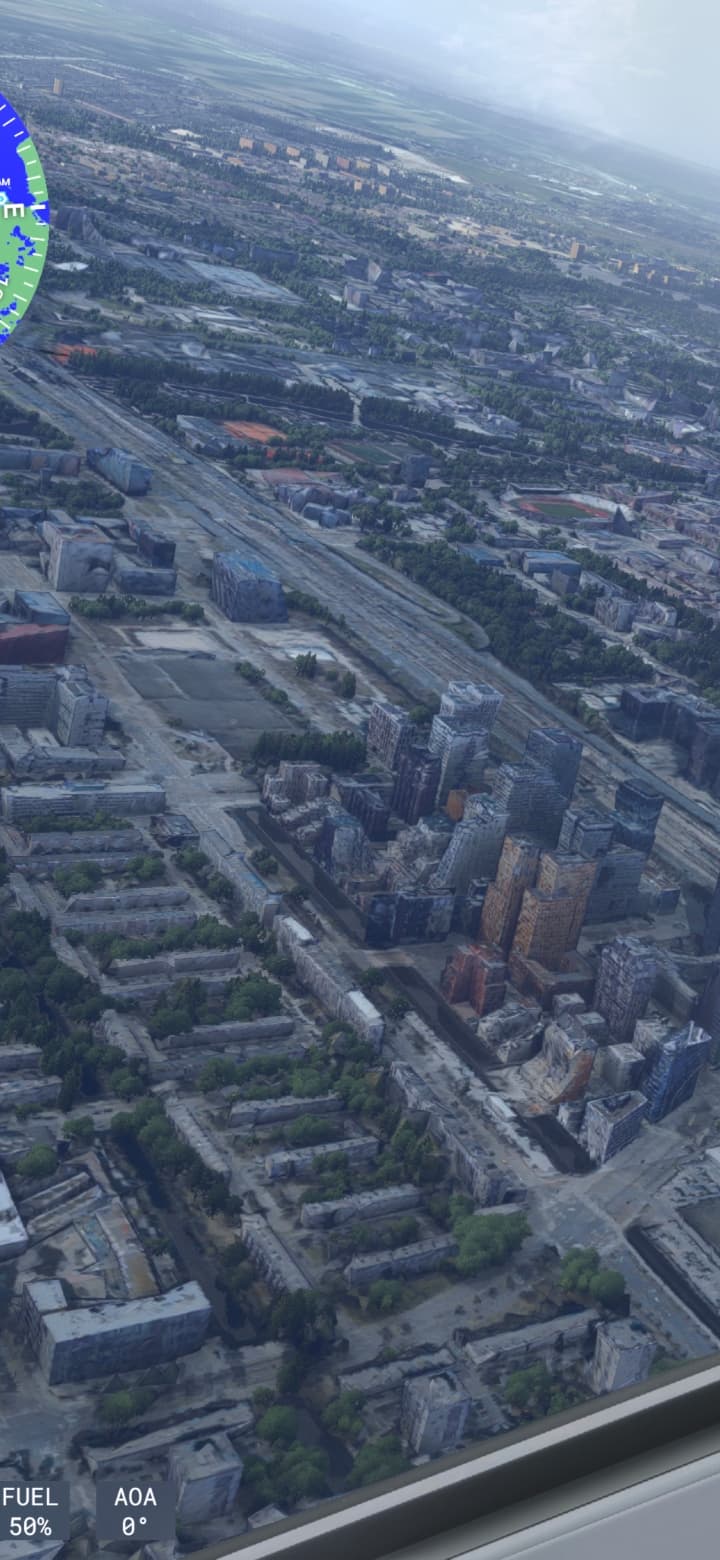
I can see massive LOD changes over photogrammetry cities happening with SU4 now. It seems the sim reduced the range of the LOD level changes drastically making them very apparent.
Coordinates or location:
All photogrammetry.
FREQUENCY OF ISSUE
How often does this occur for you (Example: Just once, every time on sim load, intermittently)?
Every time.
REPRODUCTION STEPS
Please list clear steps you took in order to help our test team reproduce the same issue:
Take off and fly over an area with photogrammetry
Visible LOD changes around the camera.
YOUR SETTINGS
If the issue still occurs with no mods and add-ons, please continue to report your issue. If not, please move this post to the User Support Hub.
All settings to max.
Deleted caches and reset rolling cache.
MEDIA
Please add a screenshot or video of the issue occurring.
100% and its absolutely awful. Flying over Las Vegas the city just isn’t streaming in properly. The LOD is far too aggressive. some of the city loads in and other tiles are staying very low quality and have massive delays loading in. Then the low quality ones load in properly and some others load out. It seems like to save performance the game is only loading in scenery/photogrammetry where the camera is focusing and aggressively culling everything out of camera but if flying with external camera and panning around the speed of scenery streaming cant keep up and its all just a blocky mess and very inconsistent. It’s a massive shame because I never had issues like this on 2020. This is on a 1gb connection.
Just did a bit more testing, and in terms of cities streaming in, you can essentially completely resolve the blocky tile streaming by turning off photogrammetry. With it turned off, streaming happens as you would expect, very subtle transitions to higher quality layers that don’t stream in abruptly as blocky tiles. With it turned on, it looks like its aggressively switching between the bing map layer and the higher quality layer.
Another issue, is that toggling photogrammetry on or off is requiring a game restart for me. It gets stuck on applying settings and will not move on. This is on Xbox Series X.
2020 doesn’t seem to have this issue. The layers stream in and are presented normally.
It is absolutely horrible. It’s as if they make everything worse, in stead of better. I downloaded everything that could be downloaded, not because i have slow internet (4gbps), but because their servers are so horribly throttled, nothing loads normally. Buildings look awful, mountains, landscapes, etc. This was confirmed when i was downloading all streamed content. Even with 4gbps it took 5 hours to download 200gb.
This is what looked bad about FS2004 and FSX, and we accepted it then because we had no choice, that was just the limitations of what computers could do. Now, 20 years later, we should NOT still be having to put up with this.
You will always have to reduce details on longer distances. We may have faster computing power at hands but also the world got more and more detailed at the same time - it is the old race between fidelity and available computing power.
The problem I have with the issue described in the original post is that someone at Asobo/Microsoft reduced the ranges where the LOD changes are happening and this is now affecting my perception as it annoys the living hell out of me.
These changes weren’t that apparent pre-SU4 as they were done farther away.
Also: This decision should (to a degree) be left up to the player. I’ve set everyhing to Ultra and it is already bad. If they decide: Hey, we can get a lot of performance out of this - fine by me, but leave me the choice of keeping the render distance so that it still looks good (with all the penalties).
The detail reductions on FS2020 (prior to SU16) were done in such a way that they were smooth and not immediately obvious. This was one of the first things I noticed when I started playing FS2020, I was joyful at how I didn’t have an obvious ring around me any more. So the computing power has outstripped the need for detail, it’s not still the same limiting factor it was.
I agree that Microsobo’s forced change is a poor choice and that players should be able to set this.
While I agree Asobo has made the LOD changes a bit more aggressive and you do notice a bit more loading changes, let’s remember that flying over the same area multiple times should put some of those changes into rolling cache and minimize the effect on subsequent flights. I did a flight out of Vegas in SU4 but had not been there in ages and I noticed the effect quite a bit. The 2nd flight I did from Vegas however was smoother and more detailed so my guess is I cached a great deal on that first flight. Time of day you are flying and world wide usage at the time can also affect the experience.
What we’re seeing is probably the result of the loud screaming from users in the early days of 2024 for improved FPS. Asobo obviously heard and responded but my guess is they hit a wall on code optimization and something else had to give.
I can move the camera back and forth on repeat and the LOD changes nacl and forth at the very same distance again and again - it’s not server or cache related, it is a deliberate value (distance) where it happens.
My man it’s simple, this is a completely vanilla game on Xbox Series X, i’ve deleted everything on it just for MSFS2024. It has a rolling cache of 256gb and i’ve installed the basic content and aircraft. This picture is Amsterdam, but it doesn’t matter where it is. This happens everywhere, all the time.
Well it sounds like a streaming issue then. Many people (even Xbox users) are having far better graphics. Are you sure your speeds to the MS servers are good? No matter how fast your rig is or how well cached things are, there are still large portions of scenery and objects that end up streamed. The world just has far too much data especially in huge cities. Sorry for your experience.