MS Store
My D: drive is FS2020 only and sits at ~ 270 GB used.
And, I have no addons except Newark Airport.
It’s definitely a bit larger than 156. You’d want at least 100 free after it’s installed most likely.
Hi RedRaven4231965. Yes, disc = hard drive - either the older type with spinning disks (HDD), or the newer solid-state drives (SSD).
I recently purchased the standard version from the MS Store, so your installation options will be a little different than mine - see Zendesk’s Steam Install Guide - but I expect the required available disk space will be very similar. The following applies to my MS store install:
The install is in two parts:
A) The core program, at a little over 2 GB, and
B) The game packages (aircraft, airports, terrain data, etc).
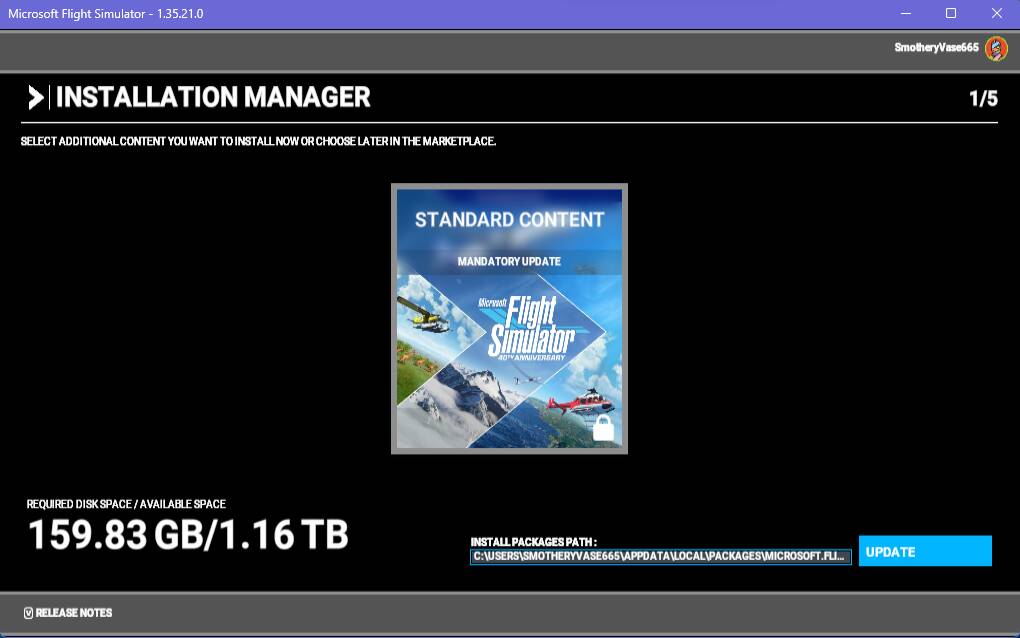
Once the core install is downloaded, it starts up the Installation Manager (see pic below) to download the game packages. As you can see from the screenshot below, my install required 159.83 GB. Yours may be somewhat higher as the Premium version includes additional aircraft & airport scenery.
The Installation Manager installs the latest version of the game (v1.35.21.0), The thirteen optional world updates will take up approximately an additional 113 GB of disk space - so ~ 273 GB, in line with the response by MSFSRonS
Right now, my core install, packages and world updates #1 & #2 take up 166 GB on my hard drive.
In addition, you can, post install, choose to configure a rolling cache and manual cache. For example, I’ve configured a 5 GB rolling cache & 150 GB manual cache.
Then there are all the additional paid, free & community addons you can optionally download & install…
MSFS is indeed a HUGE program. I’d suggest at least 200 GB of available free space (if you do not want to install any optional packages), and 300 GB or more if possible if you want the world updates too. Either way, I believe the install also needs some temporary space during the install to decompress the downloaded compressed packages before moving them into their final locations, so just having the absolute bare minimum may cause the install to fail at some point if it runs out of disk space.
If you are looking at purchasing a new desktop computer, just search for “New PC Help” in these forums. For example see this post.
Lots of folks have asked for advice over the years on what to buy & got tons of helpfully ideas & comments. If you have specific questions about what to buy, or if a specific PC you see online or in a store would work for MSFS, post a thread with the specifications & folks will be happy to tell you if they think it will work or turn out to be a lemon.
Hope this help answer your question, though I think may still be unhappy 
If it is a separately purchased version yes. If is a second installation of your current purchased copy, you can have it installed on a second machine but you cannot run both copies at the same time. In other words to run on both machines at the same time you must purchase another copy. If your app does not require the extra items in the top versions just buy the Basic for your testing if that will work. I believe the basic is on sale now for about $35 at the MS store.
Since my top of the line MSI gaming laptop of only 3 years seems to be outdated already, I just bought a GPU and a dockiing stations, cords, new keyboard and mouse to go with the new big curved monitor. Its got 32 gb of ram, 2 TB harddrive and RTX 4060 at 8 mb. I sure hope when I get it here soon and set it up I can finally download my 40th anniversary premium add I just bought from Steam. 40% off by the way like at the ms store !!! till the 4th I think. Was 75 bucks.
Don’t be too surprised if, when installing MSFS on your new PC, it takes a long time to download. See this thread, for example.
I just finished downloading all the free optional world, city, aircraft & activity updates. The total download size was ~ 80 GB, that decompressed to ~173 GB on my hard drive. I did not experience the really slow download speeds mentioned by some of the posters in the thread, but the content manager was not utilizing my full bandwidth either. The total size of MSFS on my D drive is now ~467 GB
Did you get the add ons from fly away sim site? My goodness, its a good thing I got that desktop.
well I probably just bought myself even more headaches as since I had to buy a entire new computer for 40th premium from steam, and since I have FlightGear and YSF on my gaming laptop. I bought the disc version ( could not find the one I wanted on Steam and I know people say that one works on windows 11 better) of FSX Gold edition plus the accelerator disc. Going to put it on that laptop. The reason is I got the book MSFSX real world pilot training. I love the book. But it used X version which I was told is different than the new one. Stuff in different places etc. The book has certain training missions and they give you a link to wiley.com to download them. But that link and doing what they say did not work. I did a search and found a forum entry on Flightsim.com that someone gave the link to get those missions in the book. Its here if anyone needs them… Microsoft Flight Simulator X For Pilots: Real World Training | Wiley Now I just hope im one of the lucky ones who actually CAN install FSX gold on win 11 and even luckier to get the accelerator to work as well !! Since I am NOT tech savy, should be a real adventure ! Then maybe I will learn basic key controls, find a plane with a manual. Learn to do the preflight etc and start up and maybe SOME day before i am 90 actually get to fly. Well, I finally did manage to take off from a actual runway instead of the grass and every other odd location on another sim. Landing was certainly interesting. Bouncy as hell, but like when I drove big ships we would say the old.. any landing you walk away from is a good landing.