Thanks very much for your reply and the link to your guide.
Perhaps because some paid for it … And don’t want to repay if they can avoid it.
The latest patch which no longer lets me fly a lot of my custom liveries and freezes the sim now. I found some that do work, but some have black texture sections now vs before the patch. I then left the folder untouched and just simply copied over a fuselage (same file) which would freeze the sim. that plane before the fuselage texture overwrite worked albeit some sections were now black then froze just like the other livery I no longer could use.
Is there perhaps some change in the patch that specifies only a certain type of conversion or alpha channel requirement needed for textures? If one texture is not correct, the entire plane wont load and require ending the sim in via the task manager, but if some portions are correct, but not fully set up, they load but appear black?
So after trial and error and one texture copy over at a time. I was able to figure out that the latest patch is so sensitive to what DXT format the texture was in original place, if it was a DXT 5 originally and copied over with a DXT 1 it breaks the sim. I decided to try it agan and this time convert the overwrite to the original DXT format of either 1 ore 5 it was in and now the planes load and sim does not hang. however before the patch, the DXT 1 texture did work, but it no longer does and funny how certain textures on the plane are not all DXT 5 or 1.
Also discovered that the models now get sensitive with texture size since latest patch and results in the black texture so have to resize to the original working texture size and the black texture goes away.
It sounds like what you might be running into is that you’re not redoing the layout.json every time you make a change.
2024 expects the file size in the layout.json to match perfectly now (I don’t know why, might have something to do with the “security” around career mode, they’re afraid people will try to “game” the system? I dunno).
You’re not saying what planes you’re trying to add liveries too. The format for 2024 aircraft has pretty drastically changed. They should work for 2020 aircraft, though.
These were all 2020 third party carry overs that broke after the patch, the exception was the Caribou which is streamed. It needed DXT format changes. even I did make the file sizes change size, and got fixed without touching layout.jsons.
The point was the planes and custom livery folders worked fine till patch 3, so why would it need some adjusting of layout.jsons on what was just a 2020 aircraft file and livery now since patch 3? Either way I fixed it via texture editing.
1 Like
It was more than the layout (sure the file size in layout must match) but somehow some textures had to be changed from DXT1 to 5 vice versa to now work. original DXT1 and file size matched, but then needed to be DXT5 instead and some had to be resized to try to match the original layout.json as close as possible since it became a new DXT format.
Stupid question time for me! Again! 
Am I correct in my understanding that there is currently no way to create custom liveries for encrypted aircraft such as the C172?
1 Like
Sorry no. However liveries for any of Bagolu’s 172s like the Reims rocket are possible for 2024, becuase they use the 2020 172 as their base.
Ever since I switched to 2024 I have not been able to create my own liveries. I use to spend HOURS making my own liveries and I really enjoyed it. I know they changed the format of the textures but is there a way to convert them into the new format?
1 Like
There are 3 categories of aircraft in MSFS 2024, and which type they are impacts livery creation.
-
2020 legacy aircraft – Liveries for these aircraft work fine in both simulators with little extra effort. Aircraft like the Flysimware Lear 35, CaptainSim C130H, Cows DA42 and most freeware aircraft fall into this category. There are some issues you have to work around with your liveries, but I created a guide in a separate post. If you do it right then anyone downloading your livery can use the same livery folder in both 2020 and 2024.
-
2024 hybrid aircraft - These liveries use the same basic textures in 2020 and 2024, but 2024 needs the textures in a different format. They usually use a 2020 folder structure but use KTX2 textures in place of DDS textures. The process to convert the textures is simple and easily done, but a little time consuming. The DC3, Beaver and many payware aircraft like the recently released Citation X fall into this category. Anyone downloading your livery will need one folder for 2020 and a separate folder for 2024.
-
2024 native aircraft - Lastly there are 2024 aircraft that have NOTHING in common with the same aircraft in 2020. With these aircraft any liveries created for 2020 will never work in 2024, as Asobo redesigned the 3D model and textures for the 2024 version. So, you basically have to start again and recreate a new livery from the start. Aircraft like the TBM930, King Air, Cessna Caravan, 152, 172, Longitude etc, etc, etc, fall into this category. Anyone downloading your livery will get a folder that can only be used in 2024.
So, the answer to your question depends on what category the aircraft falls into.
- 2020 legacy aircraft - No problem.
- 2020 hybrid aircraft - Requires a little effort.
- 2024 native aircraft - Yikes!, you have to start again, and it’s a lot harder than it was in 2020.
In update 3 Asobo have recently delivered on their promise removed encryption on some 3d models in 2024. Accessing these models is done using the Virtual File System accessed via Developer mode. This means 2024 3d models for default base package aircraft can now be imported into Blender, using the existing import scripts that you use with 2020 models. The problem is that 2024 aircraft use a modular design with multiple 3d models for different sections of the aircraft. So instead of importing just one 3d model (like you do in 2020), you have to import multiple 3d models for 2024 aircraft. This is not for the feint hearted. As an example, the recently released free Piper Dakota needed 9 separate 3d models imported into Blender to get a full aircraft I could paint. The number of 3d model differs on each aircraft. Then you need to reassign all the materials or you will have Blender trying to save multiple versions of the one texture.
It can take hours to get to the point where you can create a livery, compared to just minutes for a 2020 livery. You only have to do the Blender set up once for each aircraft though, so all the extra effort is a one-off task.
Livery creation in 2024 is not for the feint hearted or the time poor.
4 Likes
I would argue that, while thankfully some extremely nice people have created some batch files to ease the process, converting to Asobo’s proprietary KTX2 format is still time consuming and requires patience and skill and time and, as you note, not for the feint of heart. I can’t just load a PNG file into Paint.net and save it to Asobo’s KTX2 format. And I don’t think ModelConverterX supports KTX2 format yet for mass conversion?
Anyway, thanks for the concise instructions.
@Louiekun it’s very important now in 2024 to run the MSFSLayoutGenerator every time you make any change to an aircraft. MS2024 is a stickler now and wants a completely correct layout.json file.
Are you saying, you want a special livery from 2020 in 2024?
Tell me which one and I could have a look, if I got you right.
Scott
I assume you were asking somebody else that question?
I’m not currently at a point where I’m looking for any 2024 liveries.
The whole way the library works with liveries and models and sorting conventions and naming etc., has turned me off to the sim. I haven’t had the time to look for workarounds so I can rename planes and sort them the way I want them to be sorted. That combined with the “Fisher Price” size of the interface, as if it was designed for a 12” monitor, and I have to deal with the same zoom factor on my 55” 4K TV and I can barely see any choices at one time just annoys me too much to put any time into using the sim. I can’t get past the flight setup part without feeling disgusted. Even after this long a time.
I’m just hoping someday they take the UI seriously.
1 Like
Hi ,
I meant you, but must have understood something wrong. I also don’t use 2024.
1 Like
I was only commenting how time consuming and hard Asobo made it for creating liveries in 2024 with some of their choices, mostly the switch to their proprietary KTX2 format they chose. I understand why they chose to switch to it, I’m just complaining about the process they left us with for converting files to the format.
If they had created a standalone KTX2 converter, and/or published the format so tools like Paint.net and Gimp could possibly be used to convert files, that would ease a lot of the issues and I wouldn’t feel so angry. Currently, our only option is to use batch files created by users to trigger the conversion process in the SDK tools. That decision has driven a lot of long time painters from wanting to do the work. There’s a few stalwart painters who have taken the time to learn the process, but, it didn’t need to be that way.
That and they’re really forcing the use of painting on the 3D model, but they didn’t give us any tools for accessing the 3D models for painting, not to mention the IP issues associated with having access to the 3D models.
1 Like
So this tool isn’t what you looking for?
https://de.flightsim.to/file/89849/2020-to-2024-livery-converter
CU tomorrow
Scott
I think I’ve solved the puzzle for how to display liveries for FS2020 as “livery” rather than “variation”.
Recently the FBW team just released the first stable release which supports FS2024, so it’s time for me to test some of the liveries. Initially, I found that many of the liveries are displayed as “variation” as most of us experienced, but all of the liveries made by me have been grouped as the “liveries” of a single “variation”. I tried to figure out what are the differences between the liveries made by me and the others. I modified aircraft.cfg and SimObject folder name but nothing changed. Then I modified manifest.json but also no luck. Then the last different I could try is the package name.
All of my A32NX liveries are named like “kychungdotcom-aircraft-a32nx-livery-(icao-code)“, which is under the official package naming conventions required by Asobo, although it will be end up in very long package name sometimes. I suspect there should be some new logics implemented for package name. Then I tried to rename a livery by the others using my naming conventions, then the magic happens. That livery is now grouped together as a “livery“ with those liveries made by me.
The last piece of the puzzle is, how to made all the liveries being displayed under the base aircraft as a “livery”. For FS2020, the official aircraft and livery packages by Asobo or MS are named under such relations. Let’s say the Caravan is named “Asobo-aircraft-208b-grand-caravan-ex“, and there is a livery package named “Asobo-aircraft-208b-grand-caravan-ex-livery-01“. The package name of FBW A32NX is “flybywire-aircraft-a320-neo“, so I tried to rename all the A32NX liveries to be a pattern like “flybywire-aircraft-a320-neo-livery-(icao)“. Hurray, all the liveries are displayed as “livery“ finally. Much more simple than expected.
However, someone may experience “file path too long” problem if such naming conventions are strictly required. The only way to prevent this may be shorten the name of the SimObject folder, but shorter name may result in higher chance of VFS conflicts between the works by different modders.
2 Likes
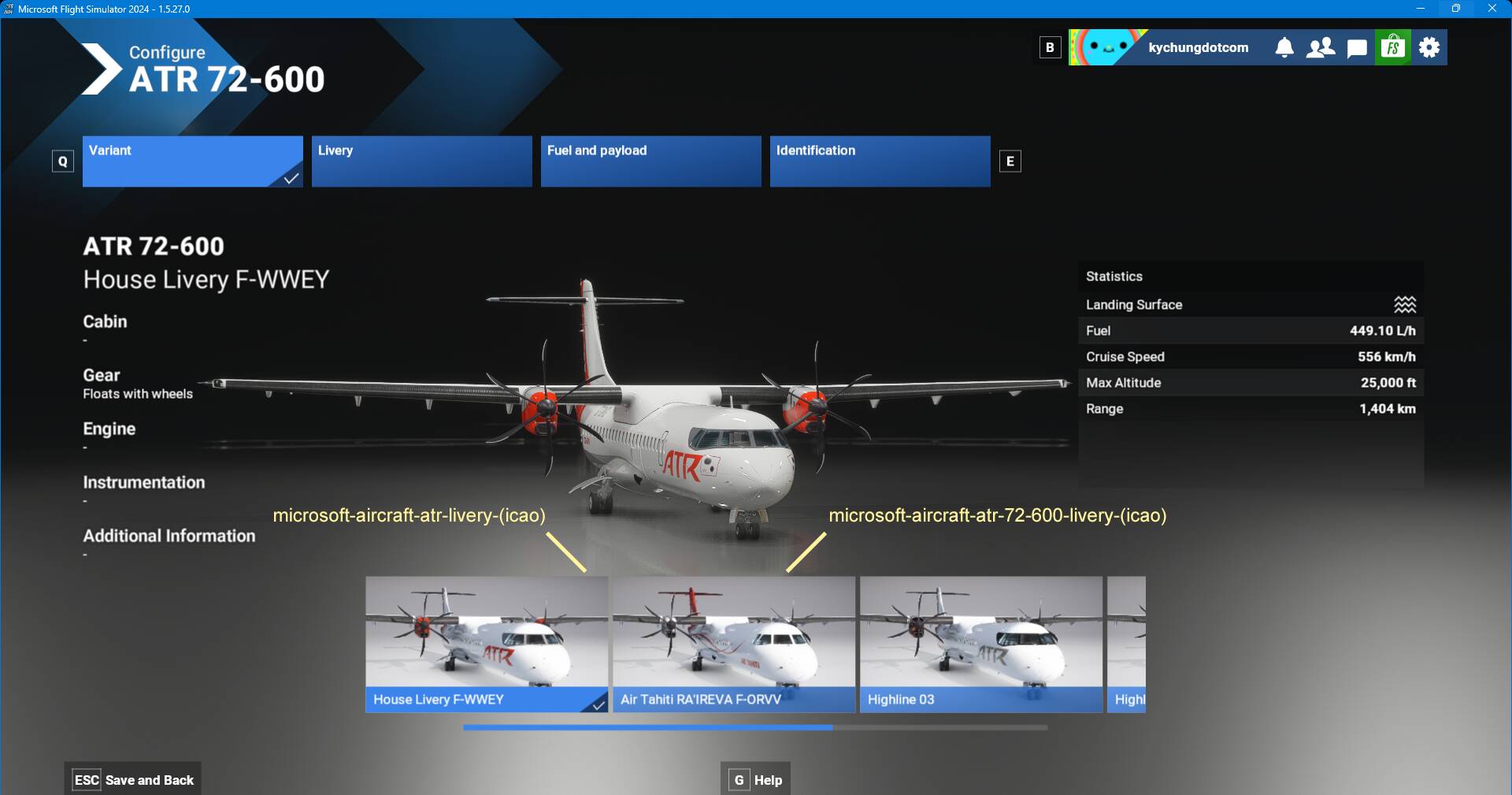
Things get more interesting when I use the same method to convert my ATR liveries. For ATR72, there are 2 variants, the first one is the House Livery where the second one is the Air Tahiti Livery. I don’t know the difference between them. However, if I rename the package name to be “microsoft-aircraft-atr-livery-(icao)“, it will become the “livery” of the House Livery variant. On the other hand, if I rename the package name to be “microsoft-aircraft-atr-72-600-livery-(icao)“, it will become the “livery” of the Air Tahiti variant.
It is even more interesting about dealing with the dynamic registration decals. For ATR42 and ATR72 passenger models, the old method of getting rid of the dynamic registration decals by overriding panel.cfg still works as expected. However, it simply doesn’t work with the ATR72 cargo model. No clue at the moment. Further investigations are needed.
1 Like
Why would ATR liveries need converted? It’s not a 2024 aircraft, so the 2020 liveries should work fine - and they have on the ATR in my case.
1 Like