I’ve deleted the Nvidia App, at the first try it worked but now I’m having the same crash again. I just want to make sure what to delete, I have only deleted the Nvidia App, you sad everything that has nivida in its name, so do I need to delete frameview SDK, HD audio driver etc.?
With drivers newer than 577.00, there will be CTDs if MSFS is running in DX11 - even without the Nvidia app.
If you want to use the latest Nvidia drivers starting from version 580.88, DX12 must be selected in MSFS 2020 settings.
If you use driver version 577.00 or older and want to play DX11 in MSFS 2020, the Nvidia app should not be installed.
And will downgrading to an older version have any negative impact on my performance?
Also I can launch the sim with Safe Mode, is this normal or my problem is about some addon in my community folder?
I have driver 577.00 installed without the Nvidia app and it’s working fine.
After every CTD and the next time you launch the game, the safe mode message will appear - this is completely normal.
It still not launching, ı downloaded the 577.00 but still crashes. No nvidia app, dx11. I really don’t understand, I just opened the sim perfectly normal this morning.
Try.
Below is a step-by-step guide on how to uninstall and reinstall the NVIDIA driver.
Uninstall Nvidia driver using the DDU program in Windows Safe Mode.
1 Download Nvidia driver 577.00
https://www.nvidia.com/en-us/drivers/details/250997/
2 Download and install DDU
3 Unistall Nvidia driver using DDU in Windows Safe Mode.
How to use Display Driver Uninstaller (DDU) Guide / Tutorial | Wagnardsoft
4 Restart PC
5 Install Nvidia driver without Nvidia HD Audio and Nvidia app.
6 Restart PC
I found the solution in another forum, Win + R > C:\ProgramData\NVIDIA\NGX\models then search for “190_E658703” and delete all the results. This worked for me, if anyone having this issue it’s worth to try. Thank you for your support.
If deleting the DLL helped, that means you didn’t follow my instructions precisely - but the important thing is that it’s working now. This fix is actually from this forum; someone just reposted it 
@echo off
setlocal

set "BASE=C:\ProgramData\NVIDIA\NGX\models"

if not exist "%BASE%" (
    echo Directory "%BASE%" does not exist.
    exit /b 1
)

echo Starting DLL cleanup in "%BASE%" ...

rem Loop through all subdirectories starting from BASE
for /D /R "%BASE%" %%D in (*) do (
    rem Check if the current folder contains at least one DLL file
    dir /b "%%D\*.dll" >nul 2>&1
    if not errorlevel 1 (
        echo Processing folder: %%D
        for %%F in ("%%D\*.dll") do (
            del /f /q "%%~F"
            type nul > "%%~F"
            echo Created 0-byte file: %%~nxF
        )
    )
)

echo.
echo Done.
pause
I created a script that recursively scans the folder C:\ProgramData\NVIDIA\NGX\models\ and all of its subfolders, deletes every .dll file it finds, and replaces each one with a new 0-byte file of the same name. This ensures that the original DLLs are rendered unusable while preserving their filenames.
Save the script into a file, for example fix.bat, and then run it with administrator privileges to execute the DLL cleanup process.
This not working for me  Unistaled nVidia via DDU in safe mode, Installed 577, after restart I clean all nVidia caches, scenery index etc. CTD just before descend. Any fly. Anywhere. Nothing helps. This is crazy that we need to do all this anywhere. FS 24 working without problems but I like more FS20… Ehhhhh
Your issue is related to CTD during flight/just before descend, but this thread is specifically about CTD during loading MSFS 2020.
Here we are only discussing crashes on startup/loading MSFS 2020.
I had CTD’s out of nowhere for an entire day, every one loading into MSFS or when I got to the main menu. Offending app was optiscaler.
Do you have the same issue if you follow the OP’s steps to reproduce it?
• YES
Provide extra information to complete the original description of the issue:
•
If relevant, provide additional screenshots/video:
I experienced this issue as well.
MSFS2020 would CTD upon loading into the sim at around 50% consistently whenever I would change from DX12 to DX11 in the sim. My initial workaround was to use the NVIDIA app to optimize the sim back to DX12 from the outside so I could load back in successfully but I wanted to know what the real problem was since I was continuously experience the GPU Error attributed to DX12.
I deleted the caches, and the config files first which didn’t help. I reinstalled the Nvidia Drivers doing a clean install and then used DDU to completely remove all the NVIDIA drivers and reinstall clean. That didn’t work either. I then ran DirectX End User Runtime Web Installer to check/fix any DirectX files. None of this allowed me to load into the sim with DirectX11. The only option seemed to be staying on DX12, until I found this thread that suggested uninstalling the NVIDIA before loading into the sim in DX11 and that finally worked.
I am currently flying successfully in DX11 with DLSS with the setting set to the defaul global Ultra settings. I am predominantly using the Fenix a320. I have not yet attempted to load into the sim using TAA which I hear has also caused issues.
Basic System Info:
CPU: Ryzen 7 58003DX
GPU: RTX5070
Windows 11
Hi everyone (DDU author here).
Just to let you know, I have forwarded this forum topic to Nvidia to provide them with additional information about the CTD issue with the NVIDIA App.
Do you have the same issue if you follow the OP’s steps to reproduce it?
- Yes
Provide extra information to complete the original description of the issue:
- For me it CTD both on DX11 and DX12
- It shows an
DXGI_ERROR_DEVICE_HUNGerror when crashed. - Leaves an nv-gpudump file on
%appdata%\Microsoft Flight Simulator - NVIDIA Nsight Graphics shows the device state is
Error_DMA_PageFaultand the fault type isFailed to translate the virtual address. - I’ve already uninstalled NVIDIA App
- The problem appears after SU16 has rolled out.
Thanks a lot for forwarding the CTD issue to NVIDIA. I really appreciate your support on this.
Also, huge thanks for your amazing software DDU - I honestly can’t live without it.
I uninstalled the old NVIDIA driver using DDU in Windows safe mode.
After restarting, I installed the new driver 581.08 without the NVIDIA app and rebooted PC.
I launched MSFS 2020 (DX11) and there was no CTD.
However, when I launched it a second time, a CTD during loading occurred.
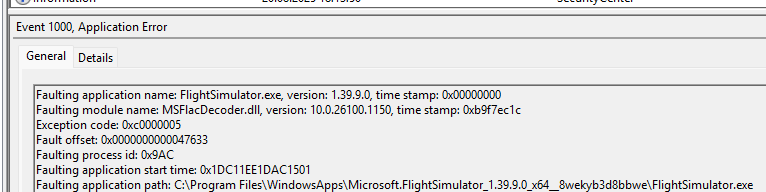
Fault bucket 1656317063562388313, type 5
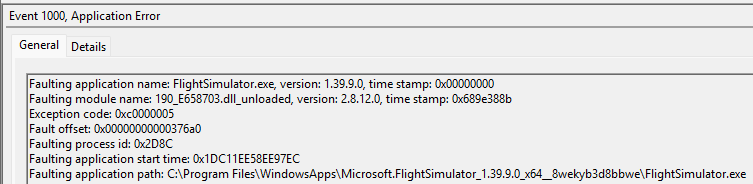
Fault bucket 2247707515348411496, type 5
Yes can happens on my side too without NVIDIA App, it seems the .DLL always return in “C:\ProgramData\NVIDIA\NGX”
Remove it each time prior launch seems to be the workaround for the moment.
Btw I’m using the Steam version.
My files / folders to delete is different than yours it seems. (according to your event viewer) that seems to be 190_E658703 (MS store)
Mine is 1B0_E658703
I guess their files are DX12 version only and didn’t take DX11 into consideration.
But that’s just pure speculation from my end.
From driver version 572.16 up to 577.00, MSFS 2020 (DX11) CTD during loading when the NVIDIA app is installed.
Starting from driver version 580.88 CTD during loading happens even without the NVIDIA app.
EDIT
I also noticed this difference from other users’ reports. So it’s good that you’re pointing this out. At least now it’s confirmed.
I’ve been thinking the same for a long time. There’s actually a simple hotfix - the NVIDIA driver could just read one line from the UserCfg.opt file
PreferD3D12 0// PreferD3D12 0 = DX11
// PreferD3D12 1 = DX12
and decide based on that whether the problematic DLL files should be integrated with the game, if the issue really comes from the driver.
Last two GRD releases result in CTD for me.
Windows 11
MSFS2020
5080
DX11
no nVidia App.
Launch sim, and half way through loading (initial load, not into a flight) CTD. Can reproduce at will. Changing to DX12 resolves the issue.