MSFS 2020 CTD during loading with or without NVIDIA app installed (DX11)

Using the template below will greatly help the team reproduce the issue and ease the process of fixing it. Before posting, search for an existing report. If you are not sure it’s a bug, please first report in User Support Hub.

3 tags are required - add them in the tag section next to the title above:

  • One for iteration (msfs-2020 or msfs-2024)

  • One for platform (ms-store, steam, xbox , or xcloud)

  • One for aircraft if related (start typing in your aircraft name in the tag section and pick correct option)

Feel free to delete this quote section after adding your appropriate tags.

ISSUE DESCRIPTION

Application crashes to the desktop after installing the latest MSFS 2020 update.

FREQUENY OF ISSUE

Frequency is everytime I start MSFS 2020.

REPRODUCTION STEPS

Please list clear steps you took in order to help our test team reproduce the same issue:

  1. I start MSFS 2020 from the start menu.

  2. Progragram continues until it reaches the NEW ACTIVITIES screen and the application crashes.

[PC ONLY] FAULT BUCKET ID

The following is from the Windows Application Error Log following the crash:

Faulting application name: FlightSimulator.exe, version: 1.39.9.0, time stamp: 0x00000000
Faulting module name: nvngx_dlssg.dll_unloaded, version: 310.2.1.0, time stamp: 0x67d089b2
Exception code: 0xc0000005
Fault offset: 0x000000000088ccc0
Faulting process id: 0x174C
Faulting application start time: 0x1DC0BA95735A519
Faulting application path: C:\Program Files\WindowsApps\Microsoft.FlightSimulator_1.39.9.0_x64__8wekyb3d8bbwe\FlightSimulator.exe
Faulting module path: nvngx_dlssg.dll
Report Id: 1f4acf95-e8da-45b5-b75e-8ff1cd796100
Faulting package full name: Microsoft.FlightSimulator_1.39.9.0_x64__8wekyb3d8bbwe
Faulting package-relative application ID: App

YOUR SETTINGS

If the issue still occurs with no mods and add-ons, please continue to report your issue. If not, please move this post to the User Support Hub.

What peripherals are you using, if relevant:

[PC Only] Are you using Developer Mode or have you made any changes to it?

I am not using developer mode.

[PC, MSFS 2020 Only] Are you using DX11 or DX12?

[PC Only] What GPU (Graphics Card) do you use?

NVIDIA 4080 graphics card. NOTE: card is configure for 3 displays to be combined as one virtual monitor (5760x1080)

[PC Only] What other relevant PC specs can you share?

MEDIA

Try using Nvidia app or control panel and optimize or change it to start in DX12. See if that works. For some reason it crashes on DX11. Definitely a bug.

We already have a forum topic about this bug - CTD during MSFS 2020 loading. Here’s the link to the thread:

https://forums.flightsimulator.com/t/msfs-2020-ctd-during-loading-with-or-without-nvidia-app-installed-dx11/732584

There’s currently a workaround available and even several of them.

Before trying any workaround, please make sure to participate in the linked thread to confirm you’re also affected by this bug.

Here come the workarounds (click to expand)

image

image

I’ve tried the workarounds on this thread step by step, unable to resolve. Saw a driver update for 580.97, same issue still. Disappointed. Hope it gets resolved soon.

Try with dx12

Do you have the same issue if you follow the OP’s steps to reproduce it?
• YES

Provide extra information to complete the original description of the issue:
• No additional information required as description is extensive.

If relevant, provide additional screenshots/video:
•N/A

This is a BIG ONE! Let’s get it fixed.

1 Like

No joy on DX12, both via Usercfg.opt as well as Nvidia app ‘Optimise’ button

Try to delete the UserCfg.opt file and let the sim create a new one.

1 Download NVIDIA driver 577.00 or 566.14 (latest stable)
2 Download and install DDU
3 Boot Windows into safe mode
4 Run DDU
5 Uninstall NVIDIA driver
7 Restart PC
8 Install NVIDIA driver without NVIDIA app
9 Restart PC


In the first post of this thread, there’s a template that you seem to have forgotten about, so I’m reminding you.

I uninstalled the old NVIDIA driver using DDU in Windows safe mode. After restarting, I installed the new driver 580.97 without the NVIDIA app and rebooted the PC. I launched MSFS 2020 (DX11) and there was no CTD. However, when I launched it a second time, a CTD during loading occurred.

Fault bucket 2183766364342687735, type 5

Fault bucket 1612783983015702999, type 5

1 Like

I’ve attempted these steps for 577.0, 580.80 and 580.97. No joy. I am not seeking help, just wishing to report the workarounds do not seem to apply to all machines.

I have not used the template no. This issue has been tracked and logged by the team.

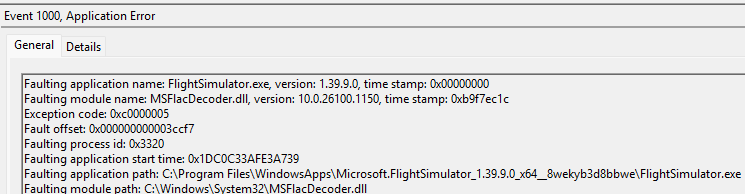
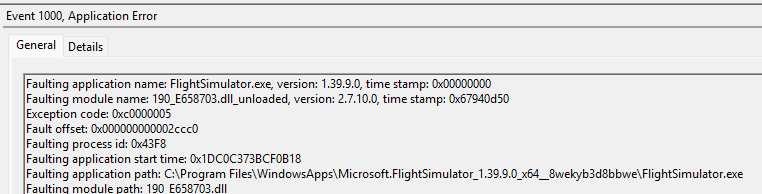
Reporting a CTD without the required information doesn’t really make much sense and doesn’t help anyone, as there are many different types of CTDs. I’ve added a screenshot of the error from Event Viewer above - please include yours as well.

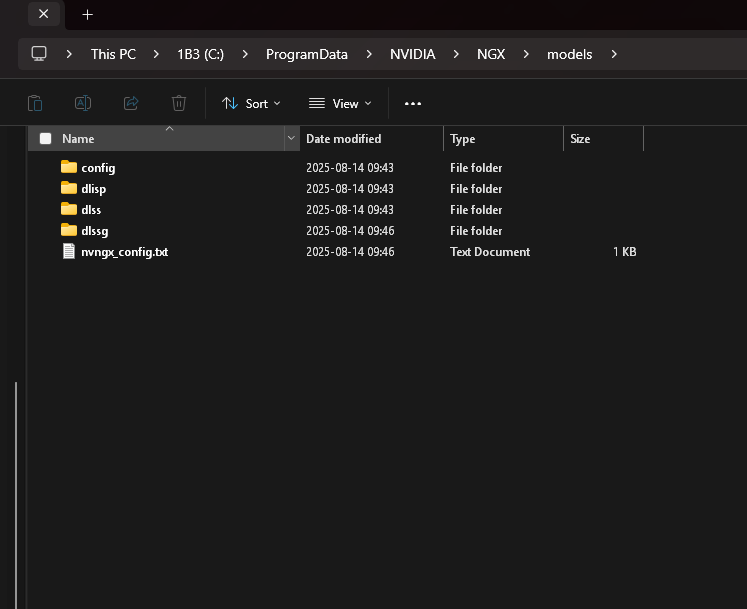
Also, please navigate to C:\ProgramData\NVIDIA\NGX\models, take a screenshot of the open folder window and attach it in your reply, please.

Hello,

i have the NVIDIA 4060 Ti

1 Like

Very well, if you truly insist

ISSUE DESCRIPTION

MSFS 2020 crashes to the desktop after SU16

FREQUENY OF ISSUE

On every launch of the programme. CTD occurs at 50.46%

REPRODUCTION STEPS

Please list clear steps you took in order to help our test team

Please see listings above.

Nvidia drivers installed, start programme, consistent CTDs at 50.46%.

[PC ONLY] FAULT BUCKET ID

Fault bucket 1988711582483212483, type 4

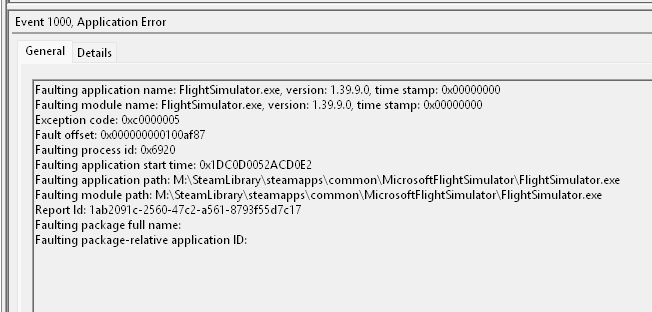
The following is from the Windows Application Error Log following the crash:

Faulting application name: FlightSimulator.exe, version: 1.39.9.0, time stamp: 0x00000000
Faulting module name: FlightSimulator.exe, version: 1.39.9.0, time stamp: 0x00000000
Exception code: 0xc0000005
Fault offset: 0x000000000100af87
Faulting process id: 0x6920
Faulting application start time: 0x1DC0D0052ACD0E2
Faulting application path: M:\SteamLibrary\steamapps\common\MicrosoftFlightSimulator\FlightSimulator.exe
Faulting module path: M:\SteamLibrary\steamapps\common\MicrosoftFlightSimulator\FlightSimulator.exe
Report Id: 1ab2091c-2560-47c2-a561-8793f55d7c17
Faulting package full name:
Faulting package-relative application ID:

YOUR SETTINGS

Not relevant, have attempted to reset Usercfg.opt to no avail.

What peripherals are you using, if relevant:

Not relevant

[PC Only] Are you using Developer Mode or have you made any changes to it?

I was using developer mode. Community folder is empty.

[PC, MSFS 2020 Only] Are you using DX11 or DX12?

Issue occurs in both DX11 and DX12

[PC Only] What GPU (Graphics Card) do you use?

Nvidia GeForce RTX 3080Ti

[PC Only] What other relevant PC specs can you share?

AMD Ryzen 7 9800X3D

Team T-Create Expert 64GB (2x32GB) 6000MHz CL34 DDR5

MEDIA

As requested,

Nvidia NGX


Note
No SL_ type folders exist

Event Viewer

I have followed these steps:
1 Download NVIDIA driver {577.00](Driver Details | NVIDIA)
2 Boot Windows into safe mode
3 Run DDU
4 Uninstall NVIDIA driver
5 Restart PC
6 Install NVIDIA driver without NVIDIA app and without sound drivers
7 Restart PC

Additional factors, changes I have attempted

  • Manually change Usercfg.opt to DX12
  • Use ‘Optimise’ in Nvidia App
  • Uninstalled Nvidia Frameview
  • Reset GPU settings in Nvidia Control Panel
1 Like

I just updated my nvidia game ready driver and now I can’t launch the sim, it crashes in the middle of loading. How can I fix it?

Switch to DX12, e.g. by optimizing the game in the nVidia app. There are several threads dealing with the problem, there you can find the details.

1 Like

I did it and it worked, but my pc is not running well with dx12, I’m getting less fps and more lag than dx11. I’ve looked at other topics and some people saying that deleting nvidia app is the solution. If I do that, how can i update my graphic card driver?

You just need to check the NVIDIA website for any new driver updates. Download The Official NVIDIA Drivers | NVIDIA

edit
We already have a forum topic about this bug - CTD during MSFS 2020 loading. Here’s the link to the thread:

https://forums.flightsimulator.com/t/msfs-2020-ctd-during-loading-with-or-without-nvidia-app-installed-dx11/732584

There’s currently a workaround available and even several of them.

Before trying any workaround, please make sure to participate in the linked thread to confirm you’re also affected by this bug.

Here come the workarounds (click to expand)

Until Nvidia fixes the application and Asobo MSFS 2020 please check what happens if you select DX12 instead of DX11 by manually editing cfg file.

To do this, you need to edit usercfg.opt file and modify the line
PreferD3D12 0

image

Change the number 0 to 1

image

and save the changes.


OR

If you need Nvidia app also select DX12


OR

If you need NVIDIA app and want to play with DX11, delete NGX folder - you’ll find it in C:\ProgramData\NVIDIA.


OR
If you don’t need NVIDIA app and want to play with DX11, uninstall NVIDIA app and then restart PC.

1 Like

Deleting Nvidia worked for me, thanks again!

You’re welcome.

1 Like