MSFS 2024 on Linux through Steam Proton

The game is in a pretty good shape on RDNA4 AMD GPUs on Linux. Tried on both Bazzite and CachyOS.

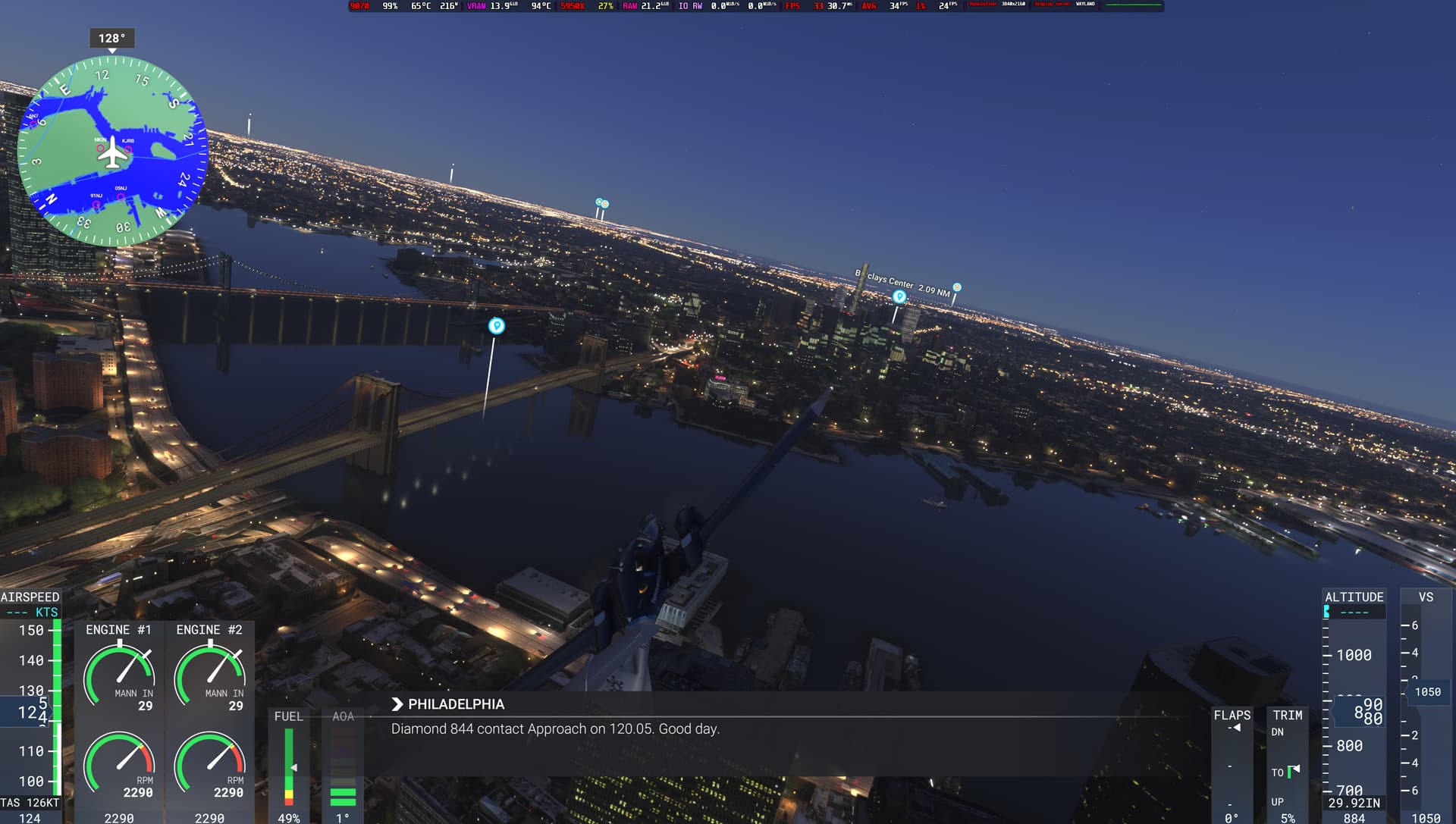
On Bazzite, the initial loading video did not work at all, but on CachyOS, everything worked perfect. Flew over NYC with SimTimes mod added, and was able to get 30-35 FPS consistently on my Radeon 9070 16 GB card with a Ryzen 5950X CPU, flying a DA62 on 4K render resolution, TAA, Ultra textures, and LOD of 200, and no FSR. Bazzite ran on Proton Experimental while CachyOS ran on Proton-CachyOS. Add MangoHud on top of it, its amazing to see how the game performs with the performance metrics. Even HDR works currently.

Seriously, Linux has come a long way to run this game, specially when MSFS 2020 was dead in the water. The frametimes could have been a little bit smoother, in the exteral camera view, when panning around, but its not smooth on Nvidia in Windows either. Overall, the frametimes were smoother than on Windows.

Heard that the game has major issues with Nvidia cards on Linux and does not start, but if you have AMD cards (9070 or 9070XT), the experience has been really good.

11 Likes

This is the year of linux on desktop (since 1994)

4 Likes

What frames do you get?

What other hardware do you use? Do you have a joke and rudder paddles?

1 Like

actually, on my system running arch, proton-cachyos from the aur seems to fix the loading bar and guarantees the game will load (with expiremental, hotfix, and GE the loading bar doesn’t work and the game may or may not load), performance is garbage, even on low with fsr 3 frame gen on and fsr 3 set to ultra performance, on my rx 6750xt its getting no more than 20fps in game and stuttering

edit: actually, every proton has bad performance
edit: removing PROTON_ENABLE_WAYLAND=1 PROTON_ENABLE_HDR=1 mangohud %command% from launch options launches with proton hotfix (way too lazy to test other versions, mainly because i’m lazy, and the sim still is really bad, and i would rather play batman arkham), but still unplayable framerate and stuttering
also on anything but proton cachyos the game wont close properly, program must be killed with systemmonitor or something else to close after hitting exit to desktop
edit: on windows performance is much better (for whatever stupid reason), and the sim still is broken even in the menus, the cursor disappears and the icon for career mode has two black boxes on the avatar, this sim is only getting worse

edit 6 days later: performance on archlinux with proton-cachyos from the AUR is actually good, but only if you wait for everything to load because loading takes longer time on linux, once everything loaded i was getting ~80 fps on linux with an rx 6750xt on very high settings with raymarched reflections set to low and raytraces shadows turned off (because rt is a useless gimmick that only works well with ai) and fsr3 set to quality and fsr3 framegen at 2x, which is right around what I get on windows, I tested with the f-18 in new york, and hdr works if you do “PROTON_ENABLE_WAYLAND=1 PROTON_ENABLE_HDR=1 %command% <normal launch options like -fastlaunch>” in your launch options, although on every launch you have to do fullscreen manually by going into the settings and turning it to windowed, then fullscreen again, alt+enter doesn’t work, also rolling cache doesn’t work so you have to wait for everything to load every single time.
Actually, the numbers are only really bad, and I mean REALLY bad, on take off and landing (but I only tested at KJFK), but other than that its okay. Also on take off there are artifacrs (at least on the f-18)

In conclusion, the game works on linux, with numbers a little less or same than on windows once you wait for things to load, now all we need is a game that actually works (talkin bout career mode here)

2 Likes

35-39 fps on 9070. The frametimes are really smooth for me. Works really well

2 Likes

I do not use any special hardware. Just use the XBox One Controller.

1 Like

What are your steam launch options?

Has anyone tried mods that require a third party installer? Like FSLTL or ORBX scenery? I’m quite hopeful that the installers can be installed via proton too, but I’m not convinced the various pieces of software will play nice together from that point onward.

I have found a solution for the rolling cache, which makes a MASSIVE difference to loadtimes and overall smoothness of the sim.

From what I understand, the problem is that the game (sorry, sim) can’t find the default directory that the rolling cache is supposed to be created in. Obviously it doens’t find it, because it’s linux. So the trick is to merely create the directory and ensure that the user has the appropriate permissions to access that directory.

In my case, I created the following nested folders and then the game immediately recognised it and started using it:

/run/media/[LINUX USERNAME]/5f675364-5f56-4d28-891d-6bfef3835a7e/SteamLibrary/steamapps/compatdata/2537590/pfx/drive_c/users/[MICROSOFT USERNAME]/AppData/Roaming/Microsoft Flight Simulator 2024/

Bear in mind:

  • My steam library is located on a secondary drive. But essentially the bolded part of the above directory forms part of the installation path of the game
  • The italiced part of the above directory was not present and I had to manually create it.
  • I found the MICROSOFT USERNAME in the above directory by going to the “Online” section of the settings menu and looking at the default rolling cache path that the game was looking for.

Once I created the above folders and ensured that my user had read and write permissions to all the folders and subfolders above, the game detected it immediately without further action.

cc: @Vibstronium (I read some of your previous posts which dealt with Linux-proton).

3 Likes

Runs perfect OOTB for me on CachyOS without even selecting a compatibility layer. Good stuff Asobo.

2 Likes

I tried a simple community addon, in MSFS developer mode, I can see the addon is detected by MSFS, but loaded failed. that is sad

FYI I don’t think you need to do that manual cache mapping if you install to the default Linux system drive. My game created this path in the prefix on its own:

/home/[linux username]/.steam/steam/steamapps/compatdata/2537590/pfx/drive_c/users/steamuser/AppData/Roaming/Microsoft Flight Simulator 2024

Game seems to run fine for me. I used Proton GE because Experimental caused the videos to not play.

How you use MSFS 2024 on Linux the game is only windows??

Steam on Linux includes a Windows application compatibility layer called Proton, itself based on a long-time project called “Wine” and customized to focus on gaming compatibility and performance.

This allows many (but not all) Windows games in the Steam library to play on Linux systems, including the Steam Deck portable and the new Steam Machine they just announced today.

It works by basically reverse-engineering the Windows API and system libraries and re-implementing them on top of Linux/Unix APIs.

[ I haven’t quite got it happy with 2024 on my Linux PC but that might have been bad timing with the login bug today. :wink: ]

2 Likes

The Steam Machine looks awesome! And Steam Frame! Oh my goodness, Valve has been busy in the kitchen.:shaking_face:

Sorry, back to topic. :saluting_face:

2 Likes

I tried MSFS2020 some time ago on my steamdeck. I got it to run, but all online services were missing (world data streaming, weather streaming, multiplayer, …): so basically all what MSFS makes MSFS.

Is this with MSFS2024 and latest proton now different: ist world data streaming, weather streaming and multiplayer now operational also on Linux?

And if anyone has it running successfuly onlinux, could you share linux distro and version and proton version + settings? Thanks.

1 Like

I have in addition ProtonUp-Qt (Link) installed to get use of Cachy OS build version of Proton under Fedora 43 working. I have to say that AMD driver RADV for RDNA4 GPU (9070XT) on Linux works far way better than on Windows. Even the DXVK overhead doesn’t impact the FPS that much. Suddenly the pixel artifacts at night is gone :smiley:

My current settings are Global High-End, TAA, 2560x1440, Vsync On, HDR On

Steam start options: PROTON_ENABLE_WAYLAND=1 PROTON_ENABLE_HDR=1 %command%

Inibuilds A350-900 at VTBS from Siamflight I got around 30-40 fps on ground without FSR. A better CPU than my current R7 5700X3D should push the fps a bit further I have only 85% GPU utilisations.

The only thing I have to figure out is to get SimConnect API working so I can use IVAO, Vatsim and other 3rd Party Clients running.

1 Like

Are addons like the fenix working on Linux?

I am also getting a phenomenal experience with FS2024 on Linux, using Proton on Steam.

What is not working so well at the moment, is enabling VR mode. That, and popping out windows as standalone windows, just instantly crashes the simulator. Everything else is almost flawless though.

I also have some add-ons, but I do not have the Fenix @Kaasboerrke. Most of what I use is in the store. I am not sure about apps that require installation on the system.

I am not able to pinpoint exactly what (technically) is causing the crashes, but if I do, I will let you know.

1 Like