Now purchased FSUIPC which has an autosave function. I wouldn’t mind these ‘errors’ too much if I could carry off where I left off. Spending 30mins+ planning the flight only to have the sim crash when mid flight is very annoying.
Guys, DX12 seems work. I tested an over night scenario, with 737 sitting on ground for over 6 hours (I went to sleep though). No CTD or Mem could not be read. Although DX12 has performance degradation and slightly stutttering, but at least it doesn’t crash, for now?


6 hours and 51 minutes without crash for DX12.
1 Like
Where is this located exactly?
thanks
So far the realtek audio fix that mjchernis suggested is working for me. Multiple flights flown. Different aircraft used and no memory crashes. Let’s hope it stays this way. Thank goodness for this community. Good job mj!!!
2 Likes
I previously had fixed my issue, or greatly improved anyways, by switching to DX12. The memory error message went away but still had some stuttering and hanging up, but it always recovered.
Today I tried mjchernis’ audio output trick and it fixed everything. Back in business! Whatever stutters I had left after just the DX12 change went away completely.
Thought I’d follow up for those that are still having the issue.
in the taskbar search type: Graphics settings → there
i did a typo, it wasn’t meant to be “advanced”.
Glad to hear it is working!
Hi, @mjchernis . Here are my sound settings. I use the Speakers Realtek(R) as my main output device. I have selected this as my default device.
Is this what I should be doing, thanks!

Is that Win10? Do you listen to sound through the monitor or separately attached speakers?
Mark
Hi Mark, I listen through my third party desktop speakers, I do not use the M28U Monitor speakers.
So to clarify:
Realtek Audio - Desktop speakers, speakers I use on a daily basis
M28U - Monitor speakers, never use
Logitech Pro X Gaming Headset - Only use for VATSIM
I logged a call with Zendesk. Switching this off seems have resolved the issue for me. I had previously tired setting the audio devices, which also helped. I was able to fly for 10 – 15 mins whereas before I could get the sim to bom in just a few mins.
After following this step. I’ve flown for well over an hour in the BA hawk. Low and fast. And the sim has been fine. Not sure if this an absolute fix, as I guess time will tell. But it’s certainly made a difference for me.
For ref. I’m running W11 with a 12700K, RTX 3080, 32GB RAM at 3600Mhz. And a Soundblaster AE9 I run the sim from an Nvme drive. And use a Saitek X56 for flight controls. My CPU and GPU are running at stock speeds. My OS and MSFS installs are both fresh.
TROUBLESHOOTING
- Unplug any peripherals you will not be using during your flight.
- Turn “Hardware Acceleration GPU scheduling” OFF
• Click on the Start menu (Windows icon in the bottom left corner of you screen) then go to Settings > System > Display > Graphics Settings
If the problem persists after that, a thorough investigation is required. Note: Our team cannot provide remote assistance to perform these steps.
Yes I’ll go along with that 100%. Certainly disabling HAGS cut them back very significantly.
Still getting the odd one though.
Just saw this. I’m now getting this too, but it appears I’m only getting it with the PMDG 737 during long hauls. Did 3 long haul flights >10 hours with the BBJ. Each time I received this error.

Just getting this error today whilst in mid flight. Crashed to desktop with it immediately. Annoying!
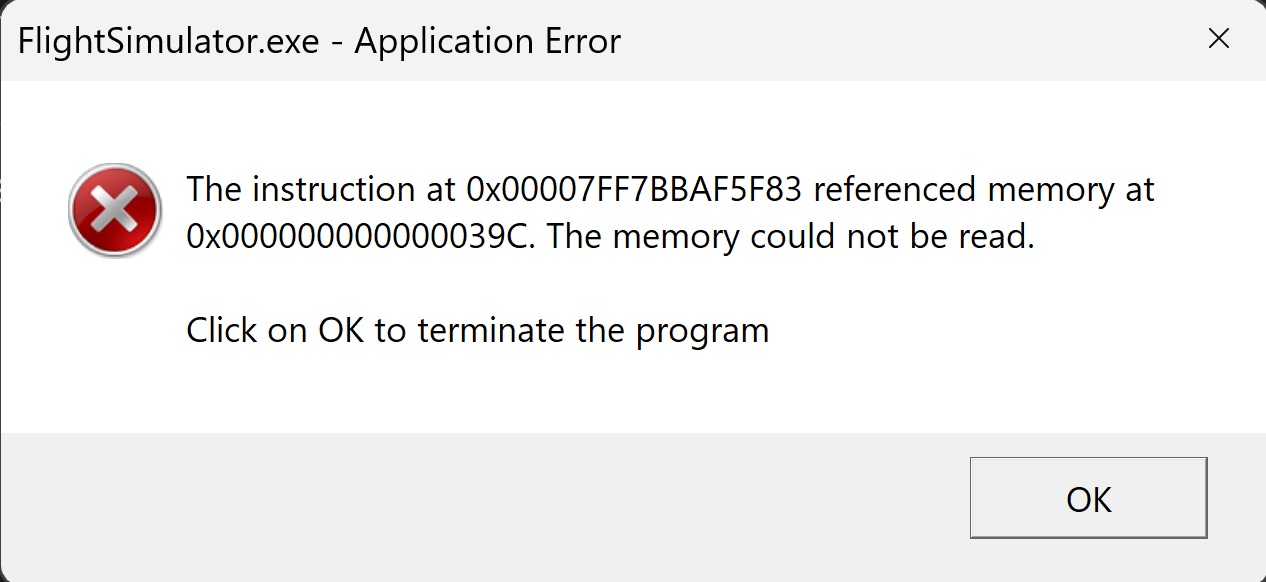
And again after a longer period of (20) flights in about 10 days without CTD. One time after 1:30 hours, one time after 2 hours. It is not only a long haul problem. First with the Mooney, second with the CJ4.
And first I got this annoying crashes, it was after WU8. I hope, that Asobo is able to finish the crashes with WU10. It is really no fun expecting the FENIX Airbus, not being sure that the CTDs have found their end.
1 Like
Got another without having had one in a while. Getting this both with and without DX12, and also my audio devices are matched up between the sim and windows settings. This is getting very frustrating. And still not acknowledged by Asobo as a bug. Oh and hardware accelerated GPU scheduling is off as well.
2 Likes
Increased FSUIPC to save every 15 minutes. Will just have to change 1 thing - be it in Windows or MSFS and then complete a few flights to see if the message will appear.

I too having been having this issue and have been trying to chase it down. I’ve had the memory message and the sim freezes…does not CTD. Initially It had only happened for me at Heathrow. I have some Orbx UK scenery, so I emptied my Community folder and the problem went away at Heathrow. Great I thought, I’ve solved the problem. But then the issue occurred elsewhere with an empty Community folder. Put everything back in the CF and Heathrow continued to work.
Started watching parameters in GPUz, and came up with this: no temp or other hardware issues, but when approaching the freeze, the sim started stuttering when it had been perfectly smooth and the memory use in both the main memory and the GPU started to increase.
Normally, the sim on my rig runs at 14-15Gb of system memory and 7-9 Gb of GPU memory. Approaching the “freeze”, my system memory increased to over 20Gb (of 32) and the GPU memory increased to close to max (12Gb) in one case slightly over. I had never seen this before and may be a hint at what is happening.
More to follow.
Curious, I had all of the flights of today flawlessly like I didn´t have in weeks or months, sound options the same as always, I did not touch nothing less in FS20 that I select the sound to the speakers and the ATC to the G2 speakers, I did not touch either still the HOGS to disabled, what I did was delete the App shortcut from that list, and maybe that does not affect.
I had something related USB of the G2 plugged in a USB-C of Thunderbolt, and this in events viewer too next to the freeze-error-critical-kernel etc. time:
“The hypervisor did not enable mitigations for CVE-2018-3646, CVE-2019-11091, CVE-2018-12126, CVE-2018-12127, and CVE-2018-12130 for virtual machines because Hyperthreading is enabled. To enable mitigations for virtual machines, disable Hyperthreading.”
What I did:
Disable in BIOS thunderbolt, plug G2 in a normal USB with its adaptor to USB-C, disable hyperthreading in BIOS, and increasing the 16GBx2 DDR5 volts to 1.34 and the RAM controller voltage IMC-PMIC to 1.22, in the third and four flight the voltage I reverted to normal to 1.25 less the IMC still 1.22, and the flights were well the same, the next I set to the normal voltage of the IMC to 1.20 default, so I think the voltages are not too much related to the problem maybe.
In WMR option I don´t mark in the suspension spoiler related the translating to English, “suspend WMR and its applications when the VR headset is in suspension”.
To be continued…