H225 is built by Hype if I’m not mistaken, not Asobo? So there is a chance that it is actually good?
It’s the general flight model for helicopters, especially in career where you have to deal with its oddities when picking up cargo, or you have to land on trees in SAR missions. Not to mention that H225 is simply not available in career mode. The H125 experience is just a nail to the coffin in my case.
Airplanes are the primary citizen in MSFS and it shows.
1 Like
Everybody is so crazy about this trim…
But the biggest thing is that the strange behaviour when landing, getting shot of into the air, IS GONE!! You can now LAND!!
Other then that the flightmodel is changed on basically all helis, just not sure what they changed, the h125 is better, the R66 worse, the cowansim 500 that I have been LOVING the last few days is now not the same anymore, gotta fly it more to see how ”bad” it is now.
Idk if this is a thing after the patch, but yes, its not the same as the s300, and could be just compensation.
Gotta fly it more now and see, but it still pulls strangely on cyclic inputs, but its better then before, at the same time almost too stable, had to check if assists was off.
But dont want to complain about that, the biggest complain now would be the antitorque that is just crazy sensetive.
It gets even harder since it rotates european style and that means pushing right trigger and that is harder to judge/control on xbox controller then when its the left one, where you have your hande snug agaisnt the controller, while on left hand you have it more in your finger then in the palm of you hand ( controllers really are made completely wrong and not made after how you really grip it).
1 Like
So what airspeed should I absolutely be keeping below in the H125, as there are a couple of “barber shop bars”, both of which I have unwittingly exceeded, at least for a short time.
I’d expect that RBS will become an issue at some point and that prevention would be way better than cure for that. 
1 Like
Can you adjust the sensitivity for the antitorque axis on the XBox controller? I reduced the extremity deadzone (or whatever it is called) for my pedals in the helicopter profile. Now the H125 is much more manageable, and the other helicopters fell better as well.
1 Like
Feels like the computer controlled mixture isn’t behaving, agreed its really horrid at higher altitudes
1 Like
The first bar (Striped) is the speed not to exceed in high winds and turbulence. The second red line is VNE.
1 Like
Thanks, I think I must have misread the indicator, as I’d thought there was also a red line at a higher speed.
I’ll have a closer look next time I’m on, but as I’d survived my earlier speed indiscretions, that higher indicator, which my speed didn’t reach, is probably the one for VNE. I’d thought there were two indicator bars before that though, but my eyes and VR are probably not what they ought to be. 
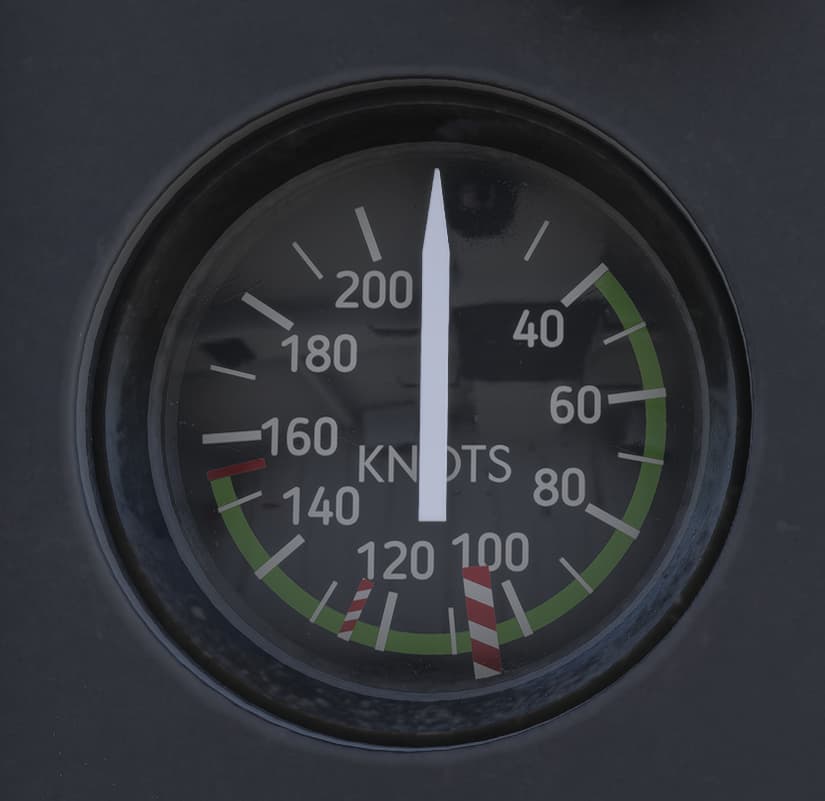
I’m guessing then, that the bar at about 105kts is the high winds limit and the red line at around 155kts is VNE, but not sure about the smaller one in between, at about 125kts?
Could that be something like max cruise speed?
I was wrong about the first bar…
I made the assumption that it would be the same as the Robinson’s I fly regularly. However, the fully articulated 3-bladed system on the H125 wouldn’t be prone to mast bumping in turbulence, so it makes sense.
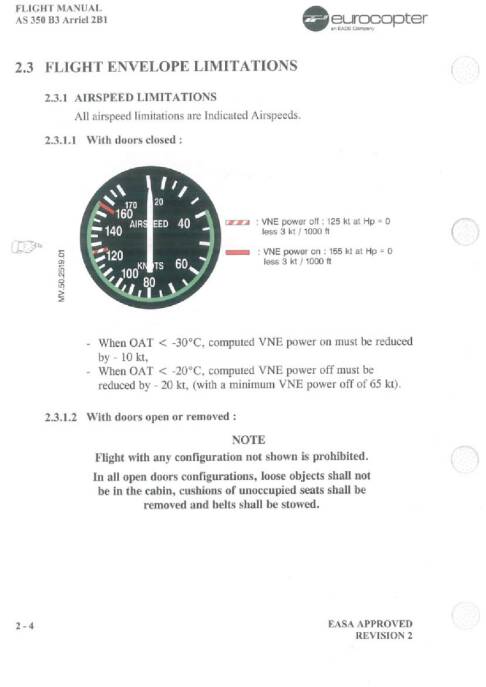
The first bar is power off VNE, so don’t go faster than this with full down collective or during an auto (125 knots)
The second redline is power on VNE. don’t exceed 155 knots.
RBS could occur above VNE, but probably won’t happen at 156 knots. There is always a safety factor built in, but pass this speed and you put the aircraft at risk.
The above pic is straight from the AS350B3 POH.
2 Likes
Thanks. I can fly with more confidence now.
you can download the free pms gtn 750 and it will be in the title bar menu. You can set transponder there for now until they put one in the cockpit
1 Like
125kts is what they call fast cruise speed.
I tried the Guimbal Cabri after the Update, and Quick Trim now works for that one too. So seems like it makes sense to use Quick Trim as default now?
QUICK TRIM is the new command to bind for all helicopters. It work like the old FORCE TRIM RELASE.
I recently had the opportunity to fly in a full H125 simulator used for training, and I took the opportunity to ask about this. It was confirmed that the H125 indeed doesn’t have trim, at least the model of their simulator, but I can also say that the cyclic in the sim was very loose compared to other helos, so the lack of trim really was irrelevant for the true machine.
So on the one hand yes Asobo is correct here. Of course the other hand is that most people have basic joysticks that provide more resistance than the real thing.
I think using the “Quick Trim (unrealistic)” is the best compromise.
1 Like
Agreed here. Whilst likely not simulated, another big thing to consider near VNE (and really at any higher speed) is jack stall/servo transparency in the Astar. Not as much of a concern on the dual hydraulic birds as it was in the single hydraulic ones, but still something to watch for at higher speeds and unfavorable nose down attitudes.
You are not wrong. Several people here, and Martial have pointed that out. Many times over.
BUT
How many of us have full-size unsprung cyclic controls? Without that trim/quick trim is the only viable option.
1 Like
Have not touched anything about the controller in 2024, its just messed up, but that most probably would help.
The h125 doesnt do any twisted cyclic stuff now, straight up on forward flight.
The cowan 500 is maybe more controllable and stable now but lost its nerve and the fun, sadly.
It was maybe the greatest heli experience in the sim before this update.
The h125 on the other hand is for sure the best chopper now, but not perfect, and in many ways because the r66 has been ”nerfed”.