Is it just me or does arming VNAV in cruise pitch the aircraft nose up?
2 Likes
(post deleted by author)
Why does the screenshot show two VNAV IAS modes?
is the weather radar working for anyone else? sometimes I’ll see a small sliver, but most of the time nothing
The aircraft gets worse with every update, and I realize now that there won’t be any hotfix; it remains unflyable for at least another six months—it’s a real shame.
2 Likes
Can’t seem to get this aircraft to play along with GSX at all  When boarding is requested the cargo & passenger doors seem to go in a constant open & close loop. Any kind work around for it ? I guess just not bother with the boarding sequence.
Not even got as far as pushback so I’m guessing that may be broken too 
GSX Profile needs to be fixed. The updated ATR version had to follow MSFS24 standards for compatibility. Its a simple fix on GSX side needed. Either wait for that or you can change the check variables in the plane profile manually to this one:
I changed the DOOR check to this variables, seems to work:
(L:MSATR_DOOR_CABIN_UNLK_LT)
(L:MSATR_DOOR_CARGO_UNLK_LT)
(L:MSATR_DOOR_SVCE_UNLK_LT)
3 Likes
Can you be more precise? My feeling after the update is positive so far. Performance seems to be ok now, also some of the bugs are fixed. It never will be a study level but this can’t be expected for this price level.
3 Likes
Thanks for Reply. Where & what file do you make these changes is it in GSX or a config file in MSFS?
Hi all. I’ve made a couple of flights with both planes in pax configuration to check their status after last update. I’m no engineer, so I’ve made screen captures and passed them to an efficient AI for analysis and comparison with real data. The result of our small test and long conversation is on the report that follows. Hope this helps to improve this plane we all love.
AAU5 ATR 42/72 – quick performance check after the update
After the recent update I did a small performance check on both ATRs, mainly to see whether the severe post-AAU4 underpowered behaviour is still present. Based on what I have seen so far, the good news is that the ATR 72 no longer appears underpowered. In a controlled climb with the power levers in NOTCH, PWR MGT in CLB and approximately 170 KIAS maintained throughout the climb, a ~22 t ATR 72 reached FL170 in about 17 minutes, which is very close to ATR’s published 17.5-minute figure. At FL170, ~21.9 t and approximately ISA+17, CRZ/NOTCH gave about 198–199 KIAS / 262–263 KTAS, so the actual cruise performance is now also very close to the QRH. The remaining discrepancy is that the aircraft achieves this performance with only about 56.7% torque and 280 kg/h per engine, while the corresponding QRH figures are roughly 65–66% torque and ~330 kg/h per engine. In other words, performance looks good again, but the power/fuel model still seems somewhat too efficient.
The ATR 42 also looks much healthier and, as expected, climbs considerably better than the 72. In our flight it reached FL190 in about 12:13 (departing at 2700 ft), using 160 KIAS in the climb. At FL190, ~18.2 t and roughly ISA+17, it stabilized at about 204 KIAS / 280 KTAS, 70.9% torque and 305 kg/h per engine. Again, the speed is remarkably close to the QRH (~282–283 KTAS under comparable conditions), while torque and fuel flow appear somewhat low (roughly ~77.5% and ~332 kg/h per engine expected). So both aircraft currently show a similar pattern: actual climb and cruise performance seem largely fixed, while torque and fuel consumption still appear lower than the published performance tables would suggest.
As for avionics, I have had no spontaneous AP disconnects. I did encounter the same apparent LNAV loss on departure, but after seeing the aircraft handle other very sharp turns correctly, I suspect this may be related to a flight-plan discontinuity rather than turn geometry itself; that still needs more testing. Most importantly, this is not an exhaustive test: these conclusions are based on only two test flights, so they should be treated as preliminary observations rather than definitive validation of the flight model. Still, compared with the clearly underpowered behaviour reported after AAU4, the current build looks substantially improved.
1 Like
In GSX when you opening the menu within the Flightsim you can choose “customize Airplane” (pic 1). Here you need to click on each door to get the line to change (pic 2). Don’t forget to click “save” on the upper right corner!
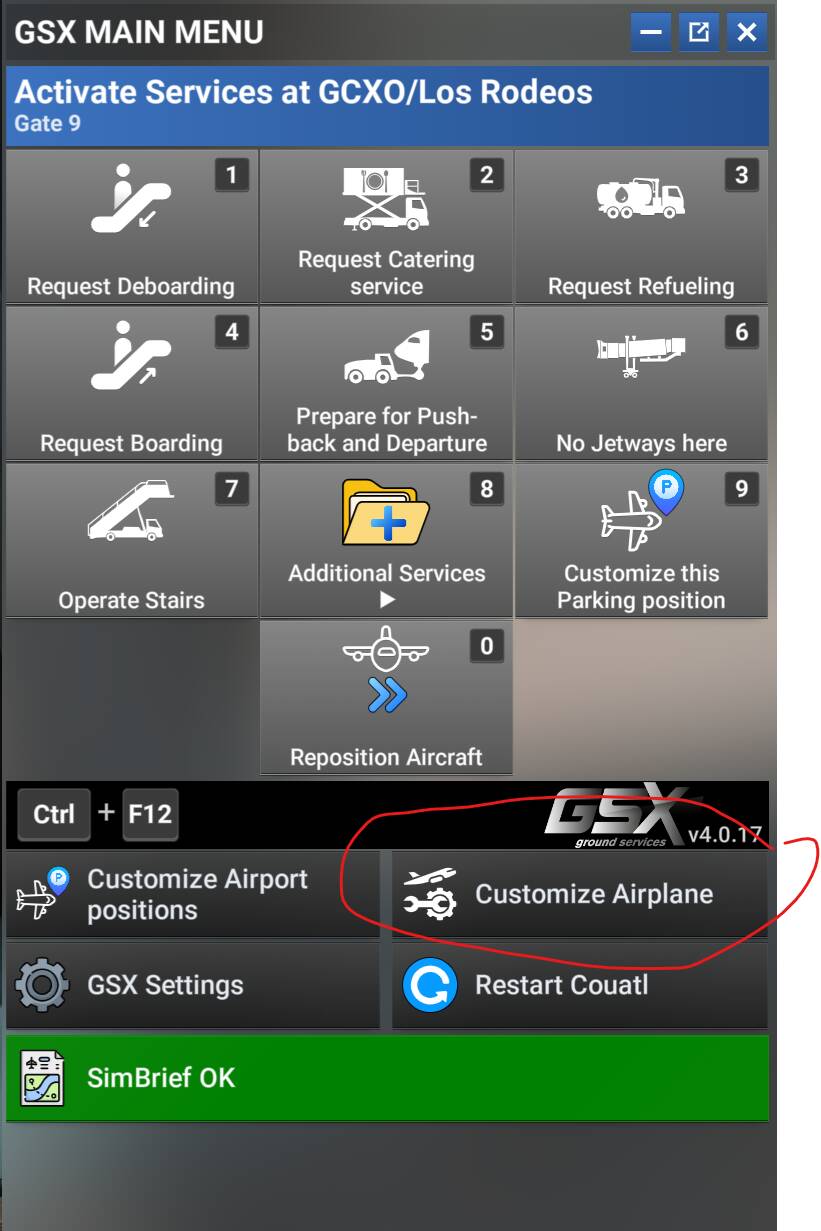
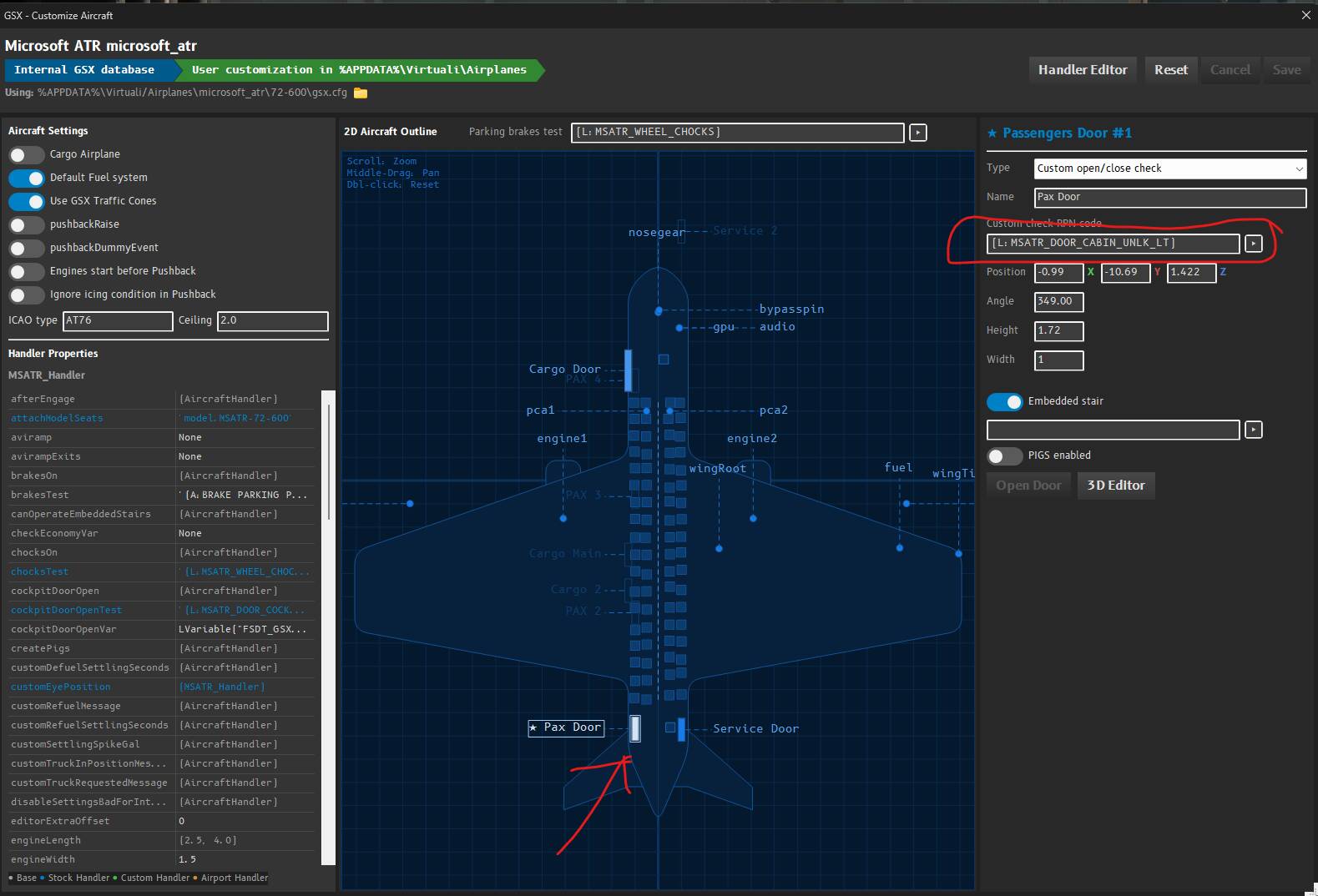
2 Likes
Nice one Thank You
Has anyone else been having problems starting the engines on the ATR in MSFS 2024?
I’m having an issue where Engine 2 refuses to start properly even when using Hotel Mode. Engine 1 starts fine when I’m on ground power but once I lock the engine/prop disconnect the ground power and try to continue the startup, I can’t get Engine 2 to start and sometimes I can’t even unlock the propeller.
The strange thing is that I can get around the problem by:
- Starting Engine 1 using ground power.
- Disconnecting ground power.
- Pushing back.
- Reconnecting ground power (even though the GPU isn’t visibly connected outside the aircraft
 ).
). - Starting the engine again and suddenly everything works normally.
So it seems like something is getting stuck with the Hotel Mode / prop brake / hydraulic system rather than the engine itself.
I’m also using the Thrustmaster TCA throttle quadrant, so I’m wondering if this could possibly be related to a control binding or hardware issue.
Has anyone else experienced this in the current MSFS 2024 ATR, particularly with a TCA throttle?
While every second flight on average goes well, I had another autopilot gremlin last night where VNAV was stuck on, the aircraft would not stop climbing or descending when reaching the set altitude, and I couldn’t enable another vertical mode, ie switching to v/s or ALT SEL, they wouldn’t turn on.
As I said in my last post about the autopilot not engaging, the aircraft has come a long way and is fun to fly most of the time, but it still seems like a lottery if I’ll be able to have a flight without autopilot issues.
1 Like
The normal procedure is to start number two first, then number one.
I’m not sure if it will make a difference though as I haven’t tried the reverse order.
You can start any engine first. When not using Hotelmode there is no point starting engine 2 first. We used to start engine 1 on groundpower, remove the GPU, then during pushback start engine 2. It should work either way, including start on batteries.
3 Likes
Thanks for confirming, I suspected as much, I just never tried the other!
So I got the ATR, and as others have mentioned, the autopilot keep disconnecting. What are the main causes of this? Have a deadzone of 0.1 on all flightcontrols, so dont expect it to be that. What else can cause it?
On Xbox the flight/engine model still ist broken. After all these years. It is completley impossible to slow this thing down. On a normal ILS glideslope with flaps and gear extend I can´t get below 140, 150 knots in Flight Idle. Unless I am missing something completely the thing is not usable for Xbox