Hello new PS5 player here I picked up the C-17 a couple days ago as my first dlc plane and I do really love it but I can confirm on PlayStation 5 the crackling sound bug is there it is very very bad almost unplayable in third person because of the crackling can hurt my ears it also does sometimes occur in the cockpit but mostly when your on the ground also the checklist shows nothing on the EFB on PS5 also I see has already been reported the tablet in the cockpit is not clickable and cannot be used to load cargo .
Yes, AFAIK it was only introduced with SU4. We didn’t track it before then.
This bug has been identified, and seems to be the result of recent CPU optimizations for console. Will be addressed in a future update.
Unfortunately, this was not caught by the PS5 QA Team, will escalate for review.
Also logged and escalated to Asobo, same code that works fine on PC doesn’t work on console.
1 Like
Hello, I’ve noticed that the Velocity Vector isn’t correct on the Head Up Display. Any chance that you could look at that? Also do you have an ETA for addicting the vertical and lateral management modes? I’d like to do TACAN approaches for example
VV was reviewed on the latest update, and it should be correct. Can you please specify the issue?
LNAV is fully functional.
1 Like
Deleted my previous post as I had outdated information. I apologise, looks like everything I asked about was fixed in the last few updates. Should have informed myself beforehand
Thanks for letting me know the VV is fixed though.
2 Likes
I didn’t realize the change was made to the buttons on the pfd so that part makes sense now lol.
All the other avionics seem to boot up as usual and function normally. The only issue is the pfd shows that screen when avionics are turned on. the screen brightness dimmer for the pfd still works too.
I have a 40 GB free on my Xbox and I also added more GB to the rolling cache in game and still have the issue.
I’m willing to completely uninstall the aircraft or sim and reinstall it if u think that could help
Hi,
I’ve noticed some texture issues on the C-17. In the cockpit, some corners look low-res (seat, floor, etc.). It’s even more visible on the exterior, especially on the engines and some other areas. I’m on PS5, and it kind of takes away from the experience. Just wanted to report it.
Thanks.
These are likely part of the reduction of textures that came with this aircraft’s updates in SU4. It’s a trade off, as prior to this change the aircraft was virtually unusable on consoles and low/medium-end PC’s
As mentioned above, significant reductions to texture resolution were required to lower the VRAM impact, particularly on consoles. Not much that can be done as the memory budget is limited.
If we manage to further improve resource utilization (eg. via extensive modularity and LODs) in the future, then we may be able to bring back some of the higher res textures.
Please also note that consoles (Xbox and PS5) will downsample the textures even more (texture resolution slider hard-coded to “MEDIUM”, while in PC is generally “HIGH”), which compresses textures even further to optimize VRAM space.
Thanks for the explanation.I understand the VRAM constraints on consoles, though I’m a bit surprised as aircraft like the 747 or A400M don’t seem to suffer from similar texture degradation on PS5
Hopefully future optimization and texture prioritization will allow the C-17 to reach a comparable level of visual quality.
Thanks for the reply, the EFB seems to be a general console issue where the cargo door buttons etc. are non responsive on the Xbox Series X. Multiple users on console say there is no checklist present, the aircraft performance section to calculate V speeds also doesn’t work which is annoying as there is no option in the EFB to do this either. Being on console it’s very handy to have an easy way to calculate V speeds. A system you find in the A320 neo EFB would be great where it provides a takeoff section to do this.
In regards to the stall, takeoff speed to 160 KTS and increasing, and the randomly harshly banks to the right and is unrecoverable with no stall warnings sounding.
1 Like
You may also operate the doors from the loadmaster station (#4): Cargo and Loadmaster | Miltech Simulations-Microsoft C-17 Globemaster III | Miltech Simulations Documentation Hub
VSpeeds are automatically calculated: Primary Flight Display | Miltech Simulations-Microsoft C-17 Globemaster III | Miltech Simulations Documentation Hub
Checklist missing is a logged issue, only on console it seems.
The bank you describe seems to be consistent with a stall, though 160kias is enough speed for takeoff. Would have to see your takeoff weight, flaps config, angle of attack, etc..
1 Like
First, thank you for your hard work with this aircraft. I bought the upgraded FS24 just for the C-17. It is a real treat since I see them quite often in real life.
I play on PC, my specs are: Ryzen 9 7950X3D, RTX 5080, 64 GB RAM. I use Simbrief for flight planning. Since SU4 released, every time I have tried to fly the C-17 there have been issues. Some of these include:
1- Takeoff V-speeds have become broken. After inputting the perf weights, I’m getting speeds way out of range. If I’m supposed to rotate at 1,192 knots I think we need new engines. Lol
2- No megenta flight path display on the ND or PPI. The flight directors seem to still track the plan. LNAV was engaged with MSN on the PFD. I always use a SID and STAR when available and delete discontinuities. Using direct to a waypoint on the path did not help.
3- All four engine N2 readings would not rise above 25%. All other engine indications were green. Ignition was set to A and B, pumps on (120K fuel), APU and APU bleed were on, cross bleed open. No amount of restarts or power sources made a difference.
Pretty sure y’all are already aware of the APU EGT temp being incorrect. Small ask related to the APU, but is there a plan to model to actual APU inlet door? It was the first thing I noticed when FS24 came out.
With all that, I still love the plane and appreciate the effort put into it. This also isn’t the only plane I’m having issues with, just happens to be a favorite.
2 Likes
The PERF Page on FMC is not supposed to be accessible. There are no public performance values for this aircraft to calculate from, so the PERF was entirely disabled.
Instead, we’ve developed a system to automatically calculate the VSpeeds, and display on the PFD: Primary Flight Display | Miltech Simulations-Microsoft C-17 Globemaster III | Miltech Simulations Documentation Hub
There is no magenta line on the C17. Most times the flight plan is displayed entirely in white, particularly on PPI pages. I think I’ve seen a green highlight on ND, will have to double check the manual.
This is a known bug being tracked.
Not something we’re tracking, will take a look.
Concerning wrong EGT, see also my post from February:
1 Like
I am making a profile for my controllers using spad.next. For the heading, speed, and altitude push button to activate, I have the button pushing in but it does not activate with either of those. Not sure if I have the correct variables.
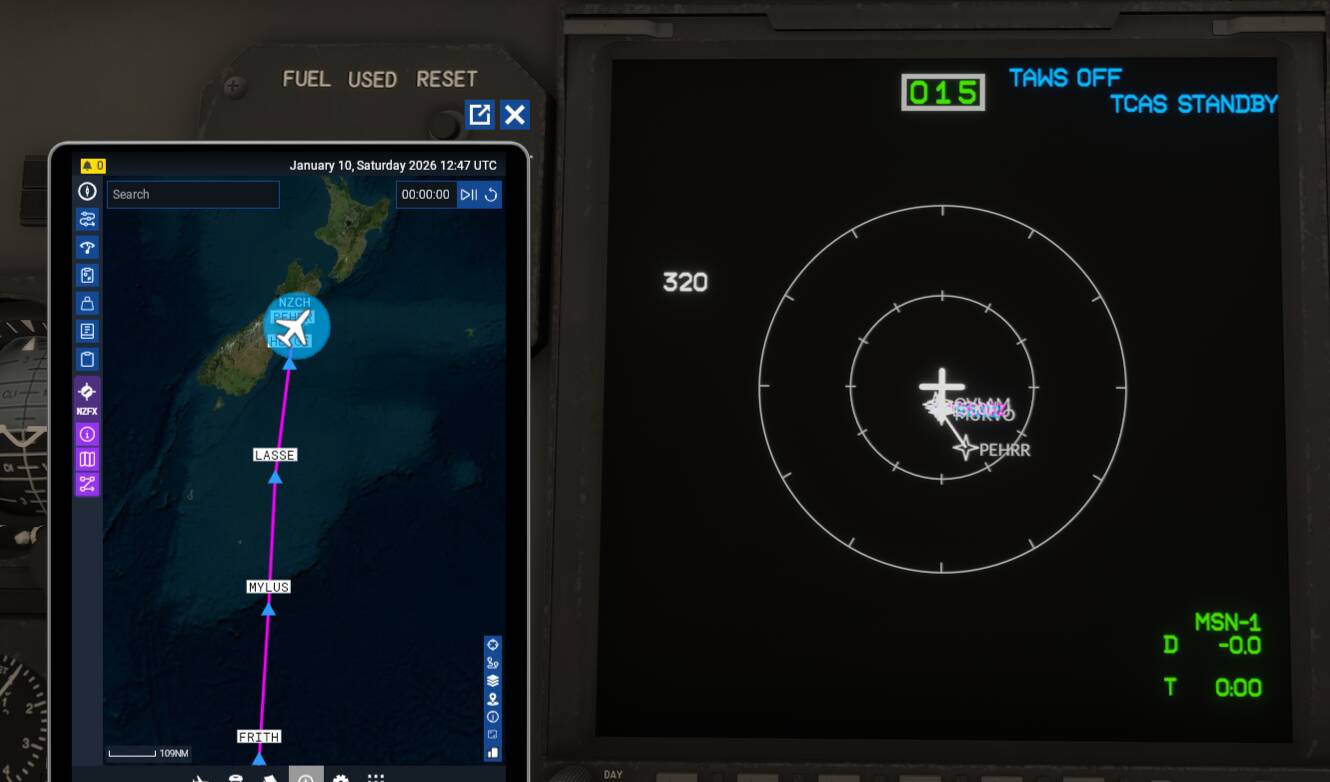
So I’m new to using the computer here, for some reason it says the waypoints aren’t in the database even though its the current AIRAC cycle? Not sure if this is a bug or not, but it stops after the waypoint PEHRR and says the rest can’t be found.
I also keep getting the error of Key Not Active, I’m not sure if it means like licensing key, or keyboard key. Any help is appericated!
Just a note for anyone who is finding their 2024 C17 liveries are not working anymore. The C17 has been updated form a hybrid 2024 model to a full 2024 model. A simplified explanation is that a hybrid 2024 model uses the old 2020 folder structure but uses the newer KTX2 texture format. A full 2024 model uses a unique 2024 folder structure as well as the KTX2 textures. Liveries are not interchangeable between the two formats.
Liveries using the dynamic tail number will need more work than those using a fixed tail number. The doors have a colour variation once the livery has been converted, so the livery textures might need to tweak to align with the textures used by the new model.
Not sure when this update happened as I hadn’t flown the C17 for a while. This is one problem with having a streamed environment, as you never know when updates have been applied that might break something you use (or have created), like a livery.
The good news is that existing liveries are easy enough to convert from one format to the other. So if you have a favourite C17 that no longer works, you will need to contact the livery creator to get them to update the folder structure. I am in the process of updating the few C17 liveries I have done.
1 Like
Was this not already part of SU4? As far as I have heard aircraft don’t get updates outside Sim Update releases
Aircraft updates usually occur outside of SU for most payware aircraft, and I am guessing this might also apply to 3rd party developed default aircraft. If you have an aircraft stored locally you get a notification to update, but otherwise you would never know until you noticed something has changed.
I had a look at the update 4 notes for the C17 and it says “Clean-built and reexported” and “Reprojected and rescaled textures for improved efficiency and memory consumption.” but it is not clear that this indicated they developed a new 3d model. The notes make no mention that changes will result in existing liveries no longer working. So it is possible that the changes were part of SU4. But I had been in the SU4 beta and been using the C17 with my liveries, so when the chnage happened is not clear.