MarinaraTrain42:
MSFS turbulence, especially mechanical turbulence is a game changer to me! The feeling that the surrounding environment impacts the air especially when closer to the ground is truly a must, and I simply can’t fly without it any more.
XP feels twitchy for me - Sorry if this annoys XP fans . In some scenarios, i.e during taxi, some flight conditions and closer to the stall , handling and behavior feels more harsh. At least with the airplanes I’ve tried (including payware) . Again speaking from a personal IRL experience with GA aircraft. Can’t point out the specifics but something involving the inertia / mass.
XP turbulence modeling - at least still true for the last time I’ve tried, is truly unrealistic and plain bad.
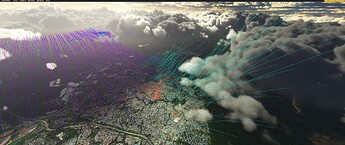
I wonder if some of what you are experiencing regarding the air flow is because MSFS is simulating the air flow up to 20 KM around the plane:
That photo is from CoastalGamer from this thread:
Preparation
To test the proximity airflow simulation, spawn in the air above the area you would like to test in a light aircraft (should have interesting terrain - not above water.) and enable dev mode. At the top menu select Options → Debug Weather. A window will then open. In that window, enable “proximity airflow visualization”. The rest of the visualizations should be disabled for now. The airflow simulation seems to happen regardless of the CFD settings. As you fly you should now see lines…
There is a 20 KM CFD around the plane in MSFS now. In effect, MSFS is attempting to simulate the air flow in the atmosphere up to 20 KM from your plane.
My understanding is that XP does not simulate air flow anywhere close to 20 KM far from the plane, and the air flow simulation around the plane is much shorter than that.