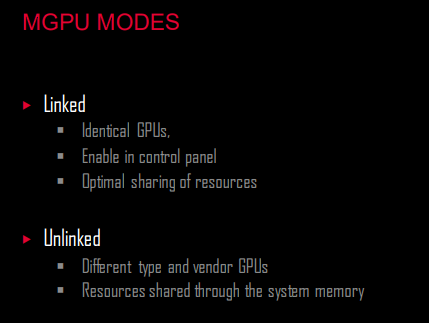
Somebody knows what’s the mGPUs status?..we already have DX12, then this option is possible (and maybe easy) to add in near future updates.
With mGPU you can use two or more GPUs working together giving more power (maybe two low or medium end GPUs that together gives more performance like high end GPU - maybe -).
I am surprised there is not more interest in this topic.
Seems to me, having multiple cards, whether linked or not, could be a real advantage, especially for those running multiple monitors. Looking forward to hearing from those with some expertise in this area.
I thought mGPU/SLI support and interest died years ago with software devs?
Also it was never double the power, but more of a GPU load equalizer between the two linked cards.
It was never double the actual firepower, it simply freed resource loads of specific features (hairworks,physx etc etc) of Nvidia GPU cards to allow more performance headroom.
Which Nvidia has a terrible history of eventually killing off and making obsolete.
RIP 3D Vision, SLI and Hairworks.
Would be nice for a flight sim to support NVLink and whatever the AMD equivalent tech (crossfire?) is for once. Even though the bottleneck is always CPU performance limitations.
I remember being stoked about Crysis 1 back in the day supporting SLI, and it actually made performance worse to where you were better off running single GPU mode because of FPS inconsistency and visual artifacts. I had dual GTX 9800s back then. It was always the same for the titles I played Crysis 1, GTA4, the software was just never fully optimized to full take advantage of the dual GPU tech. I see why single card performance was always the better much more stable option, especially with these monstrous fire breathing modern GPUs we have now.
No it wasn’t double for sure. I used Nv Inspector and for most games AFR worked very well. Kingdom Come Deliverance worked and in Full (Experimental) settings 4k and very much did not with a single card. ATS and ETS both zero stutters and full on graphics settings 4k. It was a significant jump from my single 1080 in any supported game. Yes, this SIM is very much CPU bound
yep.. SLI is death.. and also yes, it never doubled the performance, you also not get doubled VRAM, issues like micro-stuttering happend, the energy-efficence was so worst, it was never really “cheaper” to buy two mid/low-end-gpu’s ( at least for new price ) than simple wait half year for next gpu-gen. The first new-generation of GPU cards was usually direct faster than the former high-end-SLI system, often simple the “TI” models are already faster. And in the end a single GPU model worked allways much better, stable, etc.
mGPU is better than old Crossfire/SLI, because you don’t need two identical GPUs - and the GPUs are not connected physically between them -, instead you can use different GPUs (years, vendors, models), and you can gain some performance with your old GPUs (it is not the same as Crossfire/SLI, when they said that gonna be ‘double performance’)
Have had it for years. With the last 2 1080TIs. Now a single 3080. Never going back to 2 GPUs. Many applications can’t handle it, Windows even struggles sometimes. And this was even with different monitors on different GPUs.
I was an SLI guy from day 1, 3DFX VooDoo and remained a SLI guy upto 1080ti. After that there was no more support from current games and so it died. I never not once did I ever regret going SLI and I must say going to nVlink with 2x RTX4090’s, I’d rather pee on a brush fire after drinking turpentine than give that Nvidia Boss/Scalper another dime.
Makes sense… I am tending to agree, multiple GPU’s may be more of a headache than it is an advantage. Better to upgrade to the best single GPU your system and budget can accommodate.
Appreciate your comments.
Perhaps there is something you have not considered…I finally received my RTX4090 and have a question. After watching Simhangers video on DLSS Fact or Fake? I am confused…My setup is very different than many in that I am running 3 55" 60Hz (native) displays on the RTX 4090 and 4 1080p 60hz displays on a second GPU (GTX1650). Why? The RTX4090 is providing the Center view while the two side displays are the Left and Right Multi-View for a 270 degree FOV. The other displays are for 3 RSG Avionics and 1 utility display for stuff like Discord and Simbrief. My issue is I CANNOT enable NVIDIA DLSS FRAME GENERRATION… It’s Grayed out and not available. I have HW Acceleration turned on and Game Mode off and the Main GPU set to the 4090. I have tried everything except to remove the Second GPU from the System thinking that is what is preventing Nvidia from enabling DLSS Frame Gen. Any suggestions? Oh! I am running a 5800X3D with 32GB GSKILL CL18 (2x16) and the OS and MSFS are installied on a 2 TB NVME M.2 drive on a EVGA X570 DARK MoBo.
Games these days will only run on 1 GPU natively. You can assign applications to specific GPUs in Windows Settings if you have more than 1, but you can’t assign a process to run on more than 1 GPU. SLI is dead. It’s no longer supported by drivers on newer generations of cards, and no recent games support it natively.
That said, you can indeed run multiple GPUs if you need more than 4 monitors on your system. But whatever you’re using as a secondary GPU is only there to run extra displays unless you assign an application to use that GPU specifically. Otherwise, all GPU processing is done on the primary GPU and passed through to the secondary GPU to go to its displays.
Correct. Whatever one is installed closest to the CPU (top most PCIe slot). That’s GPU 0. Unless you tell the OS or application otherwise, that’s what it uses by default for actual GPU processing.
Edit: Just FYI, I do run multiple GPUs. I have a 3070Ti as my primary, and run an old Quadro P620 (GT1030 equivalent) as a secondary to run my 4 touch screens for my Air Manager cockpit.