I understand..it is proportionally more “pan” than “head movement”. Sounds very interesting. I may have to try it..
Thx for the explanation.
Tell me if you agree with the PROS and CONS of not having multiple screen or real-time windows in Flight Simulator 2020 like we had in the previous Flight Simulator X.
Look at the video I have made to drive home the point:
Making progress!
We moved up to #8 on the development list. 
need about 300 more votes
I’m building a cockpit and really need multiple screens so I don’t have to revert to an older sim.
They only had bout 10 years of simmers asking for this on every flight forum in existence, and especially in the year before the release and it still isn’t an option. So don’t hold your breath.
It’s a shame that it’s not implemented, while it was promised. I can’t post links so just search in YT for " Multi Screens Promise in Microsoft Flight Simulator 2020 from Asobo".
It would be great if multiple screen support would be mplemented in similar way as in X Plane 11, fRactor 2, Automobilista 1&2, iRacing, Race Room, Assetto Corsa, Assetto Corsa Competizione and DCS even.
PLEASE PLEASE PLEASE - CAN WE HAVE WHAT YOU SAID IN YOUR FEATURES SPEECH AND THE WHOLE REASON I SPENT THE MONEY?
TRUE MULTI MONITOR SUPPORT!
Your amazing scenery is going to waste on a single screen, or on a silly looking stretched screen over 3 monitors! This sim could change the the world of Flight Simulation BUT it desperately needs proper flight models, less bugs and crashes and Multi Monitor Support!
THANK YOU.
Really looking forward to this as well. Perhaps spring 2021? Too optimistic?
Tomorrow would not be quick enough for me!
My biggest gripe about MSFS2020; the lack of proper multi monitor support for my home cockpit…
Please, Microsoft, include this as a high priority in your development roadmap. There are so many posts asking for the same.
2 months since the release date and Microsoft hasn’t even added this to their development roadmap? C’mon Microsoft!! Is this an arcade game or a SIMULATOR?!
Also, what a PITA to get MSFS communicating with my Avare navigation app on my phone. They need to simplify that process as well.
Plan G is a good external map that can connect to MSFS and track your airplane as you go. Vastly better than the internal VFR map, it has all information like runway info, ILS frequencies, VOR, DME and more.
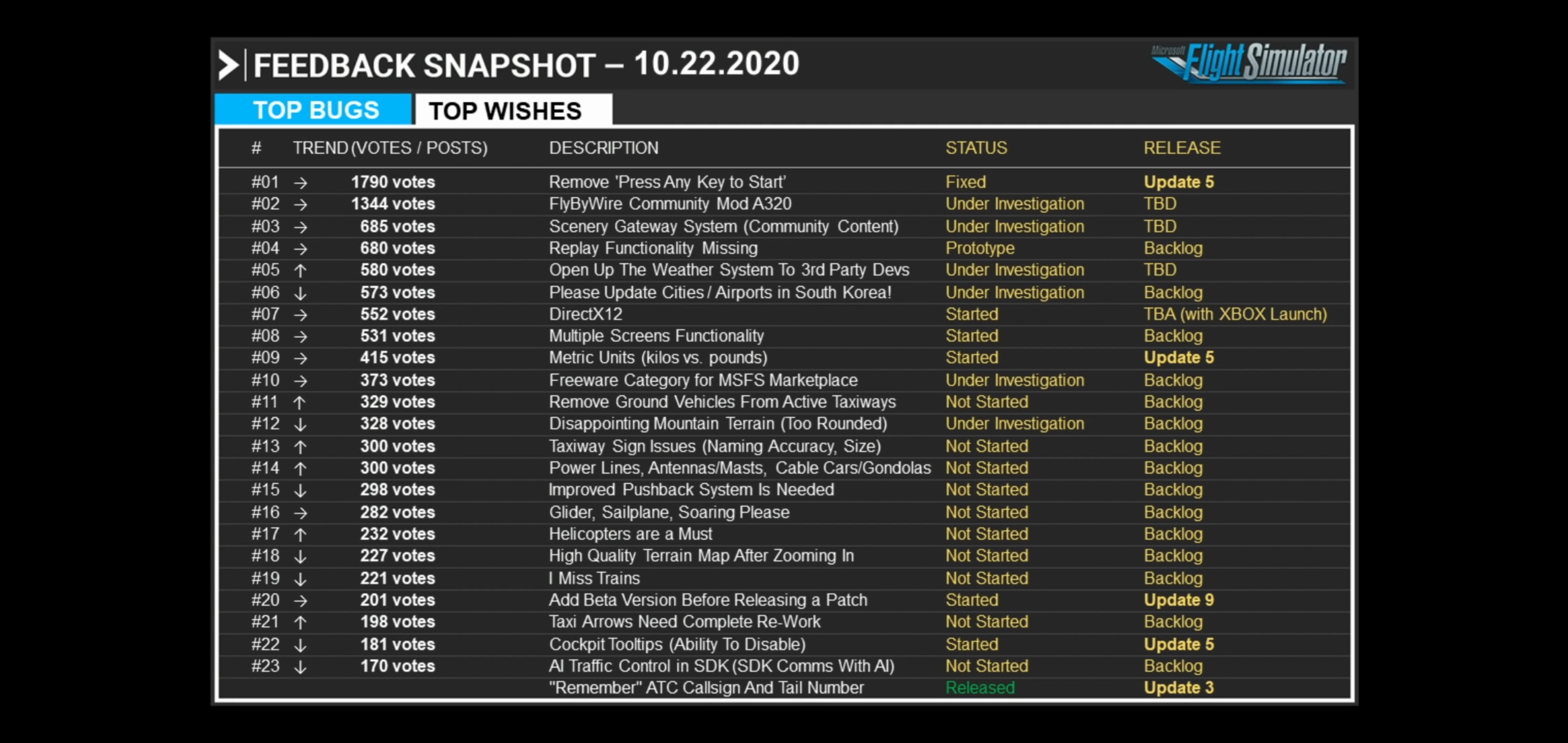
We need to keep pushing for more votes!!
As of 10.22.2020, multiple screen functionality is #8 in the wishlist queue with 531 votes. “Those are rookie numbers! We gotta pump those numbers up!”
Spread the news in forums and leave comments on youtubers videos to help draw more attention to this! Let’s climb that wishlist!
Even if it is started, its probably going to take a Long time to roll out, if P3D was anything to go by .- especially if it is going to be done correctly, and not just a quick work around solution.
While i would love to be able to use Multiple Screens correctly, maybe the current emphasis should be on getting the sim to work correctly on just the ONE screen, without crashing !!
Why you always so negative do you work for Microsoft ? they have to include multiple screens support asap because they promise to us that this feature would be include in the simulator , is no a wish is a missing feature an important one this is a simulator not a arcade game , if you don’t care why you in this forum ,we need more vote , we need this feature asap
No, I do NOT work for Micosoft – although at times it seems like we all do !!!
What a strange way to go about getting votes for your cause !!!
Once again :-
YOU want what you want when you want it.
You get what you were promised when they have it.
Where did the ASAP creep in ??
They said that MSFS “will” include Multiple Screen support, and that that is in their plan.
Did they promise this support by a specific time, (like ASAP) .. I don’t think so.
Its not that easy .. as was clearly shown when P3D developed it – and Lockheed has a much bigger incentive to get Multiple Screen working,(ASAP) to support their own IN HOUSE simulator program.
So, for what is is worth ( all of 1 cent), I will NOT be Voting to WISH for Multiple Screens, while there are far more import BUGS to be fixed for just ONE SCREEN .


For now, until you get a multiple screen option, I would zoom out so you can see out of the side windows and push up your additional monitors so you have your disks approx where they should be. Side views are available in approx the same viewpoint as you would have them, just adjust your lens correction a wee bit(it won’t 100% clear the fish eye) but it works as a work around.
Maybe something in this video will work better for you. Every setup is different. Sigh…

Wow, that’s super helpful! Thanks for the tip. I’ll give that a try.