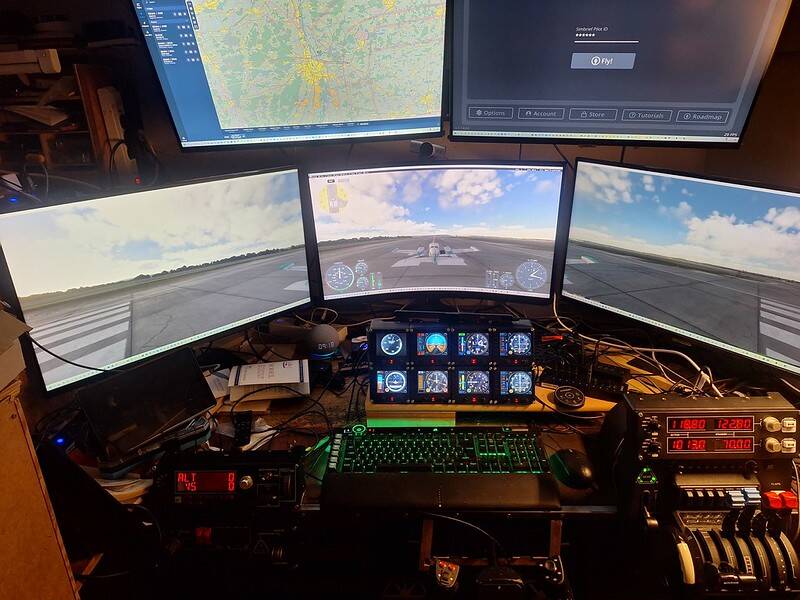
It shows the 3 32" monitors that will make it possible to fly using 3 monitors. Above those monitors I had the plan to place the 2 28" monitors, but one 28" monitor stopped working. I have all 3 Logitech/Saitek panels, Radio, multiswitch and autopilot as well as 6 Instrument Panels. I used to fly real GA planes and I want this setup to allow me to fly the same planes, i.e. Cessna 310. I also love flying the Junkers three motors so I do have 3 USB power quadrants. The setup in MSFS2020 is pretty challenging to use. Basically the 3 power quadrants have to be used as shown
Single Engine Piston:

Twin Engine Piston:

Three Engine Piston:
What is proving to be pretty challenging for me is to organize the cabling.
Finally I use the Thrustmater Pedal and the Yoge from Brunner. From them I hope to achieve maximal equivalende to the real flying.
I have improved a lot to my cockpit:
One of the very heavy design works was done to get the FIPs to display. The problem came from the fact that the FIPs have old USB 2.0 drivers and have not been updated for an eternity. This results in the fact that Microsoft’s USB enumerating of the USB 2.0 FIPs. So I have to power cycle each of them connected to USB 2.0 Hubs, which are connected to USB 2.0 sockets in a USB 2.0 controller card I had to install in my PC. The other problem is that I had to develop a script which I run after booting my PC to disable the Power Management functionality in the USB drivers.
I also got my 3 32” monitors to display the cockpit view properly arranged, as you can appreciate in this photo. I use Spad.neXt and gauges from FIPgauges.com to manage all FIPs, all 3 Saitek panels, the Thrustmaster pedals, the Honeycomb Bravo throttle, and my Brunner yoke.
To initiate my cockpit properly, I am transferring everything to HangarControl with the support of ChatGPT, which knows my cockpit very well due to its use to implement the cockpit. Another reason I am transferring everything to HangarControl is that I can automate the whole process to configure my PC, start all the FIPs by aiming to have the powercycles be9ing made in software and not by plugging and unplugging the connectors of each of the 8 FIPs. Also, to have Navigraph Charts properly display my plane on its charts a special sequence of app starting has to be made, which I find hard to memorize. I am also using Touch Portal to generate a screen on my tablet to control all camera settings, including up to 10 Special camera settings. One learning goal I have is to revive my old knowledge for ATC communication with BeyondATC as my tool, and BeyondATC to configure Push-To-Talk to one of the buttons on my Brunner yoke.
My preferred plane is the Blackbird C310R.