Hi all,
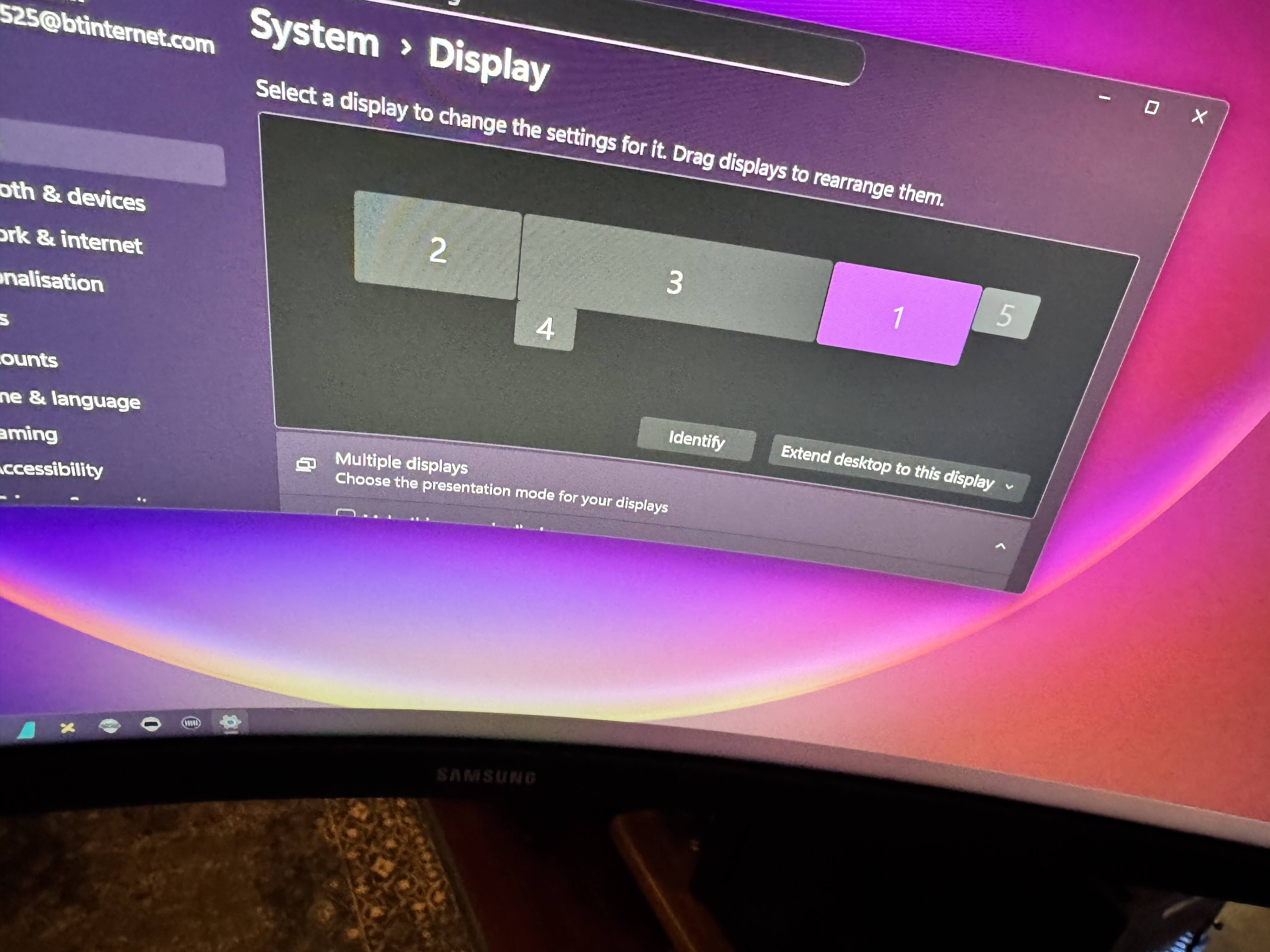
Would appreciate some help with multiple monitors. Just installed left and right monitors and having an issue). See photo. Monitor 3 is a samsung49 inch G9 in the centre, 1 & 2 are 27inch Samsung G5s. All of them work. The G5s are the new ones.
Monitors 4 and 5 are from flight sim builder and are used as in plane screens e.g. G3000. They both were fine until I plugged the G5s in
Screen 4 is powered up and displays a picture. Screen 5 is powered up seen by windows but no picture.
My graphics card is a 4090 and all the monitors are plugged into it. I have tried plugging screen 5 into the mother board HDMI and DP but no joy.
Would be grateful of any help.
Josh
You exhausted the bandwidth the 4090 can hold. Try to reduce the Hz from the monitors. Even in my 5090 I couldn’t make it work 4 monitors connected to it and I didn’t want to reduce the refresh rate. I mean what is the point to reduce the refresh rate to 60hz ? In my case I use 3 monitors connected to the graphic card and the fourth for browsing to the cpu. All 3 in the highest refresh rate.
For my Flightsimbuilder set up, I used the Startech USB to 2 x hdmi adapter and it works well, avoiding adding to the 2 monitors plugged into the 4080 super.
My (simple) understanding of the adapter is that it contains the graphics circuitry for the 2 hdmi, so may get round your 5 monitor limit. Apparently not suitable for intensive graphics but works fine for the simple G1000 displays.
Thanks. I didn’t know that  . Much appreciated
Josh
Thank you. That is great. Have just ordered one and will report back to mark as a solution as soon as it arrives. Thanks again.
Josh
Hi there @JoshBear
? From your shown picture of your screen setup, did you select screen 5 and expand desktop to the display.
If your cpu have igpu you could connect screens to this
Port or ports also
I have dp and hdmi on my cpu And have connected two monitors to it, but i must admit that i have one of these also connected with/through a matrox triplehead2go.
My dedicated gpu have my two other screens connected
Others have already pointed this out, but basically no consumer GPU will support more than 4 monitors (even if it has more than 4 ports on the back), except possibly via Thunderbolt over USB C, and even then there are other limits in terms of VRAM etc. This is just a hard limit that no GPU maker seems bothered about increasing.
You mentioned that you plugged a monitor into your motherboard ports but it didn’t work? There’s a BIOS setting that determines if your iGPU is switched on or not. You can check and make sure it’s enabled in PCI + iGPU mode. You may also need to enable dual-monitor for the iGPU vs mirroring.
A USB video card will work, and for simple 2D displays they have enough bandwidth, but in theory the two ports on your motherboard can be used for this. I have 6 screens connected to my sim PC - 4 on the GPU, and 2 on the motherboard. My board supports Thunderbolt 4 so I have mine connected via USB C which allows me to power the monitor, send the video and connect the touchscreen over a single cable.
Thanks all.
You were correct my 4090 could not handle all the screen. The 2 touch screen G1000s are now connected through a Startech USB to 2 x hdmi adapter. all is working now,. much appreciated.
Josh
I purchased 3 identical monitors. == 4K, 60mhz, 27ich. LG monitors. Using three identical cables, connected to Nvidia 4070.
Two monitors are always in full sink; one has always a slight delay. Switched cables no difference. can’t get all three to fully function as one.
Is it a hardware setting issue? a Video driver. FS2024? any hint?
In my case its only left view.