I find it concerning that the 3090ti issues with VR headset open item from the previous driver is neither fixed, moved to resolved, or still in the open items list 
On the subject of whether to upgrade to 516.xx or not, I didn’t have much choice. I went to install Forza Horizon 5 on my PC and the installation came screeching to a halt with the warning that my current Nvidia driver 472.12 (from back in Sept. 2021) was incompatible with Forza Horizon 5 and I needed to upgrade to a 516.xx Nvidia driver for Horizon 5 compatibility. And the install wanted me to abort, which I did. So I upgraded to 516.40 and the results with Forza Horizon 5 are stunning (not tried MSFS yet). The install optimized my graphics setup for EXTREME (the equivalent of ULTRA in MSFS?). Horizon 5 being fixed to the ground with a more limited world view is undoubtedly easier to compute than MSFS but everything looks photorealistic and the wife asked several times if I were watching a real video whereas she usually finds something about an MSFS 2D view to say, “that looks fake!” I’ll give MSFS a whirl and update my post.
2 Likes
You can’t claim a new video driver is responsible for great visuals if you couldn’t even install a game with the older one.
All you’ve experienced is that FH5 looks good. Trying to equate the graphics or settings to MSFS is completely meaningless.
1 Like
I’m only stating two things:
-
I couldn’t keep my Nvidia 472.12 driver, which I was quite happy with, if I wanted to install Forza Horizon 5 on my PC. I may have misstated the minimum driver requirement as 516.xx - it might have been 512.xx - but my perhaps incorrect recollection is that it was a 516.xx driver required for the latest FH5 game version.
-
The 2nd claim is that the world graphics of Forza Horizon 5 look much more photorealistic than MSFS graphics do. This had nothing to do with stating a specific driver is responsible. But since I haven’t run MSFS using the Nvidia 516.40 driver, it’s not quite a fair comparison. The most impressive thing to me was that the wife usually has some negative or meh comment to offer about any game I’m running whereas for Forza Horizon 5, she couldn’t restrain herself from gushing a few positive comments. Hope to get the same sort of response out of her for MSFS someday. And I have a very powerful system. I can run MSFS in 2D and VR in close to ULTRA settings for everything (RTX 3090 GPU, etc.) - but fake rivers still run up the side of canyons, etc., or sheer cliffs look unnatural in their textures, etc.
As I said, FH5 is a very limited, defined world (it does have weather and seasons, sort of). And the total install size for the premium version is something like 107 Gb, two thirds the size of MSFS for a much smaller world. But since MSFS can supply all the missing parts of its much larger whole planet view via the cloud, theoretically one would hope that in regions that have high quality photogrammetry, the world view could look just as good. I have yet to see a view of NYC in MSFS that stuns me with its photorealism. Last time I flew NYC, most bridges still had walls under therm.
So perhaps I’m just wishing MSFS would also pressure me to use the latest Nvidia driver and in return, at least for PG regions, by taking full advantages of all the Nvidia driver features, be able to reward the user with similarly photorealistic views with all the lighting and tones looking pretty natural.
Edit_Update: I flew a bit in 2D VFR loading old flight plans. Since I’ve been through several MSFS updates as well as the update to 516.40 since I last flew on my PC (other games and my Xbox Series X have had my attention), it’s hard to say what’s causing any differences. But 516.40 works fine for me. The Mann Gulch, MT terrain looks a little more yellowish, there are still too many trees, but the Missouri River is less prone to climb its banks. Tree textures on mountainsides don’t seem to be as well rendered as I remembered them for 472.12. Manhattan is still rendered in dark and somber tones even on a bright sunny day. So in terms of how impressive a view looks in MSFS, what Nvidia driver I’m using seems to be the least of my worries.
Can it be that your Nvidia Control Panel settings have been reset/changed when you installed the new driver?
I did a “clean install” using the Nvidia option and didn’t install GeForce Experience. My MSFS program-specific settings under Manage 3D Settings in the Nvidia Control Panel still seemed to be the same as I remembered them (but I did not carefully check what they were 9/21 and are now item-by-item). Same for my Graphics PC and VR settings under Options, General in MSFS. My OpenXR settings were unchanged from before (no custom rendering scale and motion reprojection always on). Since I have a 100 Gb manual cache, I did wonder if I should clear that for a fair test or whether I was just viewing old Manhattan photogrammetry from that cache - or if there were newer and better, is MSFS smart enough to use the newer from the cloud rather than the older from a cache?
A clean install always sets NVCP back to default settings
Because we all know that after new hardware releases, your 12900 and 3090ti will be useless, wont work anymore, and turn into nothing more than a door stop, because the CIA planted mini RF bombs in them to make them useless and MAKE you buy new to reduce the chance of an economic recession with cats and dogs living together, mass hysteria!!
Yes, it´s not only “Manage 3d Settings” that are reset. All monitor and color settings are also reset.
Gorony,
Check-out the Nvidia support pages and create a ticket.
Charles.
So I did some research by resurrecting my nvdrsdb0.bin and nvdrsdb1.bin files that contain my Nvidia 3D settings (in Program Data/Nvidia Corporation/Drs) from various PC backups. Apparently, when I installed 472.12 via an Nvidia “clean install,” I didn’t bother restoring my RTX 3090-specific settings.
So when I said I flew 516.40 with the same (default) settings that I had for 472.12, that was correct. And restoring the Nvidia RTX 3090-specific settings I was using on 9/18/21 before I installed 472.12 doesn’t make any difference in the observations that I offered in an Edit_Update footnote of a previous post commenting on my impressions on flying 2D VFR with 516.40 - that the various updates over the past 3/4 of a year make more of a difference in MSFS appearance (and behavior?) than Nvidia driver updates in my limited trial here.
To illustrate, here’s what the mountainous terrain down the river a bit from Mann Gulch, MT looks like in real life (3D Google maps satellite view). The mountainsides at this particular spot have humungous cavernous holes in their sides.
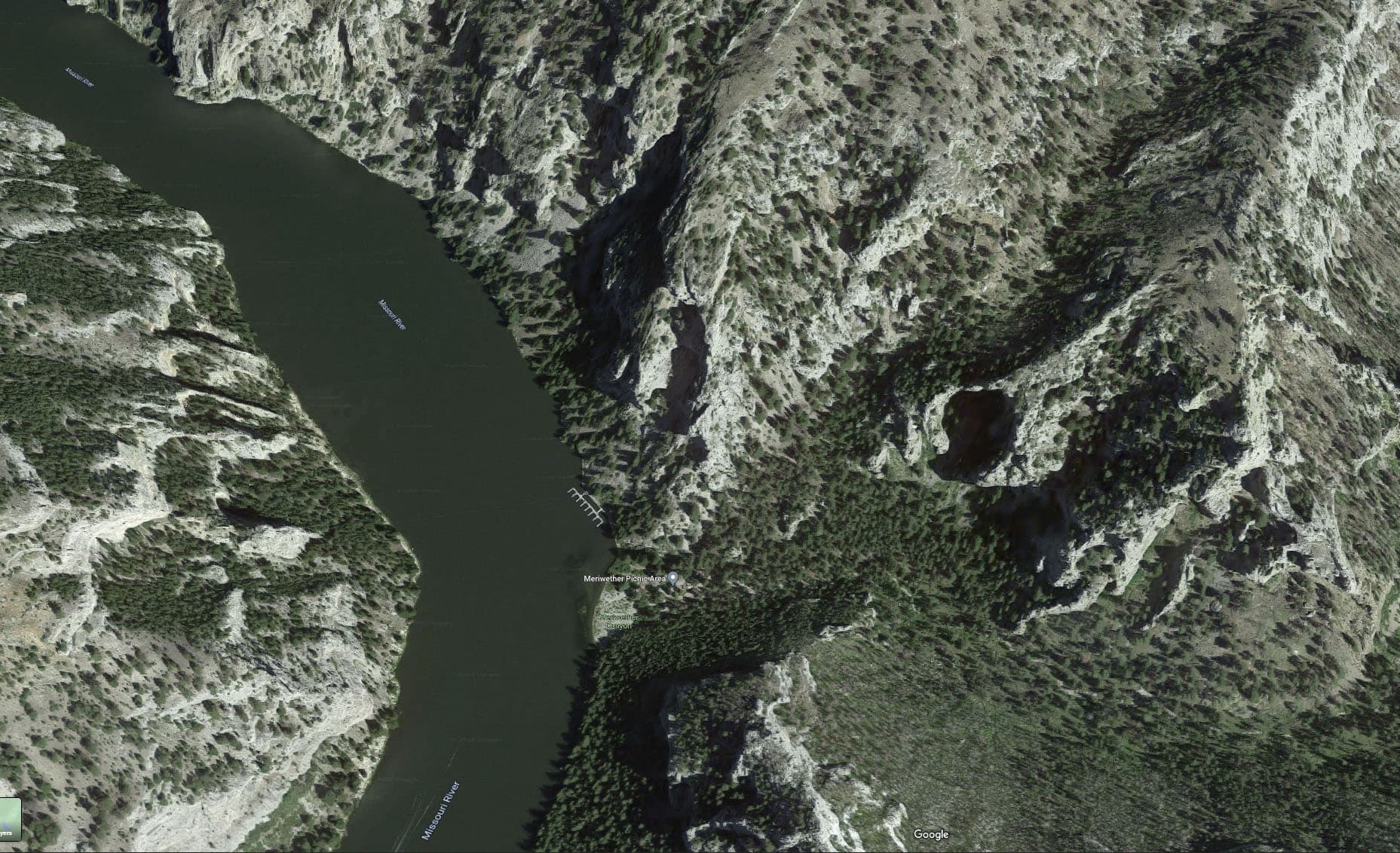
MSFS back in September, 2021 and earlier didn’t do a half-bad job of depicting the same rugged terrain - in fact, the caverns looked even more engulfing, IIRC. Here’s what the same area looks like in MSFS v1.26.5.0, the caverns have now been glossed over with apparent surfaces that aren’t there in real life (I tried to set the time at 8:30 am Mountain Time to cast as much shadow as possible to illuminate any hollows, etc).

And the general tint of the landscape is a more yellowish green than it has been in earlier MSFS versions.
I did have one problem in 516.40 with the Icon A5 becoming unresponsive to the controls. After playing around with the flaps and the engine speed, the plane wouldn’t climb in response to flaps up and near-max engine speed but just kept sinking until it crashed into a hillside. But other than that episode, 516.40 has worked fine in about an hour of flying the Icon A5 and the Zlin Shock Ultra. Maybe such slow planes don’t really test the limits of 516.40 with MSFS.
1 Like
Google maps is no comparison, it would mean streaming 10x the data which for the vast majority of users would be much too expensive. You also have haze in your MSFS shot, try first turning off volumetric effects in dev mode.
1 Like
I made a 45 minute flight from KBUR to KLAS this afternoon using the newest Nvidia drivers - great performance and no issues, visual or otherwise. RTX 3070 here, running at 1440p and a mix of Ultra and High-End settings.
3 Likes
Hi Baracus, been reading thread.
There’s some YT vidy’s by The Hillbilly Engineer that may help you troubleshoot.
They are titled,
" MSFS Performance Ryzen 2600 GTX1060"
and
" DCS Performance Improvement"
GL
I’ve updated to 516.59 and have been experiencing small freezes (4-5 seconds) every 10-15 minutes in the simulator. Going back to previous driver.
4 Likes
I don’t understand why HAGS needs to be disabled for better sim/vr performance…wasn’t it designed to help?
MSFS pushes the gpu to the max as it is, adding more stress won’t improve anything except your chances of CTD.
Hi JeanMichel,
Welcome to the forum!
Yes, I am experiencing stutters too however, I am not going to install an earlier driver before I can see if I can fix the issue using the NVCP/Windows 11 settings. I might reinstall the driver again because I have sometimes found that this can make a difference and improve things. I have hardly used my simulator over the last few months, previously back then I had very smooth performance. Iam not sure if my problem has arisen from one of the scheduled simulator updates, I have been updating the simulator and not using it in between until of just late.
Charles.
1 Like
If it helps, with this driver on my 3060 I am having a buttery experience right down to the mid twenties at difficult places such as LAX so I think the driver itself is ok (Windows 11)
2 Likes
Yeah, the new drivers seem really smooth for me too, impressed with 516.59 so far 
3 Likes