New PC to Support MSFS Triple 55" 4K TV Build

@ BuzzJungle:

  • w.r.t. memory:
    I agree with @ Airbumps2501 w.r.t. his comment on the amount of RAM. You can check to see if the model he quotes is supported on your motherboard at the ASUS ROG Strix B650E-E webpage

  • w.r.t the be quiet! SILENT BASE 802 Mid Tower Case:
    The case comes with 3 Pure Wings 2 140mm fans. My be quiet! case (500DX ) also came with 3 140mm fans which are doing a great job ( 2 in front, 1 in back). I don’t think you need any more, but if you do, the front of the 802 can hold 3 x 140mm, according to the website you referenced, so you can always add one more later on if required.

  • From Gigabyte’s website, the size of the GeForce RTX™ 4090 WINDFORCE V2 24G is:
    L=331 mm W=136 mm H=55.5 mm
    From the be Quiet manual that you can download from the website you listed; the maximum dimensions are (in mm):
    CPU cooler: up to 185
    PSU: up to 288
    GPU: 432 / 287 (with HDD cage installed)
    So the 4090 should fit in.

Lesson #1 when building your own PC: Never assume anything! :slightly_smiling_face:

Generally, each component comes with cables that are specific to that component, so, for example:

  • The Corsair PSU comes with a variety of cables.
    Note that the connectors sockets are on the side of the PSU, not the back, which is more common. I’d double check with PLE Computers to make sure the PSU will fit in the case. Since they recommended the case, I would assume so, but please refer to Lesson #1, above. :smile:

  • The motherboard comes with two 6 Gbps SATA cables, but you are installing SSDs, so won’t need these. Make sure PLE Computers provides them with the built PC, as you will need them if you ever decide to add an HDD later on (e.g. for archiving stuff).

  • The be Quiet! 802 manual does not specify any cables in the contents chart, but mine came with all the necessary cables for the on/off switch, USB ports, headphone jacks etc. that are located on the top-front of the case, & I’d be very surprised if the 802 did not include these too.

Where do you plan to install the be quiet! Silent Loop 2 280mm radiator cooler? I have my 240mm radiator located at the top of the case, with the radiator fans blowing the radiator-heated air up & out of the case. The manual for the 802 lists:
Optional radiators (mm):
Front: 120 / 140 / 240 / 280 / 360 / 420
Top: 120 / 240 / 360
Rear: 120 / 140

So, as I read it, the 280mm radiator you have chosen can only be installed at the front of the case. I guess you could blow the hot air out of the front (you do not want it blowing the radiator-heated air INTO the case), but, IMO, I do not think that is optimal. However, looking at pics on the be Quiet website, they show a front-mounted radiator, so maybe it’s OK.

I’d suggest either changing to the 240 mm (which I have, works fine) or preferably the 360 mm option (as I think the thermal output of your rig will be greater than mine), with the radiator & associated fans at the top. Move 2 of the 3 case fans to the front, blowing cool air into the case, with the 3rd case fan at the rear pulling hot air out. This creates an airflow path from front to back, past your GPU’s cooling fans, drawing that hot air out. Any remaining rising hot air will be pulled up & out through the radiator at the top. In theory, this adds additional cooling load to the radiator & its fans, but on my rig the CPU temperature rarely exceeds 66-70 degrees Centigrade when running MSFS, and the so I do not consider this a problem. Perhaps others with water-cooled systems can chime-in here with their opinions & experiences, especially if their radiator is mounted at the front.

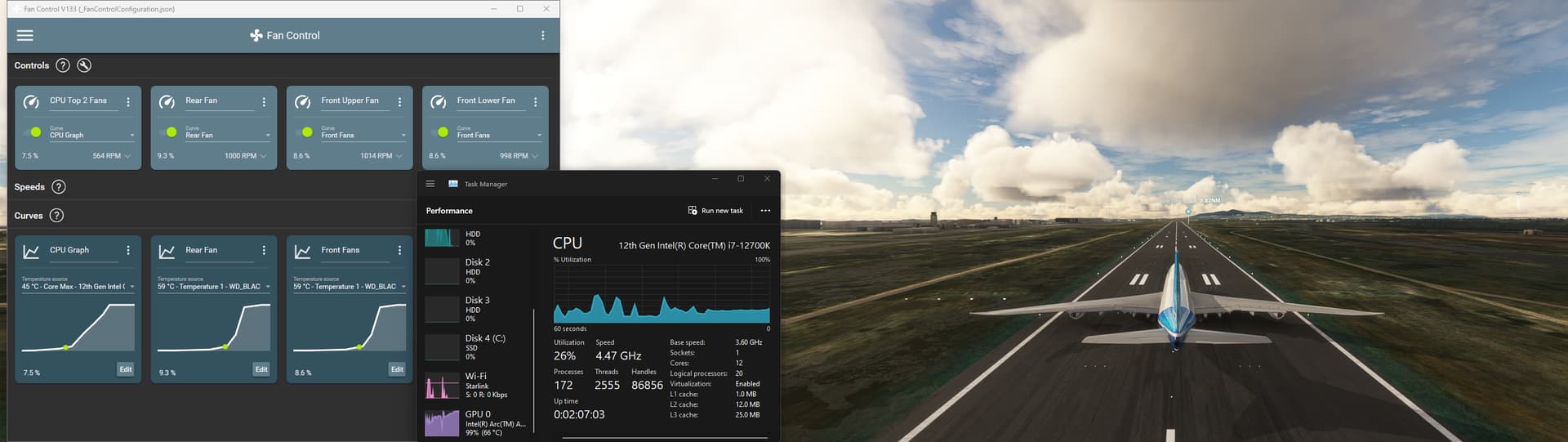
Here’s a screenshot of the MS/AS Boeing 747 on the runway at Capetown. Note the Radiator fans are running at 7.5%, rear at 9.3%, and front fans at 8.6%. You can see in the 3 lower charts that the temperatures are well within spec. for the CPU & SSD.
@SmotheryVase665 outstanding thanks again for the comprehensive info. The Kingston RAM looks good according to the linked webpage.

I’ll talk to the installing vendor about the cooling since they will be doing all the building and config - I honestly wouldn’t trust myself to try. I’ve had positive feedback from friends about this vendor so as much I can trust them sight unseen I don’t think they’d do something that would critically undercool the proposed system, but yes I agree with Lesson #1 don’t assume anything! :slight_smile:

Holy ■■■■. All this effort just to stay left in the pancake world.

My top 3 suggestions?

  1. Go VR
  2. Go VR
  3. Go VR.

I would never fly or race again without the 3rd dimension and freelook.

Have fun!

1 Like

Well, to be fair for a great VR experience you still need a similar monster PC like the one being finalised, just without the TVs.

2 Likes

Thats right.

I build this all black one autumn 2022 and I am still fine @43fps locked in VR with challenging settings.

The 11900k ( I’ve tried AMD once and learned my lessons well…) is a bit oudated of course but he has to work out his cost ;-).
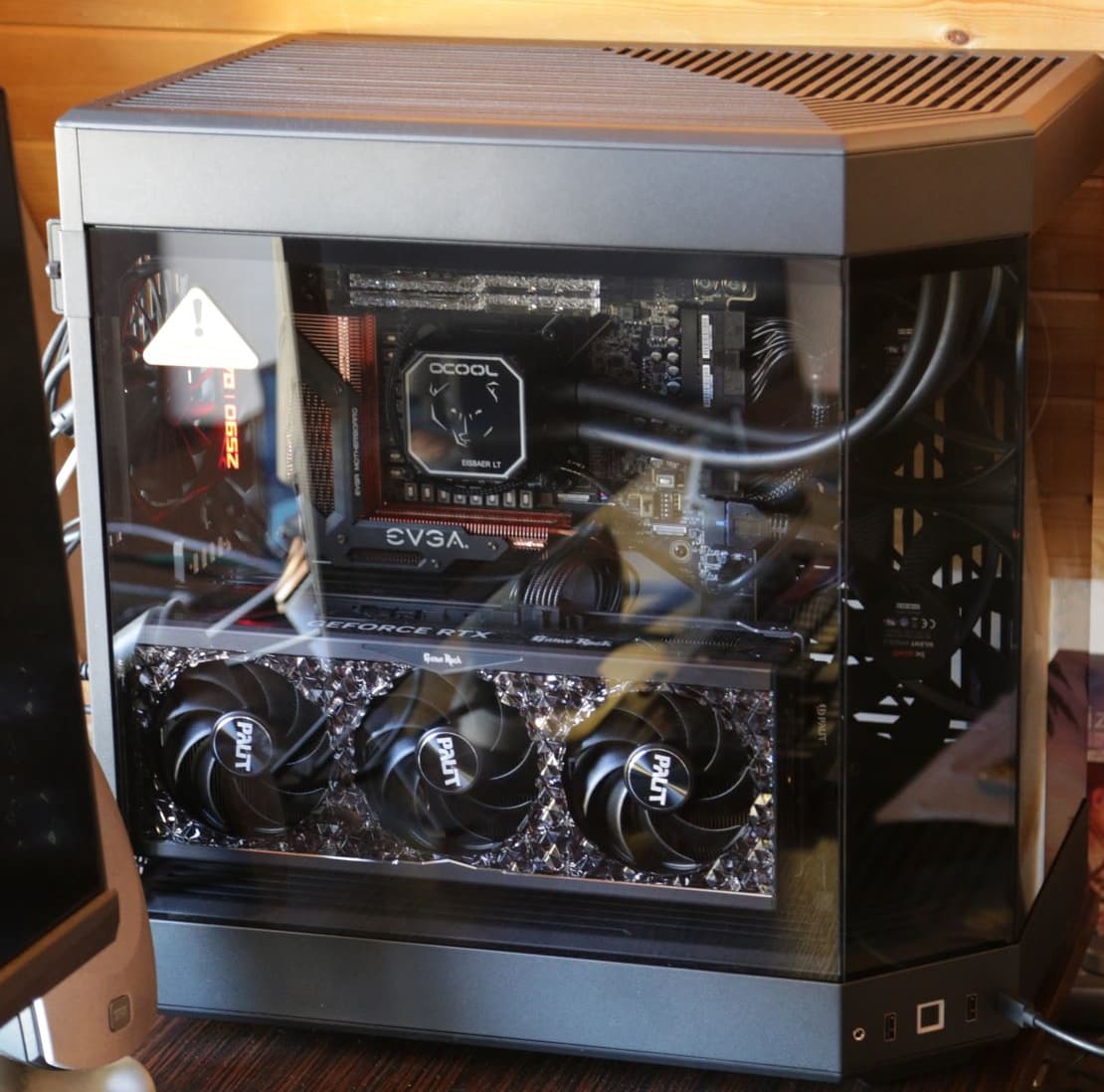
I like the clean builds that are possible with the EVGA dark mainboards. The Palit is a 4090 OC and not just works great but also looks great. RAM is now 32GB DDR4/4000 Ripjaws (due to the old mb) and thats more than enough for MSFS2020. For cooling 4 x 280 inlet and 1 x 280 + 3 x 240 (via radiator) outlet so I have a slight overpressure case here. Cooling is custom slim build 360mm AIO with alphacool parts. Because the Hyte is made for blingbling instead of airflow and only allows thin radiators at the top, its only 29mm, the cooling is not top notch but cool enough at around 70deg Celsius under workload.

And I am still have plans for the next build wich will be more spacey :rocket:.

Yet another update. Bit of a crisis of confidence because I couldn’t get the NLR Flight Simulator Pro and their monitor stand to work. This threatened to derail the whole project, but now I think I will simply wall mount the 55" TVs with extendable arm mounts to get them all in the right spot and not taking up any floorspace.

So consequently I think it is all green lights for the project and I will commence the ordering process. No doubt delivery, build and install will take time and be a challenge - but hopefully I will get there!

Again thank you all for your input on this thread - it has been immensely valuable. I’ll post some pictures as the whole thing comes together!

Well I wish you well with your new build. I’m in the Canberra area too so I’ll probably hear you squealing with joy from my house when you get it up and running! :laughing:

1 Like

Haha what are the chances of that! You probably live in the same street :smiley:

Why not just get their GT Elite kit? More sturdy that the flight sim pro stuff, allows you to fit more accessories and works with the monitor stand…

All good I think I’ve worked out TVs, wall mounting at least 2 with extendable arms to get them into the right position. Orders have been placed so I’m locked in now! :slight_smile:

Hi @ BuzzJungle. Can you provide links and/or specs for the wall brackets? They might work for me too. Thanks!

@SmotheryVase665 will do. I haven’t sourced them yet. I’ve ordered the FlightSim Pro cockpit and the TVs. I think what I’ll do is wait until they arrive, then build the FlightSim Pro cockpit. It’s on lockable wheels so I can move it forward, mark exactly where the TV needs to be, then make sure the mount I get will work. More than happy to link when I get it though.

One more thing - the PC shop has agreed with you on the 360 cooling option or actually suggested this one … https://www.ple.com.au/Products/663202/thermaltake-th420-v2-argb-sync-edition-420mm-aio-liquid-cpu-cooler

What do you think?

The Thermaltake 420 you referenced will not fit at the top of the case, only the front, if that is OK with you (specs here).

Their 360 model would fit at the top.

In the 420-in-front scenario, the 3 fans would be blowing radiator-heated air out the front of the case, through the filter. The filter is actually trapping dust INSIDE the case. You could have the 3 fans pulling air in, I suppose, but as mentioned earlier, I don’t like the idea of radiator-heated air being pulled INTO the case.

Furthermore, would the top 2 and rear fans be blowing air into the case? I don’t like the idea of pulling air down from the top - there is a filter, but you are effectively sucking dust onto it, reducing the effectiveness of the fans. The rear fan has no filter, so dust-laden air would be pulled straight into the case. Plus, your top fans would be working against the natural flow of hot air rising.

If the rear fan was configured to push air out of the case, now you would have four fans (1 rear, 3 front) exhausting the case, and 2 (at the top) trying to pull cool air in against a natural flow of rising hot air. And, don’t forget that you also have 3 GPU fans adding heat into the case as they cool the GPU.

In all the above scenarios, the airflow within the case is, frankly, a mess.

For this reason, I’d recommend sticking with either a 360 mm Pure Loop 2 or Thermaltake radiator at the top, expelling air out the top (& thus blowing dust AWAY from the dust filter), one rear fan blowing heated air (& any dust) out of the case, and two or 3 case fans at the front drawing cool, filtered air in. A lot less dust collects on a vertical (front) surface than a horizontal (top) surface).

W.r.t which cooler is better, I have no experience with the any Thermaltake product, so can only base my opinions based on their specs.
The only major difference that I noticed was that the lifespan of the Pure Loop 2 fans are 80,000 hours vs Thermaltake’s 40,000. The Pure Loop 2 radiator can also be topped-up with the included radiator liquid, which would also prolong the life of that component.

1 Like

Great stuff. Ok I agree I’ve gone back to them and asked them to go with the Silent Loop 360.

So the order is placed and now it all begins!

A relatively minor detail - I’ll probably also need a wireless keyboard and mouse. Any recommends for flight sim use only? Will be dedicated to this purpose not needed for anything else.

Never owned a wireless keyboard. I use an ancient Microsoft USB Natural keyboard and equally ancient Microsoft wireless Intellimouse explorer. I’ve never bothered to see if there are now better keyboards or mice on the market, so cannot be of help here. :upside_down_face:

1 Like

As you already ordered your computer my post will be just informative.
Btw, best of luck with your system.

I am using Triple 48 Oleds (FO48U) + 1 24"FullHD screen. 5900x, 32gb gskill 3600 DDR4 with Giga Gaming OC 4090 (less coil whine), Corsair 1200 psu Platinum (7 years old), Artic 420 AiO for cooling. (No upgrades needed until New Zen or Arrow Lake arrives. As GPU i will switch 5000 series)

Here are some advice:

  • do not compare VR with Triples and Triples with VR. I have Quest 2. If i do VFR i go VR (Lovely). If i fly PMDG 737, i go triples. Why? because i have 10 more thing working. Like Self Loading Cargo, charts, web browser, moving map on tablet. Also using my Stream Deck XL and + for some stuff, tablets, old phones etc. Most important i have a family, they may need me.

  • I Run side 2k center 4k with Frame gen (can run 3*4K but realized that is unnecessary) No VR can reach a good screens visual beauty at 4k right now (especially OLED). Hopefully in the near future.

  • VR e.g Quest 2 plugged in charging, wireless steam VR connection to PC, play msfs with a controller :rofl: in your living room. Why i am writing this? You bought 3x55" you can afford a Quest 3 easily. Keep that in mind.

  • Why Quest 3? Well any VR that does not need gpu slot will work.

  • Goodluck aligning your Triples. i have aluminum sim rig with quad monitor stand. it was painful.

  • goodluck doing HDMI-DP connection. if you have problems at triple 4K check your cables first.(especially if they are cheap cables)

  • MSFS triple is not normal triple experience like sim racing, xplane etc. MSFS triples based on your eyes looking at the center of the screens for best alignment and with your Screen size i think 60 degree may be best. (What i am using right now).

  • Also, if one TV dies you may have hard time finding same model.

Best of luck again. You may have lots of problems but it will worth the hassle. i wish i had this technology when i was 20…

2 Likes

Thanks some good advice here. Never thought about that last post! Have to hope it doesn’t happen for a while!

I am worried about the screen alignment. I’m going to go for centre wall mount and independent stands for the side ones. Hopefully I’ll get there!

So almost two weeks later and no action on the PC, I contacted the company today and they said they were waiting on the motherboard. The ETA for that part is another 10 days sigh. I went with the ASUS ROG Strix B650E-E Gaming WiFi AM5 ATX Desktop Motherboard - anyone got any ideas for a different one I could consider of at least equivalent or better to prevent this from becoming an extremely long delay?

They have told me they have these four options available. Grateful for advice on which to choose :slight_smile:

https://www.ple.com.au/Products/654781/gigabyte-x670e-aorus-master-am5-eatx-desktop-motherboard

https://www.ple.com.au/Products/654851/asus-rog-strix-x670e-f-gaming-wifi-am5-atx-desktop-motherboard

https://www.ple.com.au/Products/654778/asus-tuf-gaming-x670e-plus-wifi-am5-atx-desktop-motherboard

https://www.ple.com.au/Products/654775/asus-rog-strix-x670e-e-gaming-wifi-am5-atx-desktop-motherboard