i9-9900K 4.6GHz
RTX 3080Ti 12GB
32GB RAM
1TB Dedicated SSD for MSFS
PMDG 737-700
Fly Tampa Las Vegas
Constant stutters and a freezing spell of 30 seconds on final approach at all Airports tried even using default Aircraft. Coming from X-Plane, this is disappointing.
Welcome.
Well I only have an RTX 3070 but use the Beta atm and before that OpenXR and get quite good performance that I am happy with. Have you tried either of those?
You should try setting Terrain LOD down to 200 in graphics options (400 is max, but not advisable). Anything higher leads to most peoples CPU loads being mainthread limited (common problem with this sim) and stutters.
There are other things to try but that’s a good place to start.
I don’t know what that is
I don’t mean to be rude in any way, you need to put some work in with this sim, you need to understand the settings and what impact they have in order to optimise your system (even individuals with the same system on paper can have different results). I fly VR and it took me weeks to get my settings right regardless of the dozens of ‘butter smooth’ YouTube and Forum content. Start low and work your way up in the settings, here’s an example of differences between settings https://www.youtube-nocookie.com/embed/QFQQaP7PKDk
Just loaded it in last week, Liveries crash the game to desktop and the default planes with basic liveries fly sketchy, you are being rude because I’m trying to learn the game and right now, you’re being part of the problem.
Language barrier!
Set your resolution to 1080p or 1440p, choose High-End PC graphics preset, turn OFF all AI, turn off Photogrammetry. Happiness follows.
TonyDarkZero, thanks! Great video. Very helpful.
Hey, no problem glad it helped. Shame the topic author can’t be bothered to do a little research 

Tried that and now, sim won’t even start. Uninstalled, back to X-Plane, Happiness follows!
Pure trolling. Just like an xplane fan.
I’m a fan of Flight Simulation, this just happens to be a $300 plus waste because it feels incomplete.
No he`s not being rude, chill out and try the advice given in this forum with good grace. All are here to help.
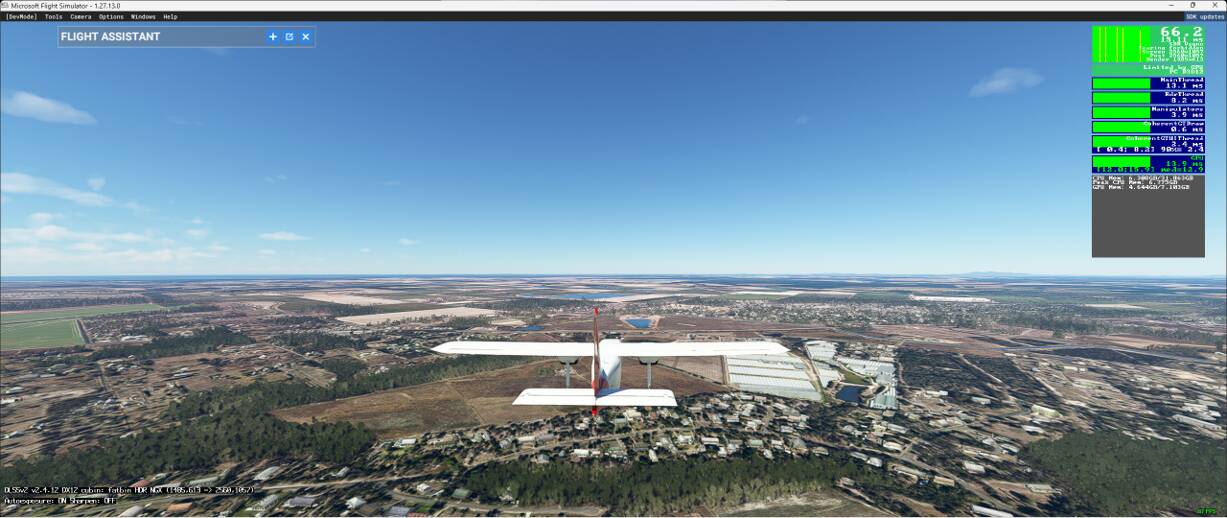
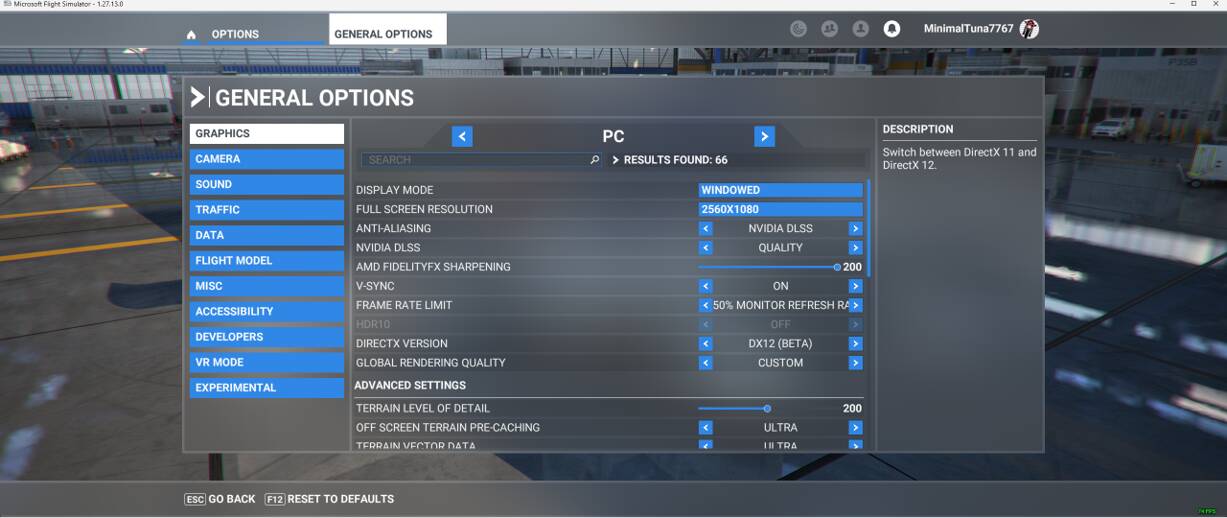
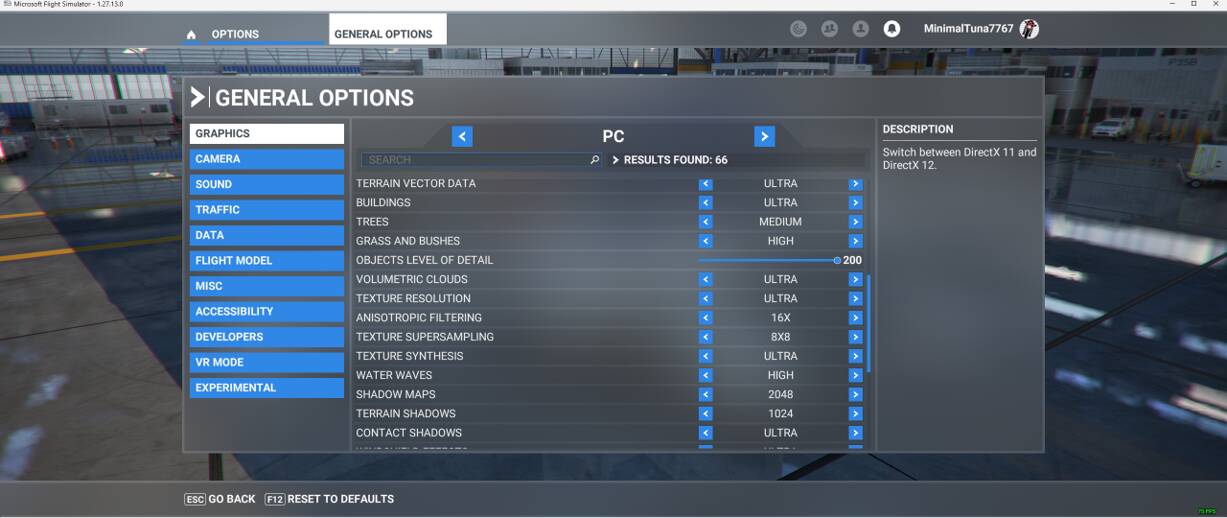
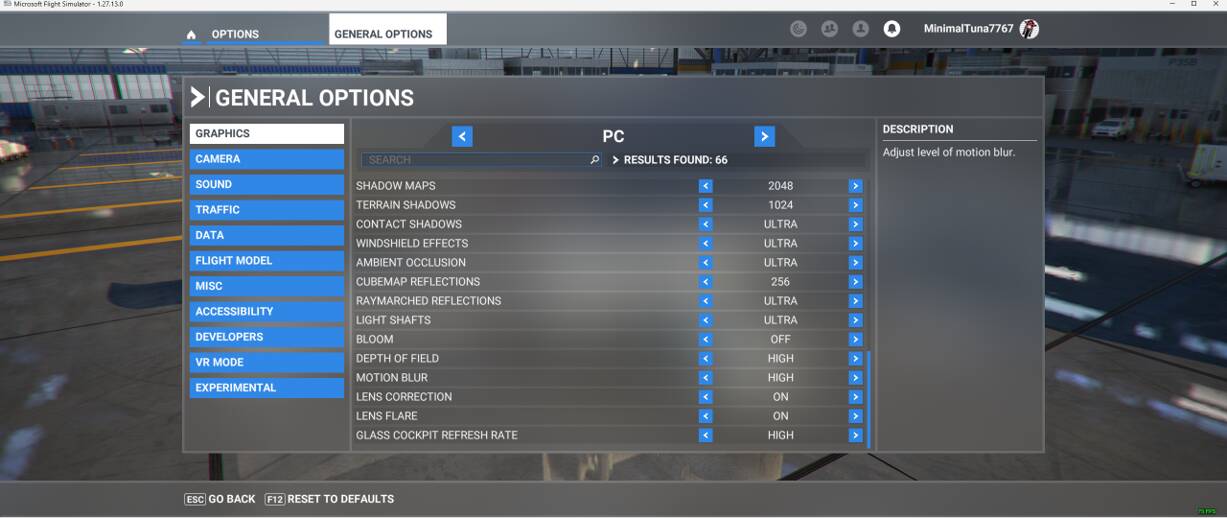
Flytampa LV is a FPS hog, are you having issues at other airports?
It is probably worth adding a few more details to help other people understand where you are at to advise where you may be able to gain some improvements through setting changes.
e.g. what screen resolution are you running? What settings are you using in the sim?
To be honest I am rather expecting you will need to lower some settings in order obtain a more fluid and enjoyable experience. If you have simply selected Ultra settings on the basis you perceive your PC to be ‘High End’, then it may simply be a case of resetting your own expectations of quite what your PC is actually cable of.
Here’s the deal, MSFS seems to not want to work with Payware making this a garbage simulator. I’ve reloaded it 3 times and now, it’s constant crashing or freezing. It’s on a dedicated SSd that was reformatted before each install. You can troll me or whatever but, after spending over $400 just to set this up isn’t cool.
Erm… I not “trolling” you… I have suggested you post some additional about what screen resolution you are running and what in game settings you have set. So what are those details?
If you do not know these details or do not wish to provide them so be it, but if you are only here to vent your frustrations then the help will quickly cease.
Getting abrasive with those trying trouble-shoot your problems is not the way to treat people who are trying to assist you. Help people to help you.
Emptied community folder, now stuck on New Activities Screen. Frustration comes from having a Sim that seems to be corrupting my Operating System.