I got FlowPro into community folder for 24 and it appears in game just fine. Im going through the tutorial and like 2020 it says to set FlowPro to the “help menu” key function in the control settings. There is no help menu in 2024 like there was 2020. Has anyone found a way to get around this?
Ive also tried to search every controller type to see if its hidden somewhere. I looked under the assistance tabs of controls as well.
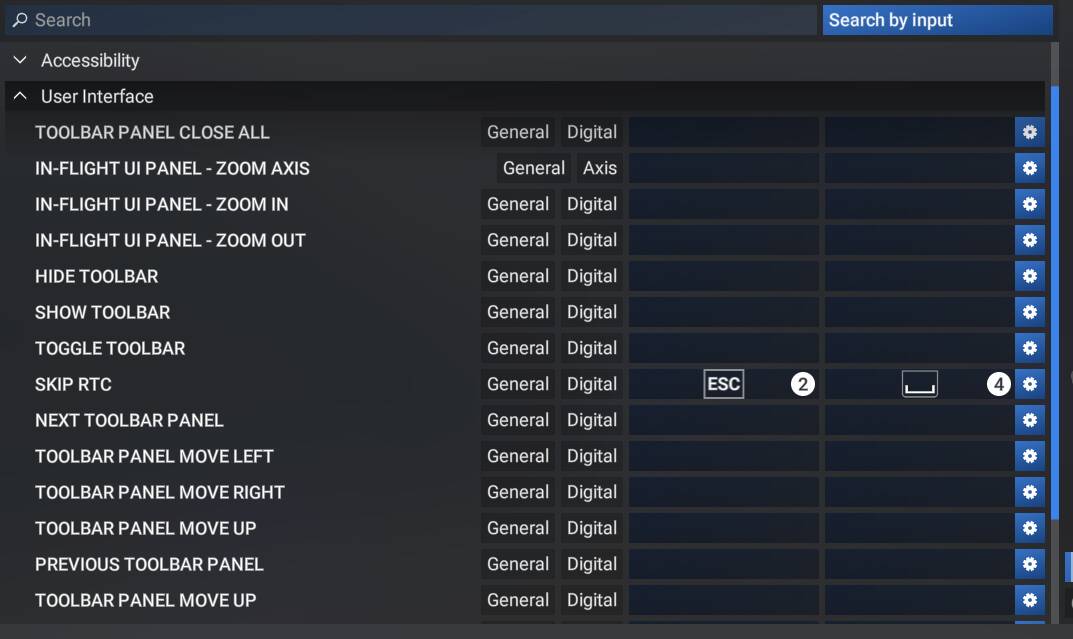
I have searched all over for help. It was on TAB in msfs2020 but now the tablet is on tab. Think it will have to be patched in by the author somehow.
1 Like
Agreed, as far as I can tell its got to be updated to use a different key. The program itself like GSX Pro works in sim once its in the community folder, but you can’t get past setup for FlowPro without setting that key.
According to the developer (P42), the addon is not fully functional in FS24 at the moment and they are working on a new native version, as can be seen in their roadmap.
They also add that the widgets will need to be updated in order to work properly.
So I think it’s better to wait.
2 Likes
Though the product page says its fully native with devs making changes so yeah I’m just going to wait for it to get updated.
Hey,
this is not like “not fully compatible”, it’s “is not work at all” as you have to assign the flow function to a button, or it’s not start at all.
So for now, this addon just doesn’t work.
Or I missed something !
Hey,
well, we had the very first update for MSFS2024 and, I could miss that but it seem that there is no way to use flow42 wheel yet, is it ?
I have noticed this as well. I rely on //42 a lot in MSFS 2020 a lot and really miss it in the 2024 version. I would say it is currently a show stopper.
Any news about the update?
1 Like
did you find a fix?
Help menu will be helpful not only for flow pro but in general within in the sim. You would have thought this would have been one of the very first items included in the sim. Its a no brainer why it was never implemented in the first place is beyond me. Navigating around the sim is daunting especially for new simmers and a help menu would be the first thing they would search for right?
I prefer context-sensitive help. Hover over something and use a keyboard command to open a help page specific to that item.
Same problem, though - there is no help. It’s almost as though they never even considered that people would need it.
We need the same thing for cockpit controls. When I hover over a control (‘Taxi Light’, for example) I should have a way to see exactly what the variable is that controls it. It would help in navigating the overly complex controls page, and would be an even bigger help to those of us who use SPAD or some other control software. Hot links for the in-sim controls. Hover over a button, click on the link, set the key bind. For SPAD all I need is the variable name.
Setting up controls in-sim should be FAR easier.