Xbox series s.
Purchased the pmdg 738 with the skins (had the pmdg for flight sim x on pc).
Worked ok a few weeks ago.
Booted up today, informed me there were mandatory updates which I let it download.
All of a sudden (i have the hotas thrustmaster, keyboard and mouse all connected) it will not let me select any buttons inside the pmdg cockpit, with any controller, even the xbox controller.
Reset the xbox, plugged all out and back in - nothing at all.
All other aircraft are responding to all controllers.

1 Like
Just restart PC 2 times in a row and then enter Microsoft Flight simulator 2020 and it should be fixed. It worked for me
1 Like
I have this same problem. Mid flight (1 hour into flight) I am unable to select any of the buttons in the cockpit. Keyboard and joystick buttons are not working. I can control the flight path and throttle with the joystick, but cannot lower gear or flaps. I had this once before, and it fixed itself after a few days, wish I knew how to get it working again, without having to exit the sim, and have a wasted flight! 
Has the fix been published to MSFS store? Im getting this issue from the beginning, can’t do a thing. Apart from moving the reading lights 
1 Like
Yep. The further you get into the flight more issues come up. I had the altimeter setting knob go crazy on me. Alarms went off. I hit standard and the knob went crazy. The trim wheel on the auto pilot the same. The cabin pressure knob. Then for some reason the throttles stop responding couldn’t move except manual. Meaning you had to move one by one with the mouse which is not good for landing.
I’ve had the -700 and -800 since release and not once has this problem come up. The last couple of days this has happened on a regular basis every flight. The whole cockpit just locks up all of a sudden and there is no recovery. There is no way to finish the flight.
So what’s the deal? Is this done on purpose so we make the switch to the 777? As far as I can see there’s no workaround so far.
this is not just with the pmdg, it happens on other a/c as well, although on the pmdg it seems to be more prominent, i have a feeling that it started with su15, but im not sure
Would this work on an Xbox series x system as well?
Hi all!
Just delete the aircraft’s packages folder which contains cache files.
For example- Steam version:
C:\Users<username>\AppData\Roaming\Microsoft Flight Simulator\Packages\pmdg-aircraft-738
Microsoft Store version:
C:\Users<username>\AppData\Local\Packages\Microsoft.FlightSimulator_8wekyb3d8bbwe\LocalState\Packages\pmdg-aircraft-738.
It works for me.
Good luck!
is this in 2020? i had bad streak of cockpit freezes with the pmdg some months ago, but they seem to be gone now.. no freezes for quite some time
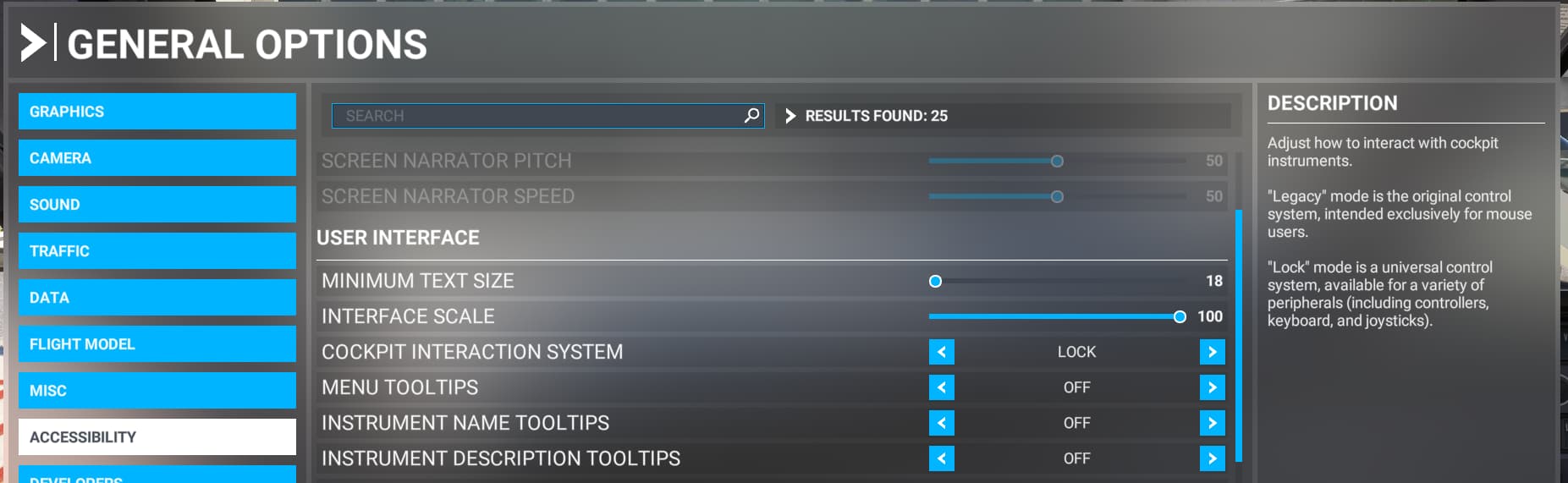
I changed the option above in the Accesciblity menu from “Legacy” to “Lock” and the problem simply disapeared.
Hy,
Just bought PMDG 738 yesterday, and been having this trouble. Couldn’t even land the plane because I can’t click anything in mid flight. Very frustrating. Tryed all the solutions above but none worked. The problem is solved each time I reload the flight. But randomly appears again. Been using PMDG planes since FS2004, never had this issues with the developer before.
was up I have the problem I have had the 737 and 777 of like a year now and it has happed to both planes no animations working and instruments not working and nothing is clickable and the other day everything was fine. I’m not sure what to do.
Does a reboot of the sim fix the issue?
no i uninstalled it reinstalled it and didn’t work
1 Like
Do you have any other addons besides the 7’s?
If so, have you tried with only the 7’s in you community folder?
should i move all in another file for whilst i check
Yes, That is the correct way.
If that solves the Issue, then add them back in groups until you find a group that affects them, and then narrow it down from there.
It’s laborious, but it’s the only way!
It won’t let me copy the folders
1 Like
I’ve seen that before but only a few times.
It isn’t very common.
It can be permissives related, and it could be that it was installed partially in the virtual file system (I hope I have that second part phrased correctly).
See if you can zip any files, and then move the zipped files.
I have seen that work in these cases.