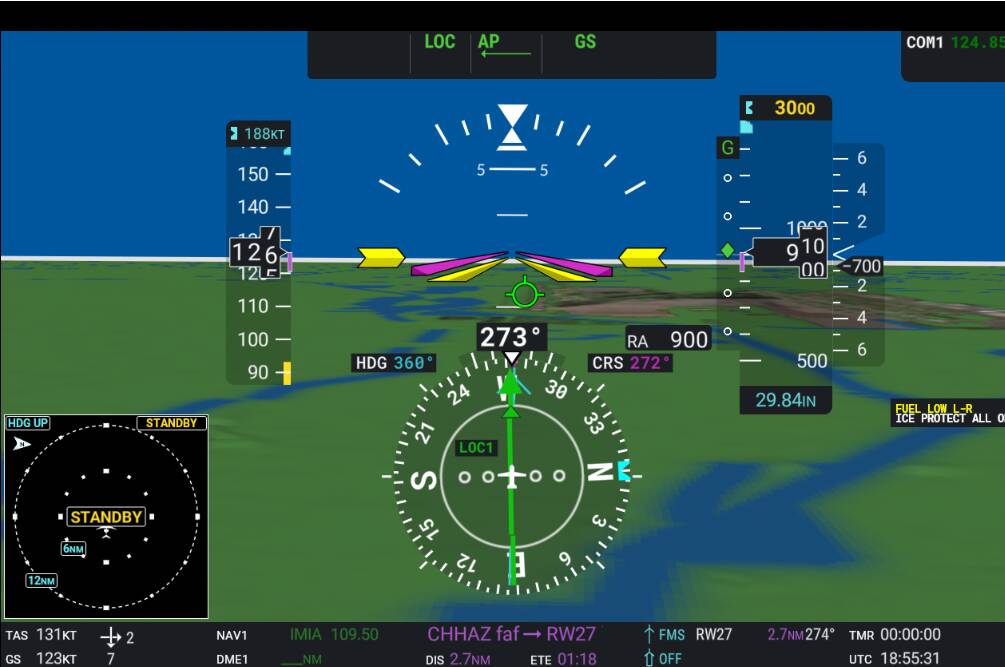
ILS27 into KMIA. Good GS capture but Localizer is off as usual. Normally don’t use AP under 700 AGL. Descending sequence.


1 Like
Humm your GS seems perfectly centered
Will try kmia’s ils tonight
Thanks a lot for providing this Dan. Do you also have an image of the PFD?
I noticed that Asobo is now hiding the COM frequencies from the MFD. I will update WT G3000 to support that, but I’m not sure what frequencies should be displayed in the top right corner of the PFD.

Hi Mikey. I’m using the fabulous FDM Longitude mod along with the updated WT g3000 and am still getting that bloody map freeze on the G3000. Have since update 5. Have you experienced this at all?
Other than the constant dining from the “cabin altitude” warning the flight mod works great. all planes should have an override feature to turn these items off …..
did more tests.
At 1st, I flew KMIA ILS27.
It was like you, centered on GS with about 5kts headwind
Then I went back to CYUL.
As this morning, on 06R I was under GS, with 20kts headwind
Then I flew the opposite, 24L
Now I was over GS, with 20kts tailwind
Flew 06L than 24R, same thing as the other runway
I decided to try without winds at all
All 4 ILS were perfectly centered
So it seems headwind/tailwind , with a certain strength(over 10-15kts), will affect the position of the plane on GS
Edit1: TBM does the same thing
Edit2: Baron with NXI doesnt seem affected
That would explain my being under at KBWI last night, it was a significant headwind.
1 Like
I have never noticed the map freeze.
Anyone else still getting a repeated dinging from cabin altitude warning with the mod?
You shouldn’t with my mod package, because the latest version doesn’t have a warning for “Cabin Altitude” it has a caution (yellow alert - chimes only once) for “Cabin Alt”. Please verify you have the latest version of the mod and that you have it installed correctly. Additionally, there’s an update (0.7.6a) to the WT G3000 that allows you to silence the annunciator audibles and stop the flashing of the CAS messages in the PFD.
I have not had any dinging with the cabin altitude warning. Using version 1.9a of the Cessna Longitude mod, and version 0.7.6a of the WT G3000 mod. Just completed a test flight from KPSC to KPDX and both mods worked perfectly.
I did several texts with mod. 1.90a and WT G3000 v0.7.6 and everything is perfect.
Thanks so much to Dakfly0219 for this mod.
No dinging here, the annunciators are very conservative in 1.90a.

@rRainman,
That’s a Nifty livery!!. If you don’t mind sharing, where might I get one like that?
best regards
Thank you Dakfly for the updated mod! I really wish there was a way for you to get involved directly with MS/Asobo and let them integrate your work into the sim.
The only thing I’ve noticed that is odd or new, not sure which. But I was climbing out yesterday after takeoff and during the climb, I got a Pitot Hear warning on the PFD. I was like, what? Then I realized when I moved over to the co-pilot side, there is indeed a pitot heat switch, and once on, the message went away. Probably my mistake all these months as I thought that was automated on the Longitude as I’ve never seen, in any checklist, for turning that on before takeoff. And probably on me as well, for never noticing that pitot heat switch as well! lol
1 Like
The pitot heat can be toggled on and off with keyboard Shift+H in any aircraft which has a pitot heater.
Not new, the pitot switch has been there all along. Just “hidden” over on the copilots side of the cockpit along with the anti-ice equipment switches. Nice that there’s a caution CAS message now, right? If you’d flown in icing conditions in the past you’d have had a lot of problems without that pitot heat and anti-icing turned on, but I’m guessing that didn’t happen to you so you never knew it was “a thing”.
1 Like
Now there is a message if anti ice is on something like ICE PROTECT ALL ON. Is it intended to be always on PFD? Other thant that the mod works excelent. Thank you!
did anyone experienced this recently? or is just me? w11, last SU, last mod, last wt, last nvidia driver (updated yesterday).
It look like it has to do with the longitude lights  it flicks like crazy

If you have de-ice switched on (co-pilot side buttons) the message should be lit. Generally, de-ice should only be on if it’s needed and turned off when landing in high moisture/low temps, unless really snowy blizzard conditions and very low temps on landing. Not sure if Dakfly has included logic for engine performance decay with engine de-ice on, Dakfly?