Hold Mach 0.8 - 0.84 (I do 0.8) until you intercept 290kts. Maintain 290kts until 10,000 feet then 250kts.
According to the placard
- Flaps 1 below 250
- Flaps 2 below 230
- Flaps full below 180 (gear down prior)
Hold Mach 0.8 - 0.84 (I do 0.8) until you intercept 290kts. Maintain 290kts until 10,000 feet then 250kts.
According to the placard
Hello,
I’m currently flying the mod but when reaching cruising altitude, I activate the auto throttle and it brings it back to idle, is this a known issue? Or what should I do?
Depends what is your speed set to? If this is the first time using autothrottle and your speed is set to FMS speed, then this is expected. Don’t use FMS speed.
No, I’m using manual set to 0.79 Mach but when I activate it, throttle goes to idle, this had never happened to me before. Any ideas of how to fix this problem?
I had the same problem yesterday also. After restart everything was fine.
For me it seems to drop to idle then recover. Similar thing if I change the altitude while using FLC. It levels out before climbing to the new altitude.
I’ve never seen such a thing
Its not really leveling out, but lowering the nose to accelerate to your newly set speed
I was talking about changing the altitude not the speed so it should be maintaining the same speed since I already had FLC on when I changed the altitude.
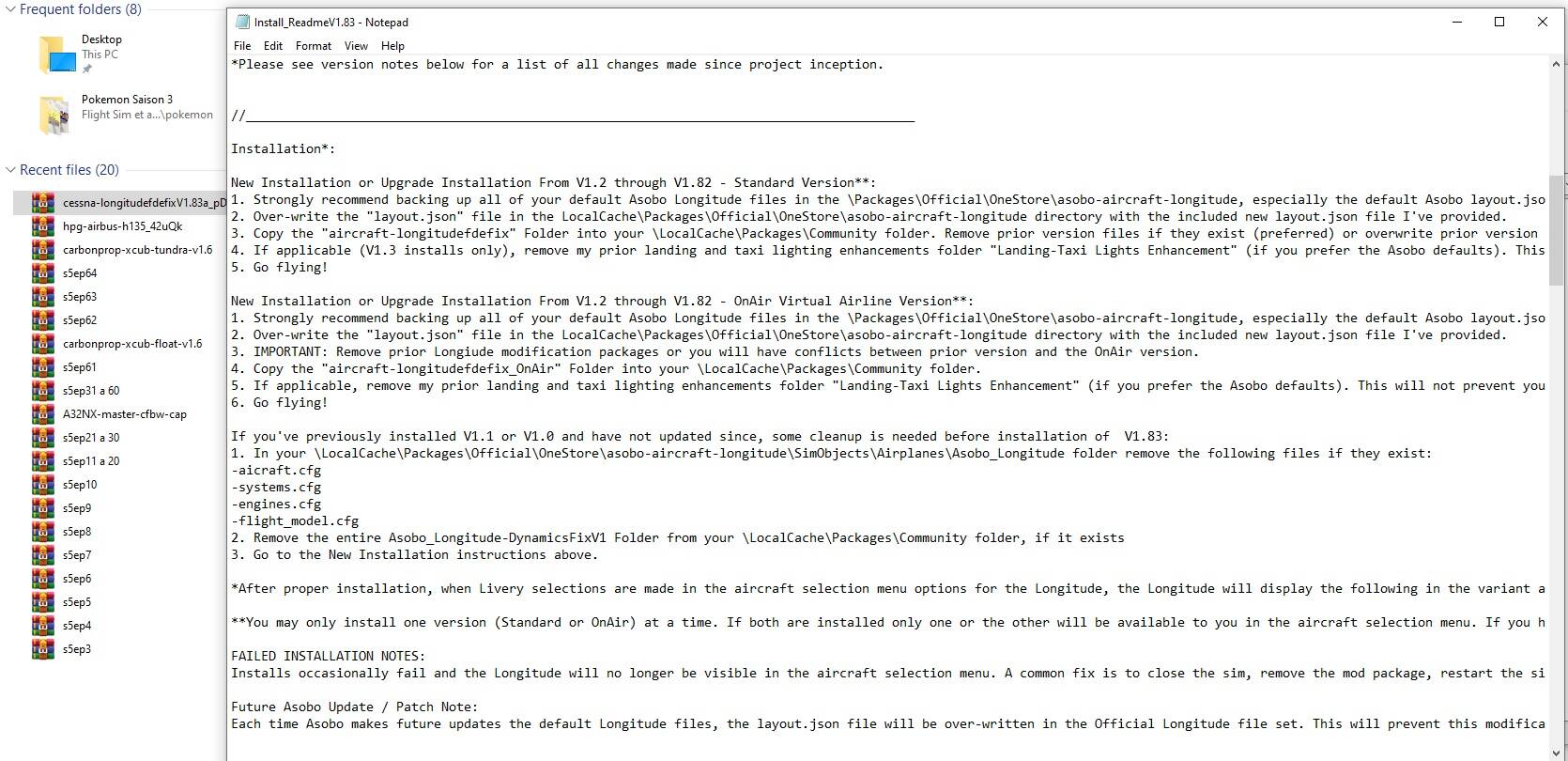
How exactly is one meant to install the mod? Couldn’t find anything in the readme and I know it’s probably a little more sensitive because it’s a “locked” aircraft, am I supposed to put both of the folders in the zip and the layout.json in or just one of the folders or something else?
How can I use a different livery (and cockpit livery) and still use the modded version? I downloaded a beige cockpit version from msfsaddon but after installed it uses the default Longitude configurations, not the modded one.
Thanks!
You should consider taking a second look at the read me file. The instructions are included.
its right in the front page of the mod + within the mod there is a file called ‘‘install instruction’’ …
Installation:
- Download the .zip file and extract to desktop or other location of choice.
- Please read and follow the installation instructions in the included Install_ReadmeV1.83.txt file carefully.
Installation Note:
To confirm correct installation, when in the livery selection menu for the Longitude in MSFS2020, the default Asobo Longitude livery will display the following in the variant area “FDE Fix V1.83” or “FDE Fix V1.83 OnAir” depending on the install version you choose. This will help you quickly identify whether installation of the package was successful and identify package version - this will only affect the default Asobo livery listing and not other liveries, however the performance modifications will be applied to all livery versions.
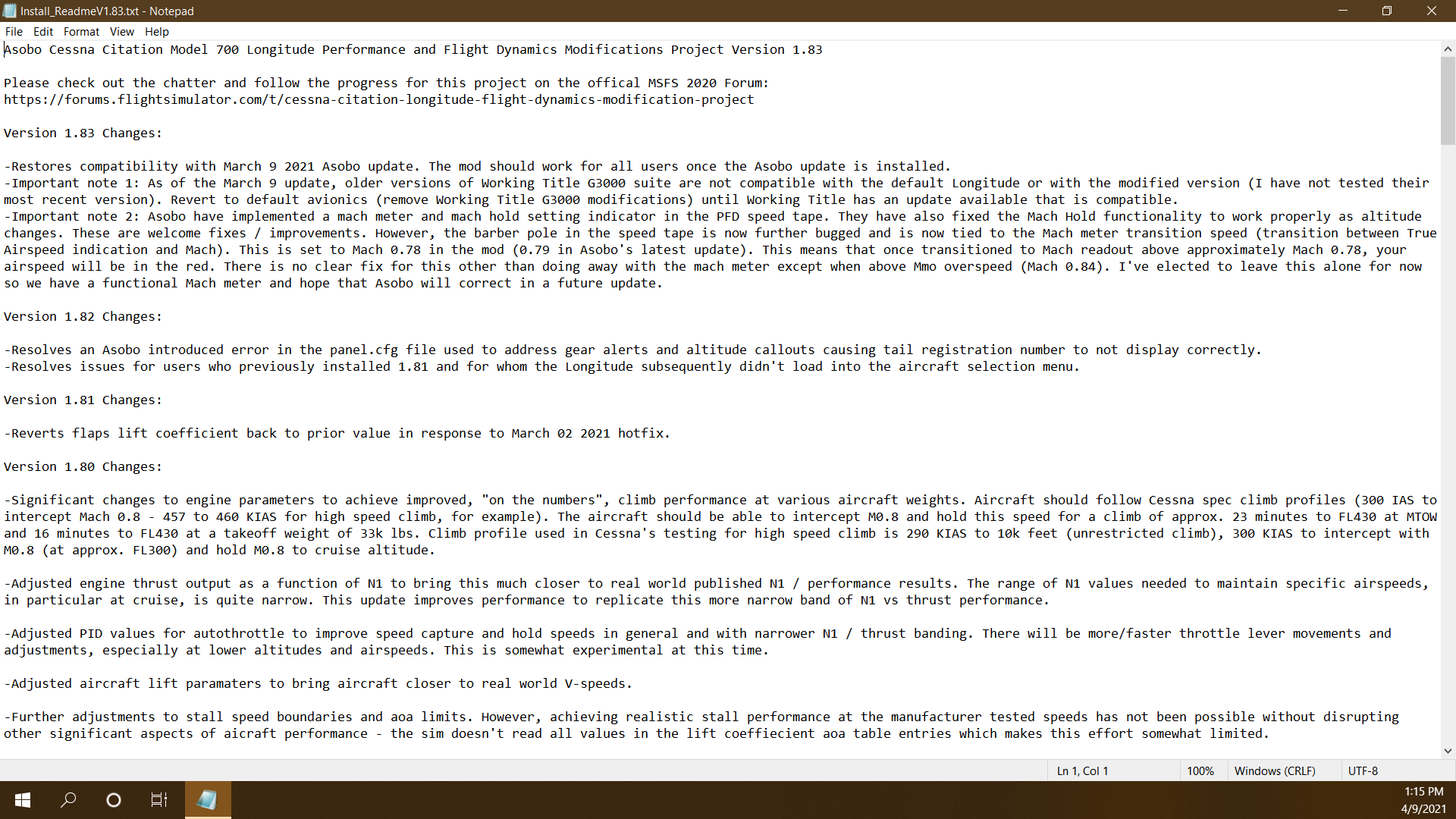
There isn’t a file called “install instruction”. And like I said, the Install_Readme file has nothing about actual installation in it. It’s just a changelog, there isn’t anything else, I scrolled all the way though. The download page just says “extract the zip and follow Install_Readme”, but Install_Readme has nothing about installation in it.
…well, I did find the installation instructions eventually. But they’re sitting right in the middle of the changelog after the notes for version 1.80, instead of coming before or after it like one would expect, so it took more looking than I thought to locate them. Not really the most intuitive location…
you may consider to practice VFR more and buy a bigger screen-size monitor.
Now that WU4 is just around the corner, what’s the official guide on what to do before updating if you have this mod installed? Since we replaced a critical file during the installation of the mod. Thanks
The file in question will be overwritten by the update. Then the mod author will put out a mod update within a day
Oh thanks. Exactly the information I needed