No need to be sorry, I appreciate your help.
Thank you 
No need to be sorry, I appreciate your help.
Thank you
One thing I just noticed, the landing gear horn test switch is wired backwards - when I mouse over it and get an up arrow then click it goes down, and vice versa. I’m in the 360.
Still haven’t worked out what my radios are doing though 
looks like a Breaker … an Inverter .. . Or you simply broke it
I am reliably informed that your Left AC BUS is disconnected 
I have little idea of what any of this means but I always like reading your posts. 
Me neither, if I am honest. 
Shows
@NightMercury358 Are there anymore plans to build other classic British turboprops in the future?
Yeah, learning it parrot fashion. I know what I want to do, just not exactly how to do it. The TBM examples make sense, at least.
For future products it would be worth considering cockpit builders, and not relying on events that Asobo haven’t exposed in an easy to access way. As the AAO developer wrote back then, having a block of Lvar to Bvar bridges would greatly help avoid reliance on the mouse for inputs. Those Lvars are just sitting around, begging to be used!
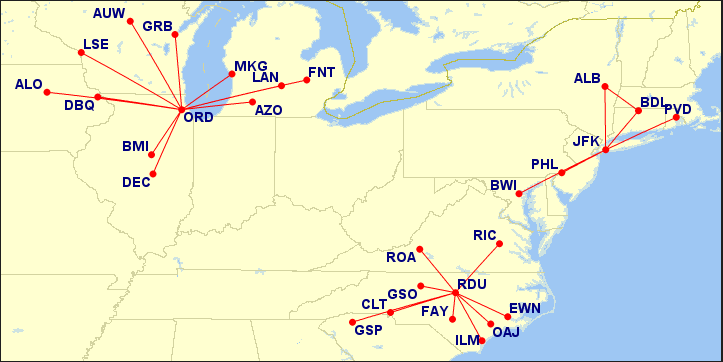
Hi everyone. I made this map of American Eagle Shorts 360 flights from 1993 (the only year I could find comprehensive schedules for). I made it for my own use but figured it may be helpful for those trying to find some fun retro passenger routes for this plane!
If you are looking for historical routes (including departure/arrival times) for the Shorts, your first step is to try the free FlighSim Dispatch utility- it has plenty. If you can’t find what you’re looking for- i.e. specific Sh330/360 routes from a specific airline, you can use TTools and AI Flight Planner to compile/read old bgl files from AI Traffic flight plans from FSX and FS9, hundreds of which are available on avsim and the retroai forums.
its in the air at the moment …
we need to find something popular, Interesting, known and without a 750 GPS LOL
we are even considering stepping it up and going for a Comet , or VC10
Plenty of interesting regional turboprops to do in a similar vein as the Shorts. Such as the Beechcraft 1900C/D and Metroliner. Both of those were in widespread airline and cargo use around the world, and continue to be utilized and IIRC very few are/were fitted with modern GPS units like the GTN 750. And I’m not aware of any other experienced developer doing these.
Without the minimum attempt to offend anyone I think the negation to provide a GTN750 is going from “understandable” to absurd. I totally understand you may not want to add a GTN750 to a Comet or a VC10, those planes never used one are not flying today and it would be completely unrealistically to do it.
But for the Shorts the aircraft is currently in operation and its largest operator does use a GTN750.
Furthermore I don’t think this implies a lot of work PILOT’s added a GTN750 to the Dash7 in less than one week and if the guys doing the GPS make an update you don’t have to do anything.
In the later versions of AAO the link between the BVars and LVars is no longer necessary. BVars can be used directly, either in scripts or by adding them to the AAO database manually.
In general, a BVar works like this:
There is a “base name”, possibly derived from the associated MSFS Input Event. This name can be used to read the value of this BVar
(B:ELECTRICAL_ExternalPower_1_Cover)
this returns the state of the red cover over the ext. power switch in the C208 0/1 = closed/open
To actuate the BVar, you add a “do-word” to that base name. Then you can make it do something
1 (>B:ELECTRICAL_ExternalPower_1_Cover_Set) opens the cover
0 (>B:ELECTRICAL_ExternalPower_1_Cover_Set) closes it
But you can potentially also use
1 (>B:ELECTRICAL_ExternalPower_1_Cover_Open)
1 (>B:ELECTRICAL_ExternalPower_1_Cover_Close)
etc.
I have seen many options for those suffixes, like _Inc, _Dec, _Toggle
Not all of them have to work, but many do.
When looking for BVars, use the MSFS Devel Mode, Tools->Behaviors. When this dialog is open, you can hover your mouse over the switch or lever that you are interested in and press Ctrl&G to get the behavior code. At the bottom of all the components there are usually the mouse actions (…LeftSingle, …Drag… etc.) In there you should be able to find the BVars and/or whatever else happens when you actuate that control with the mouse. You can also see the MSFS Input Events on that dialog in a separate tab - which in general seem to lend their name to the BVars.
For completeness sakes, since SU13 we have direct access to the MSFS Input Events themselves. Those are aircraft specific and only show up in the AAO selection lists when you are sitting in the cockpit (you can also see them in the behavior debug when using the MSFS Developer Mode)
Please note though that IEs do not work properly when MSFS Developer Mode is OFF. That is a bug in MSFS that Asobo has already fixed in the SU14 Beta.
I just wish the SPAD folks would pull their finger out, and get the same working there.
So even if I had the above working, adding code to the XML, I would still need to be in dev. mode to get them to work?
No - the bug with the devel mode that I mentioned is only relevant when using native MSFS Input Events accessed via SimConnect (which, TMBK, only AAO can do at the moment)
It doesn’t affect BVars or LVars or any other logic.
Thanks very much for the clarification.
One other thing:
when you see #whatever# strings in the BVar names or RPN code, that is just a placeholder. At runtime it is replaced with an actual value, which is why using the behavior debug is more helpful than parsing the XML files (= you get the actual, final, name, not just the blueprint).
MSFS Behavior code relies massively on those, and you would have to find the actual value by looking “upwards” through the inheritance tree for a
<whatever>
tag that holds the value that it is replacing.
Yes, I figured as much, so engine 1 or 2 for example.
The Lockheed L-188 was iconic and such a bridge aircraft in history! And it is gorgeous!