I noticed stuttering with some SteamVR games with the later 572 series, but ok with 572.16. Now with 576.02 all’s ok and stutter-free. Used DDU to properly uninstall previous driver beforehand. Also, the usual, cleared nvidia cache and rolling cache.
I can’t say there’s any significant improvements but at least it’s stable. MSFS2020 (2024 still uninstalled) PCVR with QPro/Link and i913900k/rtx4090/32Gb 6400ram. I use and love dlss4 (dlss/balanced) with 1.30x pixel density upscaling for great cockpit clarity (99% as good as TAA). Way too much shimmering with TAA, esp. dusk/dawn. Also, bit better distance clarity/textures with dlss4.
Each to their own I guess.
Thanks for your reply I’ll try ot
How can I try the same thing, 1.30x pixel density upscaling.Need I a program?
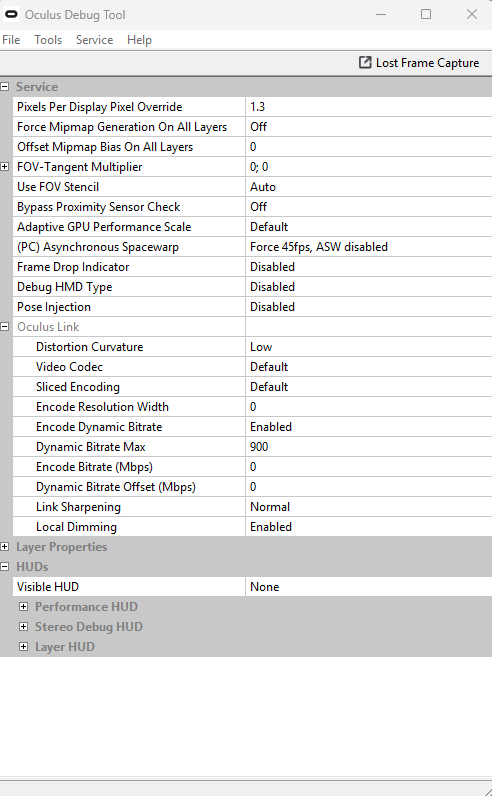
With my QPro and Q3 I do this with the Oculus Debug Tool. Depends on what headset you’re using. SteamVR allows you to adjust video % super sampling. With my Vive Pro1 I set this to 350% and let it use its own reprojection to drop the FPS to 45fps.
I’ve Quest 3. Can I see your parameters in Oculus Debug Tool?
I use Virtual Desktop
Thanks
Where is DX12 in Nvidia App? Cannot find it other than in the sim.
I backed out to 572.83. I have an RTX3060 laptop. The game failed to return to the desktop, and there were some strange graphics during the failed exit.
Ok, here’s my ODT parameters that work best for me with both my Q3 and QPro (v74) using same ODT for both Link and Air Link;
With meta-link pc app I use 80Hz refresh rate with res slider full right. The forced 45fps asw disabled, results in a very nice smooth 40fps everywhere. I’m not using VD or any mods like OpenXR Toolkit right now. None of these settings are applicable to VD btw. Only using msfs2020 for now with dx12 enabled.
Also using latest nvidia driver 576.02 (DDU used to uninstall previous drivers beforehand). I don’t install or use the nvidia app because it’s still too buggy. I just use nvidia control panel with Global 3D settings all default except power = prefer max performance and change the quality texture default from quality to high performance. I then use the latest nvidia profile inspector app to add the common 3x dlss4 overrides to latest option, including the presets (currently preset K).
Win11 graphics settings; HAGS disabled, Game Mode = off
Hope this helps mate. Cheers.
The 1.3x resolution setting is also available in the main Oculus window that pops up in Windows when you connect via Link. If you go to the Device tab, then click on your Quest, then on the panel that slides in from the right there’s a graphics setting option. At the botton of the graphics setting page is a slider for resolution super sampling.
No, that’s not the same thing mate. The res slider pushed to the far right renders the headset a effectively full native resolution. The 1.0-1.5x numbers are just indicative of the pc power required, which also depends on the refresh rate chosen. Adjusting pixel density (= super sampling) in ODT is on top of all that.
I’ve been confused about this for a while – the PC-power concept of course is made clear due to it changing with the refresh rate, but that setting also has resolution numbers shown.
I guess the 1.3x number itself is just a coincidence, but I have a Quest 2 (1832x1920 per-eye native) and with the resolution maxed it shows 5408 (/ 2 = 2704) x 2752. That’s certainly super-sampling quite a bit (complexity of VR lens correction topic aside), and does make the display clarity very noticably better.
In any case, that makes sense!
Thank you for your detailed answers. I will try this
I just reverted back to 572.83 because of stutters and some performance issues all weekend flying into/over some airports. (3090)
As predicted in my last two posts they released a hotfix quickly.
That bug was a bit too much even for NVIDIA 
Edit: 576.15 runs great so far for me.
576.02 crashes the sim as soon as i zoom into the world map (0x887a0006). My GPU temp in the Task Manager stays at 25. The nvidia app gives the normal temp. Reverting to 572.83 fixed it.
I had severe drop downs in FPS from 40 to 6 with the latest release, so back to 572.83 that solved the problem. (3070). Any reason for that stuttering?
Maybe the release notes from the Hotfix gives a hint.
@DaveDeMo6132
That’s good data, and a nice presentation. Did you benchmark with CapFrameX, and then put the results in Excel?
I had to check my driver version. I’m on 572.70 and it’s been flawless. But I’m wondering how it would compare to 576.02