It’s Sennoa, at the beginning of the career in MSFS2024 
Finally, my bug must have come from my graphics settings, because I lowered the TLOD and no crash now.
On my 4th flight (two in 2020 & two in 2024 SU2) on 577 with DLSS 310.3.0 preset K on Quality and the performance is the best I’ve ever experienced since buying this PC back in Feb. I finally feel like I am getting my money’s worth out of the 5070Ti and that DLSS is delivering on its promise as something good for gaming. I am sitting out the current betas, I wonder how many graphics issues discussed in the beta threads might be fixed by this new driver, at least for the pilots flying late model NVIDIA cards?
I’m staying on 566.14 as that’s stable for me. Ever since 570x, I have always found more problems and being on an older CPU makes my CPU always 100% high
I understood preset C is still using DLSS3 technology, and not the DLSS4?
I was only reporting what the on screen stats are showing me. So out of curiosity I selected Preset C in the Nvidia APP:

Then I selected Use The 3D Application Setting:
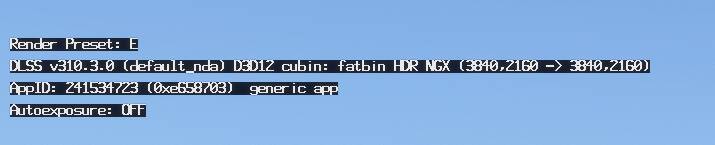
And Finally Preset K:

I don’t know why the Preset switched from C to E in the second screenshot but last time I checked this it was Preset C.
I think people will have different Presets showing if switching them with DLSS Swapper.
I can again highly recommend the debloated “Exostenza” edition drivers from guru3d forums.
Used DDU to uninstall the previous version and installed 577.00 “Exostenza Edition” drivers.
No CTD, no stutters, performing very well - today a 2h flight without any issues in FS2020 on DX12
5800x3d - 64GB RAM - 4080 - 4k - DLSS/DLAA
Rex just released info if not the actual software on ‘Atmos Core’ for MSFS2024. Basically Atmos with a different name! Check it out on their socials. If it’s the same as it is for 2020 then I highly recommend, to me it’s one of those must have addons.
I confirmed that this is the best driver I have tested. Everything was smooth with great visuals in 2D and VR.
My system is:
Motherboard: MSI X670-P WiFi Pro
CPU: Ryzen 9 7950 X3D
Memory: 64 GB DDR5 6000 mhz (4 x 16 GB)
Case: Thermaltake CTE C750 Air E-ATX
Cooling: Liquid cooling for CPU and 14 fans + 3 of GPU
PSU: Thermaltake Toughpower GF3 1650W
GPU: ASUS RTX 5090
4 SSD m.2, 2 TB each
VR: Varjo Aero
SU3 1.5.19.0
NVIDIA Drivers 577.00 debloated with NVCleanInstall and the older drivers deleted with DDU in Safe Mode.
And what did your system cost, to the nearest $1K!
I have been updating the system in phases. The latest was the RTX 5090 coming from a 4090, and I upgraded the PSU. The complete system with sim hardware and bells and whistles is around 6K.
Definitely the best driver I’ve tried in terms of fps and smoothness but one possible downside for me so far is that I’m getting severe sound stuttering in heavy PG areas. Had the occasional sound glitch before but nowhere near this level.
Will try removing and reinstalling sound drivers when i get a chance but I suspect its the 577.00 nvidia drivers fault.
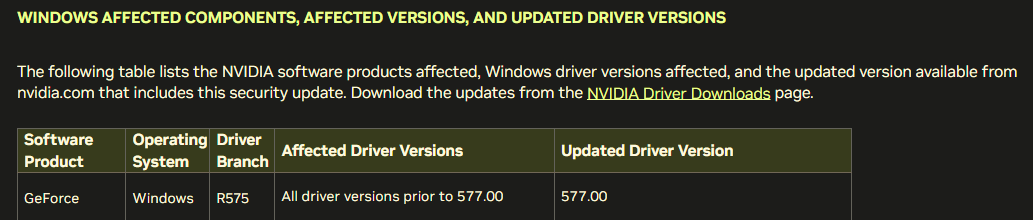
thank you very much, I can’t find a driver security update for the last release 577.00
My ESET software already started yesterday with a warning after the driver installation…
most common things would be to
- clear directx shader cache
- do a CLEAN uninstall of NVIDIA driver using DDU and then install the new driver with NVcleanstall (don’t forget to set the option to prevent windows from loading their own driver on reboot)
- clear your rolling cache
- reinstall the game
If that doesn’t help with the CTDs you should make sure
- your BIOS and chipset drivers are up to date
- your RAM is not overclocked or running too tight timings
- your GPU is not undervolted or overcloked
Oh thanks for the advice. Im being hopeful here because I need step by step instructions because I don’t know how to do any of those suggestions because I am frankly stupid when it comes to manipulating my PC. I am always just hopeful the things work out of the box!
I am not in Beta
removed my remark on that
Hello, sounds like your situation is more basic than 577, and getting you help is going to go far afield. You have a new PC with a very popular spec, perhaps search out a few build threads to see how others have been problem solving. You may wish to DM a few as well to ask for help.
I read that one uses the DDU only if installing a new GPU brand. I am using the one it came with pre-installed by the gaming company who built it.