Game Ready for Crimson Desert and DEATH STRANDING 2: ON THE BEACH
This new Game Ready Driver provides the best gaming experience for the latest new games supporting DLSS 4 technology including Crimson Desert and DEATH STRANDING 2: ON THE BEACH.
Fixed Gaming Bugs
Crimson Desert: Game crashes when launched on R595 drivers [5861012]
Resident Evil Requiem: White glowing light/dots may appear in game when Subsurface Scattering is enabled [5915673]
Star Citizen: Game client crashes when launched [5935027]
Fixed General Bugs
When the graphics card is overclocked, GPU voltage may become capped, preventing it from boosting to expected levels [5934973]
Intermittent application crash or driver timeout may be observed when playing multi-key DRM content in a browser on HDCP 1.x monitors [5934450]
Known Issues
Enshrouded: Missing terrain in some areas [5955501]
Arknights: Endfield: stutter may be observed in some gameplay [5950402]
When the graphics card is overclocked, GPU voltage may become capped, preventing it from boosting to expected levels [5934973]
I am running the ASUS GPI Tweak OC software and heard a little additional fan activity… looking good on the various GPU parameters. Just the first flight.
I upgraded from 591.74 to 595.79 earlier today (DDU in safe mode beforehand) and after testing with msfs2020/2024 in VR with my QPro/rtx5090/Link Cable, all’s working fine. I don’t see any significant differences in performance or clarity. All seems stable, so I’ll stick with this driver for now. Cheers.
Thank you for telling me. I will stick then with 591.74 as long as i dont have one of the new games that they are “game ready” for. For MSFS it seems there is no difference.
I’ve stayed with 591.86, and follow the NVIDIA Forum feedback threads. Regardless of driver version, I do use DLSS Swapper to use the latest DLSS and FSR versions in MSFS.
@GimbalAxis No matter what method you use, getting the latest msfs020/2024 dlss4.5 versions and presets is a very good idea mate. That is, assuming you are actually using DLSS, lol!
As an aside, with msfs2024 (not 2020) and the latest nvidia driver, I continue to get a few black square artifacts (mainly around the cockpit panel) in 2D mode using DLSS, but not TAA. I don’t get these in VR, which is all I fly in. No big deal since I mainly only use 2D mode when I want to do new controller setups. I can set the PC settings to use TAA and dlss with VR, but this sometimes causes instability if I switch between modes during a flying session. This is with non-beta su4, so maybe something that will get fixed with su5 final. Cheers.
For the record ASUS has officially approved the last few drivers in this series and recommends using the latest available. Been a couple days and OK with my ASUS 5080 including the ASUS GPU Tweaker OCing.
I would suggest not to install the HD Audio drivers and not install NVIDIA APP. When you switch from AMD to NVIDIA malke sure to use DDU to install your drivers.
I concur 4.5 and preset M are the real thing. It should be noted that whenever you upgrade your Nvidia graphics driver, it is common for the Nvidia app to reset your version and preset back to 310.0 and a lesser preset. Nvidia is not making that choice alone. MSFS has that as their default so Nvidia is following their specs. What we need is for MSFS to upgrade their base code to use and default to the more advanced DLSS. It clearly works great with 4.5 and preset M especially in VR
Half a dozen flights on 595.79 in 24 SU4 with no issues on my PC (specs in profile). No issues either with the NVIDIA app either for install or otherwise (with my own settings and DLSS4.5/M)
On my PC with the 5070Ti, DLSS 4.5 Performance will smoothly render in 2K with 4K output to my 65” 60Hz HDTV, providing 60 FPS in all but the most extreme situation. Wonderful for me, I love it!
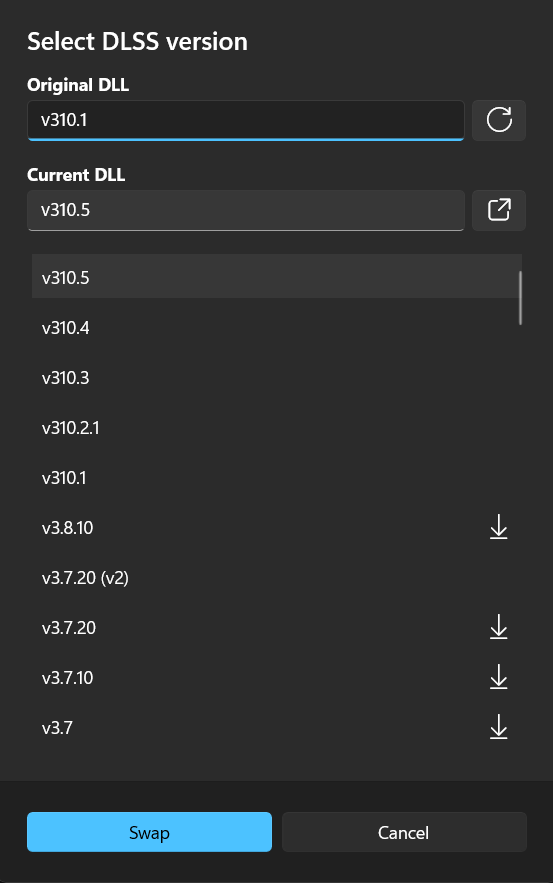
Nvidia provides various DLSS versions for their current drivers. Through a program called DLSS Swapper, one can see which of these versions are applied to various games and software you have installed.
Below is my current settings for MSFS 2024 and the drop down for the DLSS version. This program allows you to easily swap to newer versions of DLSS and their presets, also the versions available for FSR. It is also possible to use the Nvidia App to pick these options but I find it far less intuitive. Despite some people’s warnings about use of this, I have found zero issues.
You said you are coming back to nVidia. I assume you meant you have purchased a 40xxx or 50xxx-series card. DLSS 4.5 and Presets L and M are designed to take advantage of hardware in those GPU’s.
I have a 3090 Ti, which doesn’t have that hardware, and have found it’s best to stick with DLSS 4.0 and Preset K.