Am I right in saying that my oculus rift, the pre s, is not being supported? If this is the case I’m pretty annoyed as this was only purchased 3 years ago, it was expensive, I can’t believe that I’m going to have to buy a new £700 ish hp reverb g2, which is even more expensive than the rift I bought brand new. Flight sim is getting stupidly expensive, I have been looking forward to the MSFS VR release, if I’m correct and my Oculas (which I only use for flight sim) is not supported, this has ruined my Christmas break totally! Wouldn’t mind but everyone is out of stock for the HP reverb g2.
No you aren’t right
That’s great news! Although I spent most of Xmas eve trying to get the thing working with no success.
I have a pre-s and it works perfectly.
Did you install the openxr for wmr app?
Changed the registry path to the oculus runtime?
Dowloaded oculus home beta (v.24.x.x)?
What does “does not work” exactly mean? Can you switch to vr, do you see the double view on your monitor, but no image in the headset?
Or do you get an message “headet not connected”?
Or …?
So I have put the oculus app onto beta
I have changed regitstry
When I go into msfs2020 options/general all I have is Vr mode at bottom, if I click on it, it brings up the page with switch to VR, underneath it shows
vr-activate / deactivate
Vr- toolbar toggle
Etc…
But I can’t do anything with this page clicking on them does nothing, the only thing I can do is click on the switch to VR, once I’ve done that, I have a view in the headset of instructions saying Recenter, which if I click nothing happens, I’m then stuck in this view and the only way out is to control alt and delete and end the programme? Any ideas ? As I’m at a stand still?
Search the forum this issue is already solved many times.
(for example set the input keyboard to default en press space…)
Thank you for your remark, I’ve looked couldn’t find anything, why isn’t this easier for none tech people! Should be plug and play!
That ‘page’ where you can’t click anything just shows the vr-related key-mappings which are available. You actually need to map them first in the normal controls-menu before switching to vr-mode.
(unfortunatly they are not mapped by default)
I shall try this, thank you for your help Beginner314, really appreciate it. 

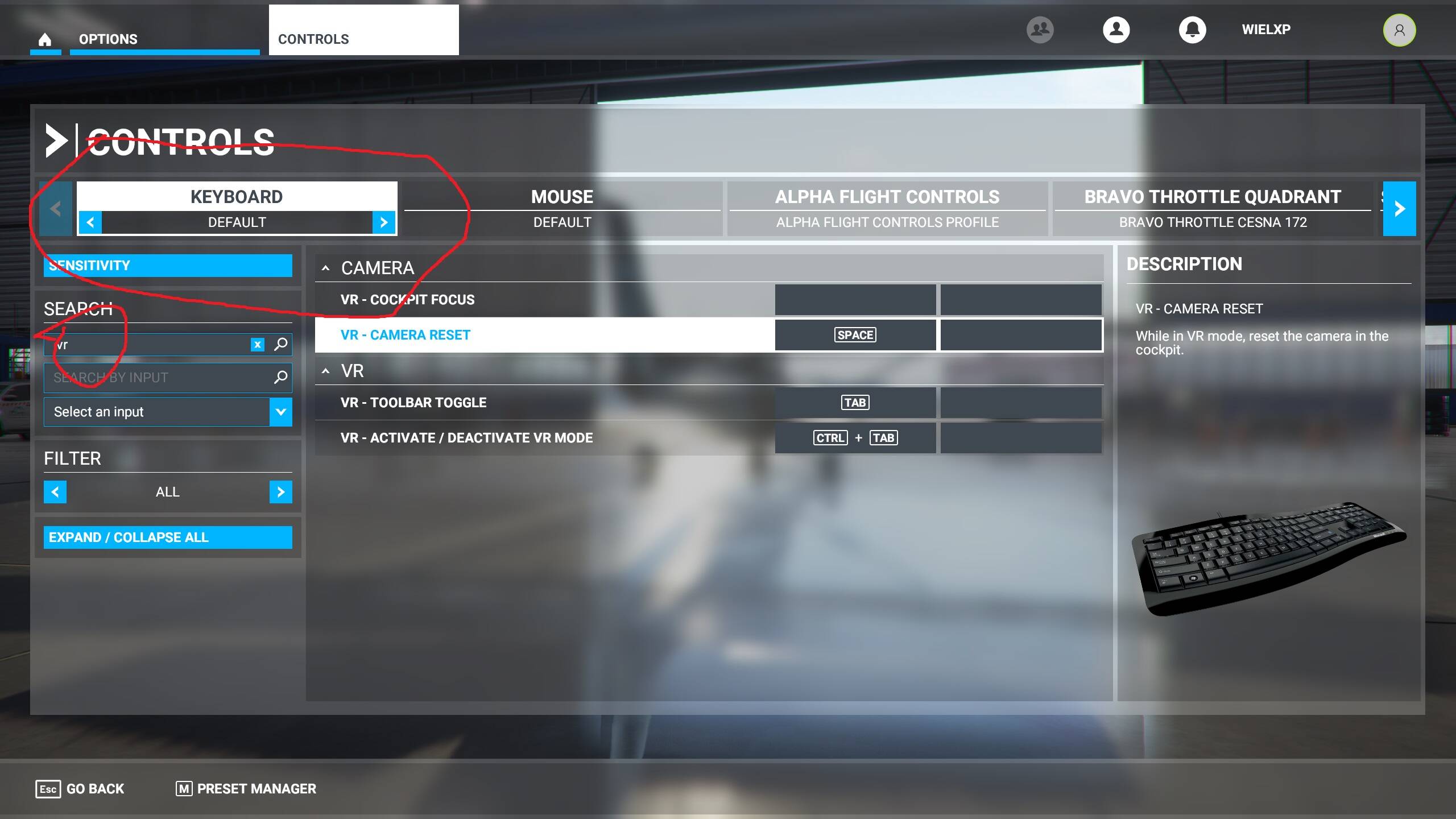
Thank you fellow simmers, yes all I had to do is select default on the keyboard settings in the sim, such an easy fix, strange thing though, I don’t normally change anything on the keyboard settings as I use yoke, throttle quadrants and pedals, not sure how it came off default, but I’m very happy to admit when I’m wrong, it’s a definite improvement on other sims vr, but I think I will still invest in the reverb g2 when it’s back in stock, as I believe the msfs awesome graphics deserve the best headset. Thank you again.
You might like to consider the following tweak. It made a huge difference to clarity and smoothness for my CV1.
In my case, I chose to use in-sim res of 80% and Pixel override of 1.5.
In short, you reduce the in-game resolution and have the oculus driver boost it back. You also set a framerate of 30 and allow the drivers to boost it back to 60 via Oculus’s ASW feature.
It really works !