Interesting. I wonder why I get a slideshow then when I use OXR200.
Maybe something in your Nvidia settings? Try what I posted a couple of days ago. I have HAGS off, game mode off, resizable BAR enabled but I don’t think that affects MSFS.
Besides the render scale the biggest impact for me is clouds and especially flying through the misty type. Even with a 3090 and 5950x the difference between ultra and high is about 7fps which is huge. I have LOD at 400/200 and terrain pre-cache ultra. OC is another fps killer and I have that off.
I’m getting 35fps on the ground or above New York etc and 45fps at say FL100, all with 50/200.
Thanks. I’ll experiment with that.
I have my PC settings on 1440p 60hz when using the G2 in VR. I also keep all of the other graphics settings identical between PC and VR and it seems to make the switching between my tv and the G2 faster and smoother (when the PC settings for me were turned up more, ie 4k and high/ultra on all), switching out of VR back to 2D was slow and sometimes crashed the sim.
I’m getting very similar results as others here. Been testing with the Berlin discovery flight (no particular reason.. just the one I chose to keep flying over and over and over again)
I’m finding that TAA/OXR 50/200, while definitely smoother than 80/100 is just a tad too fuzzy for me.
Even with my 10850K/3090 I find that 100/100 is just too jittery so I usually fly at 90/90 and then usually with motion reprojection enabled.
Inspired by this thread however, I did just test out TAA/OXR of 75/150 and am impressed. It looks nearly as good as 100/100 (without MR) but is far smoother. At 100/100 I get around 27-29FPS in the Berlin discovery flight. With 75/150 I only achieve 30-32 but it is far far smoother. Like, I almost don’t need to enable motion reprojection smooth.
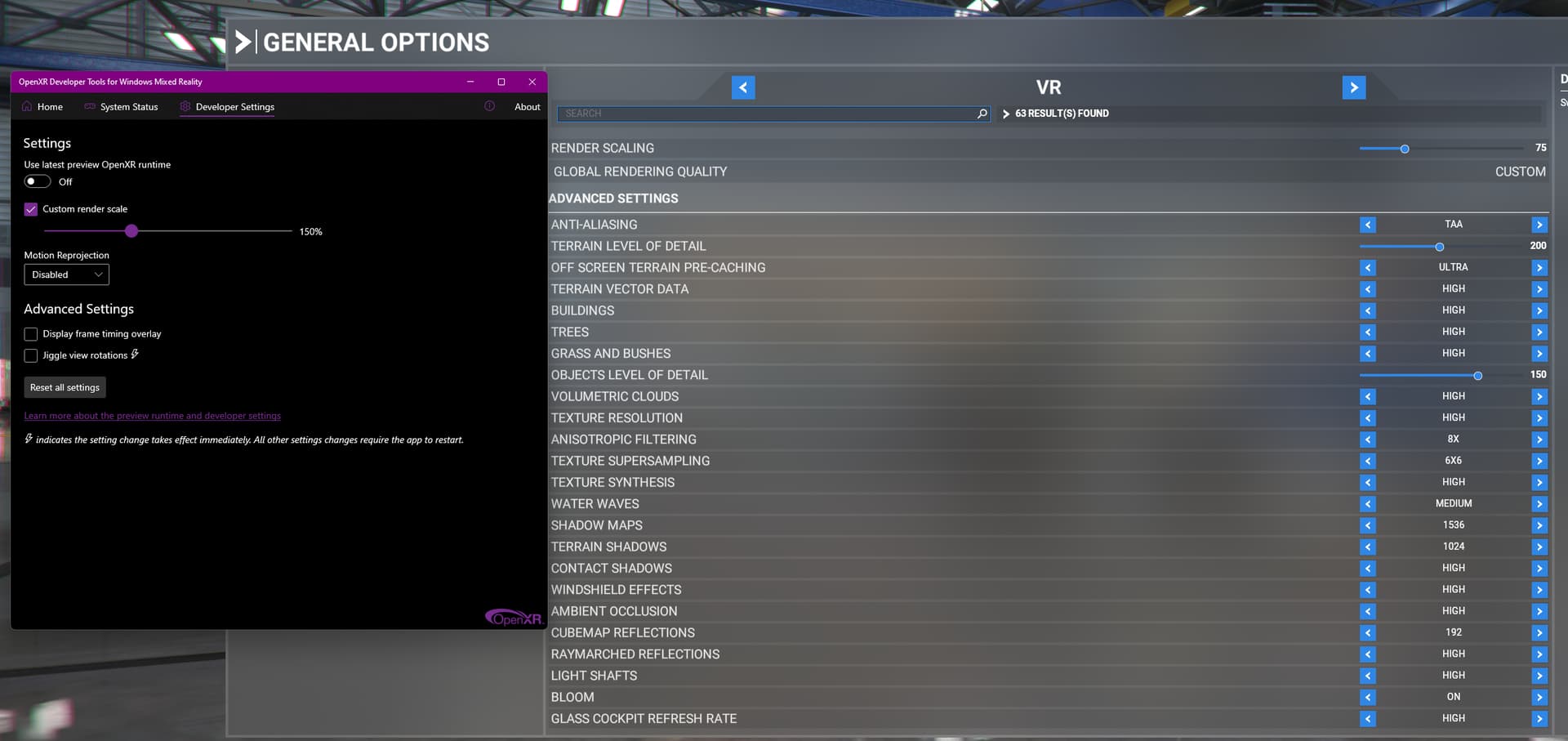
Here’s my full settings if anyone else flexing a 3090 wants to give it a shot
W11, Game Mode ON, HAGS OFF, Hyperthreading OFF,
NVidia control panel settings per above post except LowLatency=Off and Pre-rendered Frames =3
Tried it 5950x and 3090 and get 27fps in the red with 75/150. Super clear however but 50/200 gives me 34fps and green. Berlin is always the worst discovery flight for me to benchmark with, even more so than NY, Paris or London.
Problem with 50/200 is whilst the outside is very clear the cockpit isn’t. I haven’t flown the a320 for a while but can fully understand if people are struggling to read the displays. I’ve been mainly flying the Hawk where cockpit clarity isn’t important but fps is as you need to look to the sides around corners of hills etc and do a lot of rolling.
it’s surprising how we’re experiencing different outcomes with 50/200. It gives me great cockpit detail, but outside is shimmery
I’m used to using 100/100 with reprojection as a benchmark
Interesting. I’m not an AMD guy but as I understand it, your 5950 should smoke my 10850K. I’m running a 5GHz all core OC. I wish I would have spent the “little bit” extra and got the 10900. The 10850 is just a bad binned 10900, and my specific 10850 is a poorly binned one at that. Some people are getting good 5.2Ghz OCs.. I can barely get “stable enough” at 5Ghz without blowing my temps up with insane voltages. And thats even with a 480mm AIO cooler.
I haven’t tested without my CPU OC for a while but when I was setting it up (probably SU5 timeframe) I definitely noticed improved frame timing (less jitter) in VR.
I also run a healthy OC on my 3090. I have the Asus Strix which is a 480W card with 3 power connections. I crank that sucker up and give it a little extra clock. I know a lot of people shy away from GPU overclocking with MSFS, but in my experience, I pick up several FPS with my OC settings. “Several FPS” sounds ridiculous to a pancake gamer.. but as we know, VR is a game of inches when it comes to performance.
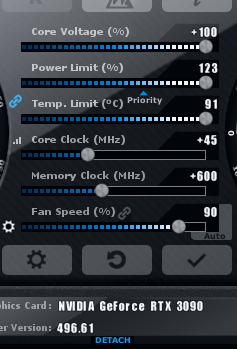
I don’t have any stability issues with either of my overclocks. Once in a blue moon MSFS will CTD, and that may very well be due to my OC’s.. but its not a problem enough for me to investigate.
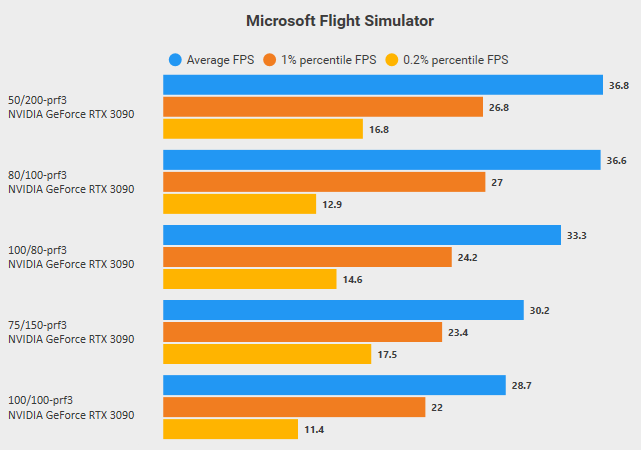
Here’s my benchmarking results.. all settings per my above post, the only difference being the render scaling (TAA/OXR). 2 minute capture starting at the beginnin of the Berlin discovery flight, east until just past the Berliner Fernsehturm building (thats what Google tells me its called) and then back to the west until the capture finishes.
It’s apparent why 75/100 feels so much smoother to me if you look at the %1 and %0.2 lows in relation to the average FPS for a given test.
I can’t get within 4fps of your scores, and that’s being Gpu limited.
Hi @PendantIsland68, just want to thank you. For a VR “pioneer” from 2016 spring playing tens of hours trying to fine tune clarity/performance in Elite Dangerous/X-Plane 11 and now MSFS - this is a really good find. Usually I play with OXR 100 / Render Scale 100, which indeed has superior cockpit clarity, and antialiasing. But when looking outside, especially now when flying in night over cities (Seattle for example) this 200/50 setting gives most realistic experience when it comes to level of clarity and sharpness of the surroundings, lights, buildings.
And on top of that, a huge performance gain. No more stutters even when flying low on photogrammetry cities.
To be noted: It can be very jaggy and stuttery with this setting for first 2 minutes before it fully settles down to be smooth. And it can “break down” when going to main menu in VR (will stutter) and when loading a new flight. So at least seems to be working perfectly with the first or a few different flights after waiting the first minute or two.
OpenXR (latest update):200% MSFS render scale:50%
OpenXR use latest preview +Motion reprojection to automatic
Reverb Pro (G2)
i7-9700k @4.9 GHz
RTX 3080 OC
Windows 10 latest update
I too have found the best results are without using the oxr render scale and taa100 in sim. Must of tried every combination until I settled on this setup.
200/50 completely wrecks VR on AMD ASUS 6800XT
ok guys, i bn watching this forum for quite a while and keep cn the different settings. I have oculus rift-s. I installed openxr and told oculus to us it. But where do I change these settings ull keep talking about. I normally use OTT or developer but they dont have these kind of setting. Is this all based on the G2?
Hi - yes it’s the reverb g2 OpenXR developer tool that it is about
aw… thank you for that.. man they sure covid inflated the price of that thing. I should’ve pre-ordered it.
My main concern with VR. With the G2 and these setting can one clearly see the airport on the horizon or is it blurred out until you hit the middle marker like the rift.
Unfortunately this didn’t work for me either - the outside was OK, but the cockpit was too blurry. I also tried 70/200, which was a little bit better, but still not good enough to easily read the instruments. Around 100/100 seems like my sweet spot.
Reverb G2, AMD 5950x, EVGA 3090 FTW3 Ultra, 32GB/PC3600, 2TB M.2 Gen3x4
You will surely be GPU limited here so as I understand it the 200mhz will have no measurable impact? There was a post recently where someone downclocked from 5.2ghz to 3.6ghz without impact. (I’m also running 10850k at 5.0 with 3090)
I don’t disagree with you, which is why I’m not super hot to trot on upgrading to the 12900. We are mostly bound by the GPU in high-res VR but at times it still seems that the CPU struggles to deliver frames consistently. I can sometimes see the “limited by” flickering between GPU and MT. It seems that more clock speed would potentially help with that.
Also, I’m way over my head in guessing and talking about these things. I’m fortunate to be able to have the system I do have  But more is always better!
I have that as well in VR - it seems to be on GPU but main thread flashes briefly every couple of seconds - I think it is like that for everyone but interested to hear if not !

Did you see this actual video?