Never apply multiple changes at the same time. For example, after making BIOS changes, test PC stability over the weekend. If everything is fine, you can then proceed with GPU undervolting and test again. This way, if something goes wrong, you will have a much higher chance of quickly identifying the cause of the problem. If you apply several changes at once, it may be difficult to determine what caused the issue.
I am quite happy with the current performance of my rig with the RTX 5090 and the Ryzen 7 9800x3d. I had resizeable bar disabled since I got my new computer in April. Of course, I am (as many of us are) always curious. What could be potential benefits of enabling resizeable bar again? thanks a lot, warm regards, Claas
Out of curiosity, what made you decide to disable ReBAR?
OMG sorry, I just double checked … I had it enabled all along, nevermind, I got confused.
EDIT:
But what definitely helped with crashes in the past w SU5.1 and stable SU5 was the June BIOS update by MSI (B850 wifi gaming plus). it´s night and day and I am very happy with that BIOS update. it´s crazy how consequential these can be.
Is that MSI Afterburner for the curve editor? I don’t recognize it.
No, it’s Asus GPU Tweak III (since I have an Asus card).
The concepts are basically the same, but I think some of the ways the software works are different from MSI Afterburner (from what I read).
I just saw this Users cry foul after AMD stripped memory crypto from its consumer CPUs - Ars Technica Will this effect us any bad way performance wise? First it was Windows 11 bitlocker backdoor and now this? We have to stay on old bioses and old chipset drivers? I will delete this msg if it is not appropriate
edit: ASUS beta BIOS brings back TSME support to AM5 X870/B850/X670 boards - VideoCardz.com
Interesting, thanks for posting.
There are many possible explanations, all speculative:
- It’s possible they removed the encrypted ram functionality to gain some performance metrics
- Equally possible it wasn’t meant to be enabled in the first place on consumer cpus
- … But the fact that the flag is there means they could enable it for those who wanted it, but as mentioned at the end, perhaps it was untested / unvalidated on consumer CPUs.
- Also possible the key was vulnerable and then better to disable it to avoid false sense of security (although, this is unlikely)
I disabled Rebar after I installed msfs2024 . Was getting bad frames with rebar on. I disabled it and good frames and way less stutters. I tried again after SU5 and same. I keep it disabled.
What graphics card are you using?
I am using AMD RX 6600.
PSA: I think changes in recent Windows 11 updates have created issues for Asus GPU Tweak III, even the latest version v2.1.3.3.
I began having issues - the PC would hang upon reaching the desktop, or hang when shutting down. So I did a complete reset, installing all my normal apps including GPU Tweak, and it happened again even before intalling MSFS. So after a lengthy interrogation with Google AI, it seems my particular system - with the newest BIOS, chipset, and Windows, GPU Tweaks method of polling hardware, or running at Boot, was conflicting in a way that was not entirely obvious - except that by not installing it, the problem is gone. I’ve switched to MSI Afterburner to apply a VF curve to my GPU, and because AB doesn’t need to be running (It just writes a settings file for the GPU) all seems to be well again.
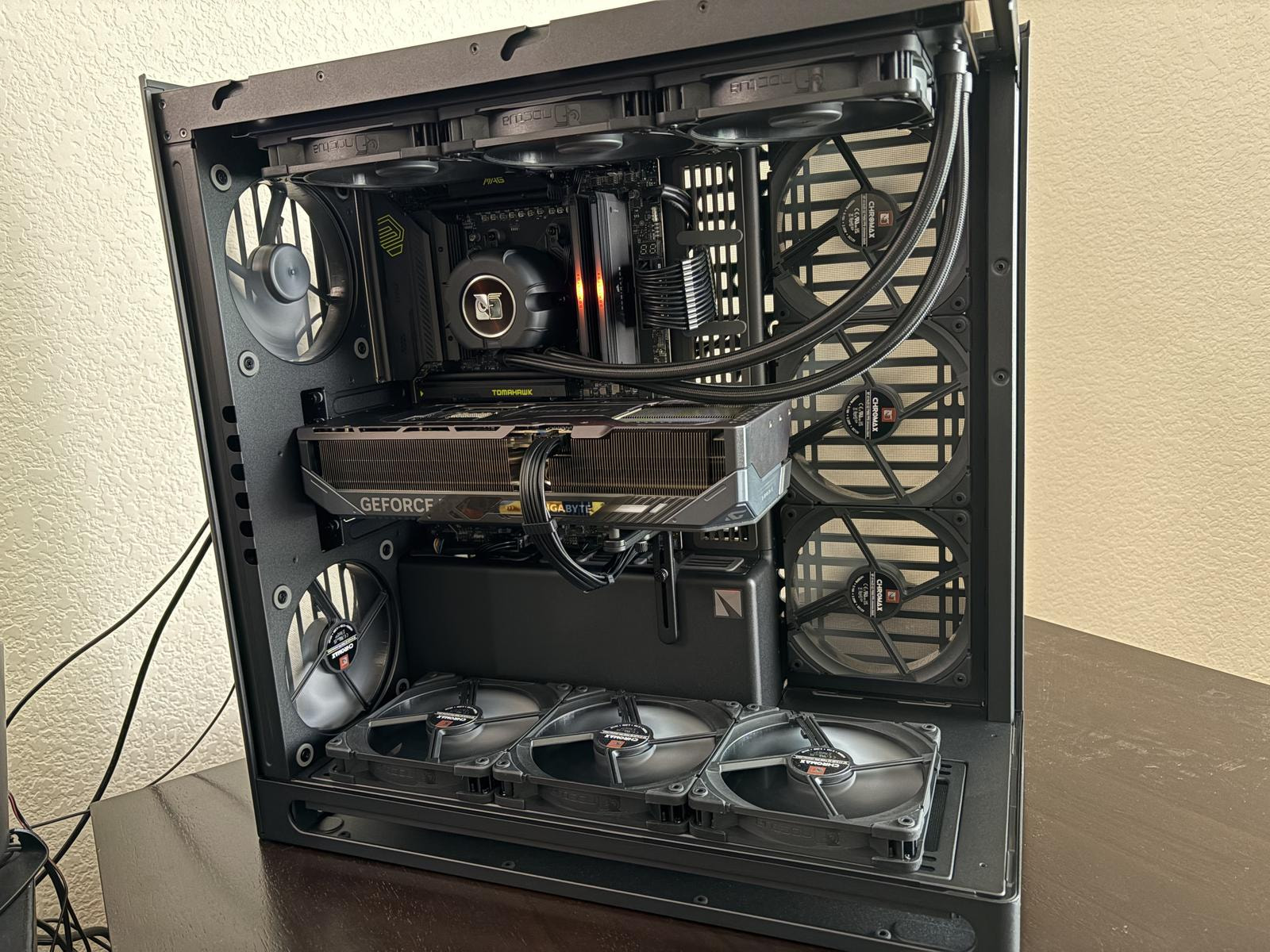
Did a Bios reset today after installing the new Noctua 420mm aio. Got my fan speeds set, AXMP enabled, Fclk 2000 Mem/U 1:1 but put PBO to Enabled over my usual Advanced treatment. Will get some sim time in and see how this setup does. I feel like I’ll go back to the advanced way of tuning but worth the experimenting on my side.
Here’s the rig. Bit of a Noctua fanboy I’ll admit haha.
Removed - Ten characters.
A bit of background news today about the BIOS industry - virtually all BIOS has a company named American Megatrends International (AMI) behind it. AMI was acquired today by Lattice Semiconductor… Good news is they state they maintain a commitment to an open ecosystem. I doubt there will be any noticeable change for regular users.
I also tune my GPU along with tuning BIOS, using MSI Afterburner and checking and monitoring with HWInfo.
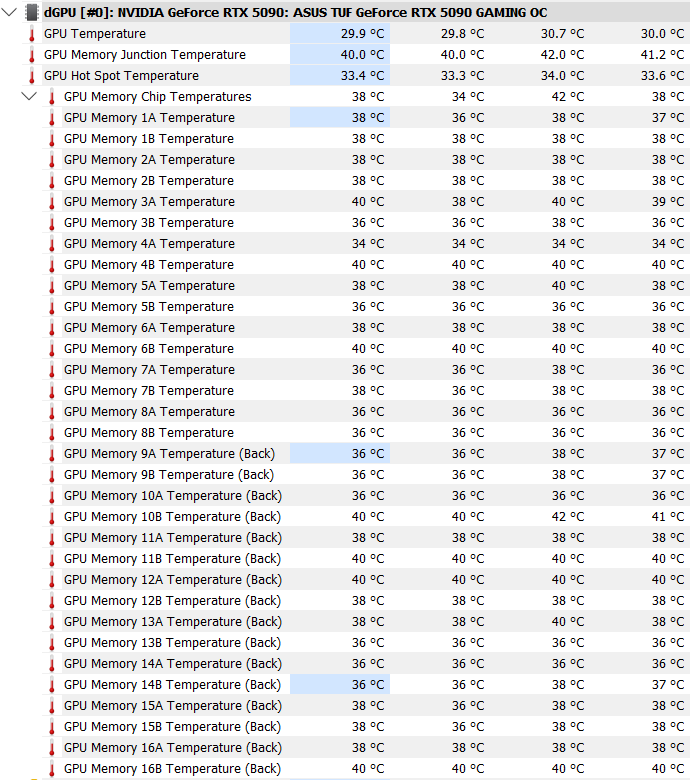
A whole slew of new sensors just became readable in the latest beta of HWInfo, including individual VRAM sensors on GDDR6X and GDDR7. Will be interesting to see if there are any surprise hotspots in there during flight.
Hello everyone,
I would like to get some advice on how to optimize my BIOS settings for the best performance of my CPU and GPU.
Here are my specifications:
- Motherboard: Gigabyte X870E A ELITE X ICE (latest BIOS update F8)
- GPU: RTX 5070 Ti 16GB Gigabyte Aero, using MSI Afterburner for curve optimization
- CPU: AMD Ryzen 7 9850X3D, with Precision Boost Overdrive (PBO) set to Auto and a negative curve of -15 on all cores
- RAM: 32GB 6000Mhz with configured in Expo mode 1
- Storage: 2TB Samsung EVO Pro 990 and two 1TB SSDs (brand not remembered)
- Power Supply: 1000W with Gold Certification
Any suggestions on BIOS settings for improving performance would be greatly appreciated! Thank you!
With AMD motherboards for Ryzen processors, you really don’t need to change much. I have the same CPU as you, so the settings from the first post in this thread, based on an MSI motherboard, should be all you need.
I think you should be able to adapt them to your Gigabyte motherboard without any problems.