Using the template below will greatly help the team reproduce the issue and ease the process of fixing it. Before posting, search for an existing report. If you are not sure it’s a bug, please first report in User Support Hub.
3 tags are required - add them in the tag section next to the title above:
One for aircraft (start typing in your aircraft name in the tag section and pick correct option)
Feel free to delete this quote section after adding your appropriate tags.
ISSUE DESCRIPTION
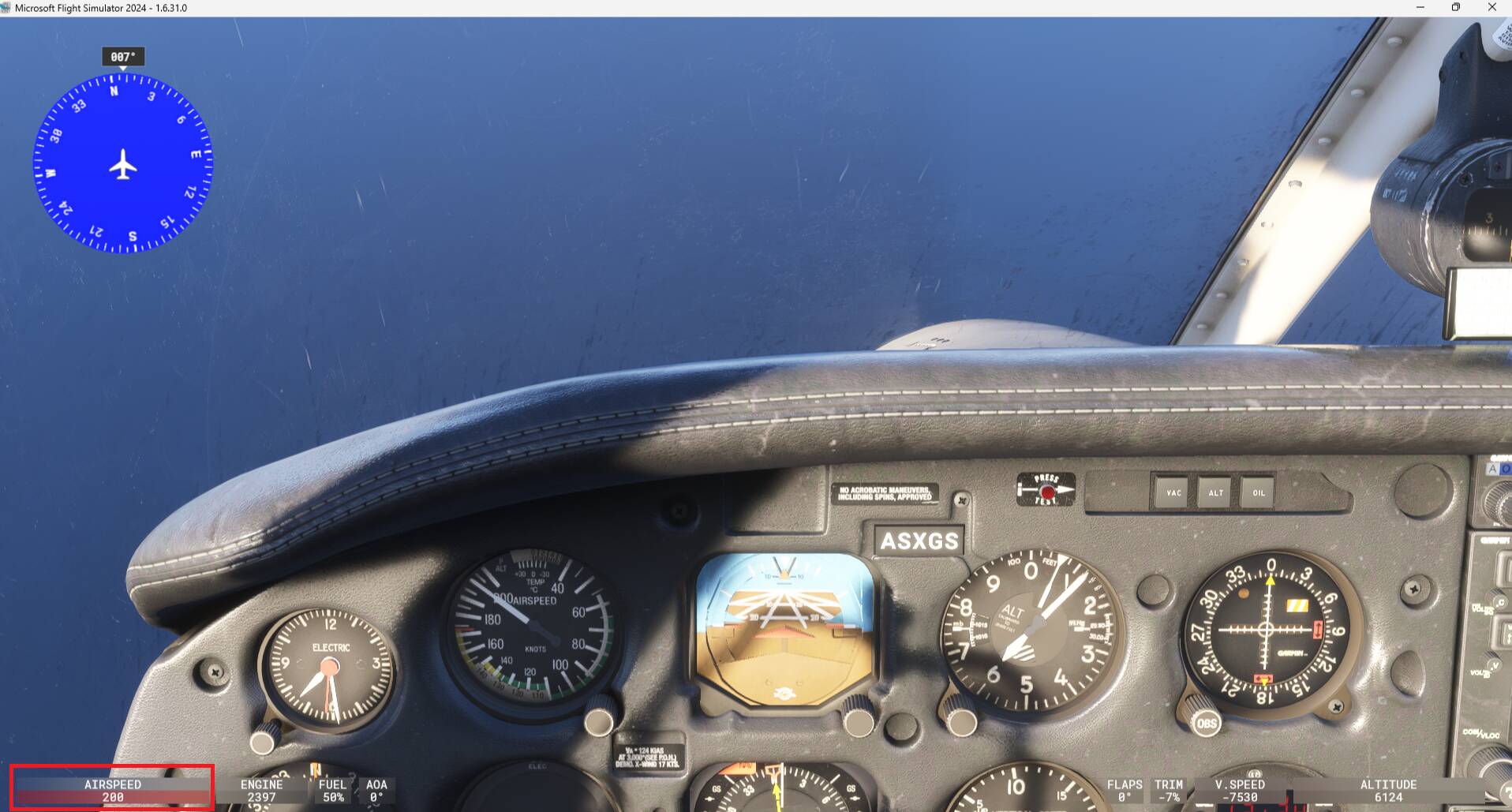
Good day, recently when flying a Piper PA28 Dakota in MSFS2024, I noticed that the Airspeed-indicator doesn’t turn red anymore at 148 knots which is the maximum speed for this aircraft.
Is that a bug or a specific setting in MSFS2024? Thanks.
FREQUENCY OF ISSUE
All the time
REPRODUCTION STEPS
Please list clear steps you took in order to help our test team reproduce the same issue:
Take off and set speed to maximum
YOUR SETTINGS
If the issue still occurs with no mods and add-ons, please continue to report your issue. If not, please move this post to the User Support Hub.
What peripherals are you using, if relevant:
[PC Only] Are you using Developer Mode or have you made any changes to it?
[PC, MSFS 2020 Only] Are you using DX11 or DX12?
[PC Only] What GPU (Graphics Card) do you use?
[PC Only] What other relevant PC specs can you share?
MEDIA
Please add a screenshot or video of the issue occurring.
I don’t think I have ever seen - or heard of - a Piper Dakota doing 190kts IAS! Normally the wings would have been gone before that I think.
But agree with the comment: not sure what can change in an analog indicator? In the following shot you can see the different colour zones a bit more clearly. The yellow caution zone starts at around 138kts and the red VNE marker is at around 173kts.
Not sure if they have fixed the issue reported there where the crash detection was occurring a 150kts instead of 173kts.
Anyway still wondering where you were seeing a red alert. Maybe if you have the cockpit HUD enabled as mentioned by @SlabsFly ?
Sorry, indeed that was what I meant. The digital Airspeed indicator in the cockpit HUD in the left bottom corner doesn’t turn red at 148 knots anymore like it should for this type of aircraft. This issue is since like a couple of days ago.
I wonder if that’s a MSFS2024 bug or a specific setting in MSFS2024.
It does not turn red at 148kts (this VNE speed was incorrect) but it does at 200kts (still not the correct speed), you can make some tests. It should turn red at 173kts that is the VNE speed.
So I would say the issue you’ve reported is linked to the existing one Piper PA28-236 Dakota: structural failure far below VNE. They’ve made some change to the VNE but it is not correct yet.
Moved to User Support Hub since issue reported here is linked to the one mentioned in above link.