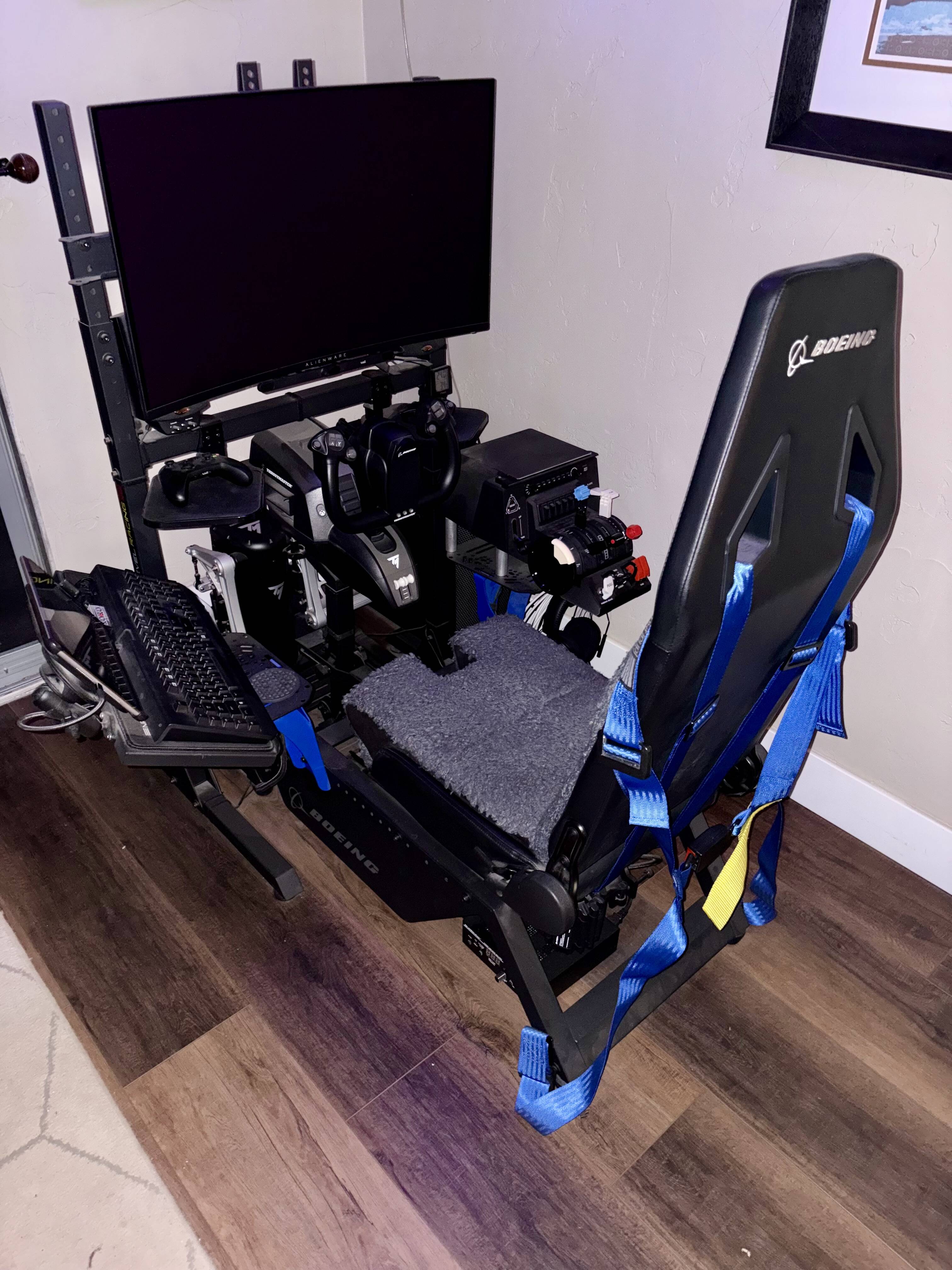
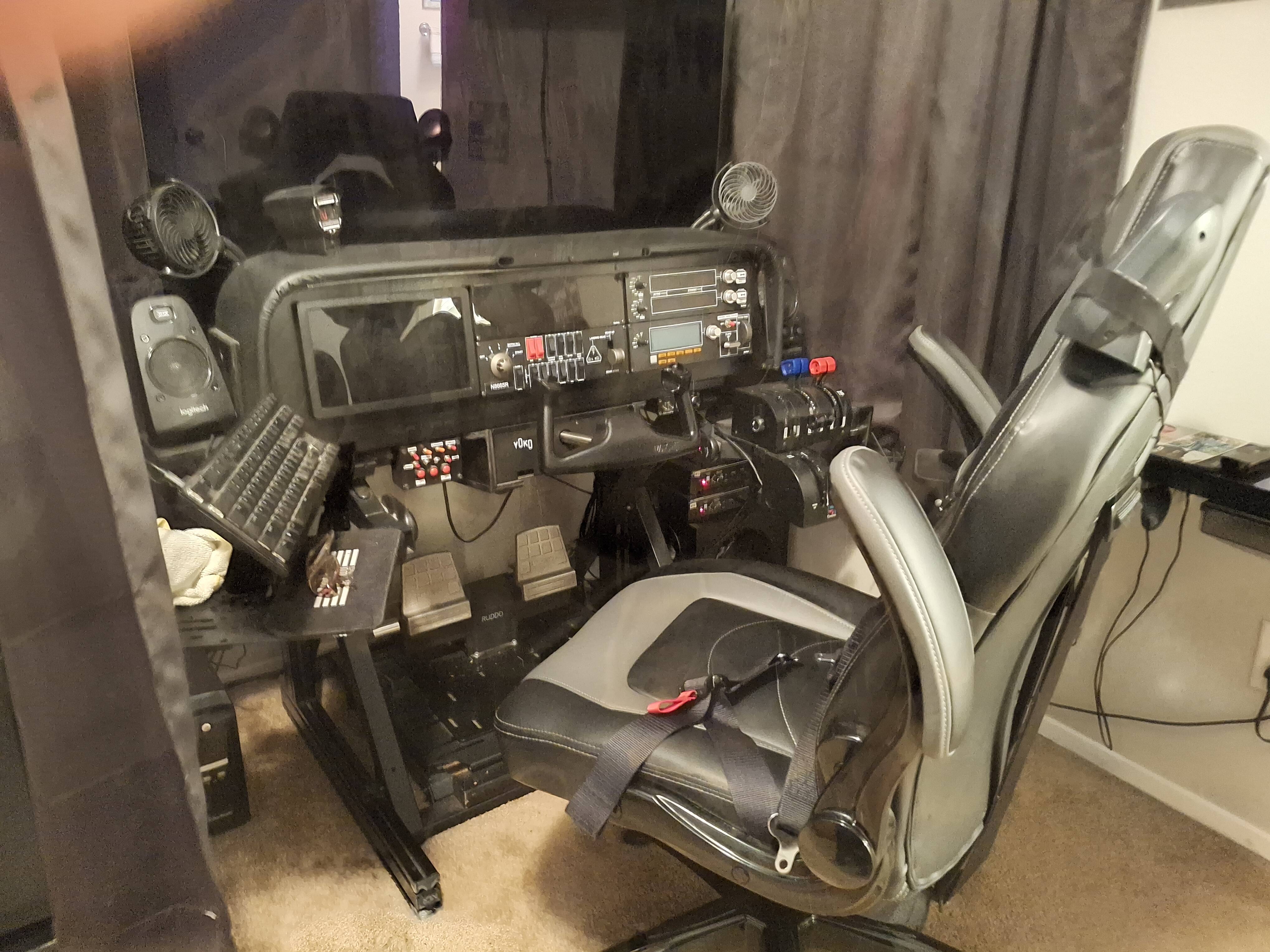
PC office chair vs. Next Level Racing Flight Seat Pro Boeing

I’m using a regular PC office chair with two bass shakers, but I wonder if there’ll be huge a difference if I’d go with the Next Level Racing Flight Seat Pro Boeing Military Edition vs the regular PC office chair, regarding the bass shakers.
Are there pros / cons with the NLR seat Pro Boeing Military Edition vs the regular PC office chair?
Any advices are welcome, thank you.

I apologize if I posted in the wrong place

I have the Boeing edition cockpit and a Buttkicker.

I didn’t have the Buttkicker prior to getting the cockpit, so I cannot speak to the effectiveness/difference when mounted on an office chair.

What I can say is that there is an included mount for the cockpit specifically for use with a Buttkicker (or like), and that works very well. The mount fits to the seat itself. The Buttkicker works great like this and adds much to the feel of the simulation.

Furthermore, the entire cockpit and all the mounting points for rudder pedals, yoke, throttle quadrant, keyboard, etc. is way beyond sitting at a desk. The biggest is not have the chair pushing away or the pedals moving away when manipulating the rudder under use. That alone was worth it to have them both rigidly mounted to the same frame.

I have found the entire setup to be a massive upgrade over my prior desk and office chair cockpit.

If you have space you must proceed with grace. Go for it!!

Yes, I have space. Just wonder if it really increase the immersion with the bass shakers mounted on PC office chair vs. Next Level Racing Flight Seat Pro Boeing Military Edition.

Thank you

It shakes the seat on both cases. I can’t see how one is going to be all that more immersive than the other.

What would add more to the immersion is the entire cockpit being assembled in such a fashion to give you a more cockpit-like experience. That will be more immersive than a desk and chair — regardless of the bass shaker being present or not.

Where bass shakers on a sim frame exceed a chair is when, in a driving sim, you have 4 shakers — one at each corner to simulate each wheel on the vehicle. That isn’t going to be applicable to a flight sim, though.

Thank you. Can you please tell me what’s the maximum height for the seat surface ? 48 - 50 cm ?

No matter how I’m doing, if I get the NLR Flight Seat Pro Boeing Military Edition, I want to keep my desk. I have a lot of stuff there, it’s just impossible without.

I include here the 75 inch ( 8k ) Samsung TV, as a monitor.

And many other things. Would that be possible, or the NLR seat Pro Boeing Military Edition can’t be used with a desk in front of me?

Unless your desk is quite short (low), I don’t think you’re going to be able to use it with the cockpit, unless you aren’t trying to access anything that is on it.

The seat is 44.5 cm from the floor.

+1 for using a fixed NLR seat over an office chair. Makes a big difference to a sim experience IMHO.

So, there is no way to adjust the height , to make it , lets say, 50 -52 cm ??

No. Not without customization. There are automotive seat style adjusting sliders that bolt to the base of the seat. These bolt to the frame of the cockpit. You’d have to fabricate blocks or something like that to space up the height of the seat.

The downside of this would be throwing the ergonomics of the various mounts that peripherals connect to. They may not be height adjustable enough to make up for that extra height.

In fact, I found the mount too low for my Honeycomb Bravo and made some spacers to raise the Bravo’s mounting plate significantly. It was so low and rearward before that it really hurt my wrist to have it bent so awkwardly to manipulate the axis.

Could you please make another photo, from a bit far away back ? Its too close, I’d like to understand exactly how it looks.

Are there no alternatives ( fixed seat , solid ) to NLR Flight Seat Pro Boeing Military Edition ?

Thank you

Rather than adjusting seat components resulting in messed up ergonomics, consider making a plywood base or similar to raise the whole rig by the inches you require or alternatively reduce the desk height by cutting down the legs, if that’s possible with your particular table design.

Yes, I agree with you. Right now I have a rubber mat under the chair ( 2 cm thick )

I could get something similar, a bit thicker

Here is what Google “ says “ :grinning_face_with_smiling_eyes:

Adding bass shakers (tactile transducers) to a PC office chair provides an accessible, immersive, and budget-friendly haptic experience, whereas mounting them on a dedicated racing rig offers superior, targeted, and more rigid feedback. While both systems, particularly when powered by software like SimHub, bring games to life by simulating road textures, engine vibrations, and impacts, the key difference lies in the rigidity of the structure, which directly impacts the clarity and precision of the vibration.

Bass Shakers on a PC Office Chair

  • Ease of Setup: Ideal for beginners or space-limited setups. A single shaker can be bolted directly under the seat or attached to the frame.

  • Performance: Provides great, immersive, and often, organ-shaking feedback. The cushioning in many office chairs can, however, dampen the high-frequency effects.

  • Limitations: The chair’s stem and casters can absorb vibrations, reducing the overall impact. It can also produce a “muffled” feel compared to metal rig mounts.

  • Cost-Effective: A 50W or similar shaker is sufficient for a noticeable upgrade.

Bass Shakers on a Rig

  • Rigidity: Aluminum profile (8020) rigs offer maximum rigidity, allowing vibrations to travel directly through the frame to your body without being absorbed by padding.

  • Targeted Feedback: Multiple shakers can be placed at specific locations (one under the seat for chassis feel, one under the pedal plate for ABS/braking, etc.).

  • System Integration: High-end, 4-corner kits can provide directional feedback, allowing you to feel which wheel is losing traction.

  • Noise Management: Rig mounts allow for cleaner, tighter, and less muddy vibrations, although they can be louder to those in the same house.

Key Takeaways for Decision Making

  • Space & Budget: If you lack space or a dedicated rig, putting a shaker (like a Dayton Audio BST-1/BST-2) on an office chair is a great, affordable entry point.

  • Immersion Level: A full rig setup, particularly with four shakers, offers much higher, more nuanced, and localized feedback.

  • Performance vs. Comfort: The less padding between the shaker and your body, the better the experience. A rigid seat on a rig will always outperform a padded office chair.

  • Essential Software: Using software like SimHub is critical to tune the haptics properly, regardless of whether you are on a chair or a rig.

For the best experience, regardless of the mounting surface, using high-quality transducers (e.g., Dayton Audio) powered by a dedicated amplifier (e.g., Nobsound) and controlled via SimHub will make either option a significant upgrade for racing or flying
simulations.

Or this :

Bass shakers (tactile transducers) on a dedicated rig offer superior, localized, and rigid feedback (e.g., separating front/rear wheel road feel), while office chair setups provide a cheaper, more accessible, but less precise, full-body rumble. Rig installations are better for immersion, while chair setups are fine for casual racing.

Bass Shaker on PC Office Chair

  • Best for: Budget-conscious users, casual racers, and space-saving, multi-purpose setups.

  • Installation: Usually one or two small shakers (e.g., TT25 or small AuraSound) clamped or bolted under the seat or attached to the center column.

  • Pros: Inexpensive, easily removable, adds significant immersion to a standard setup, and can be used for FPS gaming or media consumption.

  • Cons: The foam seat absorbs vibrations, reducing precision; hard to achieve distinct left/right effects.

Bass Shaker on a Sim Rig

  • Best for: High-fidelity haptic feedback, competitive simulation, and maximum immersion.

  • Installation: Typically 2-4 larger shakers (e.g., BST-1 or AuraSound) bolted directly to the metal or wooden structure (pedal plate and seat).

  • Pros: Extremely rigid mounting ensures high-frequency details (road texture, ABS) are felt clearly; allows for distinct, localized, and multi-channel effects.

  • Cons: Expensive, requires a sturdy rig, and can shake the whole rig/floor if not properly isolated.

Ah, this is an excellent idea.

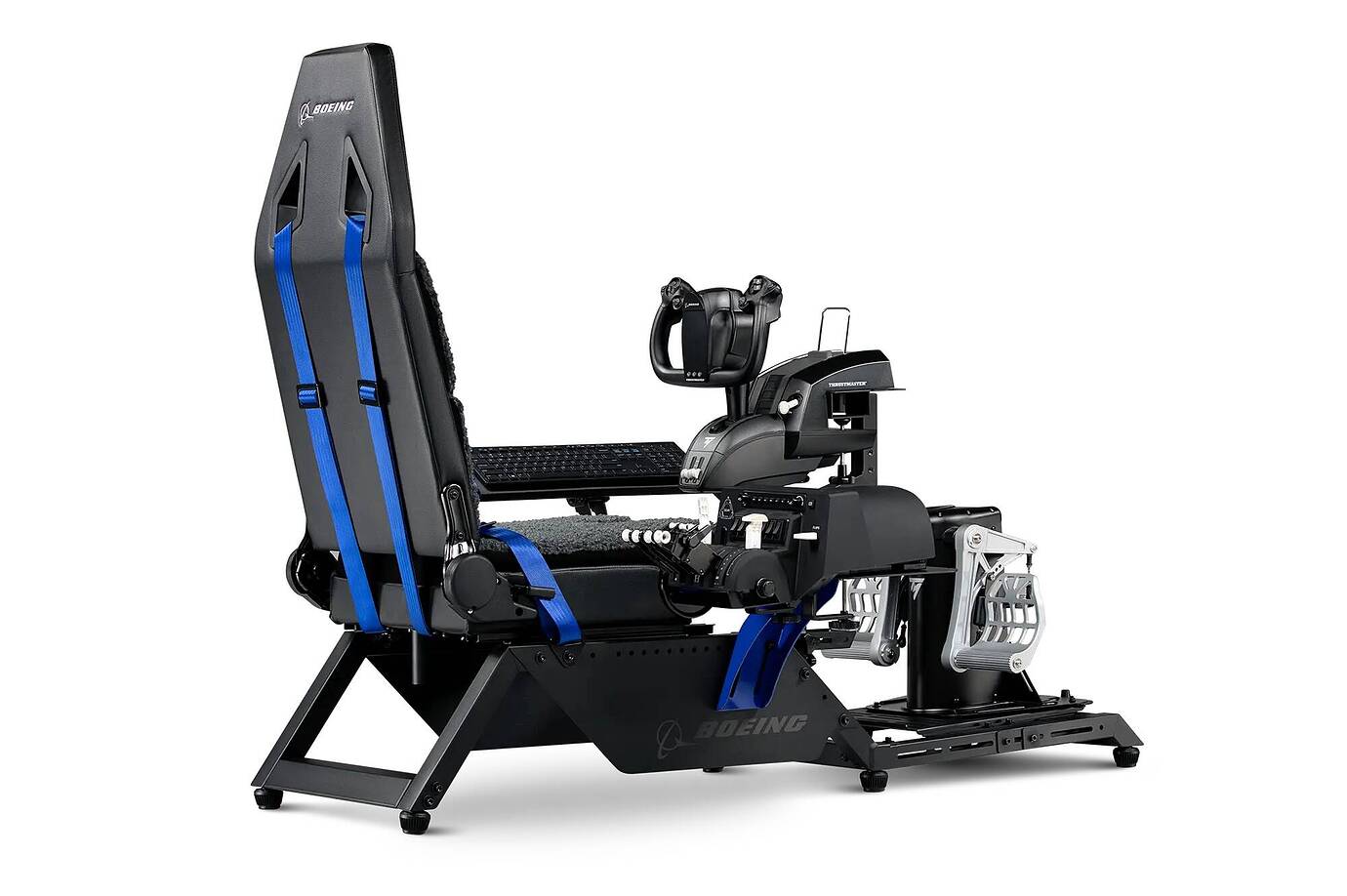
If you look at this marketing photo, you can see how they have the Bravo mounted flat on the rig’s mounting plate. See how the throttle axis are at the seat height, below the thigh if you were seated? I found that position way too low and too rearward, which forced my wrist into a very uncomfortable bend.

You can see my Bravo on the right and you can see the silver, bare aluminum spacers I showed you in the close-up photo beneath it. This raised the Bravo up and allowed me to mount it further forward, as the added height gave clearance for the trim wheel to clear the rig’s mounting plate.

PLEASE NOTE: The seat on the Next Level Racing Flight setup is the most uncomfortable seat imaginable. I had to have a machinist friend convert the unit so I could use it with an old office desk chair. There is no padding and it just plain uncomfortable. I am so sorry I bought it. FWIW

I should have maybe waited for this GTA™ Apex FS-18C Air Force Licensed Flight Simulator Cockpit – GTR Simulator

or purchased one of these https://trakracer.com/collections/flight-simulators/products/tr40s-flight-simulator

Make sure whatever seat setup you get is returnable for a full refund.

I too found the seat to be real uncomfortable so I sold it. I use the NLR Flight stand pro with a office chair without wheels and movable arm rest with one buttkicker . On the stand I have two more buttkickers.

Thank you so much for your help.

I’ll have to search for something else.

I don’t find the seat to be an issue.

I suppose we are all different.

Have you looked at SimFab chairs?

I have one and quite like it.

Yes, it seems a good alternative

I just saw this one, does anyone own it, here ?