I have i7 9700KF, the one without integrated intel GPU and I’m suffering the 76T 2fps Issue and stuttering.. so, please stop assuming that intel integrated GPU is the culprit. it is not..
I checked for memory leaks and believe that only those with 16GB of RAM are affected by that bug. I do not believe people with 32GB or more will encounter it.
I flew from Vero Beach to Miami and back. I saw the memory usage for the sim go up to close to 24GB over Miami and now that I have landed back in Vero Beach, it is back down to 12GB.
I normally have 64GB on my system, but today I am running with 96GB to see if it would make any difference, which I didn’t expect or get.
Exactly !!
I have 32GB of RAM and I have this issue. So it’s not that.
Some users are also complaining about a memory leak. That is besides the poor performance of SU3. My reference about the 16GB was only in reference to the Memory leak some users are reporting.
Those with 32GB or more I don’t think also have the memory leak, but we still have the horrendous performance that SU3 gave us.
Did an extensive test around 76T earlier today.
All data functions off. Completely offline.
With rolling cache from previous experiment in area.
Without rolling cache at all (complete pc reboot in between)
Even politely disconnected my network cable during test #2 to be sure I was 100% offline + no cache.
Took note of the items that were being loaded to memory (using resource monitor)
Haven’t checked through the entire list but all the files I did see loaded which I checked were updated on 16th February…so WU3 not SU3!!!
Why would assets for USA be getting updated (and broken) with the UK update?
Does anybody else have any similar locations with repeatable hard crash of FPS and manipulators going crazy? Worth checking what assets are loaded and when those were updated…
At what graphics settings.
Mine is 4k Ultra.
Sorry, I have 16 GByte of RAM and - as far as I know - no memory leak. But I do fly for 30 minutes tops in one session.
You are so very wrong.
Right click on my computer - Where is that?
Select manage - Where is that?
Select and right click on INTEL integrated graphics and select disable. ???
I have a Nvidia GTX Graphics card.
There is no INTEL integrated graphics card in Device Manager.
I have an i9-9900K CPU. It has Integrated Graphics.
But it is disabled by the Bios if you have a Graphics card.
How is that for a " little how-to about ".
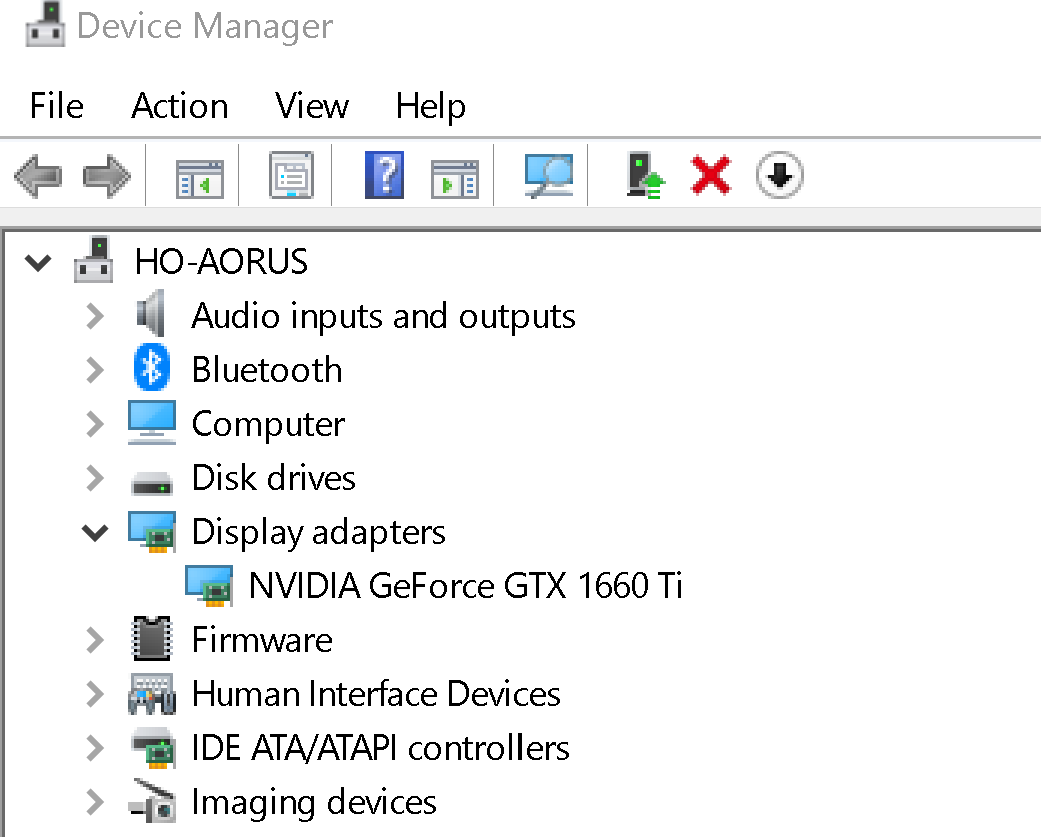
Also, the author from your source said
“Be sure you have 2 video cards”. Not integrated video.
It’s very simple.
First of all be sure you have 2 Video cards. Example 1 is intel and other one dedicated like nvidia or amd. It is because when you disable one video card then other can automatically takes place of the disable one.
Steps
- Right click on my computer.
- Select manage from the options.
- Now choose DEVICE MANAGER from the left side list.
- As soon you click on device manager, on your right side your all pc hardware components information will appear.
- Click on arrow sign of DISPLAY option, you will find both of your cards information.
- Select and right click on INTEL integrated graphics and select disable.
Note: as soon as you disable intel card, your monitor will go black for 2 sec. don’t panic.
Now your intel card is disabled. Now all your graphics will load from your other dedicated graphics card.
We’ll still have it, we may not be affected by it as quickly, though.
I play at 640 x 480 in wireframe mode, just as MFS 1.00 intended us to play.
i9-9900K CPU
Nvidia GTX 1660 TI GPU
I have the problem.
You know what they say about assume.
You should also stop writing posts that have inaccurate information.
CAPTAINASOO7 has a PC with 2 Graphics Cards.
I am not familiar with his PC. I have never seen a Motherboard that let you use the Integrated Graphics and a Graphics card simultaneously.
I am running 9700 KF (without GPU) and have problems
Intel i9-9900K is with integrated graphics, i9-9900KF is without. I was looking for i9-9900KF. But others showed me that my idea was no working idea.
32 GBs for me too and I reported about the Bug here from day 1.I only wish to be that simple…!
Really? my last 3 0r 4 machines had integrated graphics and I could run both cards at the same time with no problems…right along side my 6850 980 and 1080.
Same issue here. My local area I could fly around on ultra, no problems. Now, it can head down to 14fps over the city centre or near the major airports. Meanwhile, the GPU is near idle at 4% or less. Rarely above 7% and spends most of it’s time at 2%.
Interestingly, I reduced the affinity for the 6th core and performance was boosted by about 10%. Still, struggling with more than 16fps where previously I’d easily get 30fps or better.
Very frustrating.
The monitor I run MSFS from is tied to the Nvidia. The other monitor is tied to the integrated, but it doesn’t display much.
My integrated graphics runs at about 20% utilisation, the nvida at 2-4%. It’s not the graphics card that’s the problem, it is the CPU ultilisation.
same for me, i thought the frame drop bug was just introduced, only to find out that the FullscreenOptimisation i disabled was set to on again with the latest update.
TrackIR does work rather flawlessly now, since it almost completely got rid of the minor stutters i had especially noticable with headmovement.