I have this issue unless I move the slider from High to Ultra. Ultra is ok.
i just realized that the uploaded pictures are somehow compressed and are not representing the original screenshot. on the uploaded ones, you cannot really see the pixelated clouds. dont know any other way to upload it here
https://imgbox.com/ is a bit slow but doesn’t compress and you can just copy/paste the links here.
1 Like
now the screenshots should be more representative as they are uncompressed:


@MANFLXSRSRWY343 and @squawk1469
is this SU9 Beta?
hello FlyWithFlow, yes its with SU9
SU9 comes out next week? you are saying that you are using the Beta?
yep, SU9 beta
‘Graininess’ has replaced ‘the barn door effect’ it seems to me and I think we need to accept some level of it because of the way these clouds are created. They seem to solve it in some cases by using very blurry textures but thats not a good solution in my opinion.
I think the way textures dissolve into the distance also plays a role here so maybe they can come up with something better.
1 Like
Since SU8 I’ve had a noticeable difference in the quality of clouds, mostly negative though.
I now see very clear pixilated layered lines in clouds at times. I also now have times where clouds appear and dissappear and sometimes whole areas of clouds.
On the flip side I was playing with live weather on the other day and it was misty outside (in the real world) and as I was parked on the airfield I was amazed as I watched the mist coming along the runway and engulfed me. It was really realistic.


4 Likes
that’s TAA ghosting
so with another setting than TAA it should go away?
maybe this will fix the issue for some users with an nvidia card: https://www.youtube-nocookie.com/embed/-q6ZJIUnoqg
“Texture filtering - LOD bias” set to “clamp” … you may also follow the rest of the guide, for example turning of Filmgrain.
please report if this guide helps. i cant confirm as i have an amd card.
Always appreciate potential fixes, however I can confirm this did nothing for me. I can also confirm for myself, switching to any other anti-aliasing option present in the sim does not help.
It’s a bit better in VR, I won’t deny this, but in some light/clouds conditions, the clouds edges are still made of big boxes.
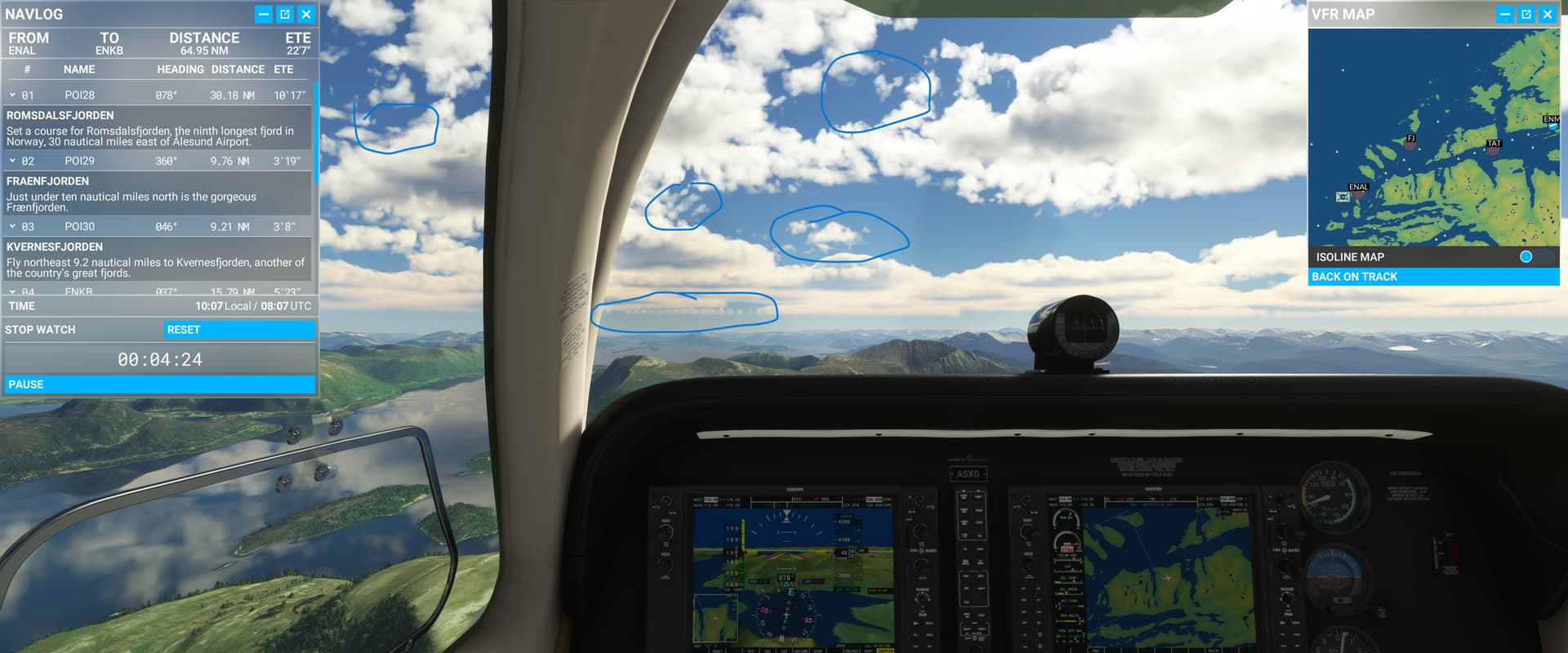
Same here, during Norway bush trip. SU9 and all graphics settings on High. Latest NVIDIA driver for 2080. Definitely became worse after recent sim updates. Clouds used to be absolutely stunning, now grainy regions, pixelated, appearing/disappearing unrealistically quickly…
I read in an article that this is normal from Asobo Studio. They did this on purpose so the frame rates can be smoother on your flight experience.