Yes I think.
The msfs2020 control bindings are in the options for msfs2024
1 Like
I am not seeing that for Xbox controllers. I may be missing that option. Do you have a screenshot?
Overall I like the new functionality. Especially the ability to have specific profiles for specific aircraft. This is huge.
It’s the overall UI that isn’t done very well. This needs improvement
Also, PLEASE fix the lack of real-time visual indication of controller inputs. This is vital when needing to make adjustments to the controller sensitivity settings. I don’t understand how something this critical was left out or left unfixed in the initial release.
3 Likes
Those “2020 Transverse” and “2024 Transverse” profiles are useless for me. They had so many errors and conflicts I gave up quickly, made new empty profiles and started over.
I would like to delete them, but that option is not available.
I do appreciate the way conflicts are shown and that they can be easily deleted. And there have been many, every day since the sim came out.
YES! Why this vital function was eliminated is a total mystery to me.
1 Like
Click on the gear icon next to the profile name and choose “Apply to all aircraft” and “Make default”. You have to do this for both General and Airplane controls.
Yeah got it and the repeat it for each peripheral and do the whole show again for helicopters, easy  .
.
the options are called, 2020 Transverse” and “2024 Transverse. These should convert you back to msfs 2020 if you select 2020 Transverse.
(post deleted by author)
2 Likes
The 2020 options don’t seem to be available on Xbox with a controller. I select “2024 Transverse,” but can’t change it.
They used a post-doc word when a middle school word would have been more appropriate.
1 Like
yes I agree
For the love of God, don’t go back to 2020 system which was pathetic.
The 2024 is actually quite flexible and powerful, but reqires a few minutes effort to understand.
Yes, it could be more efficient and userfriendly, and it still have some bugs, but it’s a big improvement over the 2020 system.
And trying to support both 24 and 20 will end in endless issues and bugs.
2 Likes
I agree … the msfs2024 UI is better than the msfs 2020.
3 Likes
No, please don’t. I understand that 4 years of using one UI and then the need to adapt to a new one is difficult for some people but the control setup possibilities in 2024 are much wider.
1 Like
Well it’s taken me near on two weeks to figure it out and get it all set up, but I finally made some progress tonight. It’s definitely more complex, sometimes frustratingly so being new, but logical once you finally get it.
The use of “set as default” and “apply to all aircraft” in the options helps a lot too, that and giving your profiles sensible names that you will remember instead of the less discenable default names they get. It’s certainly been a steep learning curve for me and a long journey to get there, but I can see their reasoning behind it.
Now if we could just get the hardware curves showing controller input levels I’d be even happier.
2 Likes
Just imagine someone new to flight sim having to figure this one out…
3 Likes
I really don’t get this, I freaking deleted all bindings and started from scratch. Created a profile for each peripheral, named it “Default” and applied it to all aircraft. Now I change aircraft, open control and what do I see:
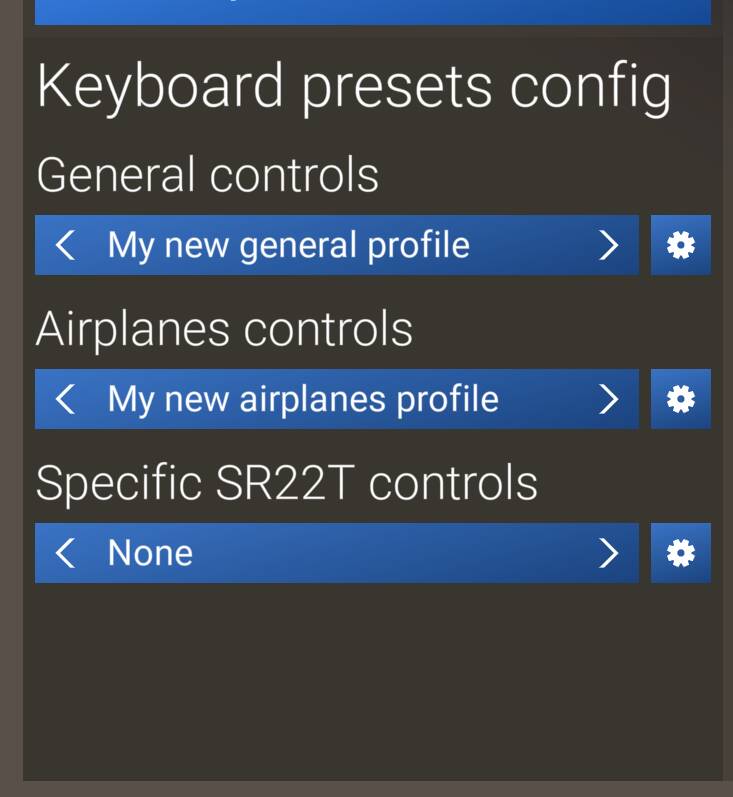
My created profile “default” is not there (not selectable). It is on some fixed wing aircraft, not on others. Asobo, you have created a monster…
1 Like
I don’t have this problem. Let’s say I connect a new controller, MSFS2024 recognizes it and automatically sets a preset from its database. But I want to modify controls to my liking, for general controls and also for airplanes control. So I click on the cog wheel next to the general controls profile, click on Duplicate and give the duplicate a name like My Controller X or whatever and tick Set as default and also Apply to all aircraft. I do the same for the Airplanes control. Then I modify the controls and save them. And from this point when using this controller it’s automatically set for all aircraft, I don’t even need to go to Control settings unless I connect a new controller.
1 Like