And the FPS with a remote screen ?? Because for the moment it is the FPS divided by 2
Pop-put screens do indeed have an impact, but I’ve found it’s only of the “FPS divide by 2” magnitude if one has an FPS limiter on (in, say, NVIDIA settings). I disabled the limiter and in general have had much less pop-out impact.
@ScorpionFilm422 Please, please for the love of god make a way to put the weather token in like the PMS530 
You can! It’s on page 12 of the instructions; documentation.pdf (pms50.com)
It’s only available on premium version though.
Thanks what I meant is…in the PMS version you can paste it into a JSON file, in this you type it in, in the sim and it is a very laborious task.
I agree it’s laborious, I just had to do it to activate my premium subscription. hopefully I will only need to do it once.
Just wanted to pop in and say thanks to @ScorpionFilm422 for bringing my favourite GPS unit into the sim, fits in and works great in the cockpit of my turbo arrow, and will be invaluable on my round the world flight.
Having owned software for this unit in both P3D and Xplane 11, I’ve certainly found it to be on par with those softwares, and in my 6 hr flight today, I honestly didn’t spot much difference to the way this software operated to the software from bigger company’s. Appreciate there are still a few minor functions that are not working yet, but I’m confident they might turn up at a later date, so much so that I purchased the premium lifetime licence straight away.
Thankyou again, it truly is appreciated the time and effort you put into getting this working.
However please don’t get it working on the RSG 750 hardware, otherwise I will have to get that as well. 

3 Likes
What’s annoying, and I can’t seem to isolate the problem, are the frequencies that aren’t clickable. Forced to restart the simulation completely.
It is not frequent, random, even rare, but when it happens (les boules, in French in the text.)
Is the basic version supposed to show wind arrow (direction and speed) on main screen/map? I’ve read the manual this time but didn’t find such information.
Yes, this is a configurable map field as it is in the RW unit.
1 Like
Did the new World Update break the mod, or does it still work?
It works fine.
Will there be compatibility with PMDG DC-6? And when does the free use of the premium version end?
If you have a vaild premium license, you can see its termination date in your PMS50 account or in the GTN750 itself (Syste/Settings/License page).
If you don’t currently own a license, you should buy one.
The integration of the GTN750 into an airplane is to be done by the aircraft providers. PMS50 just delivers the GTN750 screen.
2 Likes
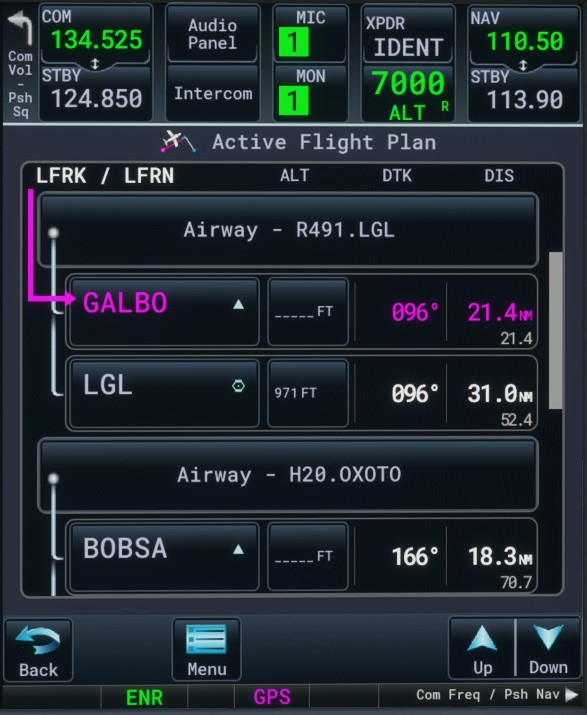
Is this based on current Asobo implemented airways, WT’s implementation/solutions, or is this @ScorpionFilm422 original functionality ?
How many are re-inventing this wheel ?
The only thing Asobo provides is the list of airways and associated icao waypoints for each waypoint. It’s quite poor and I was hoping further implementation at sim level. Maybe they didn’t finish the work yet and this will be available in a future release.
Sim level implementation would allow to easily share selected airways with several GPSs (ex dual GPSs in the cockpit). This is not done so we had to get a workaround here.
Now, main part of the implementation is about user interface.
NEW GTN 750 RELEASE
Basic (1.0.21) and Premium (1.0.18).
Please re-install both from https://pms50.com/
- Adding a popup independent panel (experimental feature)
- Airways (premium)
- Added System Status page with version + database info
- Airport info button is now active in FPL procedure lines
- Prevent adding enroute WP while an approach is active
- Workaround to add/remove WP bug in MSFS when an approach is loaded
- Some minor bug fixes
- GTN750 DA62X package compatibility with DA62X Mod v 0.4.1
11 Likes
which popup ??
Can be used in any plane , even bush without normal gps.
Opens from toolbar like weather, or normal vfr map.
Works great, no performance hit for me. All GTN functionality.