I have a similar 9800/5090 system, and my CPU stutters severely even in the skies above the ocean. 5120x1440 isn’t even 4K. tlod200, settings slightly above medium. I’m testing on a 737 in the career mode. All content is fully downloaded. Just a few days ago, I wrote a positive review, but my flight crashed to the desktop again after 5 hours, right before landing in Dallas…
1 Like
Up until the .33, it was a beautiful sim, fluid and with excellent FPS. I was almost tempted to permanently switch from FS20 to 24, but the good times, at least for me, didn’t last long—that is, until the .34 came out. With this, the sim has completely changed, not so much in terms of maximum FPS, but in terms of the constant stuttering I experience, where I didn’t have any before. The fluidity is now gone, and that’s a real shame. With the .33, I’m not saying we were perfect, because for example, there was always the problem of stuttering when panning quickly in the cockpit, but with the .34, it’s even worse. Let’s hope it can be resolved quickly!
11 Likes
Disappointed they haven’t restored the 2020 VR behavior where the render screens that are running before entering VR are turned back on after exiting
Now more than ever I’ve noticed that on XboxX a lot depends on the plane, some are unplayable in career and even in free flight, Citation Longitude and all the helicopters, it’s useless to disable options etc. Other planes (PC24 for example) are superfluous. How is it possible that the plane model can completely break the sim?
I suffered the exact same with the .34 update and lost all the stability and smoothness I briefly enjoyed with .33.
After tweaking settings and reinstalling, with no success, I had pretty much given up and moved back to 2020 again. However, this morning I have rolled back my Nvidia driver to 581.80 (from 591.44) and the major stutters have gone with smoothness back to the .33 standard when panning the cameras.
It’s not perfect, but a huge improvement… Good luck and hope this may also work for you.
I’m going to try updating from 581.29 to 581.80. The former driver had been working great in SU3, but at this point I’m willing to try anything to get things working right with SU4 1.6.34 again. I’ve tried everything else I can think of.
Unfortunately, I won’t be able to test the sim for at least a week, due to a problem with my custom cooling loop that was causing high GPU temps I need to fix.
But I will report back here eventually.
1 Like
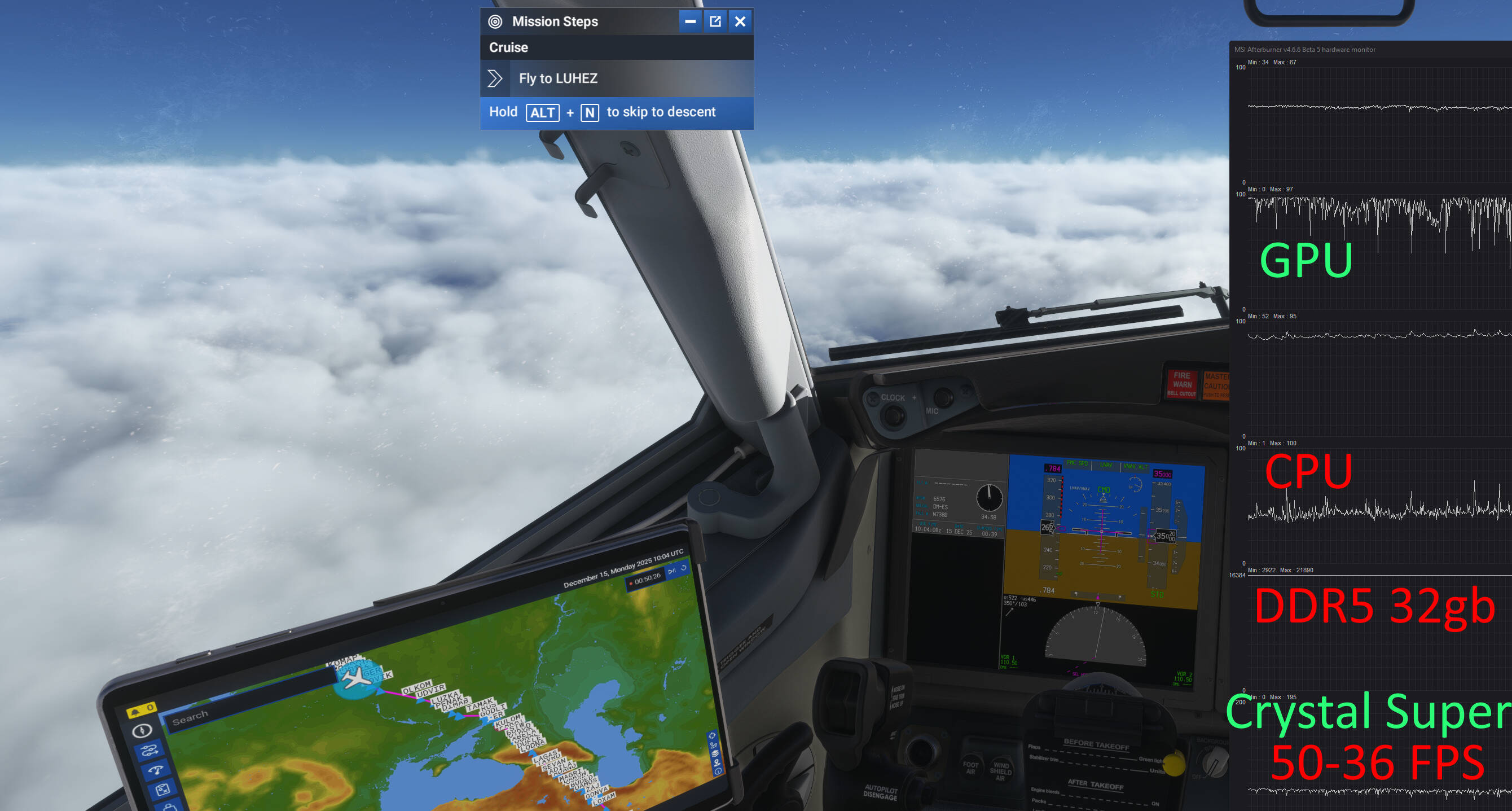
I don’t know if there were any changes in the simulator from the developers during the current night. But my simulator is working almost perfectly again, which I am certainly happy about. At the time of writing this message, msfs24 is in the background on a flight flight from Dublin to Dubai. From the beginning of flight planning to the current time, there were practically no freezes, I was even able to open PS and take a screenshot. So, Crystal Super, 1.0 resolution, high graphics settings, and a plan of 45-50 fps with drawdowns up to 36 on acceleration of the x2 simulation time, I think it was even smoother on x1, but due to the fact that there were practically no triggers and stutters, I calmly entered the level with a slight acceleration and now switching to the monitor I am writing this the message.
What has been done, let’s figure it out, try, and help find the problem.
Since the problem was with the CPU (9800x3d), which stuttered terribly and did not allow the GPU (5090) to work even at 90%, I did an undervolt along the -20 curve and raised the frequency to 5425 mhz. Then I rolled back the nvidia driver to 581.80 (although I’m sure it’s not the case, because a few days ago everything worked just as perfectly, literally on Friday, but Saturday and Sunday were terrible in terms of stability), Installed the nvidia 10 GB cache.
I also deleted all streaming data from the simulator, leaving only the purchased DLC. And disconnected the trees from Bijan.
Is it possible that the load on the servers is a little less today than on the weekend? I do not know how it works, just stating a fact.
And so I’m flying in such thick clouds, and my fps is 56-58 on the monitor (5120x1440), no stuttering, although yesterday I couldn’t even turn off the game, it was a solid 0.1%…
I’m experiencing a significant loss in performance since the update. Constant stuttering when panning and scenery pop in.
1 Like
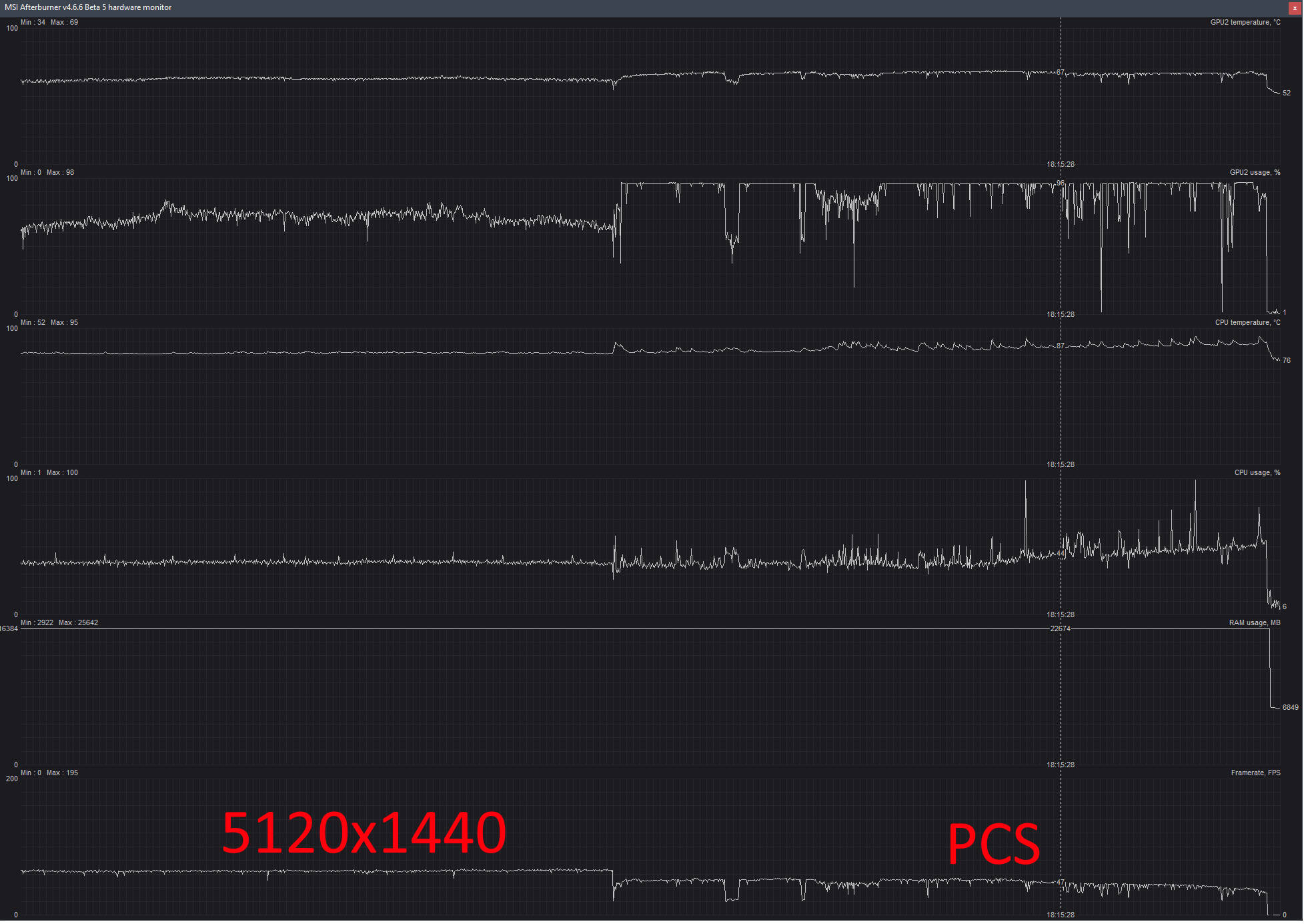
upd: I finished my flight, which was smooth, both on the monitor and in VR (yes, there were slight stutters, but not critical.
I think we need to pay more attention to our settings, drivers, and any content that might conflict. My performance is excellent right now.
Still have a significant performance issue in the MAP view for Career when I am filtering jobs (e.g., filter on Longitude and Charter Service - VIP) – it is smooth as butter with no filters and 100s of jobs on the map – but filter it down to just a few and it is almost unusable. Not everyone has this issue but some do.
And PLEASE, please, please give Career mode just a little bit more love & care in this next cycle… it is so buggy it is painful and people quit using it – especially around ATC behaviors. Also, your English translations are terrible  things like, from Medevac, “David, what is your pain level? Squeeze my hand once for yes, and twice for no” and “I’ve been part of this crew about a few years now and we’ve already worked with our pilot too, which is a great thing because we need to trust each other and good coordination” – free translation fixes: “David, what is your pain level? Squeeze my hand once if it’s tolerable and twice if you need more pain management.” and “I’ve been part of this crew, including the pilot, for a few years now which is important because we need trust and good coordination.”
3 Likes
I did a few more test flights after the latest two hot fixes… Things looks better now. It’s a bit more fluid. The foveated bug remains (anything but default 50 setting induce image jitters). There are still crashes. I was going back and forth from the main sim view (in flight) to settings to tune on the go… but after a few itterations, it eventually killed the sim to desktop.
It also seems like the changes you make while in flight, into the setting menus (while in VR always for me) is not always WYSIWYG … Performance was fairly OK, but I wanted to test if I could get more… but as I went into changing things, performance degraded again to a point it looked like a bad 30 FPS slide show… and no amount of going back to the settings that “ worked “ restored the performance back.
There seems to still be some sort of memory effect / memory leaking issues in there.
It’s getting better, but not yet what I would call “ stable ”.
There is some sort of memory leak similar or kind of a similar thing introduced in SU4 i think especially the 34 Version. The fps themselfes are buttersmooth… but sometimes the game acts like it would have some sort of “framerate hiccup” for half a second… sometimes also during a normal flight … especially when turning fast around with the aircraft or even more while panning the camera around.
5 Likes
I have the feeling we’re back to SU3 issues.SU4.33 was still good but 34 is terrible again. No fps on arrival. I really SMH because… WHY?
8 Likes
Try a foveated render value of 40/35. I also get strobing if I use Opxrtk and crop the image, or, for example, a foveated render value of 33/37.
Values that are multiples of 5 / 10 seems a bit less flickering, but still not stable anough to not cause dizziness after a while. The only value that seems to feel totally jitter-free is 50.
I know this sim will let me down in the future but today’s flying was awesome. I first checked the GFA which led me to the FAA weathercam for lakeland FL KLAL which showed a pleasant 3400 foot overcast. I loaded in at KLAL expecting dark, very low, monster storm clouds but instead I saw almost exactly what the FAA cam showed. Im sure its a fluke.
I had chosen the C152 default version and had a few stutters at the takeoff airport but I flew towards Orlando and it was smooth and the clouds seemed very right. Similar clouds were over us a few days ago. The PG looked really pretty good if not great in a few spots. The clouds had a 3D quality about them that I haven’t seen in a long long time. I hope it wasn’t just my imagination or just that particular weather situation at that location at that time of day at that time of year…good gosh!
like Mulder: I want to believe!
but today was good. I want to see some solid high level overcast and not always the see through smears. and if a front has created a cloud deck, it should be there even if I fly twenty miles away (or 50 or even 100)
4 Likes
Perfect flight for a couple of hours with the Pilatus PC24, no jerkiness, no slowdowns, I would like to see other planes behave like this in my career. Xbox X, pg on, everything on medium except fauna off, real-time weather off, set back a few hours. Unfortunately, the traffic planes disappear after a few seconds of being spotted in flight.
1 Like
In 1.6.34.0 there is a disappointing 20% to 30% drop in frame rate from .33 and earlier.
Xeon 3.3GHz, 32GB, gti1080TI, Low settings, NVidia 581.80
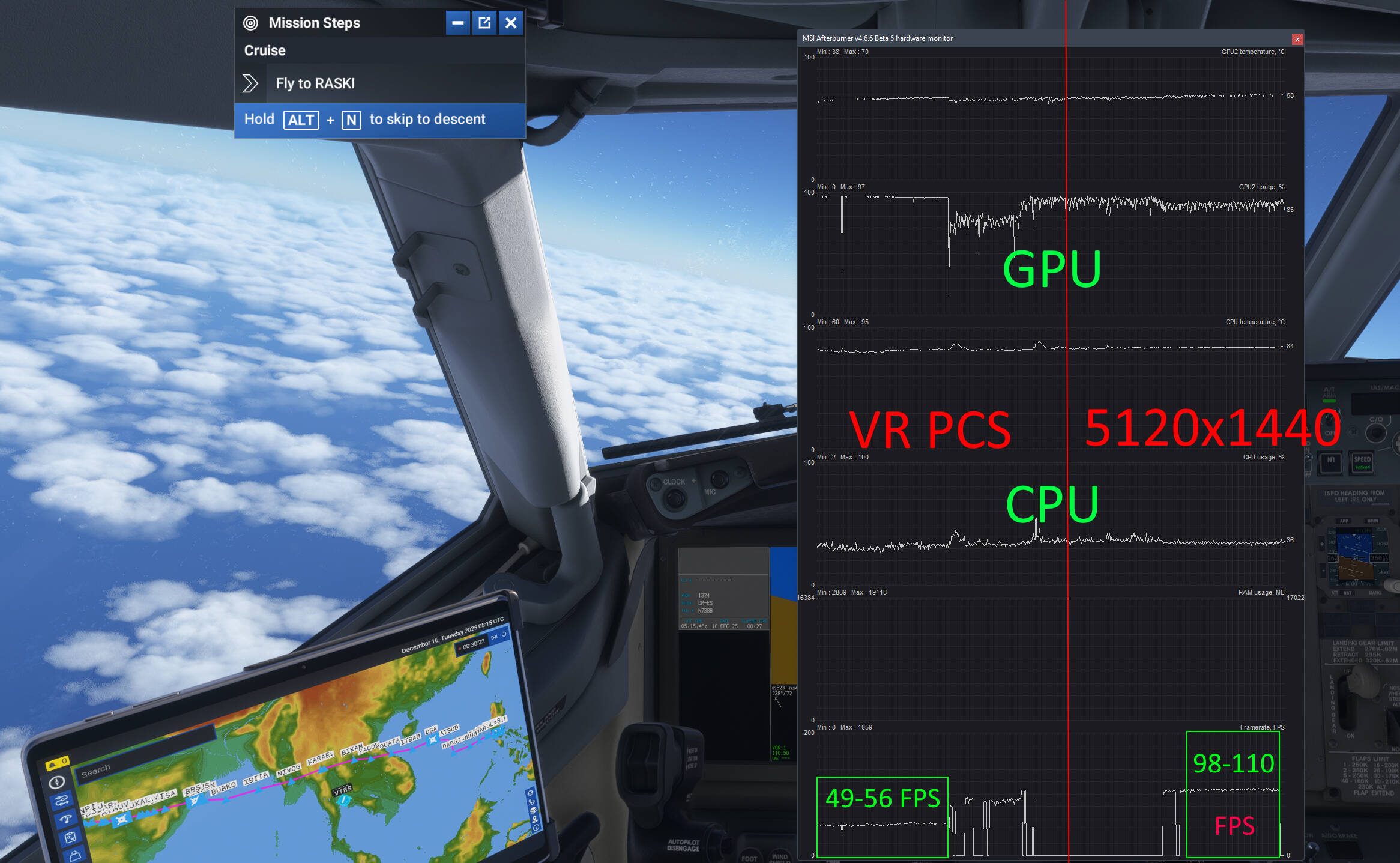
When I wrote my happy review yesterday regarding the performance of SU4 1.34, I couldn’t even think that the simulator was still working “poorly”. Of course, it’s undoubtedly better than the SU3 version, but I still didn’t have more than 60 fps on my monitor, and the GPU was only 55-60% loaded, since the focus was on the CPU.
What I see today is that my simulator has literally come to life, I don’t have any more freezes, and the fps has grown a lot, as well as the stability and smoothness of the game. I just took off from Oman (OOMS) and I’ve never had such smoothness! in VR (Crystal super, TAA 100%, render 1.0, DFR 35%,TLOD 200, high graphics settings) I got 49-55 fps (there was only one jump to 36 fps), while I accelerated the time by x4… Now I switched to the monitor and lo and behold, I see 100+ fps! I do not know what happened, I only cleaned the shaders, I do not know if this was the reason, but I consider it important to supplement my previous reviews. And one more important detail, yesterday I took off from Dubai and landed in Oman, it was bad in VR, about 36-38 fps, the GPU was loaded at ~70% with constant jumps to 0% terrible trolling (the weather and time of day are about the same, the day is slightly cloudy) And today I get stable and maximum GPU load and high fps. Unbelievable! Today is my best day at msfs24!
One thing I don’t understand about FS2024, which doesn’t happen with FS2020, is the excessive flashing in bright areas (so it sucks at night!) with Gsync enabled. The weird thing is that it does it even with a very stable and fixed FPS in very light situations. I really don’t understand what could be causing it. Besides that, another thing that ruins everything is when you pan, the sim seems to lose what’s around it and has to reload, resulting in noticeably annoying stuttering. This has always been present in FS2020, but here it seems even worse… because… I’m just wondering why…